
September 6, 2026
7 min read
CPQ starts to matter when products, pricing, or contract terms become complicated.
HubSpot includes CPQ capabilities in Commerce Hub and lists edition details on its revenue software pricing page.
Software cannot define a sales process on its own. Teams first need to settle their products, pricing rules, approval paths, and ownership. CPQ can then turn those decisions into a repeatable workflow that sellers can follow.
What CPQ Features Actually Control
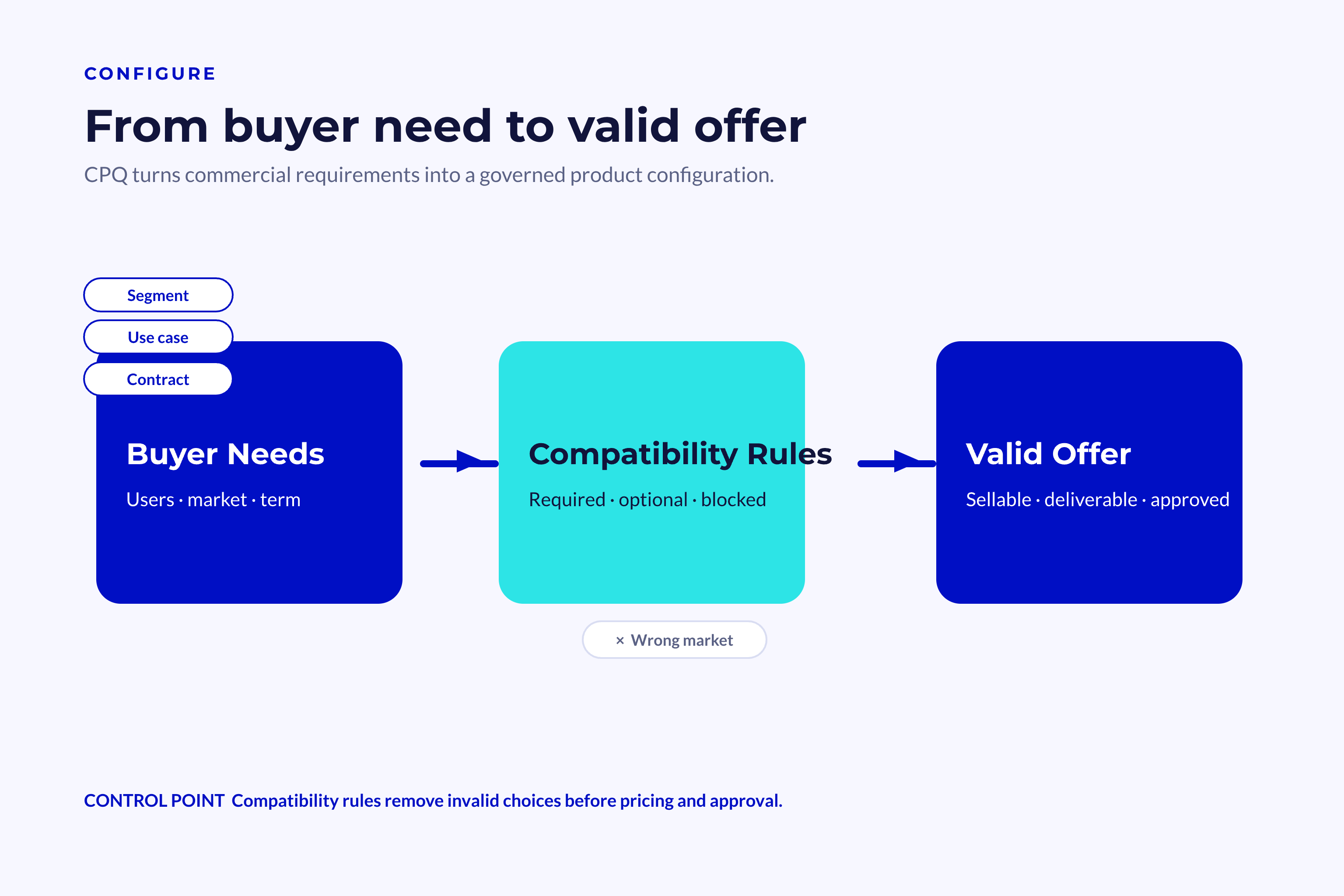
CPQ stands for configure, price, quote. Each word marks a connected stage of the commercial process. Together, the three stages transform a buyer’s needs into an approved offer.
Teams that invest in sales operations can manage this process more effectively.
Configuration Builds a Valid Offer
Configuration sets the boundaries of what sellers can include in a deal. It aligns products, services, quantities, and contract terms with what the buyer needs.
A basic CRM product library holds items and their prices. CPQ goes further by adding rules for how those items work together.
Configuration rules can determine:
-
Product selection
- Products that can be offered together
- Services that require another item
- Packages that rule out certain options
-
Quantity limits
- Smallest permitted order sizes
- Highest volumes the business can support
- Required volume increments for specific plans
-
Buyer conditions
- Size of the company
- Region or currency
- Length of the contract
- Products or subscriptions the buyer already has
-
Delivery requirements
- Setup services
- Training packages
- Levels of support
- Technical work that must be completed
These controls stop sellers from putting together offers that operations cannot deliver. They also spare managers from checking every possible product combination.
HubSpot demo: using Quote Rules to block an invalid product combination before it reaches the buyer. Source: Q2 2026 Revenue Hub release round-up.
💡 Insight
Configuration is not simply a digital catalogue. It is a collection of commercial rules designed to protect the buyer, the seller, and the delivery team.
Pricing Applies Commercial Logic
Pricing starts with the configured offer and works out what the buyer should pay. That calculation may account for standard prices, discounts, usage bands, and contract terms.
Strong CPQ features keep pricing logic clear and consistent. Sellers can see both the final price and how it was calculated.
| Pricing Capability | What It Controls | Business Value |
|---|---|---|
| Price books | Standard prices by market or segment | Keeps regional pricing consistent |
| Volume tiers | Price changes based on quantity | Rewards larger commitments |
| Discount rules | Allowed reductions by product or role | Protects margin |
| Contract terms | Monthly, annual, or multi-year pricing | Supports different buying models |
| Bundled pricing | Combined prices for grouped products | Simplifies complex offers |
| Usage pricing | Charges linked to consumption | Supports flexible SaaS models |
Pricing rules need to match the company’s real commercial policy. If they don’t, automation simply makes the wrong decision faster.
Core CPQ Features Across the Quote Process
A complete CPQ platform does more than run calculations. It moves a deal from product selection to approval, document creation, and buyer acceptance.
This matters because gaps often open between strategy and the daily work of sales teams. Research on the strategy execution gap shows why plans fail when teams cannot turn them into consistent action.
Guided Selling and Product Selection
Guided selling asks sellers a structured set of questions to help them find the right offer. Based on their answers, the system recommends products, packages, or service levels.
This capability is especially useful for companies with large product catalogs or complex dependencies. It puts logic once held by experienced staff into the hands of newer sellers.
A guided workflow might ask about:
- The buyer’s primary use case
- The expected number of users
- Any required integrations
- The target launch date
- The level of support needed
- Any security or legal conditions
Those answers can prompt the system to recommend specific products and required services. They can also rule out options that do not suit the buyer’s situation.
Good guided selling should do the following:
- Explain why the item was recommended
- Show which buyer response led to that recommendation
- Permit approved exceptions
- Save the final selection in the CRM
- Leave the seller responsible for the decision
That last point is important. CPQ should inform commercial judgment, not take the place of discovery.
💡 Tip
Begin guided selling with five essential questions. Add a question only if its answer changes the offer or approval path.
Approvals and Quote Generation
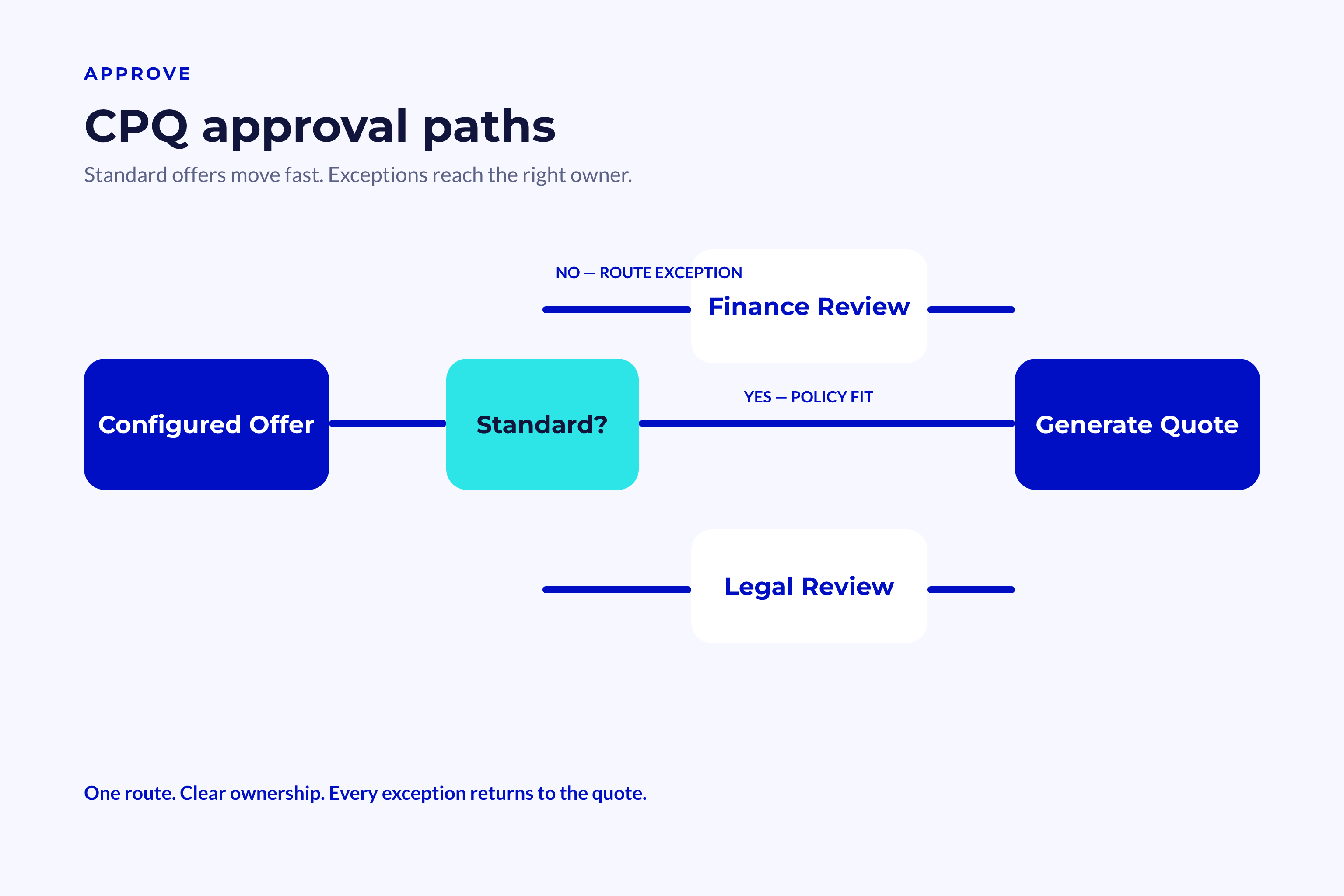
Approval automation routes exceptions to the right person. Typical triggers include steep discounts, unusual payment terms, and non-standard contract periods.
The workflow needs to give managers enough context to decide quickly: the deal value, the effect on margin, the requested exception, and the seller’s reasoning.
An approval path might look like this:
- The seller submits the configured offer.
- CPQ checks it against pricing and policy rules.
- Standard offers proceed directly to quote generation.
- Exceptions are routed to the correct approver.
- The decision is sent back to the deal record.
- The approved version becomes the quote shown to the buyer.
Quote generation takes structured deal data and turns it into a consistent document. Depending on the platform and its configuration, that document may include product lines, prices, terms, taxes, payment details, and approved legal text.
Well-structured tables make complicated offers easier to review. Formal guidance on clear table structure supports a straightforward principle: readers should be able to scan labels and relationships easily.
.
How CPQ Works with CRM and Revenue Operations
CPQ does not work on its own. It relies on clean CRM data, clear ownership, and a defined process connecting sales, finance, legal, and delivery.
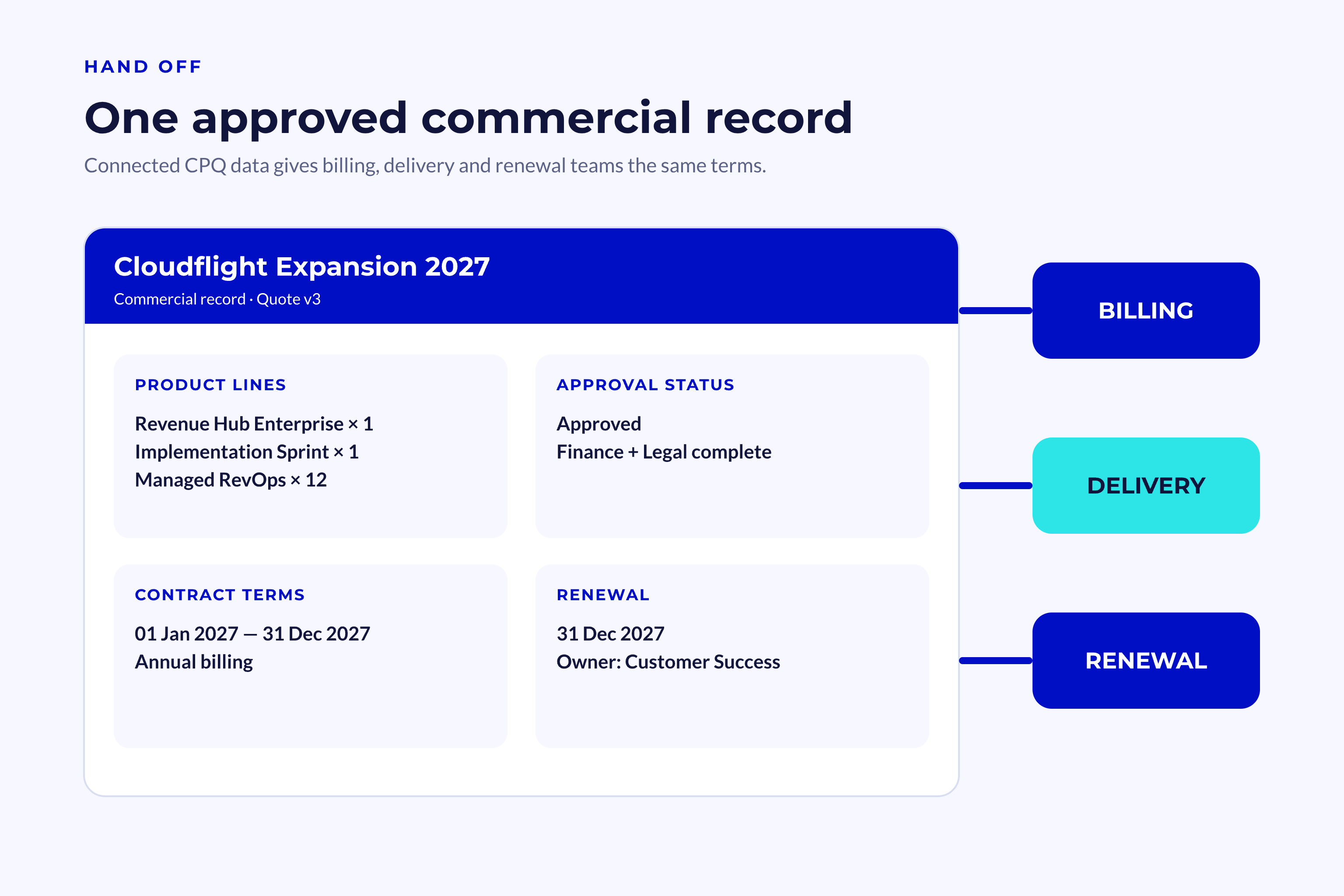
With a connected setup, the entire commercial record stays in one place. It ties together buyer context, products, approvals, quotes, and final contract terms.
CRM Data Provides the Context
CRM data tells CPQ who the buyer is and what the deal calls for. The relevant details may include region, company size, lifecycle stage, existing products, and deal owner.
The information moves both ways. CRM data shapes the quote, and activity on the quote updates the commercial record.
CPQ can receive data from:
-
Company records
- Billing country
- Segment
- Industry
- Customer status
-
Contact records
- The contact’s buying role
- Their signing authority
- Their communication details
-
Deal records
- Current pipeline stage
- Expected close date
- Assigned deal owner
- Forecast category
-
Product records
- Stock keeping unit
- Base price
- Billing frequency
- Tax treatment
Once the quote is approved, the system should write the final terms back to the CRM. Teams can then use that information for reporting, handoffs, renewals, and future expansion work.
A solid revenue context model ties all those details to a single commercial record. Without that structure, quote data risks becoming yet another isolated layer.
Downstream Teams Use the Approved Terms
Sales is not the only team that uses CPQ data. Finance needs the billing terms, legal needs the approved clauses, and delivery needs an exact record of the products sold.
Customer success needs a clear picture of what to expect, too. If the handoff is vague, confusion can set in before onboarding even starts.
The approved quote needs to include:
-
Finance receives:
- Final prices
- Billing frequency
- Payment terms
- Tax details
-
Legal receives:
- Approved clauses
- Contract period
- Renewal terms
- Recorded exceptions
-
Delivery receives:
- Products and services sold
- Start dates
- Setup requirements
- Special commitments
-
Customer success receives:
- Business goals
- Service level
- Contract scope
- Expansion limits
With one shared record, teams spend less time re-entering information and are less likely to work from different versions.
📊 Fact
A CPQ workflow delivers value only if approved quote data reaches the teams handling billing, delivery, and renewal.
Business Benefits of CPQ Features
Better process control brings the clearest benefits. Speed still matters, but accurate quotes, protected margins, and dependable handoffs tend to create more lasting value.
Teams can spot these gains by comparing their old quoting process with the new one. That means measuring not just the time saved, but also the errors prevented.
Sales Teams Gain Speed and Confidence
Waiting on pricing checks or rebuilding quotes by hand costs sellers momentum. CPQ clears many of those routine decisions from their path.
Automation cuts down on context switching, too. Sellers can configure and price an offer without bouncing among CRM records, spreadsheets, email threads, and document templates.
Sellers commonly benefit from:
- Faster product selection
- Clearer discount limits
- Fewer questions about pricing
- Shorter waits for approval
- Consistent quote formats
- Better visibility into buyer status
- Less manual data entry
Together, these improvements can reduce the time from discovery to a usable proposal. They can also help new sellers take on complex offers sooner.
AI-supported automation is showing up more often across revenue teams. HubSpot’s AI marketing research offers a broader look at this move toward assisted work.
Automation still needs to serve a clearly defined process. It should never infer prices, products, or terms without approved business rules.
Leaders Gain Control and Better Data
Revenue leaders need to see why discounts occur and where quotes get stuck. CPQ produces structured data that can answer both questions.
The system records product choices, discount levels, approval times, quote versions, and buyer responses, giving leaders a clear view of patterns that manual documents often hide.
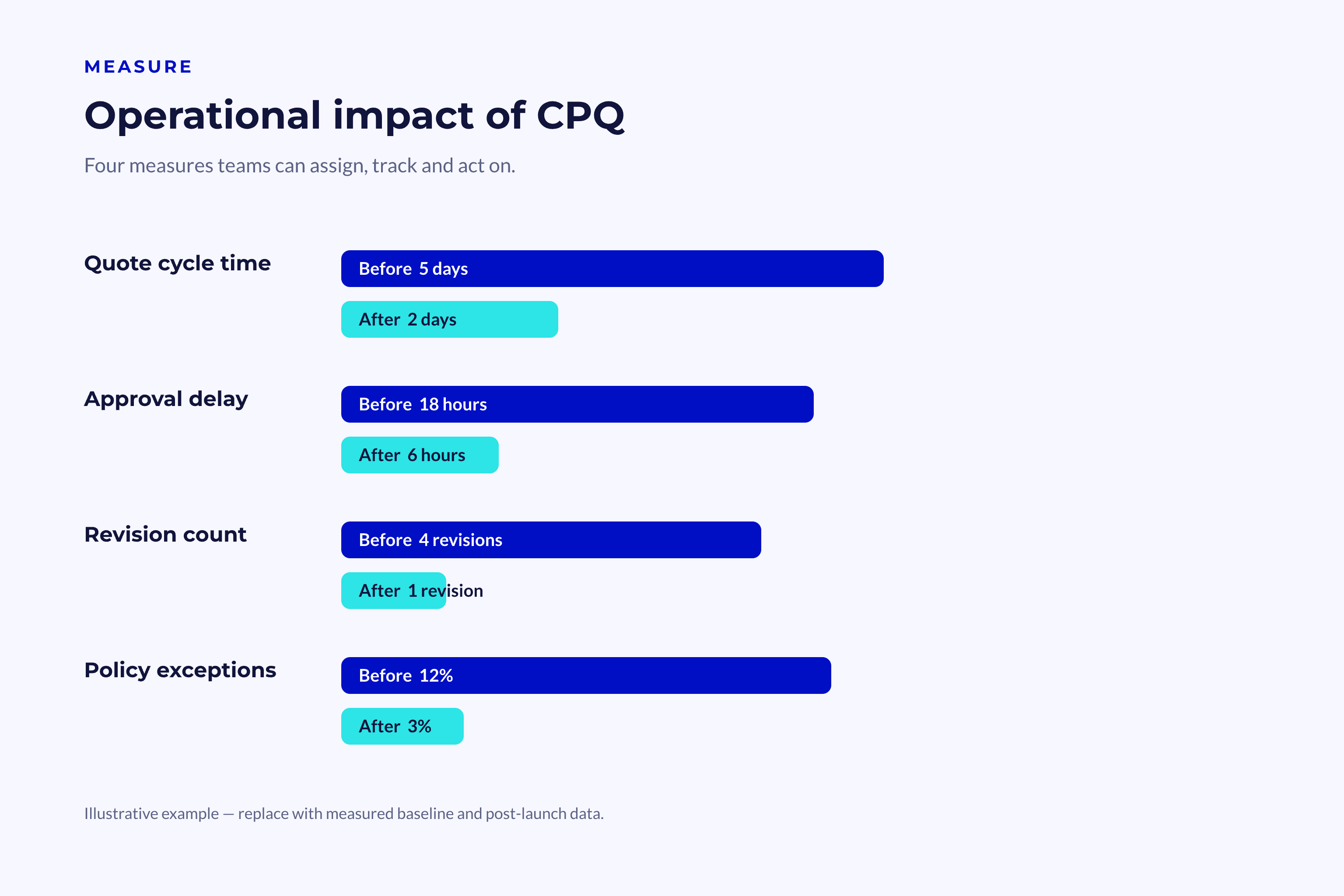
Useful CPQ measures include:
- Time from opportunity to first quote
- Time spent awaiting approval
- Average discount for each seller
- Discounts by product or segment
- Quote acceptance rate
- Number of quote revisions
- Margin for each package
- Use of approved product bundles
- Frequency of policy exceptions
These measures give leaders something concrete to use in coaching and process improvement. They also show whether the real problem lies with sales, pricing, or approvals.
The sales KPI framework offers a practical rule: track measures that lead to action. Even a large dashboard is of little use if no one owns the next step.
For a closer look at the topic, read our guide to the HubSpot Prospecting Agent.
How to Implement CPQ Without Automating Bad Process
A CPQ implementation begins with commercial design, not software setup. Before anything is configured, teams need to agree on product structure, pricing authority, approval policy, and data ownership.
The technology phase turns those decisions into small, testable steps. Putting the process first reduces risk and helps people adopt the system more easily.
Define Rules Before Building Workflows
Begin by tracing the quote journey as it works today. Capture each step from discovery to signature, along with every handoff and delay.
Then separate real business rules from old habits. A rule safeguards margin, delivery, compliance, or buyer fit. A habit may survive simply because the old system required it.
Start by documenting these areas:
-
Product structure
- Product families
- Required add-ons
- Incompatible combinations
- Service dependencies
-
Pricing policy
- Standard prices
- Volume bands
- Discount limits
- Renewal rules
-
Approval policy
- Trigger conditions
- Named owners
- Response targets
- Escalation paths
-
Data ownership
- Record owners
- Required fields
- Update rules
- Audit duties
📝 Note
An approval should not be automated simply because it exists today. Confirm first that it serves a real business need.
Launch a Controlled First Version
For the first release, focus on one clearly defined offer type instead of trying to handle every product, region, and contract model at once.
Pick an offer with enough volume to put the process through a meaningful test. Avoid starting with the rarest or most complicated deal.
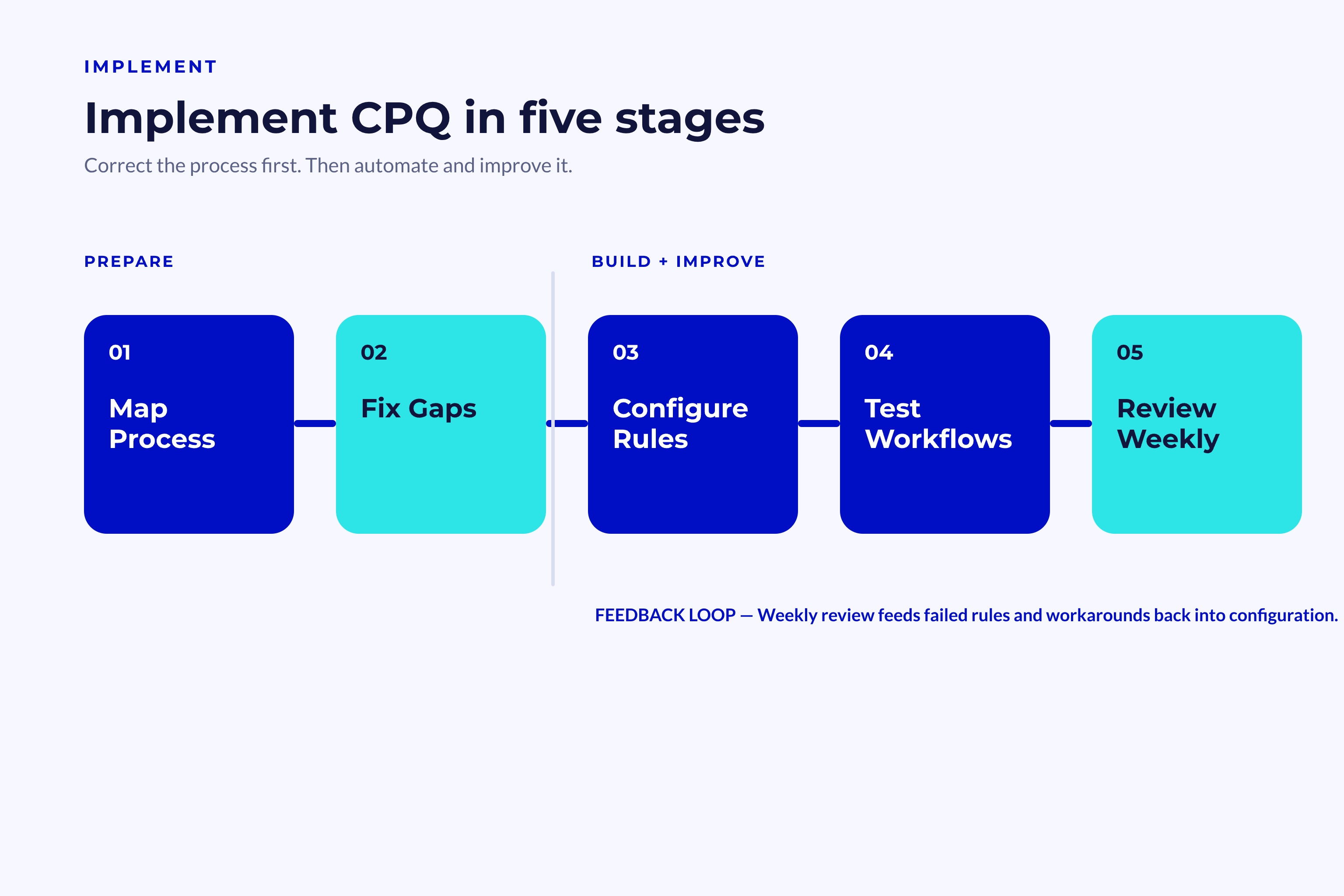
A controlled rollout can be broken into five stages:
- Document the current workflow and establish baseline measures.
- Select one product and pricing model.
- Set up the configuration and approval rules.
- Test both standard deals and known exceptions.
- Train users, then review the results each week.
Bring sales, finance, legal, and delivery into user testing. Each team will spot risks the others might overlook.
More complex HubSpot setups may need outside technical support. The HubSpot partner directory shows how the ecosystem identifies providers that handle implementation and integration work.
Once the system is live, review any failed rules and manual workarounds. They show exactly where the process still needs refinement.
For more detail, read our guide to the HubSpot Contracts Object.
Conclusion
CPQ features make quoting more than a document task; they turn it into a controlled revenue process. Shared rules and data connect configuration, pricing, approvals, buyer documents, and downstream handoffs.
When the setup starts with the process, sellers can work with more confidence, margins are easier to control, and commercial insights become clearer. The result also includes cleaner handoffs, more dependable reporting, and a more consistent experience for buyers.
Key Takeaways
- CPQ brings product configuration, pricing logic, approvals, and quote creation into one connected workflow.
- Guided selling helps sellers put together valid offers without depending on memory or knowledge scattered across the business.
- CRM integration gives finance, legal, delivery, and customer success access to the approved commercial terms.
- A strong implementation starts with clear rules, clean data, named owners, and a focused first release.
- The biggest gains come from faster work, fewer errors, stronger margins, and more dependable revenue data.