
August 2, 2026
9 min read
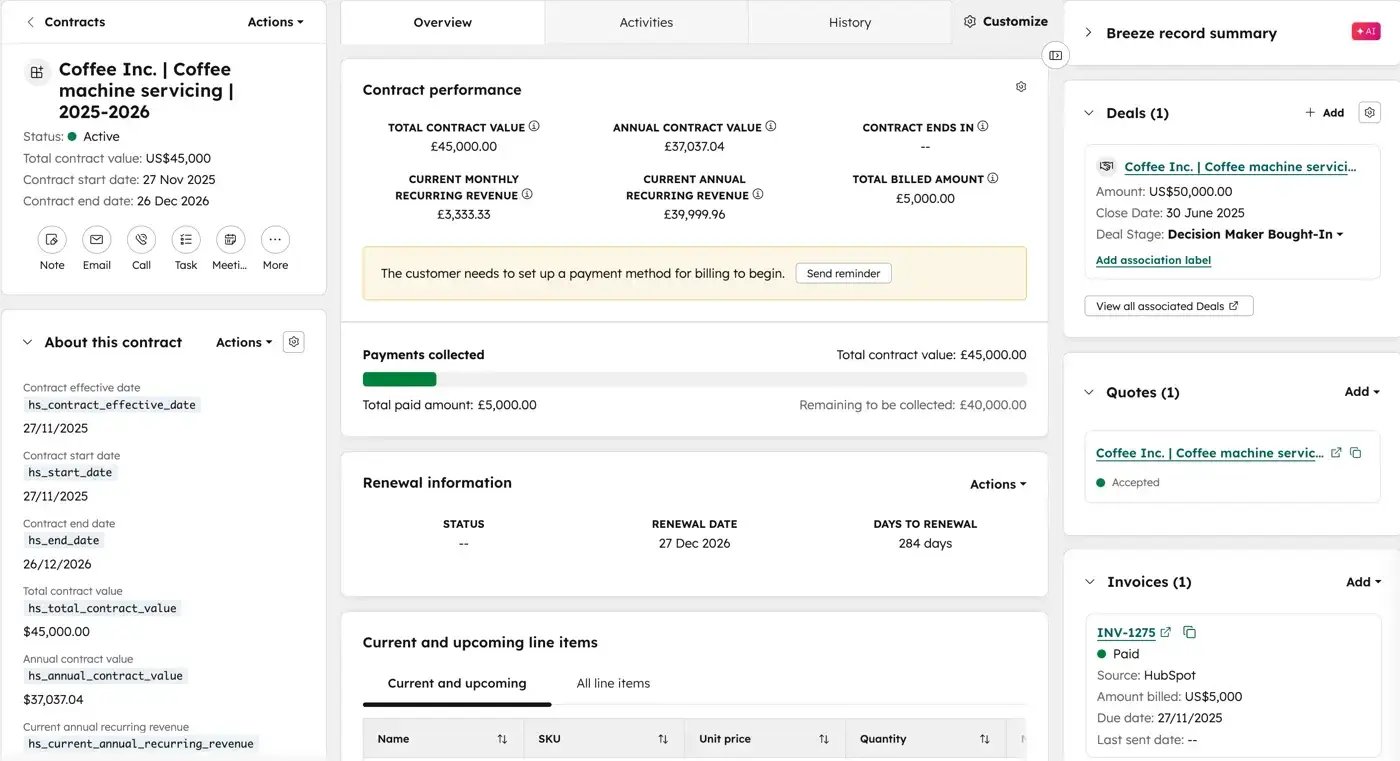
For RevOps teams using Revenue Hub Professional or Enterprise, HubSpot’s Contracts object creates a native record of committed revenue from an accepted quote when automatic contract creation is enabled.
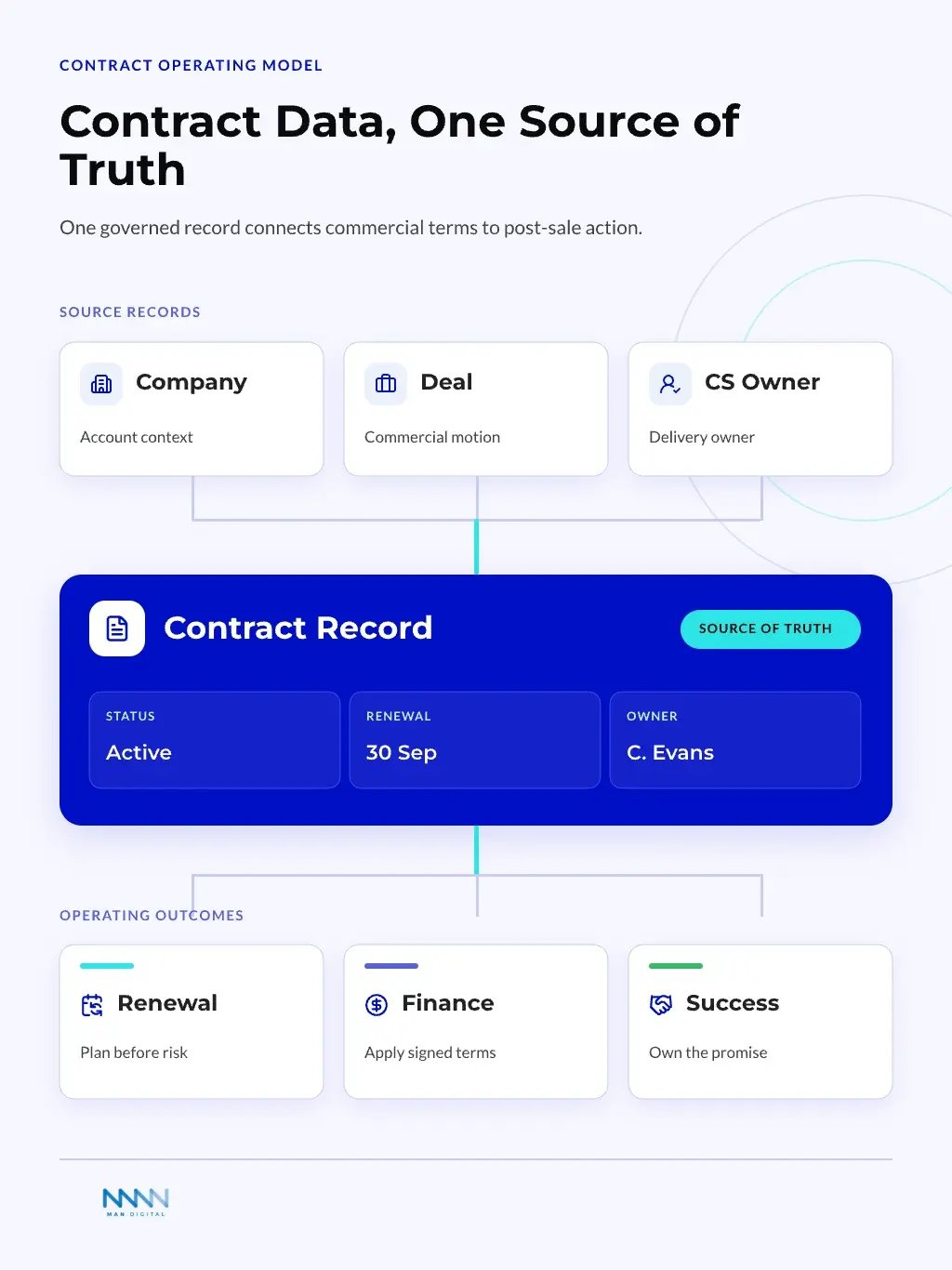
The record brings contract status, revenue metrics, billing details, renewal dates, and associations with deals, companies, quotes, invoices, payments, line items, and subscriptions into one operating view.
The value is not another record type. It is a clearer link between signed commitments and the work that follows.
Why the HubSpot Contracts Object Matters
HubSpot positions the Contracts object as a centralized source of truth for committed revenue. It is available with Revenue Hub Professional and Enterprise, and users need a Revenue Hub seat to create or edit contract records. HubSpot documents the current behavior in Understand contracts in HubSpot and Set up contracts.
Most teams do not need a contract record because it looks tidy. They need it because renewal dates, notice periods, billing terms, owners, and obligations often drift after signature. The right model turns contract data into action, not another place to store notes.
What RevOps Teams Should Know Before Rollout
- When automatic contract creation is enabled, HubSpot creates a contract after a buyer accepts a quote and carries over the quote’s line items, terms, and details.
- Accepted legacy quotes do not create contracts. HubSpot also says contract imports and subscription-to-contract migrations are not currently supported.
- Customers cannot view the HubSpot contract object directly, so customer-facing quotes, invoices, and receipts remain part of the process.
- Contract-based workflow enrollment is currently in beta for Revenue Hub Professional and Enterprise.
These constraints matter because contracts are revenue records, not merely legal documents. Signed terms shape renewal timing, expansion paths, service obligations, and forecast risk.
Contracts Connect Revenue Promises to Delivery
A signed contract is not the end of a revenue motion. It starts the next operating cycle.
Sales can close the deal, but customer success inherits the promise. Finance needs billing terms. RevOps needs dates, owners, renewal logic, and reporting rules.
The core contract signals usually include:
- Start date
- End date
- Renewal date
- Notice deadline
- Contract status
- Contract owner
- Related company
- Related deal
- Signed value
- Billing cadence
- Renewal type
Each field helps a different team answer one practical question: what did the customer agree to, and what should happen next?
Insight
The biggest value of the Contracts object is not storage. It gives RevOps a native trigger point for post-sale workflows.
Contract Data Reduces Spreadsheet Drift
Many teams track contracts in spreadsheets because HubSpot did not always feel like the right home. That works for a few accounts, then breaks as regions, products, and renewal models grow.
Spreadsheets drift because nobody owns every handoff. One person updates the renewal date, another changes the company record, and finance keeps a third version.
Where drift appears first:
-
Renewal dates differ across systems
- The CRM shows one date
- The finance file shows another
- The CSM uses a private note
-
Contract owners are unclear
- Sales owns the close
- CS owns the relationship
- Finance owns billing logic
-
Reporting rules change by team
- Pipeline reports use deal close dates
- Renewal reports use contract end dates
- Forecasts mix both without clear rules
The HubSpot Contracts object can reduce that drift when teams define the data model first. That is why the contract layer should sit inside a wider revenue operations design, not beside it.
What the Contracts Object Changes
HubSpot already had ways to store contract-related data. Teams used deals, companies, line items, custom objects, and integrations. The new object changes the choice because contracts can become a native revenue layer instead of a workaround.
From Deal Records to Contract Records
Deals track sales motion. Contracts track agreed commercial terms.
That difference matters.
A deal can close once, but a contract can drive renewals, amendments, expansions, and obligations. When both live on the same record, teams often overload deals with fields that belong elsewhere.
Use deals for:
- Active sales opportunities
- Pipeline stage movement
- Sales forecast inputs
- Rep activity
- Close probability
- Sales process reporting
Use contracts for:
- Signed commercial terms
- Renewal timing
- Contract lifecycle status
- Post-sale obligations
- Renewal ownership
- Commercial risk flags
Unlike deals, which track individual opportunities, contracts support the customer-agreement lifecycle. HubSpot’s documented process uses accepted change or renewal quotes to update a contract, while related deals can represent expansion or upsell motions. That separation keeps closed-won history distinct from future renewal work. See HubSpot’s guide to view and manage contracts.
Takeaway
A contract object helps teams stop treating every post-sale event as a deal update.
From Custom Workarounds to Native Modeling
Before this object, many teams built custom objects for contracts. That was reasonable when contract data had no clear native home.
Custom objects still have a role. They help when your business model needs unique records, such as subscriptions, assets, locations, or service entitlements. But native objects are easier for teams to adopt when the use case is common.
HubSpot supports custom contract properties, so RevOps can extend the native record without rebuilding the contract model as a custom object. Use a custom object only when the business needs a genuinely different entity, such as an asset, entitlement, location, or another specialized relationship.
| Modeling Choice | Best Fit | Main Risk | RevOps Check |
|---|---|---|---|
| Deal fields | Simple first sale motion | Deals become overloaded | Can sales still read the record? |
| Company fields | One contract per account | Multi-contract accounts break logic | Can one company hold many terms? |
| Custom object | Unique business model | More setup and governance | Is the model truly custom? |
| Contracts object | Signed terms and renewals | Weak process design | Are handoffs mapped clearly? |
The right model depends on the relationship between account, deal, contract, and renewal. RevOps should decide that relationship before creating fields.
How RevOps Teams Should Model Contract Data
The Contracts object will only help if the data model reflects how the business works. RevOps teams should start with relationships, not fields. This section shows how to design the contract layer before building workflows.
Map the Contract Relationship First
A contract record should answer one question clearly: what commercial agreement governs this customer relationship?
For some companies, one company has one active contract. For others, one company can have several contracts across regions, products, or business units. That difference changes the whole model.
Start with these relationship questions:
- Can one company have multiple active contracts?
- Can one deal create more than one contract?
- Can one contract cover multiple products?
- Can one contract renew into a new deal?
- Can one contract belong to a parent company?
- Can amendments change the active contract record?
- Can customer success own renewal timing?
These questions prevent a common mistake. Teams often create fields before they understand record relationships.
A clear HubSpot data model makes this easier because it separates objects, associations, and reporting rules before automation begins.
Tip
Build the first contract model on paper before adding fields. If the relationship map is unclear, workflows will only hide the confusion.
Define the Minimum Required Fields
RevOps teams should avoid turning the object into a legal database. HubSpot is the operating layer, not the full document repository.
That means the contract record should hold fields that drive work.
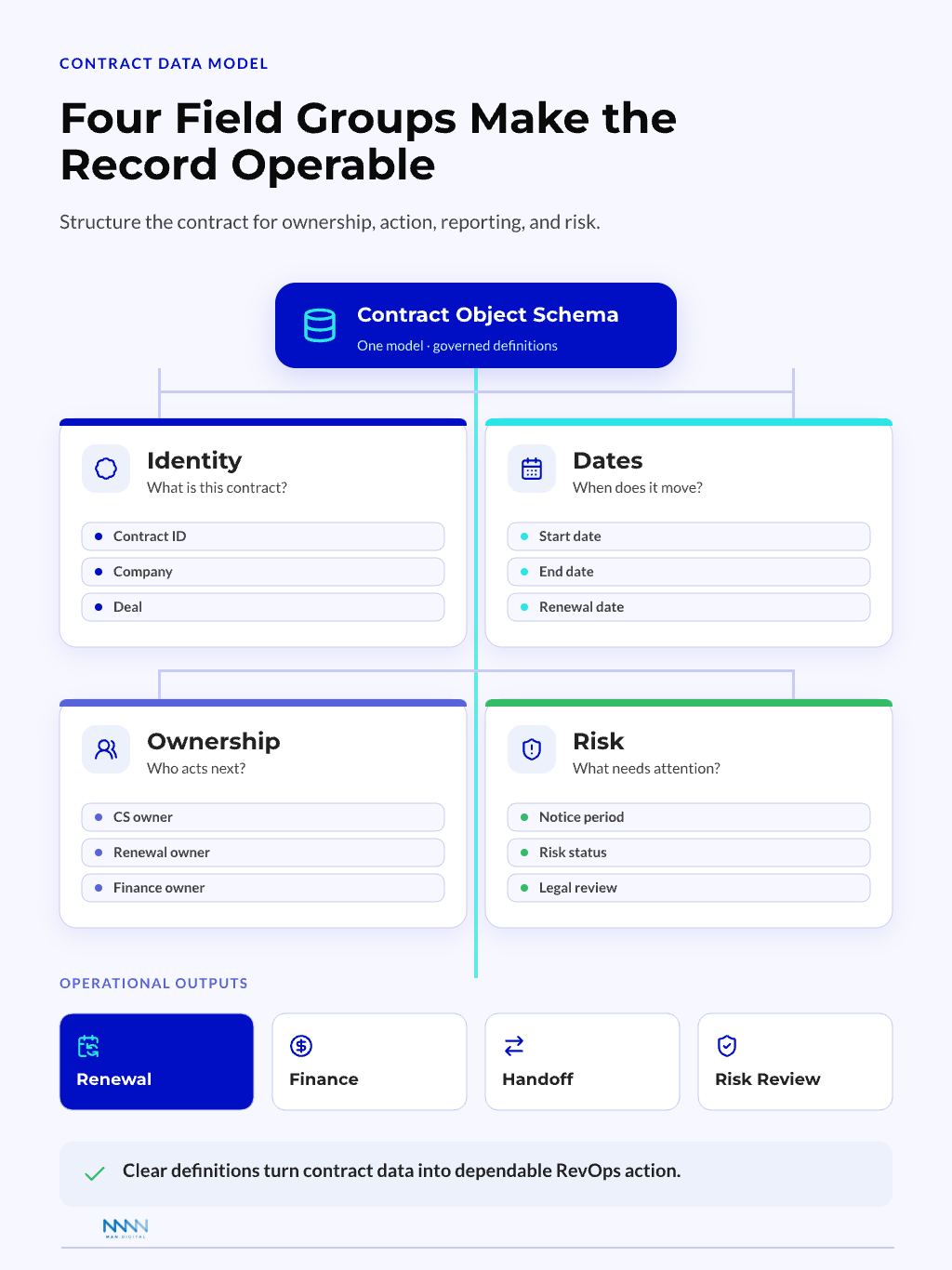
A practical field set includes: Start with HubSpot’s standard contract properties, then add custom properties only for operating signals the standard record does not cover.
-
Identity fields
- Contract name
- Contract type
- Contract status
-
Date fields
- Start date
- End date
- Renewal date
- Notice deadline
-
Ownership fields
- Contract owner
- Account owner
- CSM owner
- Renewal owner
-
Commercial fields
- Contract value
- Billing cadence
- Renewal type
- Payment terms
-
Risk fields
- Auto-renewal flag
- Notice risk
- Health status
- Legal review needed
Each field should support a workflow, dashboard, or decision. If it does not, it can belong in the legal system instead.
Workflows, Reporting, and AI Readiness
The HubSpot Contracts object becomes useful when it triggers action. A clean record can support renewal planning, handoffs, risk reviews, reporting, and AI summaries. This section explains which workflows RevOps teams should design first.
Renewal and Handoff Workflows
Renewals often fail because teams start too late. A contract record can anchor the renewal timeline.
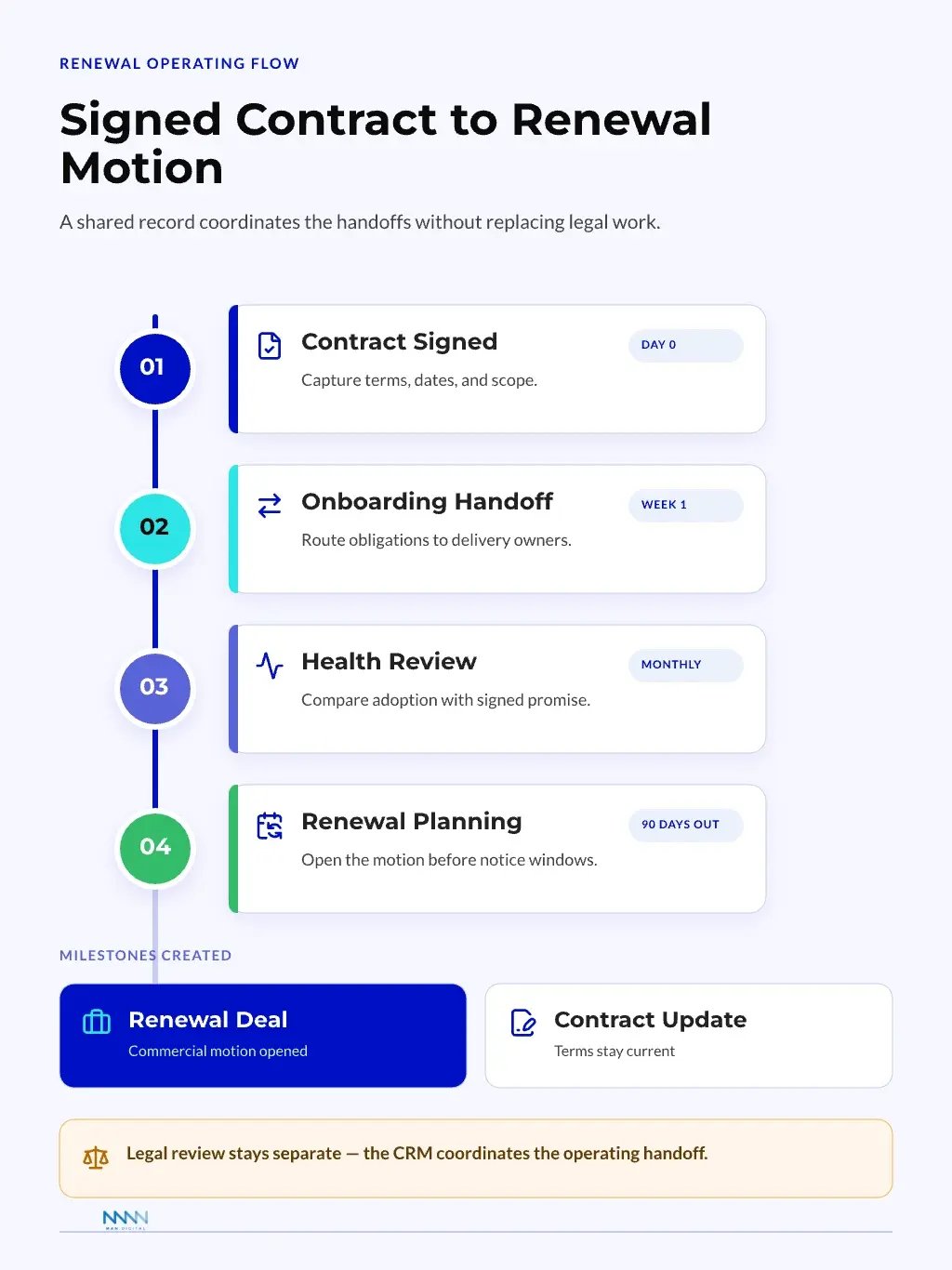
The workflow should start from the renewal date, not from a rep reminder. That makes the process repeatable across teams and regions. Contract-based workflow enrollment is currently a beta feature for Revenue Hub Professional and Enterprise, and each team should set planning windows from its actual renewal and notice periods rather than treating 90 days as a universal rule.
A simple renewal workflow can follow this path:
-
Contract reaches renewal planning window
- Create renewal task for owner
- Notify customer success
- Check account health
-
Contract enters commercial review
- Review current value
- Review product usage
- Confirm expansion path
-
Contract moves to renewal motion
- Create or update renewal deal
- Assign sales owner
- Set forecast category if needed
-
Contract reaches close outcome
- Mark renewed, churned, or changed
- Update renewal date
- Store new contract terms
This keeps renewal work inside the revenue system. It also gives managers earlier visibility into risk.
A strong forecasting setup can then separate renewal pipeline from new sales pipeline without blending the two.
Contracts also help teams control post-sale handoffs. The signed terms define what customer success, finance, and operations need to know.
A contract handoff can include:
- Sales marks contract signed
- RevOps checks required contract fields
- Finance receives billing terms
- CS receives start date and obligations
- Contract owner confirms renewal rules
- System creates onboarding or success tasks
- Dashboard tracks missing handoff data
Note
A contract workflow should not replace legal review. It should turn approved terms into operational steps the revenue team can manage.
Dashboards and AI-Ready Data
A contract dashboard should not show every field. It should answer the questions leaders ask during revenue reviews.
The best dashboards group contract data by action. That helps teams move from reporting to decision-making.
Useful dashboard views include:
-
Renewal timing
- Contracts ending soon
- Notice deadlines approaching
- Renewal deals not created
-
Commercial exposure
- Contract value by renewal month
- At-risk value by owner
- Contracts without renewal type
-
Operational quality
- Missing required fields
- Contracts without company association
- Contracts without active owner
-
Customer success risk
- Low health accounts near renewal
- Open support issues near renewal
- Expansion accounts without sales owner
These views help leaders catch problems before quarter-end. They also give RevOps a governance checklist that teams can review weekly.
HubSpot contract records can expose status, total contract value, annual contract value, monthly and annual recurring revenue, billing details, renewal dates, and associations with contacts, companies, deals, invoices, line items, payments, quotes, and subscriptions. RevOps should use these standard signals before adding custom dashboard fields.
AI needs clean structure before it can help. If contract data is scattered across notes, files, and private spreadsheets, AI can only summarize noise.
AI-ready contract data should be:
- Structured, not buried in free text
- Associated with the right company and deal
- Updated through clear workflows
- Governed by required fields
- Reviewed by human owners
- Scoped to the right permissions
This is where the operating model matters. AI can assist RevOps, but it should not decide contract logic without clear guardrails.
Our article on AI in RevOps explains the same pattern. Agents work best after teams define workflows, data ownership, and escalation rules.
Insight
AI readiness starts with boring structure. The cleaner the contract layer, the more useful renewal summaries and risk prompts become.
Implementation Checklist for RevOps Teams
A clean implementation starts with scope control. The goal is not to rebuild every contract process at once. The goal is to create a usable contract layer that teams trust and maintain.
Start with a Small Operating Model
RevOps should begin with one contract motion. That can be renewals for one region, one product line, or one customer segment.
Small scope makes testing easier. It also shows where data quality problems appear before the object touches every team.
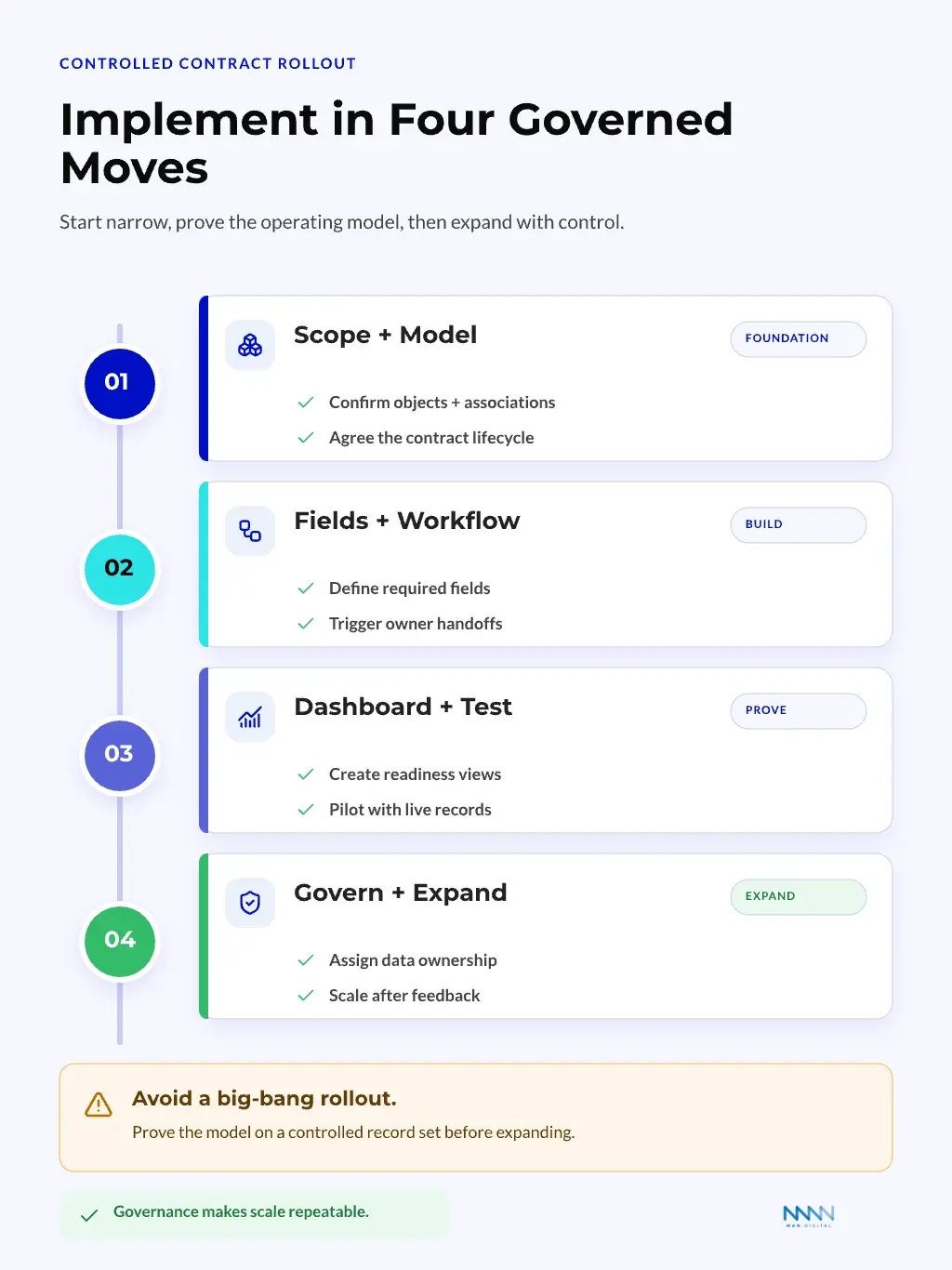
A focused rollout can follow this sequence:
- Define the contract use case
- Map object relationships
- Select required fields
- Build one renewal workflow
- Create one governance dashboard
- Test with real accounts
- Review missing data weekly
- Expand only after adoption holds
This approach avoids big CRM changes. It gives RevOps room to learn from actual records.
Keep the pilot small enough to validate quote-to-contract creation, associations, permissions, renewal dates, and reporting before scaling the model.
Watch for Common Failure Modes
The Contracts object can still fail if teams treat it like a new container. Structure alone does not fix weak ownership.
The most common risks are simple and preventable.
| Failure Type | What It Looks Like | Practical Fix |
|---|---|---|
| Overloaded fields | Teams add every legal detail | Keep only fields that drive work |
| Weak ownership | Nobody updates contract status | Assign a contract owner |
| Poor associations | Contracts are not linked to accounts | Require company association |
| Late renewal triggers | Tasks fire too close to end date | Set earlier planning windows |
| Split reporting | Teams use different date logic | Define one renewal reporting rule |
Governance questions to review monthly:
- Are renewal dates complete?
- Are contract owners current?
- Are high-risk contracts visible?
- Are renewal deals created on time?
- Are required fields blocking poor handoffs?
- Are teams using the dashboard in reviews?
The setup may also expose bigger consulting needs. When object design, automation, reporting, and governance all change at once, a HubSpot consulting model can help define scope before configuration expands.
Tip
Treat the first rollout as a controlled operating test. A trusted small model beats a broad model nobody maintains.
Frequently Asked Questions
This FAQ answers the practical questions RevOps leaders ask before changing their HubSpot data model, including operating impact, ownership, rollout scope, and current product limits.
What is the HubSpot Contracts Object?
The HubSpot Contracts object is a native Revenue Hub record for managing committed revenue after a buyer accepts a quote. With automatic creation enabled, HubSpot creates the contract from the accepted quote and carries over its line items, terms, and details. The object is available with Revenue Hub Professional and Enterprise, and a Revenue Hub seat is required to create or edit records. HubSpot explains the lifecycle in Understand contracts in HubSpot.
What Are the Current Limitations of HubSpot Contracts?
HubSpot currently does not support contract imports or migrating existing subscriptions into contracts. Accepted legacy quotes do not create contract records, customers cannot view the contract object directly, and contract-based workflow enrollment is currently in beta.
How Should RevOps Teams Use the Contracts Object?
RevOps teams should use it as an operating layer for contract data, not as a legal archive. The record should hold fields that trigger work, support dashboards, and clarify ownership. Legal documents can still live in a dedicated contract system or document store.
Does This Replace Custom Objects for Contracts?
It can replace some custom contract objects, but not every custom model. If your contract process follows common renewal and ownership patterns, the native object can be enough. If your business has complex subscriptions, assets, or entitlements, custom objects can still be needed.
Who Should Own Contract Data in HubSpot?
Ownership should sit with the team that maintains the operating workflow. In many B2B firms, RevOps governs the model, sales updates commercial motion, and customer success owns renewal readiness. The key is one clear owner for status, dates, and field quality.
How Long Does a Contracts Object Rollout Take?
A focused rollout can move faster than a full CRM redesign, but timing depends on data quality and process clarity. Teams should start with one renewal motion, one dashboard, and one workflow. Broader rollout should wait until users trust the first version.
What is the ROI of Using Contract Records in HubSpot?
The return comes from fewer missed renewals, cleaner handoffs, better forecast inputs, and less manual admin. The object creates value when teams use it to trigger action, not when they only store contract fields. Better contract visibility can improve revenue control.
Conclusion
The HubSpot Contracts object can turn contract data from a scattered admin task into a clear RevOps operating layer. When teams model relationships, define ownership, and connect records to workflows, they gain better renewal control and clearer post-sale visibility.
The real value is not the object by itself. The value comes when RevOps uses it to build cleaner handoffs, strengthen forecast inputs, and help teams act before contract risk becomes revenue loss.
Key Takeaways
- The HubSpot Contracts object gives RevOps teams a native place to manage signed terms and renewal signals.
- Deals should track sales motion, while contract records should track agreed commercial terms and lifecycle status.
- Clean associations, required fields, and ownership rules matter more than adding every possible contract detail.
- Renewal workflows should trigger from contract dates, not private reminders or spreadsheet checks.
- AI workflows become more useful when contract data is structured, governed, and connected to the right records.