
September 6, 2026
11 min read
Our view on CPQ
- A quote is an output; its accepted terms must remain usable after the sale.
- Buying a faster quote editor will not repair a mismatch that begins when billing reconstructs the agreement.
- Routine offers need clear rules, while finance review belongs on exceptions that require a decision.
- MAN Digital’s published Truvio project is connecting subscriptions, contract changes, recurring revenue, and ERP billing schedules—a wider scope than quote generation.
- The practical test is whether the first invoice and the next renewal follow the accepted offer without retyping it.
What does CPQ mean in a revenue workflow?
CPQ stands for configure, price, quote. Configuration determines which products belong in an offer, pricing applies the company’s rules, and quoting presents the approved result to the buyer. CPQ software connects those decisions with the customer and deal records that sales already uses.
For teams investing in sales operations, the starting question is which decisions need control—not which quote template looks best.
Configure: build a valid offer
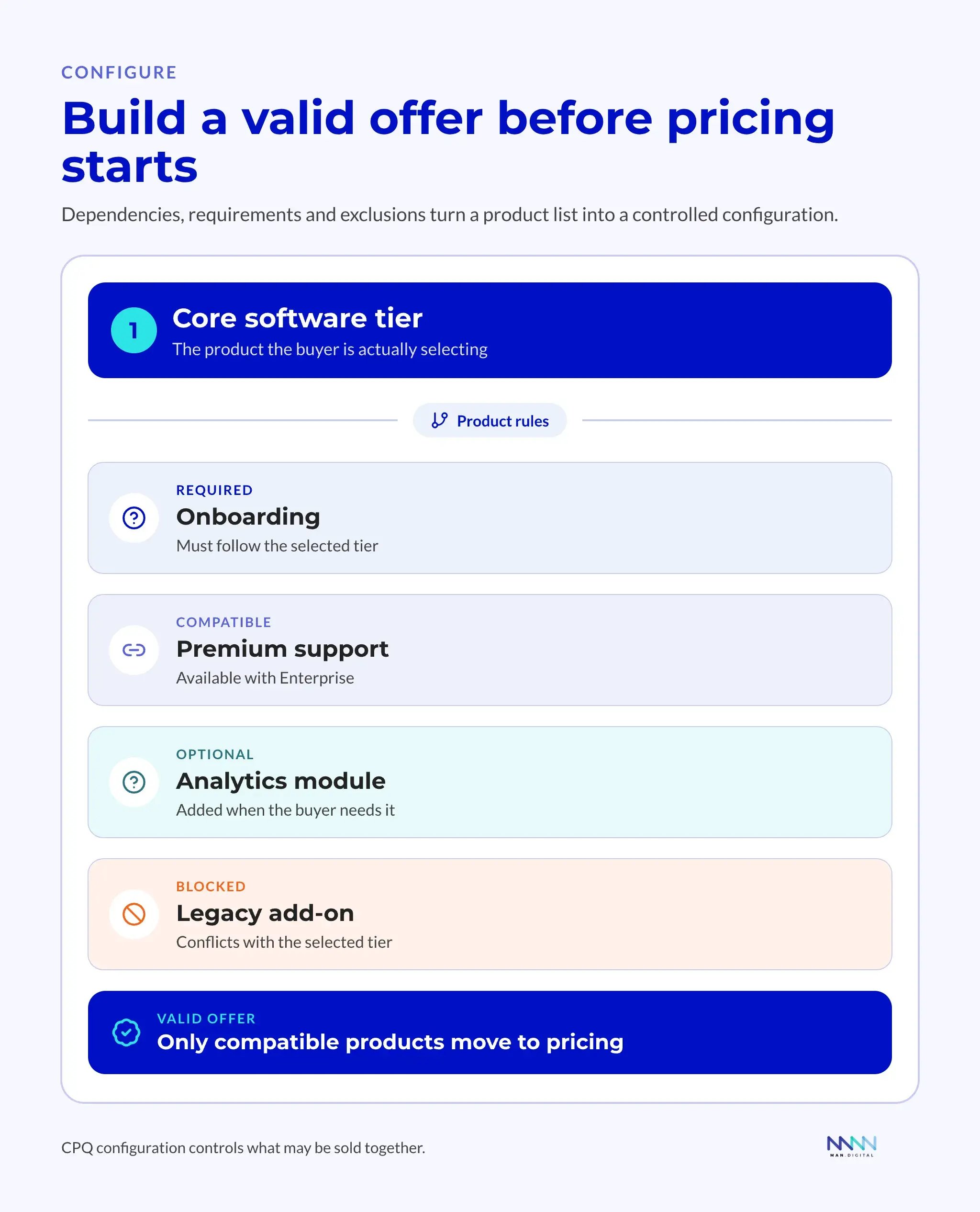
Configuration determines what a sales rep can sell together. A simple business needs little more than a product name, quantity, and standard price. A more complex B2B company sells software tiers, services, support packages, usage limits, and market-specific terms. Configuration rules turn that catalog into valid combinations.
| Rule type | Business question | What a configured CPQ system controls |
|---|---|---|
| Product compatibility | Which products can be sold together? | Flags or blocks incompatible combinations before the offer is issued. |
| Required components | What must accompany this product? | Adds the required item where supported, or prevents completion until it is included. |
| Product dependencies | What does this add-on require? | Checks that the necessary core product or prerequisite is present. |
| Eligibility limits | Where and to whom does this offer apply? | Restricts or validates selection against the buyer’s market and segment. |
| Quantity conditions | What minimum or maximum applies? | Checks quantity limits and blocks or routes exceptions according to policy. |
The response depends on the platform and the rules installed. Hiding an option, adding a required item, displaying a warning, and blocking publication are different behaviors. Salesforce’s product-rule documentation distinguishes rule types; HubSpot’s quote-rule documentation describes warnings and publication blocks. Neither means every product dependency is handled automatically.
Consider a company selling software, onboarding, and managed support. Its enterprise tier requires advanced onboarding; the basic tier uses a lighter service. A configuration rule checks that the selected onboarding package matches the software before the offer reaches the customer.
That check matters before acceptance. Once a buyer has agreed to an incompatible bundle, correcting the offer means reopening the price, scope, or delivery promise. Configuration gives sellers freedom within limits the delivery team can honor.
Price: apply the agreed policy
Pricing starts with an approved base price and applies the relevant quantity, term, customer, and discount rules. The price list holds the values; pricing logic determines which values apply and when an exception needs review.
| Pricing element | Business question | CPQ control |
|---|---|---|
| Base price | What is the approved starting price? | The applicable product price and price-book version. |
| Volume rule | Does quantity change the unit price? | A defined tier or calculation. |
| Contract term | Does commitment length affect price? | A term-based adjustment. |
| Customer status | Does this customer have agreed terms? | An account-specific rule or agreement. |
| Discount | How much authority does the rep have? | A threshold and an approval route. |
| Tax treatment | Which tax calculation applies? | Validated transaction inputs passed to the designated finance or tax service. |
| Exception | When must finance review the deal? | A recorded decision before release. |
Insight
A pricing engine is only as reliable as its rules, source data, and ownership model.
Reps apply existing policy during a deal. When a buyer asks for terms outside it, the system records the request and routes it to the responsible owner. The result is a price the business can explain, defend, and honor.
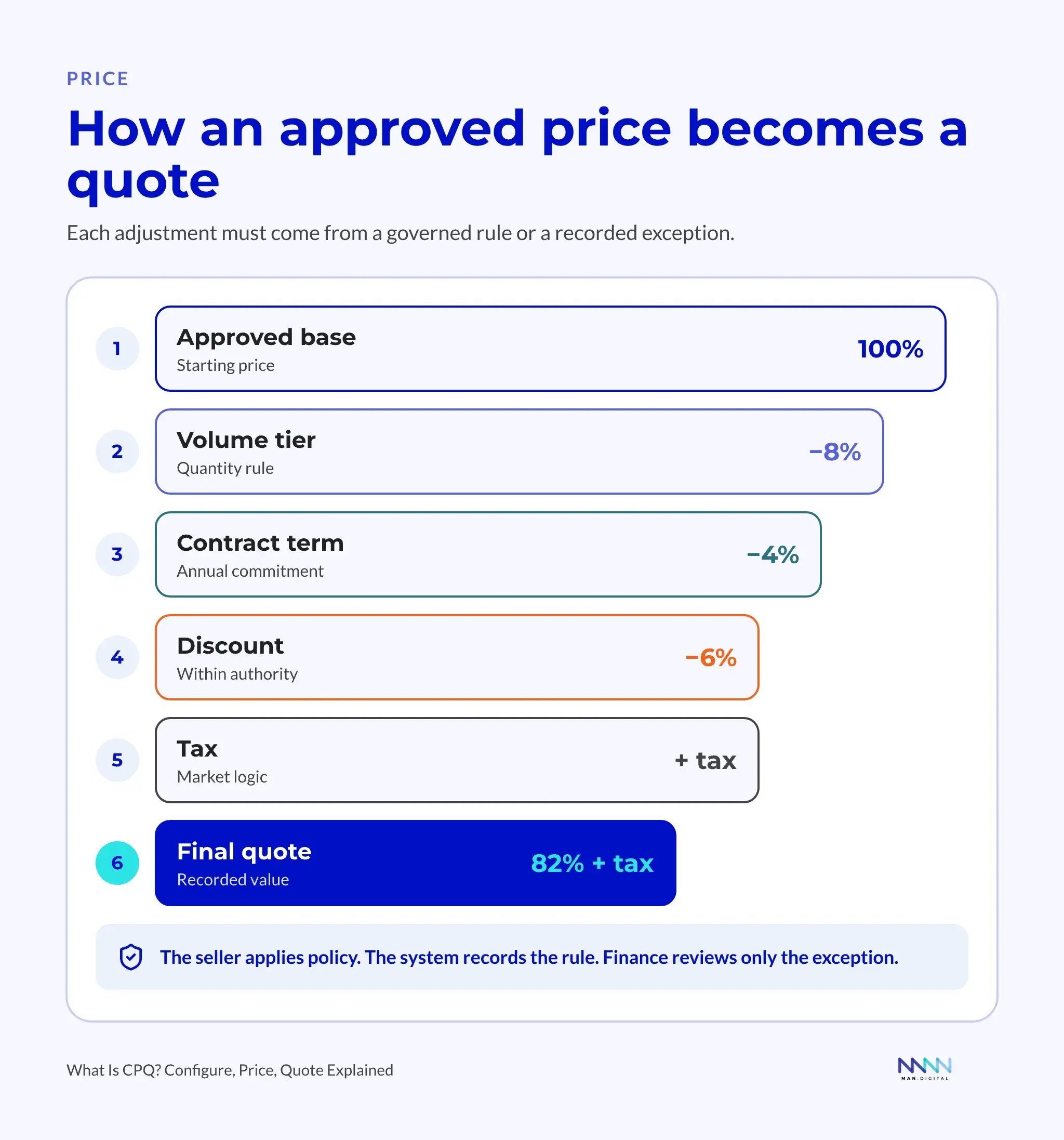
Illustrative pricing example: the graphic starts at 100% of the base price and subtracts 8 percentage points for volume, 4 for the contract term, and 6 for an authorized discount, leaving 82% before tax. Each reduction uses the same original base; sequential percentage discounts produce a different result. These are example rules, not HubSpot defaults or a savings claim.
What a rep may approve alone and what goes to finance depends on discount thresholds and approval authority.
Quote: preserve the approved offer
Quote generation turns the approved configuration and price into an offer the buyer can review and accept. Products, quantities, contract dates, payment terms, and the acceptance method belong to that version. A changed offer needs a new version and, where policy requires it, renewed approval.
A quote is an output, not a complete revenue system. Its accepted terms still need to reach the records used for contracts, billing, and renewals.
Why does manual quoting break as B2B companies grow?
Manual quoting becomes fragile when offer variety and approval needs outgrow the controls around the documents. Templates get copied, formulas drift, and old prices remain in local folders. Finance reviews one version while the customer receives another.
Spreadsheet quotes separate the offer from its record
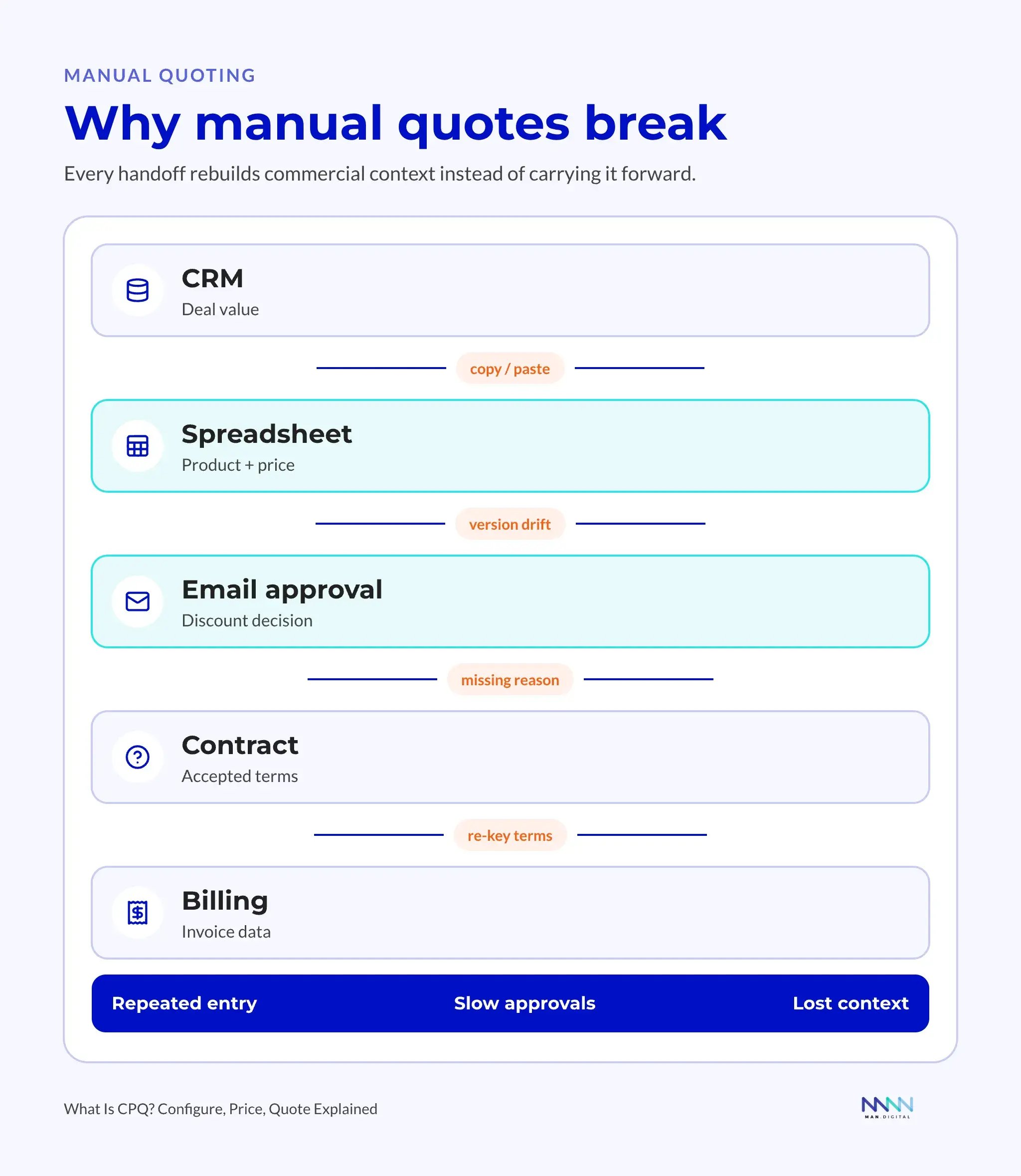
The familiar failure starts with a deal in the CRM and an old quote workbook on a rep’s laptop. Product and price details change in the workbook. A manager approves a discount in email, legal edits another document, and the customer signs a version that no longer matches the deal record. Finance then rebuilds the order before billing.
Each handoff loses context. Experienced reps remember valid bundles; finance remembers discount limits; delivery knows which promises are feasible. New sellers depend on those people being available, and reviewers repeatedly reconstruct the same deal.
The gap also affects forecasting. If negotiation changes the offer but nobody updates the deal, the forecast keeps the old value. A reliable revenue context connects the latest offer, its approval, and the accepted terms.
Recognize the limits—and the cases where CRM quoting is enough
CPQ deserves evaluation when several of these problems recur:
- Reps build invalid combinations or need repeated product guidance.
- Different quote templates produce conflicting prices or terms.
- Discount exceptions wait without a clear owner or decision.
- The CRM, signed offer, and invoice disagree.
- Renewals require someone to reconstruct the agreement from old files.
A company may not need a separate CPQ implementation while all of the following remain true:
- A short product list and one maintained price book cover ordinary deals.
- Products have no dependencies that require repeated manual checking.
- Standard terms and a single approver cover the exceptions.
- The accepted offer is reproducible from the CRM and its attachments.
- Billing receives the agreed products, dates, and terms without retyping them.
In that situation, maintaining the catalog, tightening template control, and naming an approval owner may solve the problem. Headcount alone is not a reason to buy CPQ. If the offer is already accurate and the mismatch begins in billing, fix that handoff first.
Insight
Quote speed is not the only useful measure. A fast quote that creates billing errors or weak margin moves the delay downstream.
How does the CPQ workflow move from deal to quote?
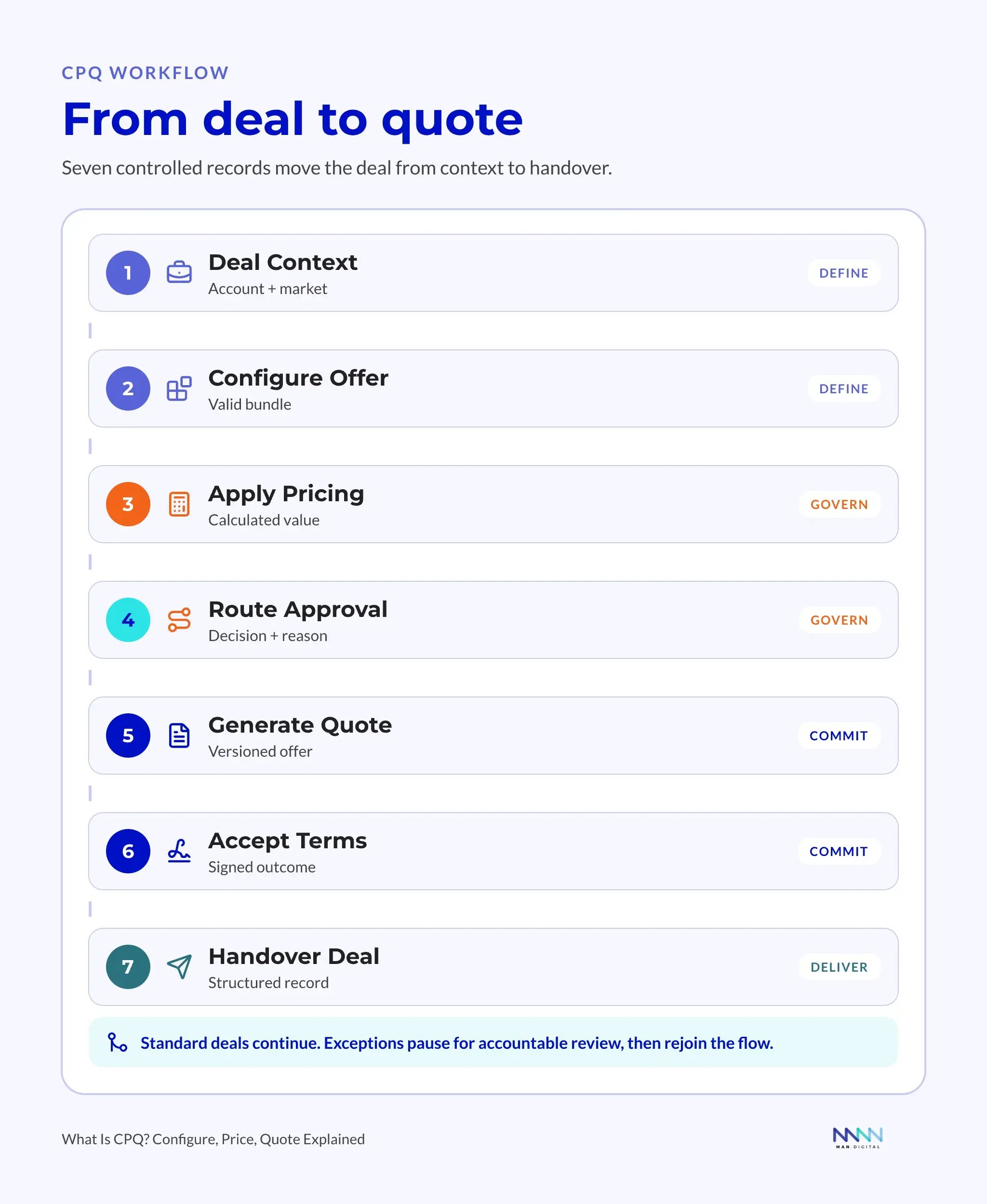
A reliable CPQ workflow begins with the buyer and deal context, validates the offer, applies pricing, handles exceptions, and records acceptance. Each stage produces information the next stage needs.
The core workflow connects seven decisions
The seven stages below summarize the process; the CPQ workflow step by step expands the mechanics, including negotiation and the order handoff.
- Confirm deal context: identify the buyer, billing entity, market, currency, and term.
- Select the offer: choose the core product and valid supporting items.
- Apply pricing logic: use the approved price book and applicable quantity or term rules.
- Check exceptions: identify nonstandard discounts, products, and terms.
- Route approvals: send each exception and its rationale to the accountable owner.
- Generate the quote: produce a version that matches the approved offer.
- Capture acceptance: preserve the accepted version and pass its terms to contracts and billing.
The record needs to show the selected products, pre-discount price, applied rules, exception request, approval decision, quote version, and acceptance status. A reviewer must be able to reconstruct why the final offer was allowed.
Approvals follow the risk
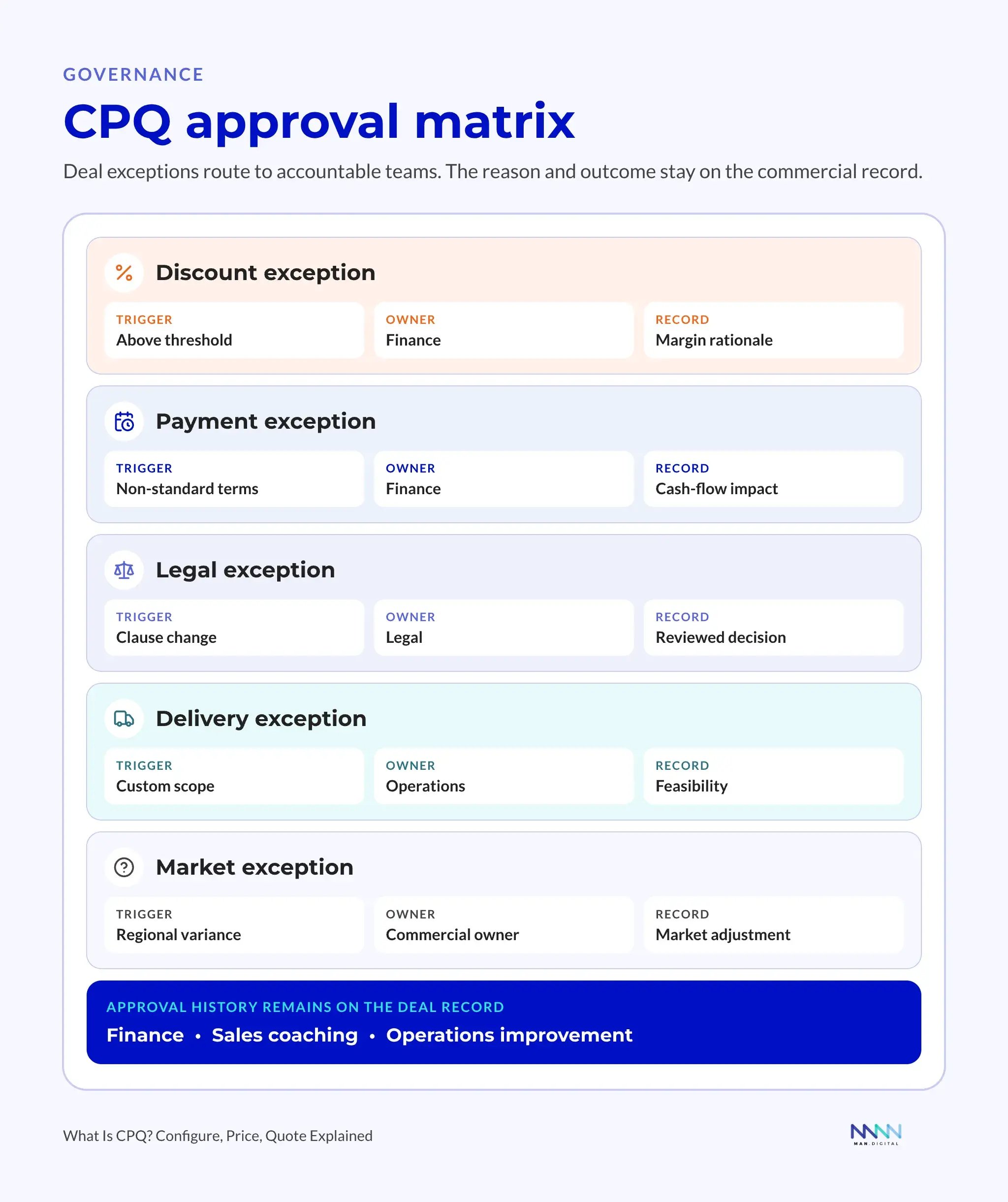
A standard renewal and an enterprise offer with a large discount do not need the same review. Sending every quote to finance creates a queue; allowing every quote through leaves pricing policy unenforced. The approval path separates routine offers from material exceptions.
| Deal Condition | Typical Risk | Likely Owner | Workflow Response |
|---|---|---|---|
| Standard product and price | Low | Sales | Continue automatically |
| Approved volume adjustment | Low | Sales manager | Quick review or automatic rule |
| Discount beyond rep limit | Margin | Finance | Margin approval |
| Custom payment terms | Cash flow | Finance | Terms review |
| Contract language change | Legal | Legal team | Clause review |
| Unsupported product mix | Delivery | Product or operations | Configuration review |
| New market requirement | Compliance | Finance or legal | Market review |
Each rule needs a trigger, an accountable owner, a response target, and a recorded outcome. “Discount above rep authority” is a trigger. “Finance reviews it” names an owner. The agreed response time prevents an invisible queue, and the decision explains what was approved or what must change.
Tip
Route approvals by exception type, then assign the responsible role. This keeps the policy usable when individual people change jobs.
One deal, from configuration to a mid-contract change
Illustrative example: a software company is selling an annual subscription, onboarding, and managed support to a growing customer. The rep begins with the buyer’s account and billing entity in the CRM, confirms the intended start date, and selects a software tier. The buyer requests an add-on that is incompatible with that tier. A configured rule blocks the combination and explains the dependency, so the rep agrees on a valid package before discussing the final offer.
CPQ loads the annual price book for the customer’s market and currency. The requested seat count falls into an approved volume tier, which changes the unit price. The buyer then asks for an additional discount beyond the rep’s authority. The rep records the reason, and the quote enters finance review with the products, term, original price, and proposed exception attached. Finance approves the exception for this deal; the decision does not silently change the standard price book.
The rep generates the quote from that approved version. The buyer checks the subscription, onboarding scope, billing frequency, and contract dates, then accepts. The connected quote-to-cash workflow creates the contract and invoicing schedule from the accepted terms and records the renewal date. Finance checks the handoff against the accepted quote rather than rebuilding the agreement. Onboarding receives the purchased package and start date from the same accepted record.
Partway through the term, the customer adds seats. The rep opens a change quote linked to the existing contract. The workflow uses the agreed amendment rules and effective date to calculate the added recurring charge and any prorated adjustment for the remaining period. An exception follows the approval path again. After acceptance, the contract and billing schedule reflect the change while retaining the original agreement and its history. The renewal then begins with the current recurring products, without charging the one-time onboarding fee again.
This outcome depends on a designed handoff between CPQ, contract management, and billing. Buying quote software alone does not create those connections or decide how amendments are priced.
Where does CPQ fit in HubSpot RevOps?
CPQ governs the offer. Quote-to-cash continues through contracts, billing, payment collection, and the changes that follow the sale. Some platforms combine these functions, but the ownership of each record still needs to be explicit.
Our recommendation: do not buy CPQ to fix a quote-to-invoice mismatch until you have identified where the accepted terms are being lost. MAN Digital’s published Truvio project summary describes work connecting subscriptions, contract changes, recurring revenue, and ERP billing schedules. That scope illustrates why a quoting project needs to be judged by what reaches billing and renewal, not just by the document it creates.
HubSpot’s CPQ documentation, updated August 5, 2026, lists Revenue Hub Professional and Enterprise and explains the seat requirements. Advanced quote approvals require Enterprise. The wider connected CPQ, billing, and payments flow is documented as a beta; availability and setup must be checked for the account.
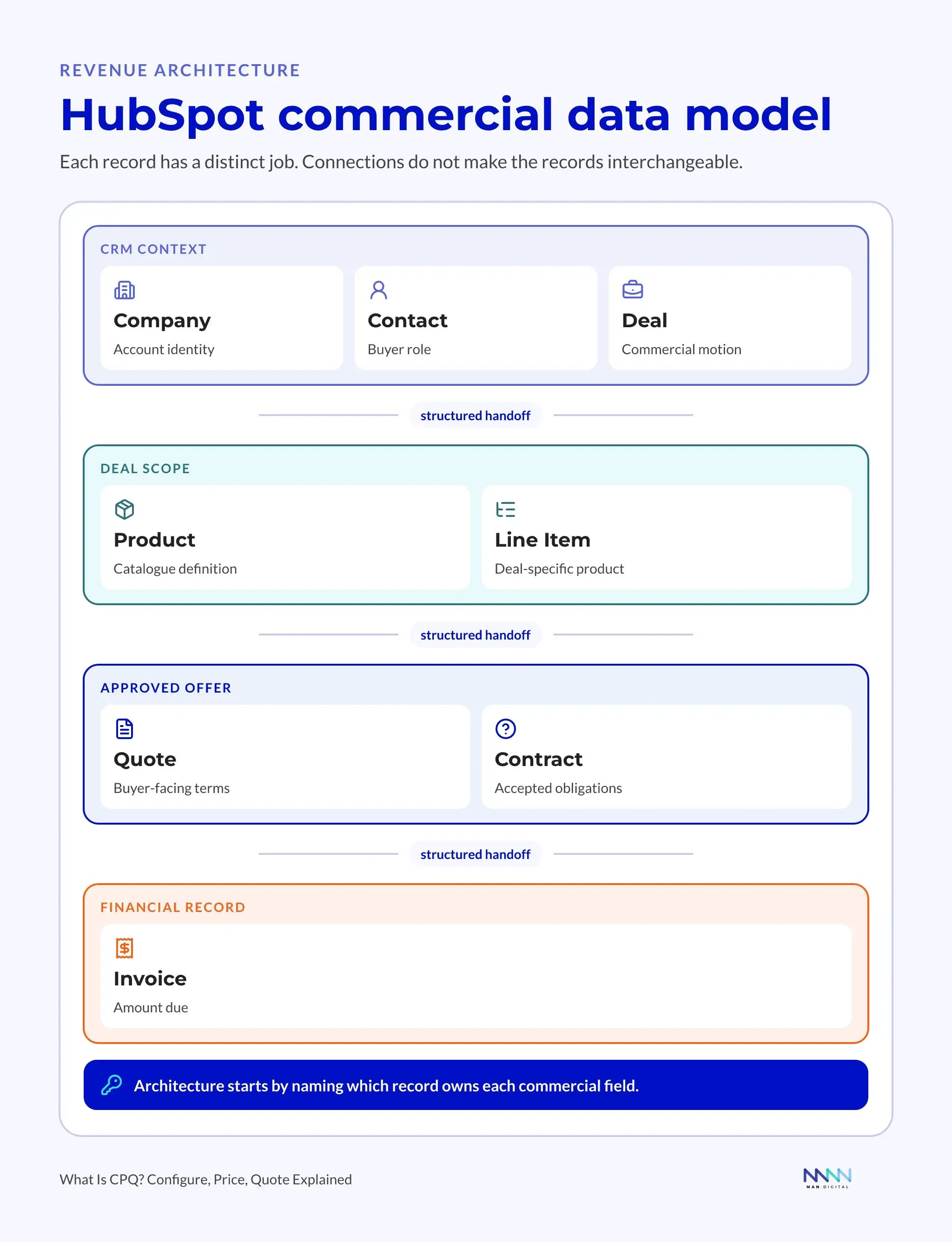
HubSpot’s Revenue Hub introduction presents CPQ, billing, and payments as connected parts of the revenue process. It provides context for the ownership decisions below: keeping records on one platform does not make quotes, contracts, and invoices interchangeable.
CPQ data model: who owns the price, contract, and invoice?
Sales quotes one thing and the invoice shows another. Before changing the integration, identify which record is allowed to define each value. Two systems may display the same term, but they must not both rewrite it independently.
The following is a recommended ownership pattern, not a claim that every company uses the same applications. Choose the actual system for each domain during design.
| Data domain | Authoritative record or system | Accountable team |
|---|---|---|
| Customer and opportunity context | CRM for contacts, relationship owner, deal stage, and sales activity. | Sales and RevOps. |
| Product definition | The designated product catalog, ERP, or product master. | Product and operations. |
| Price book | One approved pricing master; CPQ consumes its effective version. | Finance or the pricing team. |
| Configured offer and calculated price | CPQ, including products, quantities, adjustments, and quote version. | Sales within approved pricing policy. |
| Approval state | The approval workflow attached to the quote version. | The named finance, legal, or product approver. |
| Accepted contract terms | The contract record linked to the accepted agreement and amendments. | The designated contract owner, with legal oversight. |
| Invoice schedule | The billing system, using accepted dates, charges, and billing frequency. | Billing and finance. |
| Ledger and accounting entries | The accounting system or ERP. | Finance. |
| Payment transaction | The payment processor or bank for the transaction; accounting reconciles settlement. | Finance. |
The integration passes product identifiers, dates, terms, and status between these owners. Displaying an invoice status in HubSpot does not make a sales user the owner of the invoice or ledger. Define which system owns each commercial field before allowing two applications to update the same value.
The HubSpot contracts object connects accepted terms with later changes and renewals. HubSpot’s connected CPQ, billing, and payments documentation describes how quote acceptance creates the contract, billing schedule, and initial invoices when that beta is enabled.
The contracts demo below follows an accepted quote into a contract, then shows an upgrade and a renewal that excludes one-time fees. It makes the distinction practical: the current recurring agreement must survive changes to the original sale.
Test the handoff before choosing the platform
Start with products, pricing authority, approval conditions, accepted terms, and billing requirements. Name who maintains each rule and who decides exceptions. Those decisions become the specification for fields, workflows, permissions, and integrations.
MAN Digital’s Revenue Hub walkthrough follows quote creation, the Contracts object, billing schedules, mid-contract changes, and renewals. The readable lesson is that acceptance starts a continuing record: later invoices and amendments need the agreed terms, not a fresh interpretation of the sales deal.
Product context: the June 2026 Revenue Hub release; video published June 30, 2026. Start with quote creation at 23:04, billing at 36:46, or proration at 41:03. Current availability depends on the account’s edition and configuration and may differ from the recording.
What belongs in a CPQ implementation estimate?
Compare estimates against the same set of deals and exceptions. A license price does not include the work of cleaning the catalog, deciding approval authority, migrating agreements, connecting billing, testing amendments, or training the teams that maintain the system.
- Software: name the edition, seat types, billing period, currency, required add-ons, and usage limits.
- Design and data: include product cleanup, price-book ownership, approval policy, contract mapping, and migration.
- Build and integration: distinguish native functions from add-ons and custom work, including monitoring and recovery from failed handoffs.
- Acceptance and operation: include scenario testing, training, named maintenance owners, and support after launch.
Use HubSpot’s official Revenue Hub pricing page for current packaging, then request an estimate tied to those requirements. Review price and delivery scope together: an inexpensive setup that leaves finance rebuilding invoices has not resolved the original problem.
Frequently asked questions
Is CPQ a sales process or a software product?
CPQ names both the configure-price-quote process and the software used to enforce it. Buying the software does not establish discount authority or decide which products belong together. Agree on those rules first, then demonstrate that the proposed system enforces them on a normal deal and an exception.
Can a company keep using CRM quotes without a separate CPQ tool?
CRM quoting is enough when the existing tools handle the product list, price book, approvals, and accepted terms reliably. Before buying more software, try to reproduce a recent accepted quote from its records. If that works and billing receives the same terms, improving the existing setup may be the better investment.
What should we prepare before asking for a CPQ estimate?
Prepare a standard accepted quote, a discount exception, a renewal, and a mid-contract change, together with the price book and billing rules behind them. Ask each provider to identify native features, custom work, migration, and ongoing ownership against those examples. This creates a comparable scope without relying on a generic implementation price.
What must pass before a CPQ rollout goes live?
A CPQ rollout is ready when sales and finance can trace a standard deal, a rejected exception, an accepted quote, and a later amendment through the relevant records. Test permissions, duplicate submissions, failed handoffs, and recovery. Require named sign-off owners and a rollback plan before opening the workflow to all sellers.
Can HubSpot create invoices automatically after quote acceptance?
HubSpot documents automatic contract, billing-schedule, and initial-invoice creation in the Connected CPQ, Billing, and Payments beta. Confirm enrollment, Revenue Hub access, billing settings, and payment requirements before relying on that flow. Do not assume that a portal using legacy quotes or a different billing setup behaves the same way.
Which quote value should update the sales forecast?
The forecast needs a defined measure, such as total contract value or annual recurring revenue. Map the approved quote’s matching value to the corresponding deal field; exclude one-time fees from recurring revenue measures. RevOps owns that mapping and sales owns stage and close-date judgment. Flag disagreements instead of silently overwriting either record.
Key takeaways
- Configuration validates the product mix, pricing applies policy, and quoting preserves the approved offer.
- The seven-stage workflow records context, selection, price, exceptions, approval, quote version, and acceptance.
- The pricing illustration uses additive reductions from one base; real calculations must follow the agreed rules.
- A CPQ data model assigns ownership from the customer record through the ledger and payment transaction.
- Implementation acceptance must cover amendments and failed handoffs as well as the first successful quote.
Questions to ask a CPQ vendor or implementation partner
Bring a recent accepted quote and its first invoice to the evaluation. Ask the provider to trace the products, price, approval, and billing terms through the proposed system. Then change the deal: add seats, request an exception, or move the start date. These questions turn a polished demo into a test of the process your teams will operate:
- Which combinations are blocked, which produce warnings, and where is each rule maintained?
- Who owns the base price, calculated quote, accepted terms, invoice schedule, and payment status?
- What happens when a rep exceeds discount authority or changes an already approved quote?
- Can finance trace the first invoice to the exact accepted version without re-entering the terms?
- How do amendments, prorated adjustments, renewals, and one-time charges move through billing?
- Which required functions are native, in beta, provided by an add-on, or custom-built?
- Who detects a failed handoff, repairs it, and proves that retrying will not create duplicate records?
Ask for answers using your scenarios and record the remaining gaps. A useful proposal explains what the system will enforce, where human decisions remain, and who owns maintenance after launch. If those answers point to connected quoting, contracts, and billing work, see MAN Digital’s quote-to-cash implementation in HubSpot.