
October 26, 2026
8 min read
Fewer teams can see why those records matter together when revenue is at risk.
That gap matters because selling now depends on better data and cleaner handoffs.
In Salesforce’s sales research, reps report spending only 28% of their week selling.
When time is already tight, weak context turns every forecast call and handoff into extra manual work.
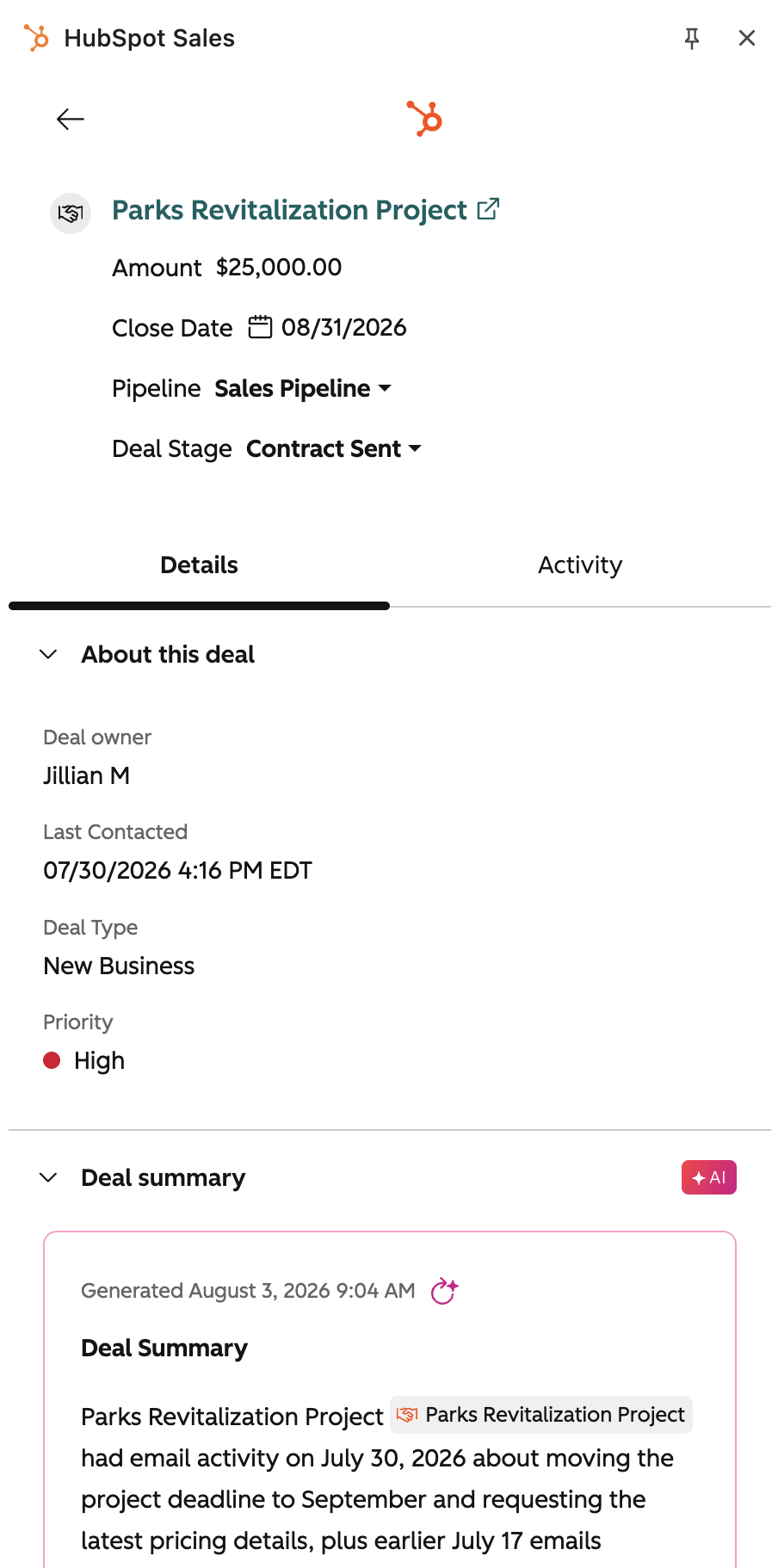
A deal record can show amount, stage, owner, and close date. It often misses buying committee change, contract risk, pricing history, service pressure, and renewal timing. Revenue context gives HubSpot the commercial memory your team needs to act with more confidence.
What Revenue Context Means in HubSpot
Revenue context is the layer of commercial meaning around your CRM records. It does not replace HubSpot objects, properties, or pipelines. It connects them so sales, marketing, CS, and RevOps can read the same account story before taking action.
Teams investing in revenue operations see measurable improvements here.
The Commercial Record Around the CRM Record
HubSpot stores structured records well. Companies, contacts, deals, tickets, activities, and related records help teams track what exists and what happened.
Revenue context explains what those records mean for commercial action.
Core CRM data usually shows:
- Who the buyer is
- Which company they belong to
- What deal is open
- What stage the deal sits in
- Which owner manages the record
- What activity happened recently
Revenue context adds meaning:
-
Buying motion
- Who influences the deal
- Who blocks progress
- Who signs the agreement
-
Commercial terms
- Pricing structure
- Contract scope
- Renewal timing
-
Risk signals
- Slow activity
- Missing stakeholders
- Support pressure
-
Growth signals
- Product adoption
- Expansion interest
- Cross-sell fit
This is the difference between a CRM database and a revenue operating system.
Why This is Not Just More Properties
Many teams try to close context gaps by adding more fields. That can help when the signal is simple. It breaks when every team defines context differently.
A field is useful only when people agree on its meaning.
💡 Insight
Revenue context works best when it has rules, owners, and workflows. Without those rules, extra properties become another place for stale data.
A strong model answers three questions:
- What does this signal mean?
- Who owns the next action?
- Which workflow should run when it changes?
That keeps context useful beyond one dashboard.
For teams already shaping RevOps in HubSpot, this layer becomes the bridge between records and operating rhythm.
Why Your CRM Misses the Commercial Record
Most CRM gaps are not caused by lazy teams. They come from a system design that tracks activity before meaning. This section shows where the story breaks and why teams need a better commercial layer.
Records Fragment Across Teams
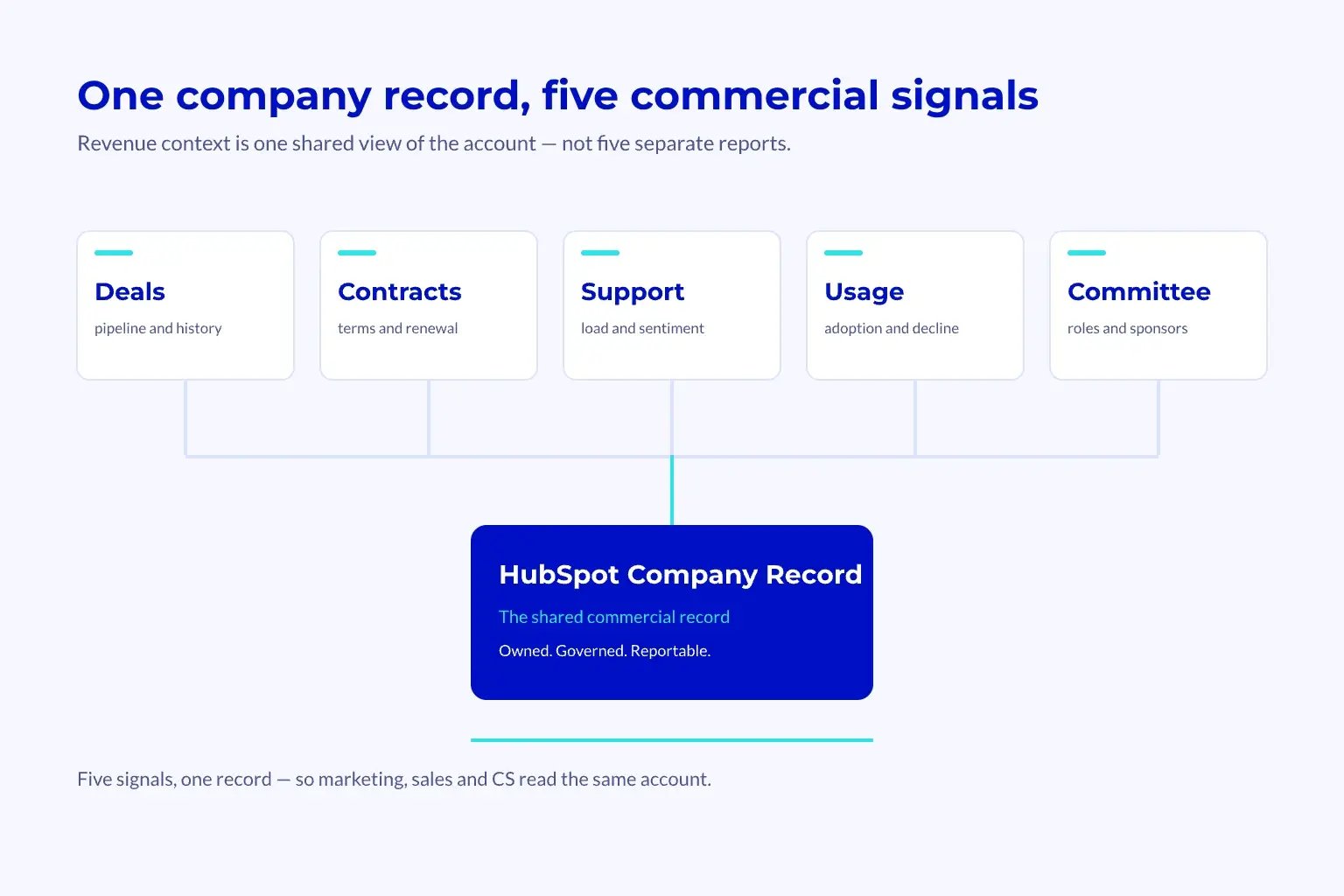
Marketing sees source, campaigns, and lifecycle movement. Sales sees calls, meetings, deal stages, and forecast notes. CS sees tickets, adoption signals, renewals, and account risk.
Each team owns part of the truth.
The problem appears when leaders ask simple questions:
- Why did this account stall?
- Which buying group changed?
- What risk threatens renewal?
- Which customers are ready to expand?
- Which deals need executive support?
- Which accounts need a new commercial plan?
A single record rarely answers those questions alone. The answer lives across linked records, past activity, human notes, and commercial history.
Common signs of missing revenue context:
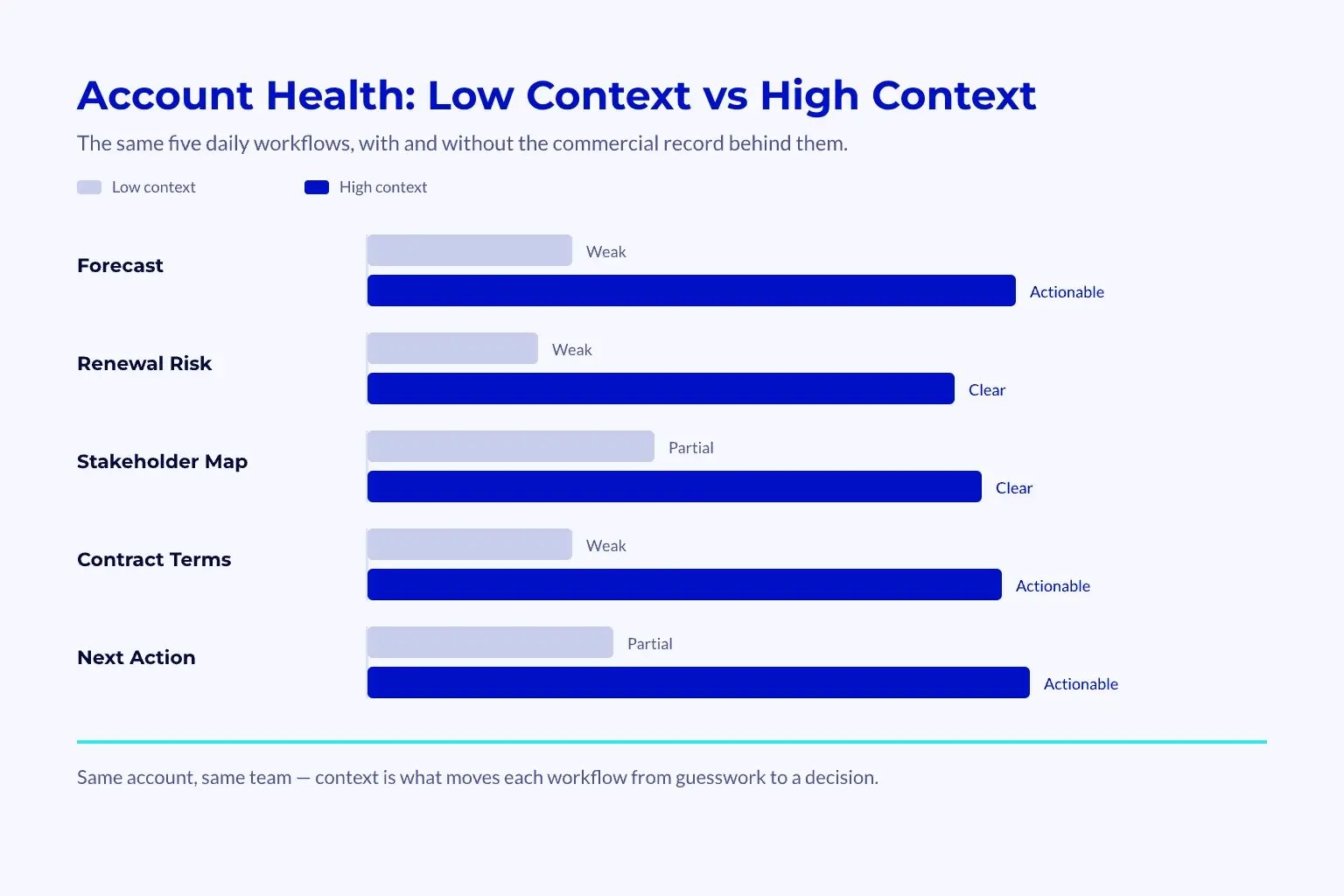
- Forecast calls depend on rep memory
- Renewal risk appears too late
- Marketing cannot see which campaigns influenced revenue quality
- Sales cannot see service or onboarding risk
- CS cannot see commercial history before expansion talks
- Leaders debate definitions instead of decisions
A CRM can hold data and still hide the story.
Buying Has Become More Complex
Modern B2B buying involves more people, more steps, and more internal debate. That makes context more valuable than raw activity.
McKinsey describes B2B growth as a mix of connected data, digital buying, and coordinated customer journeys in its B2B growth equation. That pressure shows why CRM records need shared meaning, not just cleaner storage.
📊 Fact
A deal stage only shows where a deal sits now. It does not explain stakeholder tension, urgency, contract shape, or post-sale risk.
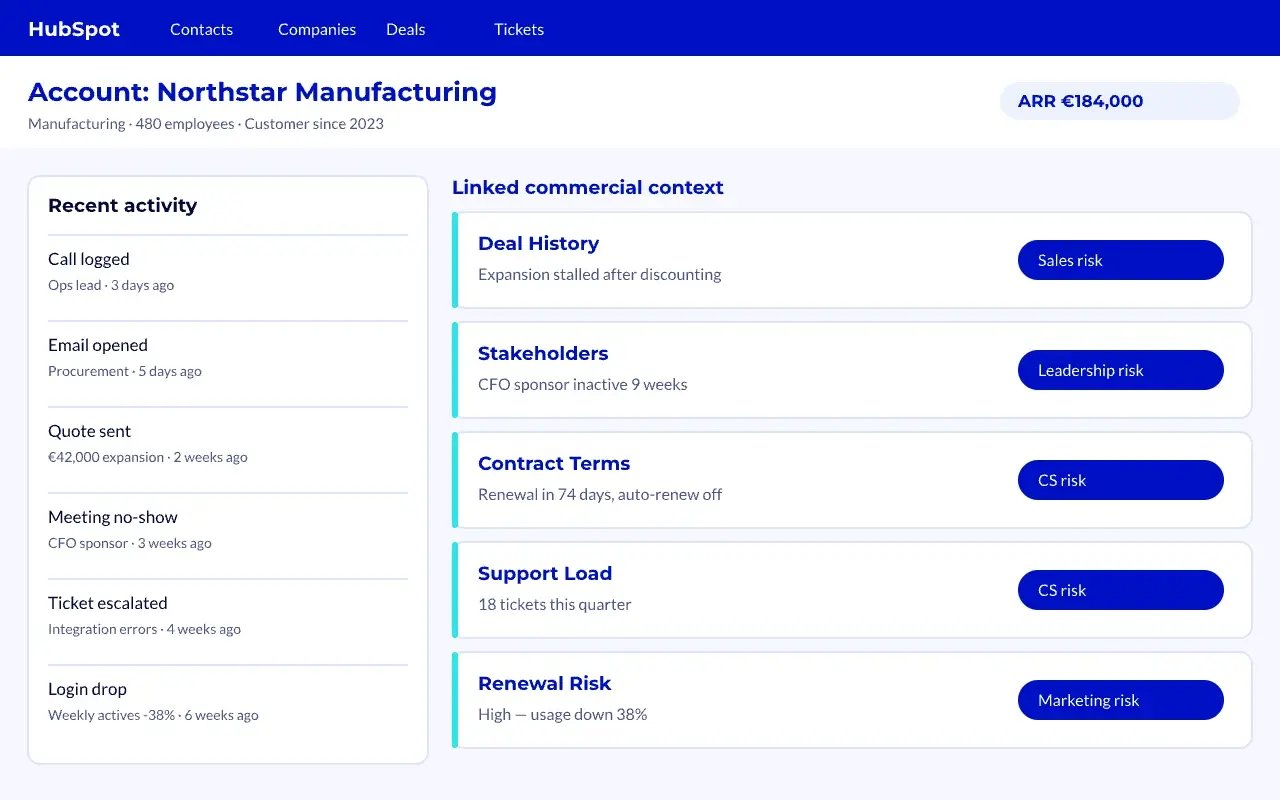
That missing layer creates practical pain:
-
Sales risk
- Reps overtrust stage movement
- Managers miss weak buying consensus
-
Marketing risk
- Campaigns get credit for volume
- Revenue quality stays unclear
-
CS risk
- Renewal action starts too late
- Expansion timing depends on guesswork
-
Leadership risk
- Forecasts lose trust
- Investment choices rely on partial data
Revenue context HubSpot commercial work needs a clear data model before automation. The goal is not to store everything. The goal is to store the few signals that change action.
The Five Context Pillars
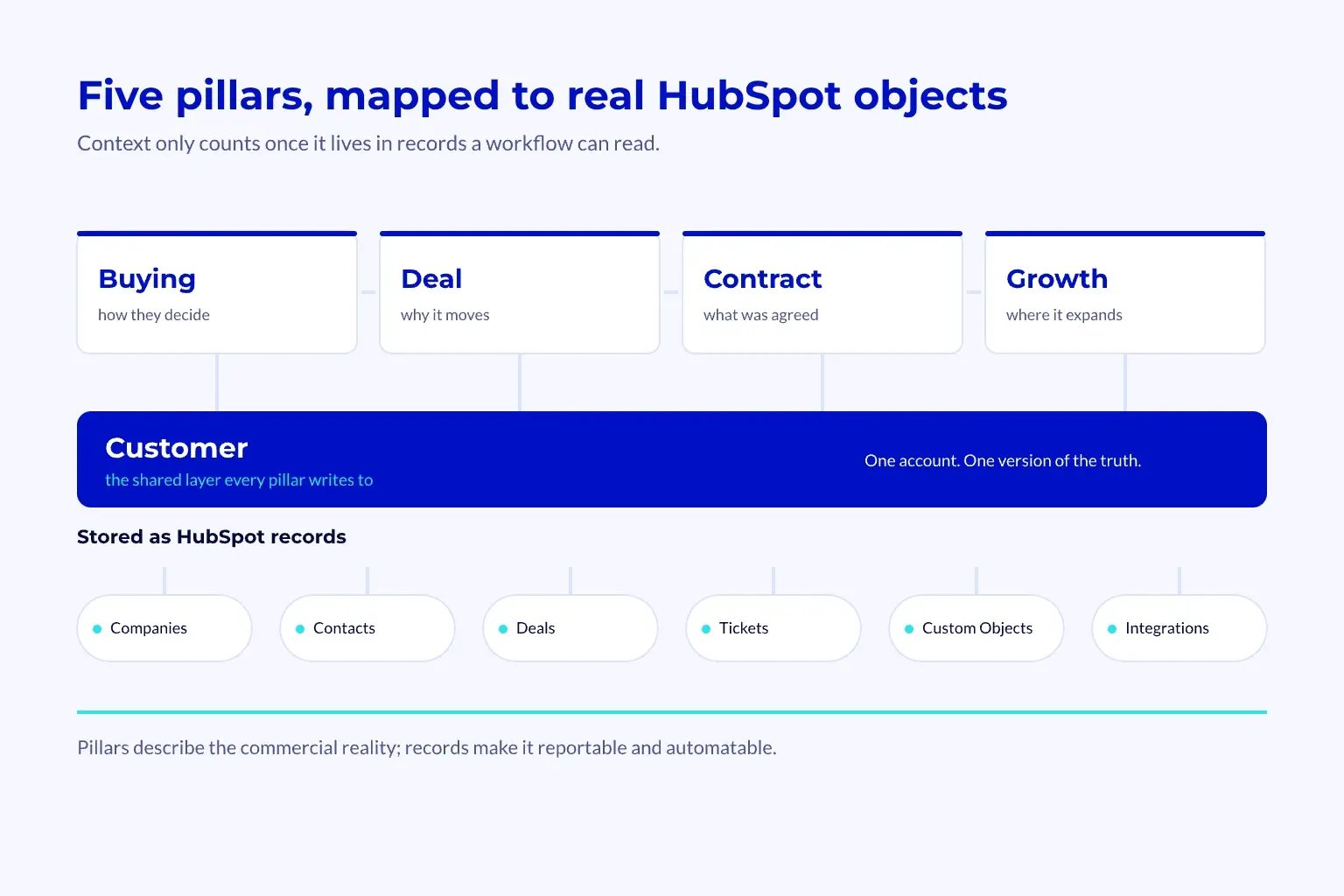
A practical model usually has five pillars. Each pillar answers one commercial question. Together, they create a shared record that teams can trust.
| Pillar | Question It Answers | Example Signals | Primary Owner |
|---|---|---|---|
| Buying Context | Who is involved and how do they decide? | Stakeholder role, buying trigger, blocker | Sales |
| Deal Context | Why will this deal move or stall? | Stage risk, next step, close plan | Sales |
| Contract Context | What commercial terms shape the account? | Renewal date, scope, pricing model | RevOps |
| Customer Context | What is happening after purchase? | Usage, tickets, onboarding status | CS |
| Growth Context | Where can revenue expand? | Product fit, adoption, expansion trigger | RevOps and CS |
This table is simple by design.
A team can add depth later. First, it should agree on the context that changes daily decisions. That keeps the system useful for managers, reps, CSMs, and leaders.
What Belongs in HubSpot
Not every signal needs its own custom object. Some context belongs as properties. Some belongs as associations.
Some belongs in connected systems.
HubSpot’s CRM model is built around records, properties, and relationships. Revenue context should extend that model, not fight it.
💡 Tip
Start with the decisions your teams need to make. Then choose the HubSpot structure that supports those decisions.
A simple mapping approach:
-
Use properties when the signal is simple
- Renewal date
- Account tier
- Buying stage
- Risk status
-
Use associations when relationships matter
- Multiple stakeholders
- Related deals
- Parent and child accounts
- Service issues tied to renewal
-
Use custom objects when the thing has its own lifecycle
- Commercial agreements
- Product subscriptions
- Implementation projects
- Revenue milestones
-
Use integrations when another system owns the source
- Billing data
- Product usage
- Data enrichment
- Support platform events
This keeps HubSpot clean while still making commercial context visible.
Many teams benefit from mapping this layer before migration or rebuild work. The same thinking supports a stronger HubSpot data model because structure comes before workflows.
How to Build Revenue Context in HubSpot
Building this layer is a RevOps design task, not a quick field update. The work starts with commercial questions, then moves into structure, ownership, governance, and workflows. This sequence keeps HubSpot useful instead of heavy.
Start with Decision Questions
The fastest way to avoid CRM bloat is to list the decisions that need better context. Each field, object, and workflow should support one of those decisions.
Good decision questions include:
- Which open deals need manager review this week?
- Which renewal accounts need CS action now?
- Which buying committees have no executive sponsor?
- Which closed-won deals need onboarding attention?
- Which accounts show expansion fit but no active plan?
- Which accounts have commercial risk that leadership should see?
Then map each question to a signal.
Example mapping:
-
Question: Which renewals are at risk?
- Signal: Support volume, low usage, missing business review
- Owner: CS
- Action: Renewal risk workflow
-
Question: Which deals need coaching?
- Signal: Stage age, no next meeting, weak stakeholder map
- Owner: Sales manager
- Action: Pipeline review task
-
Question: Which accounts fit expansion?
- Signal: Adoption, segment, product gap, renewal window
- Owner: CS and RevOps
- Action: Expansion play
This method keeps the system tied to work people already do.
Design Governance Before Automation
Automation can spread bad context faster than humans can fix it. That is why governance comes before workflow logic.
Governance should define the rules before teams build workflows.
Minimum governance rules:
-
Field ownership
- Who updates the signal
- When they update it
- What counts as complete
-
Data definitions
- What each status means
- Which values are allowed
- Which teams can change them
-
Workflow rules
- What triggers action
- Who receives the task
- What happens if no one acts
-
Review cadence
- Weekly pipeline review
- Monthly data quality check
- Quarterly model refresh
📝 Note
Revenue context fails when everyone can edit everything. Clear ownership protects trust.
This is also where RevOps teams decide which HubSpot build work belongs in-house. For complex setups, HubSpot consulting can help separate quick fixes from operating model work.
How Teams Use Revenue Context Day to Day
Revenue context HubSpot commercial value appears when teams use it in daily work. The system should reduce handoff loss, speed up reviews, and make account decisions clearer. This section shows how sales and CS use the same layer for different outcomes.
Sales Uses It for Better Forecasts
A forecast based only on stage and amount is fragile. It misses buyer agreement, next steps, stakeholder strength, and contract blockers.
Revenue context adds the evidence behind rep confidence.
Sales teams can review:
- Buying committee strength
- Last meaningful buyer action
- Commercial blocker status
- Mutual action plan progress
- Contract or legal friction
- Renewal or expansion dependency
This turns a forecast review into a commercial review.
Managers stop asking, “Do you feel good about this deal?” They ask, “What context supports the forecast category?”
That shift matters because the team now reviews evidence, not optimism.
CS Uses It for Retention and Expansion
Customer teams often inherit accounts with weak commercial history. They see tickets and usage, but not the original promise, pricing logic, buyer goals, or expansion path.
Revenue context gives CS the account memory they need.
CS teams can see:
- Original business case
- Contract scope and renewal window
- Key stakeholder roles
- Product adoption risks
- Support trends
- Expansion signals
This makes handoffs cleaner after close.
It also helps CS choose the right play. A customer with high usage and weak executive engagement needs a different plan from a customer with low usage and many support issues.
Revenue Hub discussions often focus on quoting, billing, and subscription workflows. A Revenue Hub overview shows why the commercial layer now sits closer to CRM operations.
For teams moving commercial workflows into HubSpot, the same context supports quote-to-cash design because contract signals need clean records. HubSpot’s own end-to-end revenue guidance and contract documentation reinforce the same point: commercial terms work best when they sit close to the operating record.
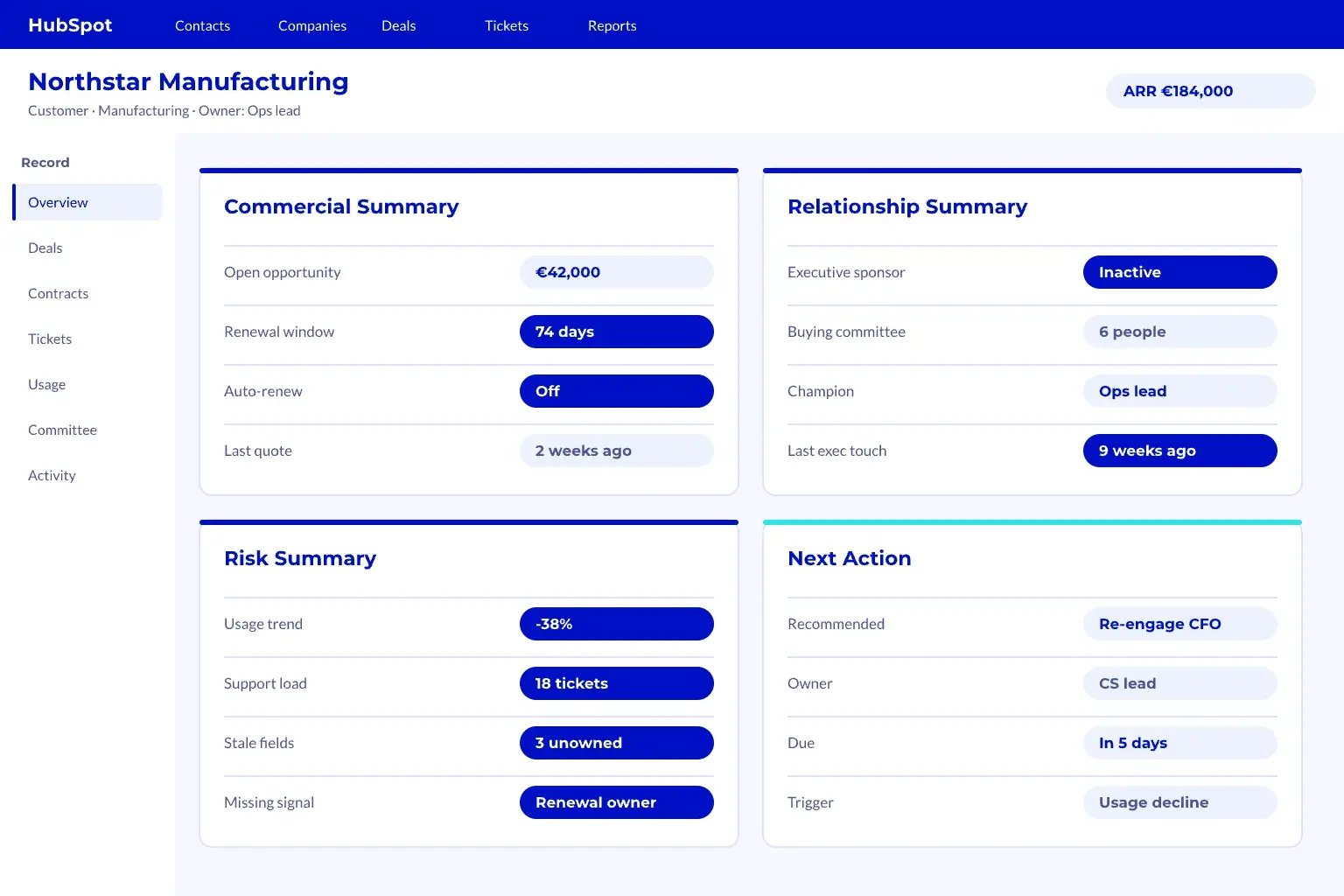
A healthy daily account view includes:
-
Commercial summary
- Account tier
- Current contract status
- Renewal timing
- Expansion fit
-
Relationship summary
- Decision maker
- Economic buyer
- Champion
- Blocker or missing role
-
Risk summary
- Deal risk
- Renewal risk
- Support risk
- Data quality risk
-
Action summary
- Next meeting
- Open task
- Required approval
- Workflow status
Each section should answer a real operating question.
If a field does not change action, it does not belong in the top view.
Failure types to watch:
| Failure Type | What It Looks Like | Fix |
|---|---|---|
| Field Sprawl | Too many properties with weak use | Remove fields that do not drive action |
| Owner Confusion | Teams update the same signal differently | Assign one owner per signal |
| Workflow Noise | Alerts fire but no one acts | Convert alerts into owned tasks |
| Dashboard Drift | Reports show stale or unclear data | Review definitions each month |
| Context Gaps | Account story still lives in notes | Move key signals into structured fields |
This checklist supports a simple rule: build less, use more.
Frequently Asked Questions
This section answers practical buyer questions about the commercial record HubSpot often lacks. The answers focus on scope, timing, ownership, and value. These questions reflect what senior revenue leaders usually ask before changing CRM architecture.
What is Revenue Context in HubSpot?
Revenue context in HubSpot is the commercial layer that explains what CRM records mean. It connects deals, contacts, companies, tickets, contracts, usage signals, and renewal data into one account story. The goal is better action, not more data capture, so teams can judge risk, next steps, and growth potential faster.
How Long Does It Take to Build Revenue Context?
A basic version can take a few weeks if the team already has clean data and clear processes. A deeper model takes longer when it includes custom objects, integrations, and governance. The fastest path starts with a few high-value decisions, then expands after teams prove the model works.
Does Revenue Context Require Custom Objects?
No, it does not always require custom objects. Many teams can start with properties, associations, views, and workflows. Custom objects make sense when the commercial item has its own lifecycle, owner, and reporting need, such as subscriptions, agreements, implementations, or revenue milestones.
Who Should Own Revenue Context?
RevOps should usually own the model, but each team should own its signals. Sales owns deal and buying context. CS owns customer risk and renewal signals.
Finance or RevOps often owns contract and commercial terms, especially when quote-to-cash workflows sit close to HubSpot.
What is the ROI of Revenue Context?
The ROI comes from faster decisions, cleaner handoffs, fewer forecast surprises, and earlier renewal action. It also reduces manual research before account reviews. The strongest value appears when leaders use the same context in pipeline, renewal, expansion, and forecast meetings.
When Should a Team Build This Layer?
A team should build this layer when HubSpot has records but leaders still cannot explain revenue movement. Common triggers include weak forecast trust, messy renewals, unclear expansion signals, poor handoffs, or a migration into HubSpot. The best time is before automation scales bad process.
For a deeper look, see our guide on Salesforce HubSpot migration.
Conclusion
Revenue context HubSpot commercial design helps teams turn HubSpot from a record store into a shared commercial operating layer. It gives leaders the missing account story, improves decisions, and supports cleaner handoffs across the full revenue journey.
The value is not more data for its own sake. The value is a stronger system for clearer forecasts, earlier retention signals, better account plans, stronger trust in HubSpot, and a cleaner path to growth.
Key Takeaways
- Revenue context adds commercial meaning around HubSpot records so teams can act with more confidence.
- The strongest models start with decision questions, not extra properties or dashboards.
- Buying, deal, contract, customer, and growth context create a practical shared account view.
- Governance protects trust because every key signal needs an owner, definition, and review rhythm.
- A strong revenue context layer can improve forecasts, strengthen renewals, and enable better growth planning.