
October 16, 2026
14 min read
The value is not the move itself.
It is the simpler system your team gains after it.
Salesforce has its own object logic, formulas, rollups, validation rules, permission patterns, and reporting habits.
A strong migration preserves the commercial meaning, removes noise, and rebuilds the right structure in HubSpot. This playbook treats the project as RevOps architecture work, not a copy-and-paste CRM task.
Salesforce to HubSpot Migration in 2026: What Actually Changes
The timing matters because HubSpot is no longer a small-business CRM choice. HubSpot reported 267,982 customers as of 31 March in its quarterly filing. For mid-market teams, that scale changes the question from “Can HubSpot handle us?”.
To “Can our operating model fit the way we now want to run revenue?”.
A migration changes more than where records live. It changes how teams define accounts, contacts, deals, activities, ownership, lifecycle stages, and reporting trust. This section explains what changes when a mid-market RevOps team moves from Salesforce to HubSpot.
Teams investing in revenue operations see measurable improvements here.
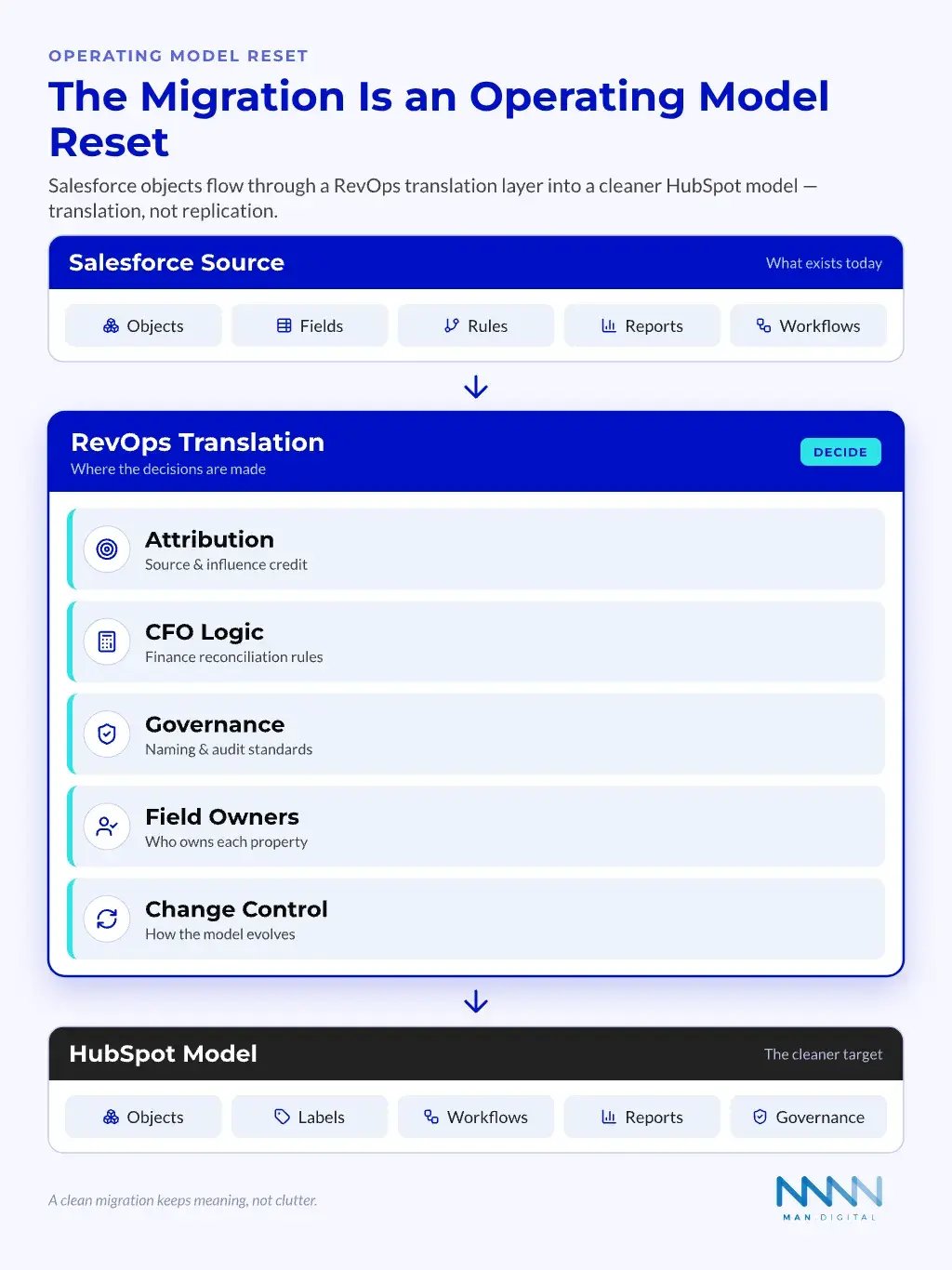
The CRM Move Becomes an Operating Model Reset
Salesforce is often where years of commercial choices have accumulated. Some still matter. Others reflect old campaigns, past leaders, retired regions, or broken workflows.
HubSpot gives teams a chance to rebuild the operating model in a simpler way. That does not mean making HubSpot basic. It means making the system easier to understand, govern, and use.
The shift usually touches five layers:
- Data model
- Objects
- Properties
- Associations
- Labels
- Process logic
- Lifecycle stages
- Deal stages
- Qualification rules
- Handoffs
- Automation
- Routing
- Notifications
- Task creation
- Renewal workflows
- Reporting
- Funnel metrics
- Forecast views
- Attribution logic
- CFO reconciliation
- Governance
- Field ownership
- Naming standards
- Change control
- Audit rhythm
💡 Insight
The migration is not a technology swap. It is the moment when RevOps decides what the revenue system should mean.
Translation Beats Replication
Replication copies every object, field, and rule into the new system. Translation asks what each item means, whether it still matters, and where it belongs in HubSpot.
This matters because Salesforce and HubSpot can express the same business idea in different ways. A Salesforce custom object can become a HubSpot custom object. It can also become an association label, a property group, a pipeline, or a workflow pattern.
A translation lens asks better questions:
- Does this field support a current process?
- Who owns the data after cutover?
- Does the value still drive routing or reporting?
- Can HubSpot model this with a simpler native feature?
- Does finance need this field for revenue checks?
- Does sales need it inside daily deal work?
- Does customer success need it after handoff?
A clean migration keeps meaning. It does not keep clutter.
One of the biggest shifts is native AI: HubSpot’s Breeze AI tooling becomes available across the CRM once you migrate.
When Moving From Salesforce To HubSpot makes sense?
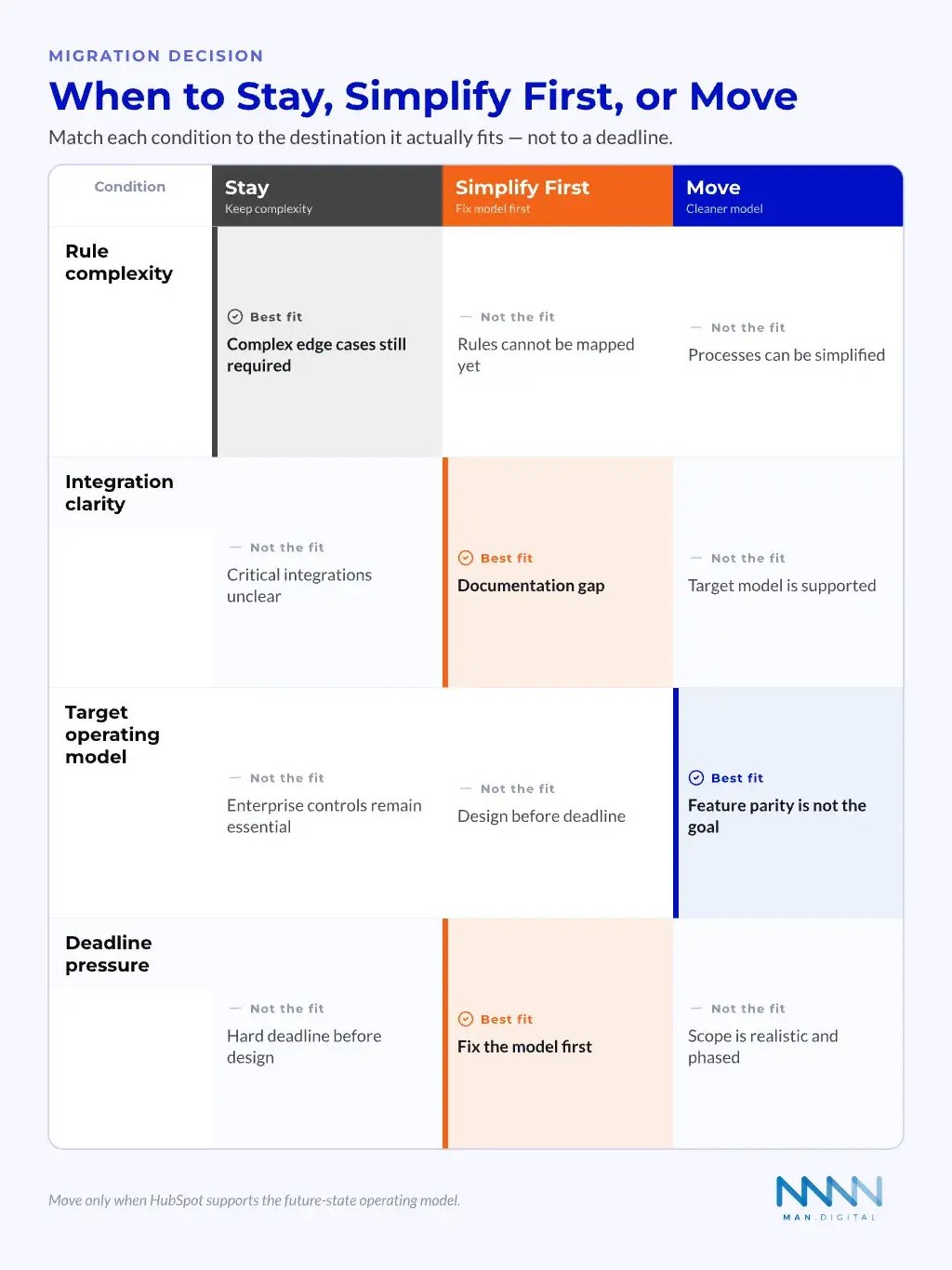
Not every company should leave Salesforce. Salesforce can well meet complex enterprise needs. Moving makes sense when the current CRM no longer clearly supports the revenue model, and HubSpot aligns with the target operating model.
The Common Mid-Market Trigger Points
Mid-market teams often reach a point where the CRM no longer matches the way they sell. The business has changed, but the system still reflects past decisions. That gap creates admin work and weak trust.
The strongest reasons to move include:
- CRM debt is slowing the team
- Too many fields
- Too many page layouts
- Too many exceptions
- Adoption is weak
- Reps work outside the CRM
- Managers export data to spreadsheets
- Leaders distrust dashboards
- Commercial teams need one workspace
- Marketing needs better lifecycle visibility
- Sales needs cleaner deal context
- CS needs clearer account health signals
- RevOps needs faster change cycles
- Workflow updates take too long
- Reporting fixes wait behind admin queues
- Simple changes need too many approvals
- Finance needs clearer revenue data
- Forecasts do not reconcile
- Closed-won numbers differ by report
- Renewal and expansion data sits apart
This is where revenue alignment becomes practical. The CRM should support the revenue model, not force teams into old system habits.
When is staying on Salesforce better?
A respectful migration plan also knows when not to move. Some teams depend on Salesforce features, managed packages, custom code, or security patterns that HubSpot can not match directly. In those cases, a rushed move creates more risk than value.
Salesforce remains a strong fit for many complex environments. That includes firms with deep enterprise account hierarchies, highly custom app logic, or mature Salesforce development teams.
Pause the migration if these risks are present:
- Your team cannot explain current revenue rules.
- Finance depends on reports nobody can rebuild.
- Custom objects have unclear ownership.
- Security rules are too complex to map.
- Integrations are not documented.
- The business wants a deadline before a design.
📝 Note
Moving only makes sense when HubSpot can support the target operating model. It does not need to mirror every Salesforce feature.
If the move is justified, a specialist CRM implementation partner can de-risk the cutover.
What Data and Logic You Can Lose If You Migrate Badly
Poor migrations do not always fail on record counts. They fail when hidden logic disappears. This section covers the data, rules, and reporting meaning that often get lost during rushed moves.
Record Counts Are Not Enough
The issue is usually not missing names. It is lost context.
Sales teams need activity history, ownership, lifecycle stage, buying role, association context, and deal progression. Finance needs values that reconcile with bookings and forecasts. CS needs renewal dates, health signals, and support history.
Bad migrations often lose meaning in these areas:
- Associations
- Contacts linked to the wrong company
- Deals missing buying committee context
- Activities linked to records without clear meaning
- Lifecycle data
- MQL and SQL definitions changed
- Disqualified reasons lost
- Closed-lost reasons merged badly
- Deal logic
- Stage dates missing
- Forecast categories not mapped
- Product lines removed from pipeline views
- Ownership
- Old owner fields ignored
- Territory logic broken
- Handoffs left unclear
- Reporting
- Old filters not rebuilt
- Report definitions treated as exports
- CFO metrics not reconciled
A stronger migration test asks whether the business can still answer its core revenue questions.
Hidden Logic is the Bigger Risk
Salesforce often stores business logic in formulas, validation rules, rollups, automation, and reports. Review each piece of logic before deciding whether to rebuild, simplify, retire, or move it outside the CRM.
Some logic can belong outside the CRM.
Salesforce explains formula fields as a way to calculate values from other fields. Those concepts need review before migration, not blind export from Salesforce formula field guidance into HubSpot.
Security and visibility rules need the same care. Salesforce security models can include profiles, roles, sharing rules, and permissions, so map those controls before cutover using the Salesforce security implementation guide.
Logic review should cover:
- Formula fields that drive reports
- Rollups that drive account scoring
- Validation rules that protect data quality
- Workflow rules that route leads or tasks
- Approval logic tied to discounts or regions
- Report filters used by finance
- Permission rules that affect visibility
💡 Tip
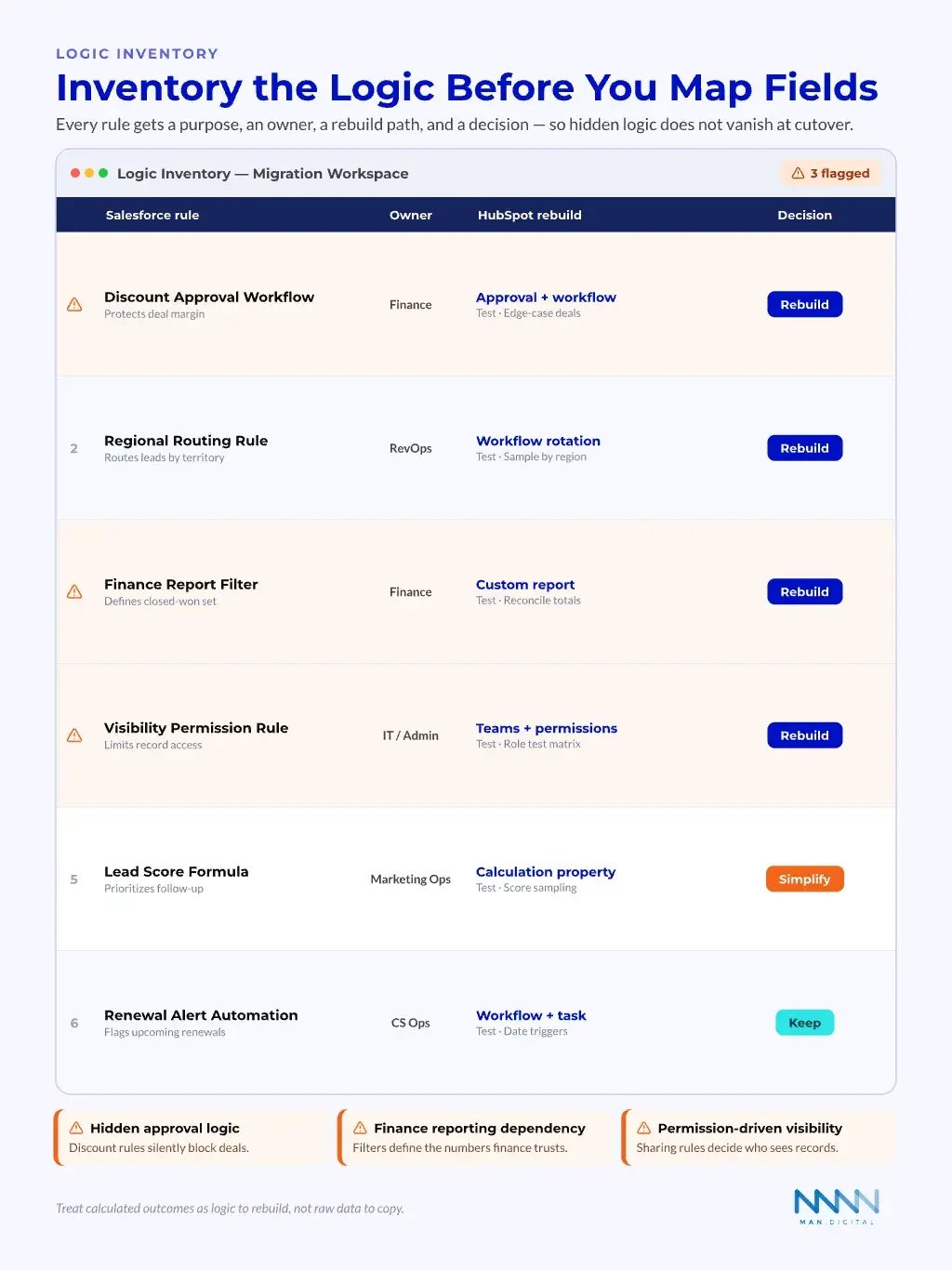
Build a “logic inventory” before mapping fields. It stops the team from treating calculated outcomes as simple raw data.
Before mapping a single field, inventory the Salesforce logic that drives reporting and routing. Every rule needs a purpose, an owner, a HubSpot rebuild path, and a decision — keep, simplify, rebuild, or retire — so calculated outcomes are not silently lost at cutover.
The sample logic inventory below shows how common Salesforce rules translate into HubSpot.
| Salesforce rule | Owner | HubSpot rebuild | Decision |
|---|---|---|---|
| Discount Approval Workflow | Finance | Approval + workflow | Rebuild |
| Regional Routing Rule | RevOps | Workflow rotation | Rebuild |
| Finance Report Filter | Finance | Custom report | Rebuild |
| Visibility Permission Rule | IT / Admin | Teams + permissions | Rebuild |
| Lead Score Formula | Marketing Ops | Calculation property | Simplify |
| Renewal Alert Automation | CS Ops | Workflow + task | Keep |
To avoid losing rollups, attribution, and automation logic in the move, many teams bring in a HubSpot RevOps agency to map that logic before cutover.
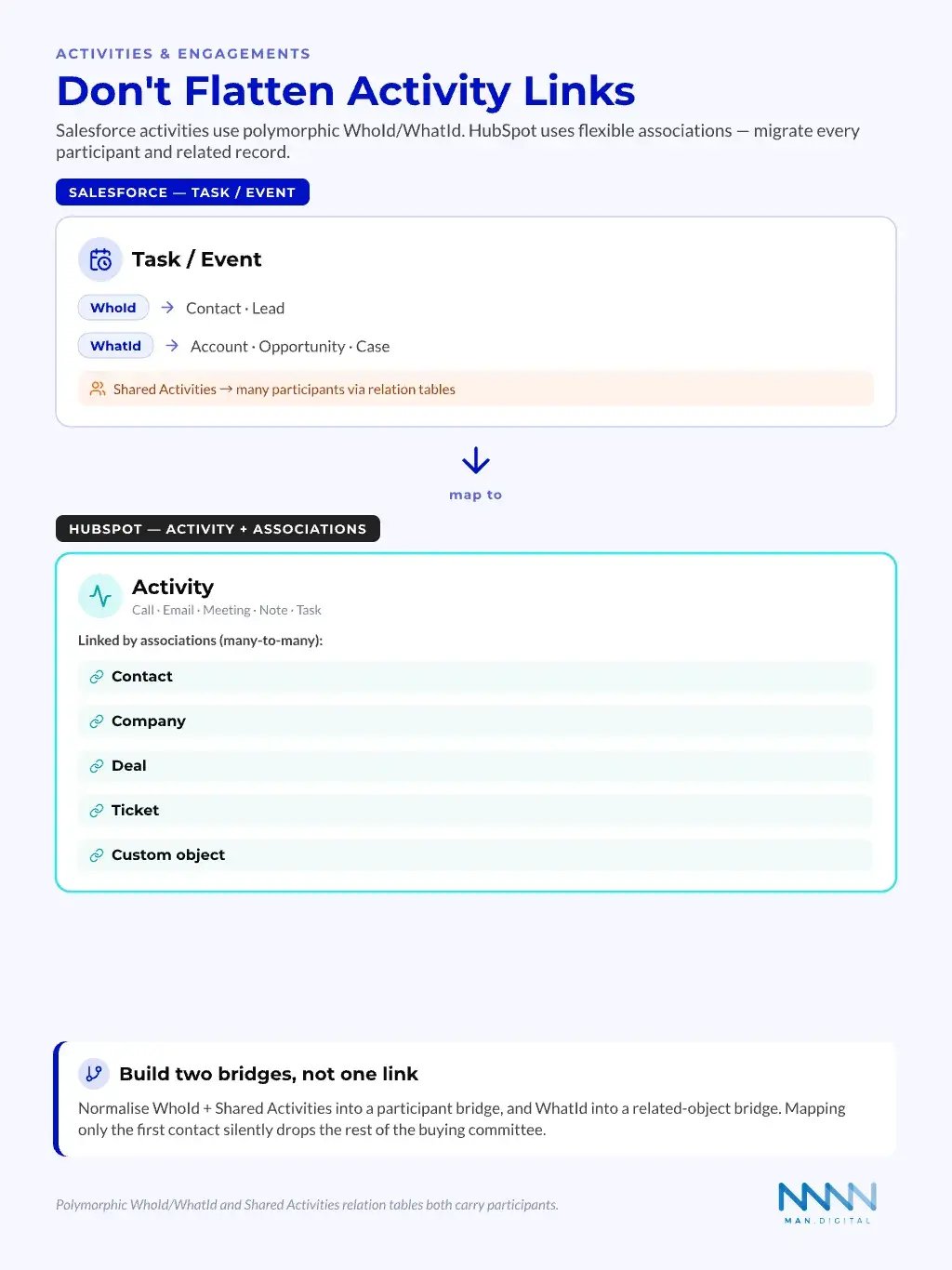
Salesforce activities do not map one-to-one to HubSpot. Task and Event records use polymorphic WhoId and WhatId fields, and Shared Activities can tie a single activity to several people.
HubSpot represents the same relationships through flexible associations, so a safe migration preserves every participant and related record — not just the first contact.
| Salesforce activity link | What it stores | HubSpot equivalent |
|---|---|---|
| WhoId | The person: Contact or Lead | Association to a Contact |
| WhatId | The related record: Account, Opportunity or Case | Association to a Company, Deal or Ticket |
| Shared Activities relation tables | Multiple participants on one activity | Multiple associations on one activity |
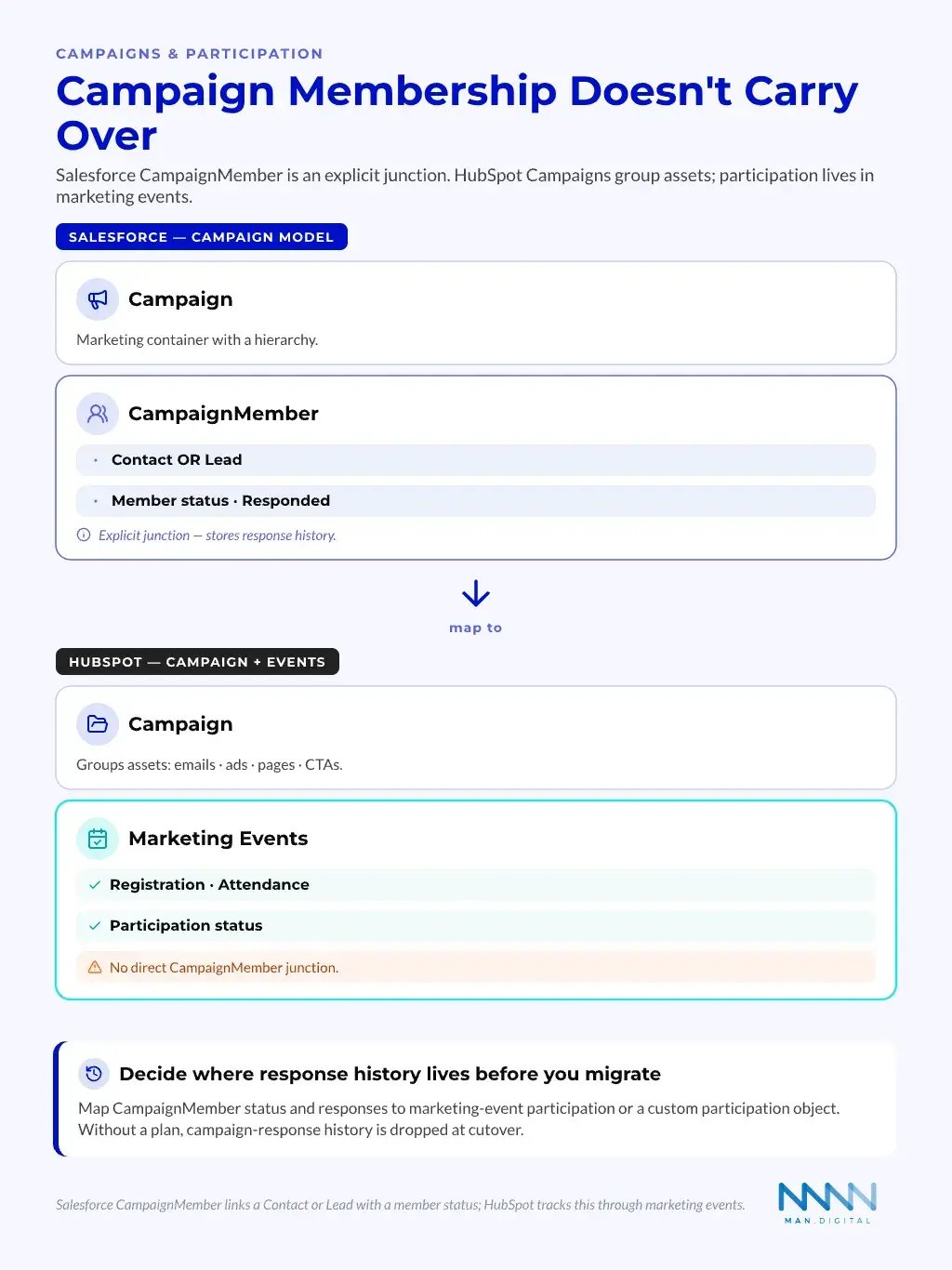
Campaign data is another common loss point. Salesforce uses an explicit CampaignMember junction that records each Contact or Lead and their member status, such as Sent or Responded.
HubSpot Campaigns instead group marketing assets, and person-level participation lives in marketing events — so decide where member status and response history will live before you migrate.
| Salesforce | What it represents | HubSpot equivalent |
|---|---|---|
| Campaign | Marketing container with hierarchy | Campaign that groups assets |
| CampaignMember | Junction linking a Contact or Lead with a member status | Marketing event participation |
| Member status (e.g. Responded) | Campaign response history | Event registration / attendance status |
Salesforce vs HubSpot Terminology and Data-Model Differences
The two systems share many CRM ideas, but they do not use the same model everywhere. A clean migration starts with language. Teams need a shared glossary before they can make reliable mapping decisions.
Objects, Records, and Relationships Mean Different Things
Salesforce data modeling uses objects, fields, and relationships. HubSpot uses CRM objects, properties, records, associations, and association labels. The terms look similar, but the design choices differ.
Salesforce admins may expect one pattern. HubSpot admins may solve the same need with labels, custom objects, pipelines, or properties.
The official Salesforce data model reference is useful context before teams translate those structures into HubSpot.
| Commercial Concept | Salesforce Pattern | HubSpot Pattern | Migration Question |
|---|---|---|---|
| Company or account | Account | Company | Does hierarchy need simplification? |
| Person | Contact or Lead | Contact | Should leads become contacts with lifecycle rules? |
| Sales opportunity | Opportunity | Deal | Do stage meanings match? |
| Relationship type | Lookup or master-detail | Association or label | Is the relationship structural or descriptive? |
| Custom process | Custom object | Custom object or pipeline | Does it need object-level reporting? |
| Calculated value | Formula or rollup | Calculation property or workflow | Does logic need real-time accuracy? |
This table is not a universal mapping. It is a starting point for architecture choices.
Association Labels Change the Design Options
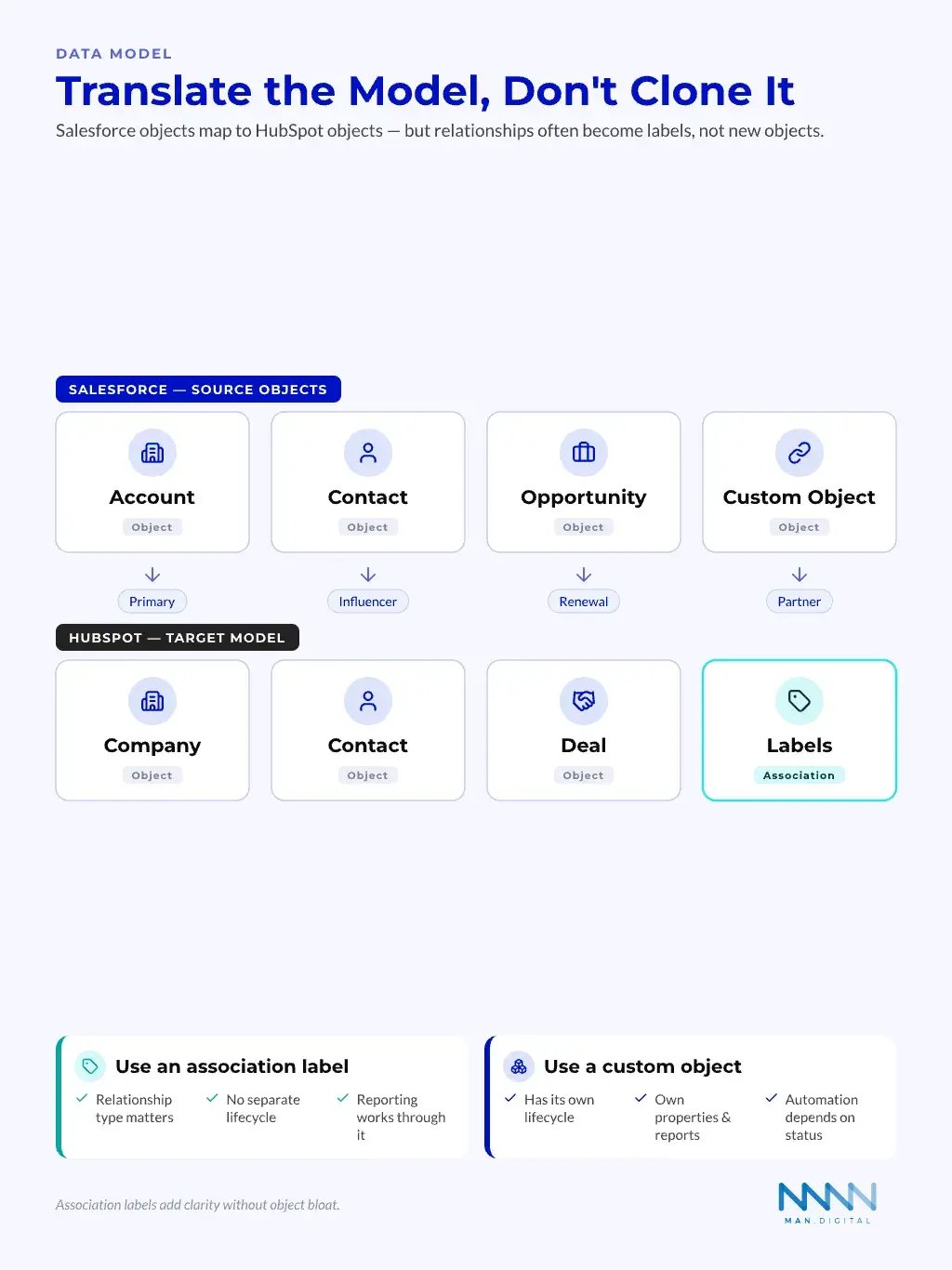
HubSpot association labels can describe relationships between records. That can reduce the need for some custom objects. It can also make relationships clearer for daily users.
For example, a contact linked to a company can be a decision maker, billing contact, technical evaluator, or former employee. In Salesforce, teams can have used fields, roles, or custom relationship objects. In HubSpot, labels can make that context easier to scan.
Use association labels when:
- The relationship type matters to users.
- The relationship does not need its own lifecycle.
- Reporting can work through the association.
- The label improves clarity without adding object bloat.
Use a custom object when:
- The record has its own lifecycle.
- It needs its own properties and reports.
- Multiple teams work on it over time.
- Automation depends on its status.
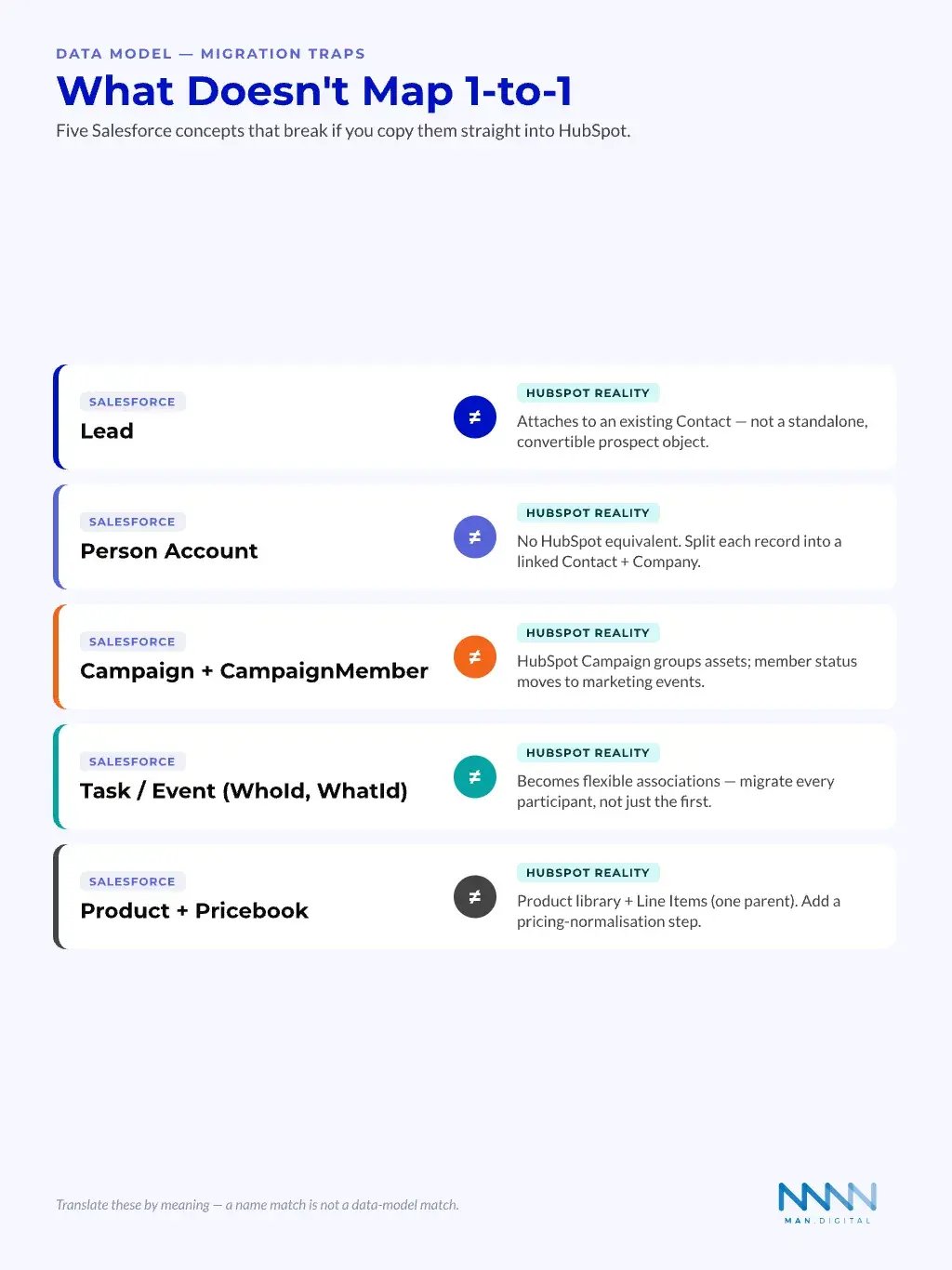
Some Salesforce concepts have no clean HubSpot twin, so mapping them by name is one of the most common migration mistakes. The five below must be translated by meaning, not copied. The table summarises what each Salesforce object actually becomes in HubSpot.
| Salesforce concept | Why it doesn't map 1-to-1 in HubSpot |
|---|---|
| Lead | Attaches to an existing Contact — not a standalone, convertible prospect object. |
| Person Account | No HubSpot equivalent; split each record into a linked Contact and Company. |
| Campaign + CampaignMember | HubSpot Campaign groups assets; member status moves to marketing events. |
| Task / Event (WhoId, WhatId) | Becomes flexible associations — migrate every participant, not just the first. |
| Product + Pricebook | Product library plus Line Items (one parent); add a pricing-normalisation step. |
How Salesforce Fields, Rollups and Formulas Translate Into HubSpot
Field migration is where many projects look simple and then get messy. The work is not just matching names. It is deciding what each field does, who uses it, and how HubSpot should hold or calculate it.
Field Triage Comes Before Field Mapping
A field map should not include everything. It should classify fields first. This avoids moving old debt into a cleaner CRM.
Sort each Salesforce field into one of five groups:
- Keep
- Used in active workflows
- Used in required reports
- Used by commercial teams
- Merge
- Duplicates another field
- Has similar values under another name
- Can become one standard property
- Archive
- Needed for history
- Not needed for daily work
- Should not clutter user views
- Rebuild
- Formula, rollup, or automation logic
- Needs HubSpot-native design
- Requires test cases
- Retire
- No owner
- No current use
- No reporting need
HubSpot imports can bring object records into the CRM, including associations when prepared correctly. The HubSpot guide to importing objects shows why clean files, object types, and association setup matter before upload.
Calculations Need Business Testing
Salesforce formulas and rollups often drive key commercial views. HubSpot calculation properties can cover many needs, but teams should design them against the business question. A field that looks similar can not behave the same way.
Testing should compare:
- Source value in Salesforce
- Target value in HubSpot
- Expected business meaning
- Record sample across edge cases
- Report impact after migration
- Owner sign-off from RevOps or finance
📊 Fact
CFO trust depends on metric reconciliation, not matching field labels. A dashboard is not trusted until finance can trace its inputs.
The Official HubSpot Migration Stack
HubSpot has native options that can support migration work. These tools are useful, but they do not replace architecture. They help move or sync data after the team has decided what the target model should be.
Native Tools Can Handle Simple Patterns
HubSpot supports imports, sync tools, and migration services. These options can work well when the source data is clean and the target model is clear. They are less useful when the project has complex logic, unclear objects, or heavy reporting debt.
HubSpot Smart Transfer helps move data from other apps into HubSpot, and Data Sync can connect supported apps. HubSpot also explains that Data Sync field mappings control how fields align between systems.
Native tools fit best when:
- The data model is simple.
- Objects map clearly.
- Record volumes are manageable.
- Historical logic is limited.
- Integration needs are short term.
- Teams can test before cutover.
Native does not mean automatic. The team still needs mapping rules, association logic, test records, and a rollback plan.
Custom Objects and Labels Extend the Model
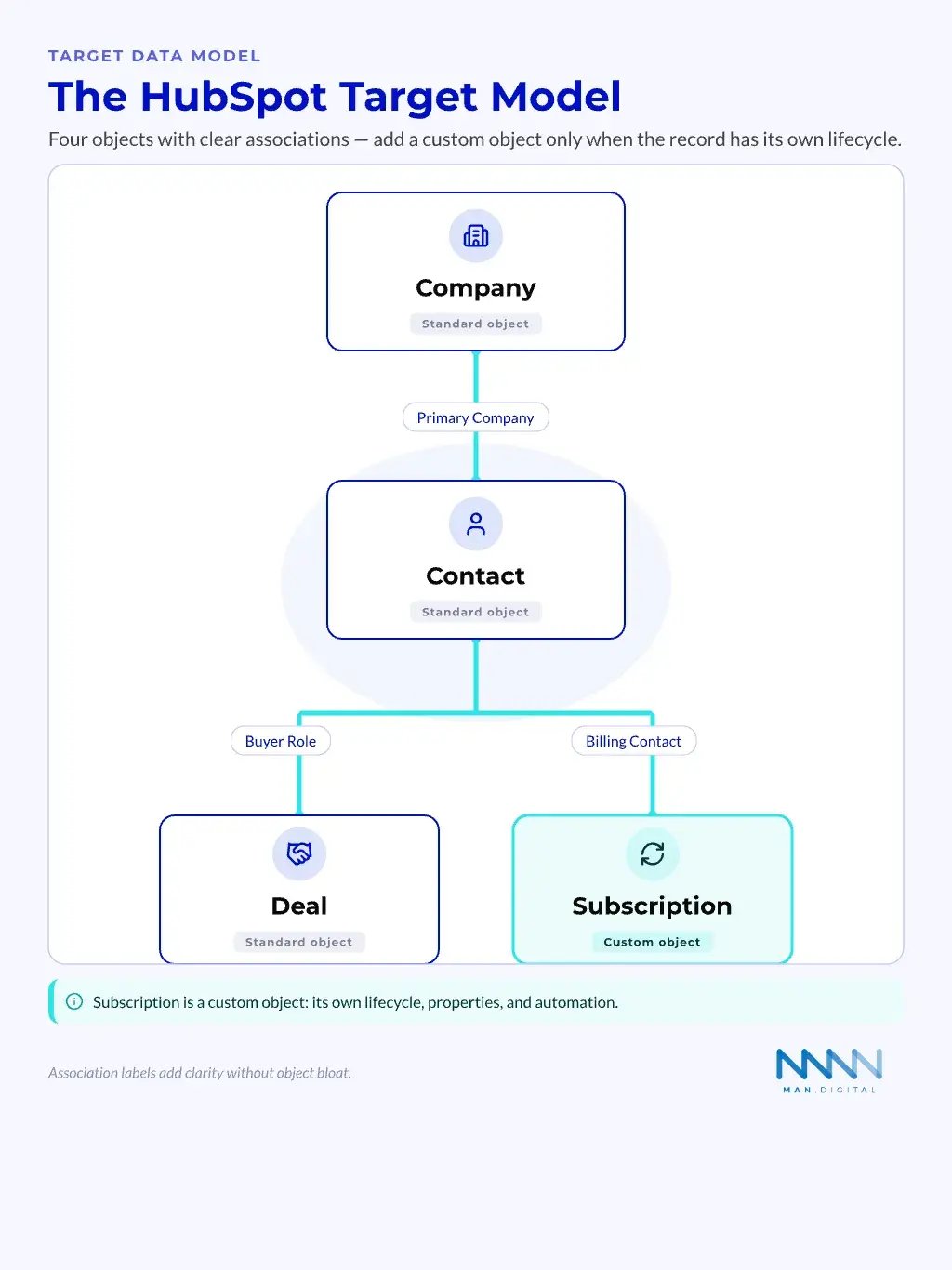
HubSpot custom objects let teams model business records beyond standard CRM objects. HubSpot developer docs describe custom objects as CRM objects with their own properties, associations, and endpoints. That makes them useful when a process has its own lifecycle.
Custom objects should not become a dumping ground. They should serve clear business needs. Examples include subscriptions, locations, assets, onboarding projects, or partner accounts.
Good custom object candidates have:
- A clear name users understand
- A lifecycle or status
- A set of owned properties
- Relationships to companies, contacts, or deals
- Reporting needs that standard objects cannot handle
- Workflow needs tied to the object itself
Third-Party Tools: Middleware, Reverse Etl and Warehouse-First Options
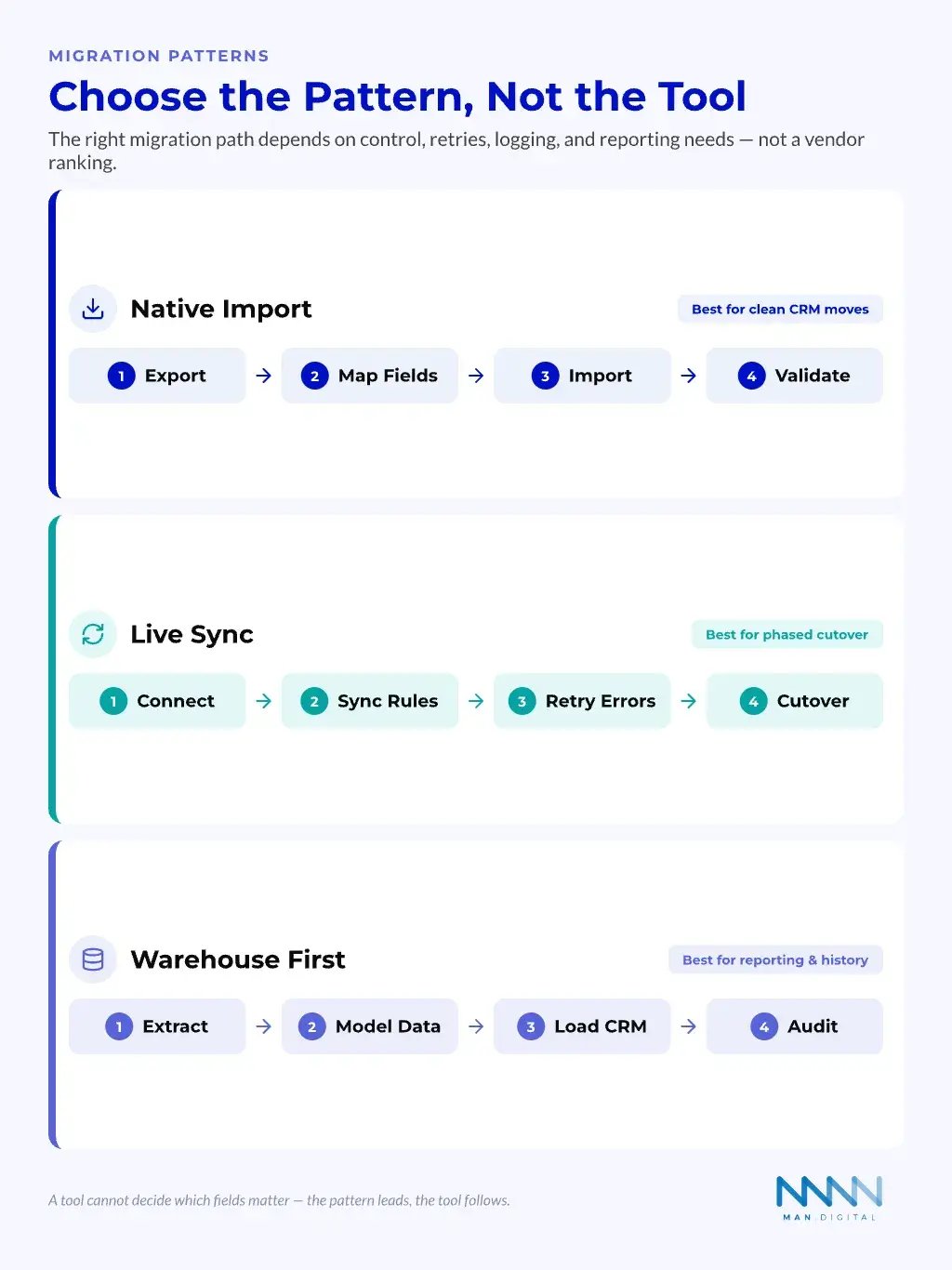
Third-party tools can help when migration patterns go beyond native imports or simple sync. The right choice depends on the pattern. It should not come from a ranked list or a vendor preference.
Choose Tools by Migration Pattern
Tool choice starts with the shape of the project. Some migrations need one-time imports. Others need a live transition period.
Some need a warehouse-first approach because reporting depends on data from many systems.
The three main patterns are:
- Native migration
- Best for clean CRM moves
- Uses imports and native HubSpot tools
- Needs strong mapping and testing
- Middleware or live sync
- Best for phased cutover
- Keeps systems aligned during transition
- Needs clear conflict rules
- Warehouse-first migration
- Best for complex reporting and data history
- Uses the warehouse as the control layer
- Needs data engineering support
The official Salesforce guidance on export options explains that admins can export data through built-in routes. That source layer still needs cleaning before any target system can trust it, as shown in Salesforce export guidance.
Avoid Tool-First Decisions
A tool cannot decide which fields matter. It cannot confirm whether an opportunity stage means the same thing as a HubSpot deal stage. It also cannot tell finance whether a report is commercially equivalent.
Tools such as Stacksync, Tray.ai, Fivetran, Census, and Airbyte can support different sync or pipeline needs. Treat them as options within an architecture decision, not as universal recommendations.
Evaluate third-party tools against these points:
- Supported source and target objects
- Field mapping control
- Association handling
- Error handling and retries
- Sync direction
- Conflict rules
- Logging and audit trails
- Warehouse support
- Team skill fit
- Total operating burden
The 8-14 Week Migration Playbook
A mid-market migration usually needs a structured playbook. The exact timeline depends on data volume, integrations, logic complexity, and stakeholder speed. The sequence matters more than the calendar.
Weeks 1-4: Design Before Movement
The first phase should slow the team down enough to make good choices. This is where RevOps, IT, finance, sales, marketing, and CS agree on the target model.
The design phase should include:
- Discovery
- Current objects
- Active integrations
- Core reports
- Pain points
- Schema triage
- Keep, merge, archive, rebuild, retire
- Field owners
- Object decisions
- Association strategy
- Logic review
- Formulas
- Rollups
- Validation rules
- Automation
- Reporting design
- CFO metrics
- Pipeline views
- Funnel definitions
- Forecast needs
This phase produces the migration blueprint. Without it, the project becomes a technical exercise with weak business control.
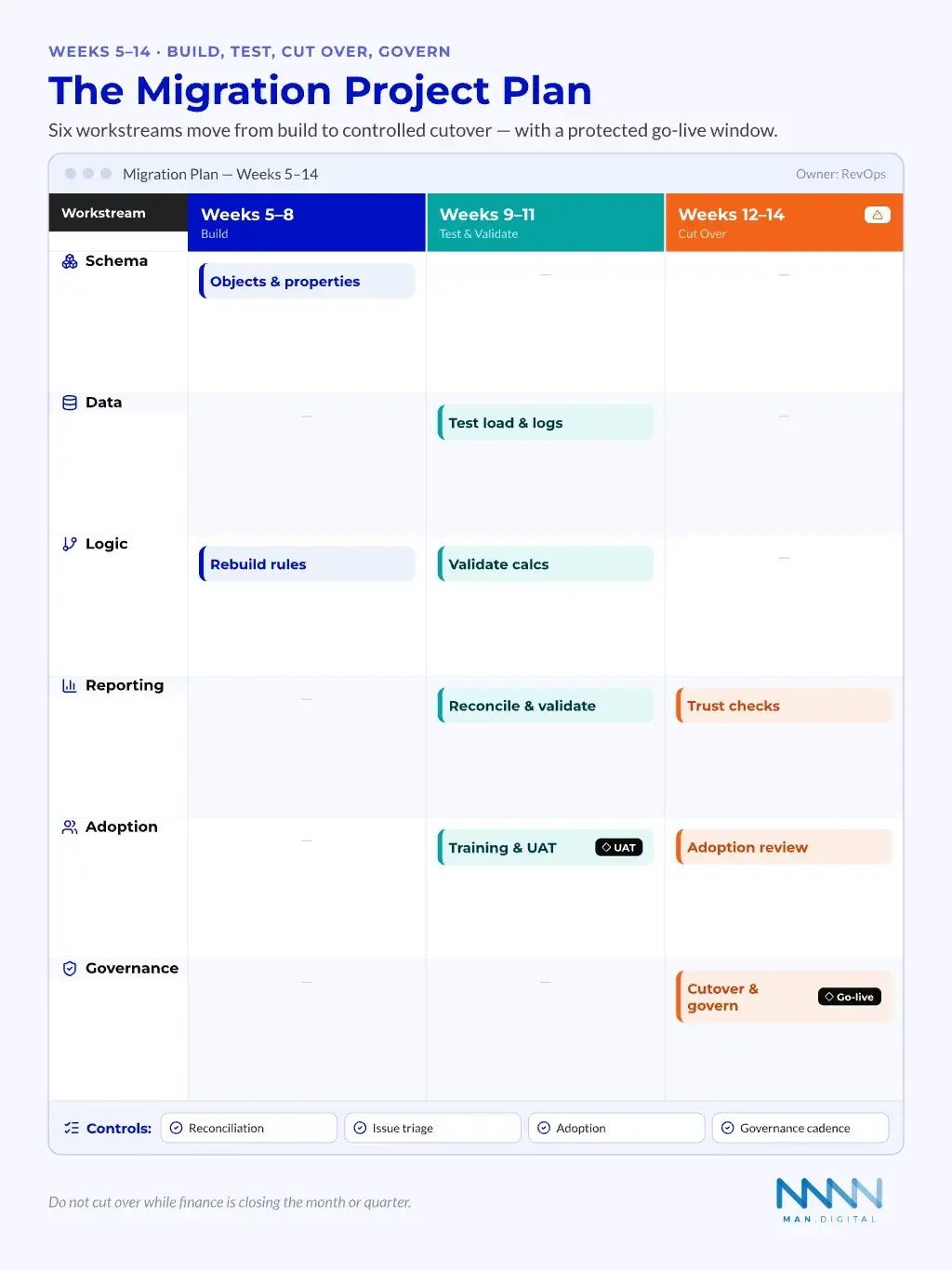
Weeks 5-14: Build, Test, Cut Over and Govern
The second phase moves from design into controlled execution. It should include test loads, validation, user acceptance, cutover planning, and post-launch governance. Cutting over without these steps creates avoidable risk.
A practical sequence looks like this:
- Weeks 5-6: HubSpot build
- Objects
- Properties
- Pipelines
- Association labels
- Weeks 7-8: Test migration
- Sample records
- Error logs
- Association checks
- Report checks
- Weeks 9-10: Business validation
- Sales review
- Finance reconciliation
- CS handoff tests
- Marketing lifecycle checks
- Weeks 11-12: Cutover planning
- Freeze window
- Rollback approach
- User training
- Launch support
- Weeks 13-14: Stabilisation
- Dashboard checks
- Issue backlog
- Adoption review
- Governance cadence
💡 Tip
Do not launch the migration when finance is closing the month or quarter. The cutover window should protect reporting trust.
Why Working with a HubSpot RevOps Agency Changes the Outcome?
An agency should not just move records. The value sits in architecture, process design, testing, reconciliation, and adoption. That is why the best partner feels more like a RevOps operator than a technical exporter.
Agency Value is in the Hard Middle
Most migration risk lives between systems. It appears in field meaning, process gaps, report logic, and user behaviour. A strong HubSpot RevOps agency can make those choices visible.
This matters most when internal teams are already running the business. They can understand the system deeply, but lack the time to redesign it while managing current demands.
A useful agency should support:
- Schema triage and data model design
- Salesforce logic review
- HubSpot object and association planning
- Workflow redesign
- Reporting parity checks
- Finance reconciliation
- User training and adoption support
- Post-launch governance
For partner selection, the same principles apply as in partner fit. Choose for process depth, not just platform badges.
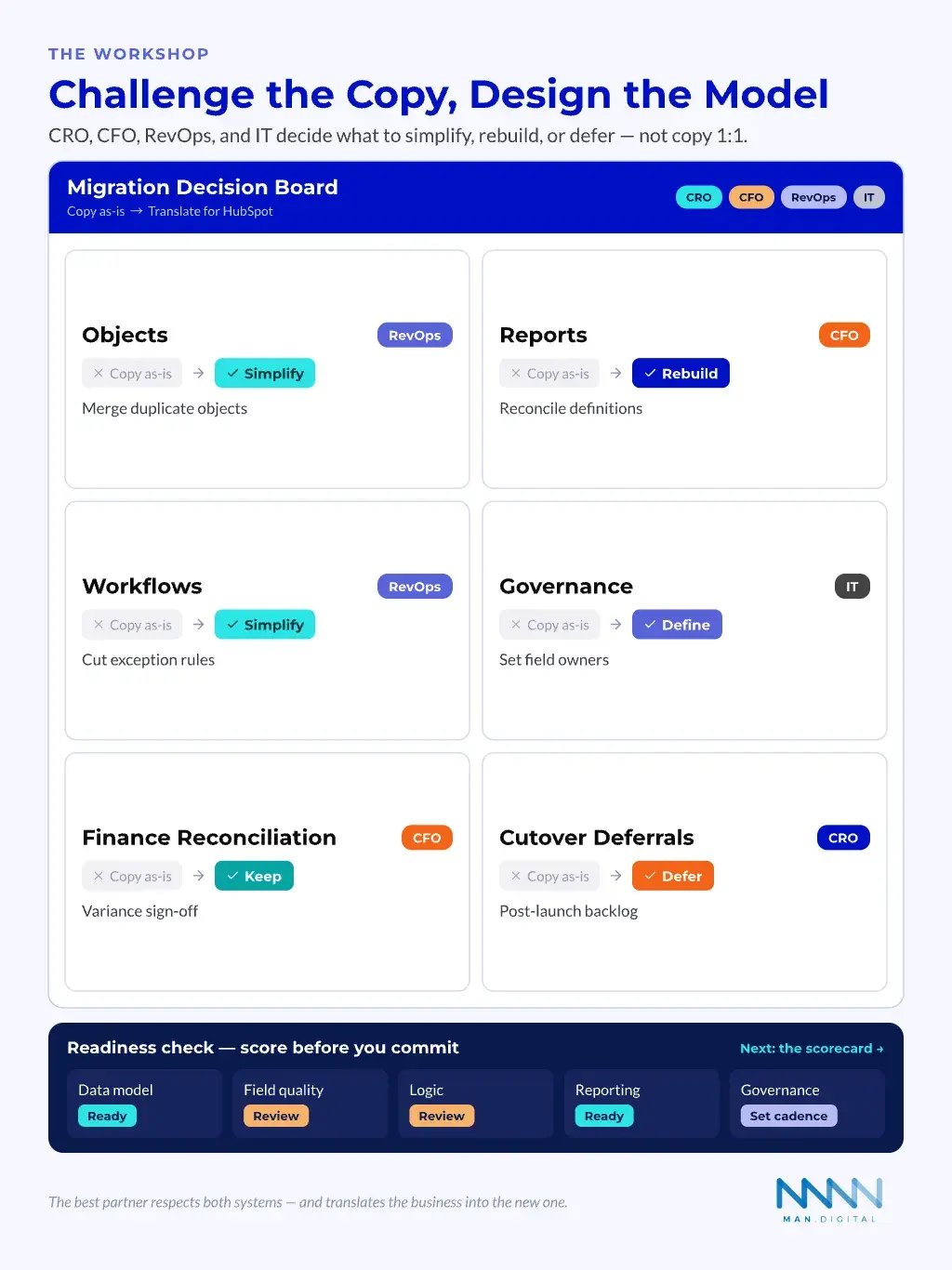
The Agency Should Challenge Bad Copying
A partner adds value when they challenge the urge to move everything. This can feel slower at first. It usually saves time after launch.
Strong challenge looks like this:
- “Why does this field still exist?”
- “Which team owns this value?”
- “Does this report drive a decision?”
- “Should this be a label, property, or object?”
- “Can this workflow be simpler in HubSpot?”
- “What does finance need to reconcile?”
- “What can wait until after cutover?”
The best partner respects Salesforce and HubSpot. They do not bash the old system. They translate the business into the new one.
Migration Readiness Scorecard
A readiness scorecard helps leaders decide whether to start, pause, or simplify first. It gives CROs, CFOs, RevOps, and IT a shared view of risk. It also prevents the project from becoming a deadline-led CRM move.
Score the System Before You Commit
Readiness should measure business clarity, not just technical access. A team with good admin access can still be unready. A team with messy data can still move well if owners agree on the target model.
| Readiness Area | Green Signal | Red Signal | Fix Before Migration |
|---|---|---|---|
| Data model | Objects have owners | Custom objects lack purpose | Run schema triage |
| Field quality | Key fields are used | Many fields have no owner | Keep, merge, retire |
| Logic | Rules are documented | Formulas are unclear | Build logic inventory |
| Reporting | Finance metrics defined | Reports conflict | Reconcile definitions |
| Integrations | Systems are mapped | Sync rules unknown | Audit data flows |
| Adoption | Users support change | Teams expect copy and paste | Run role-based training |
| Governance | Change process exists | No post-launch owner | Set RevOps cadence |
The scorecard should produce a decision: start now, simplify first, or delay until core risks are solved.
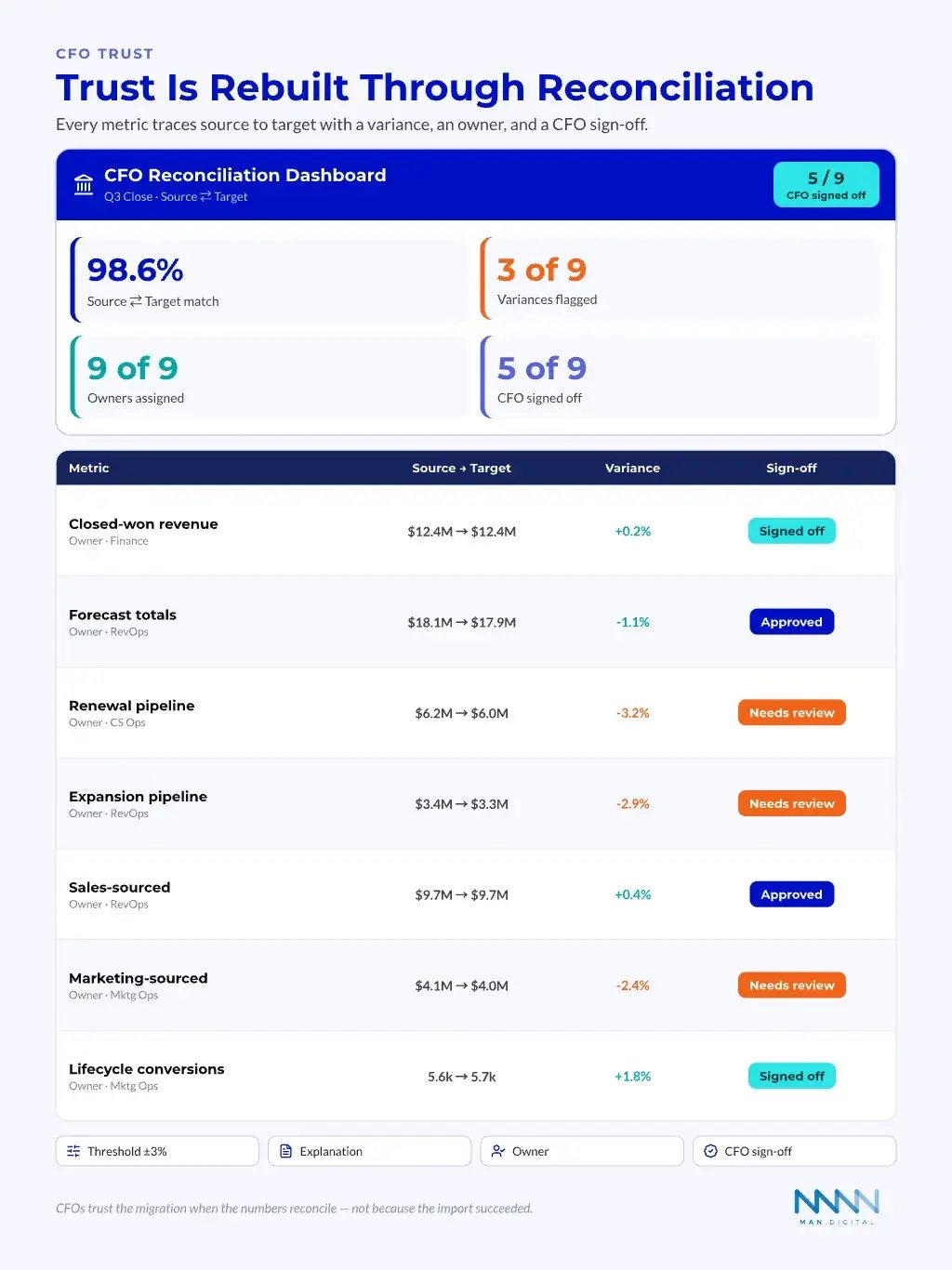
CFO Trust Needs Reconciliation
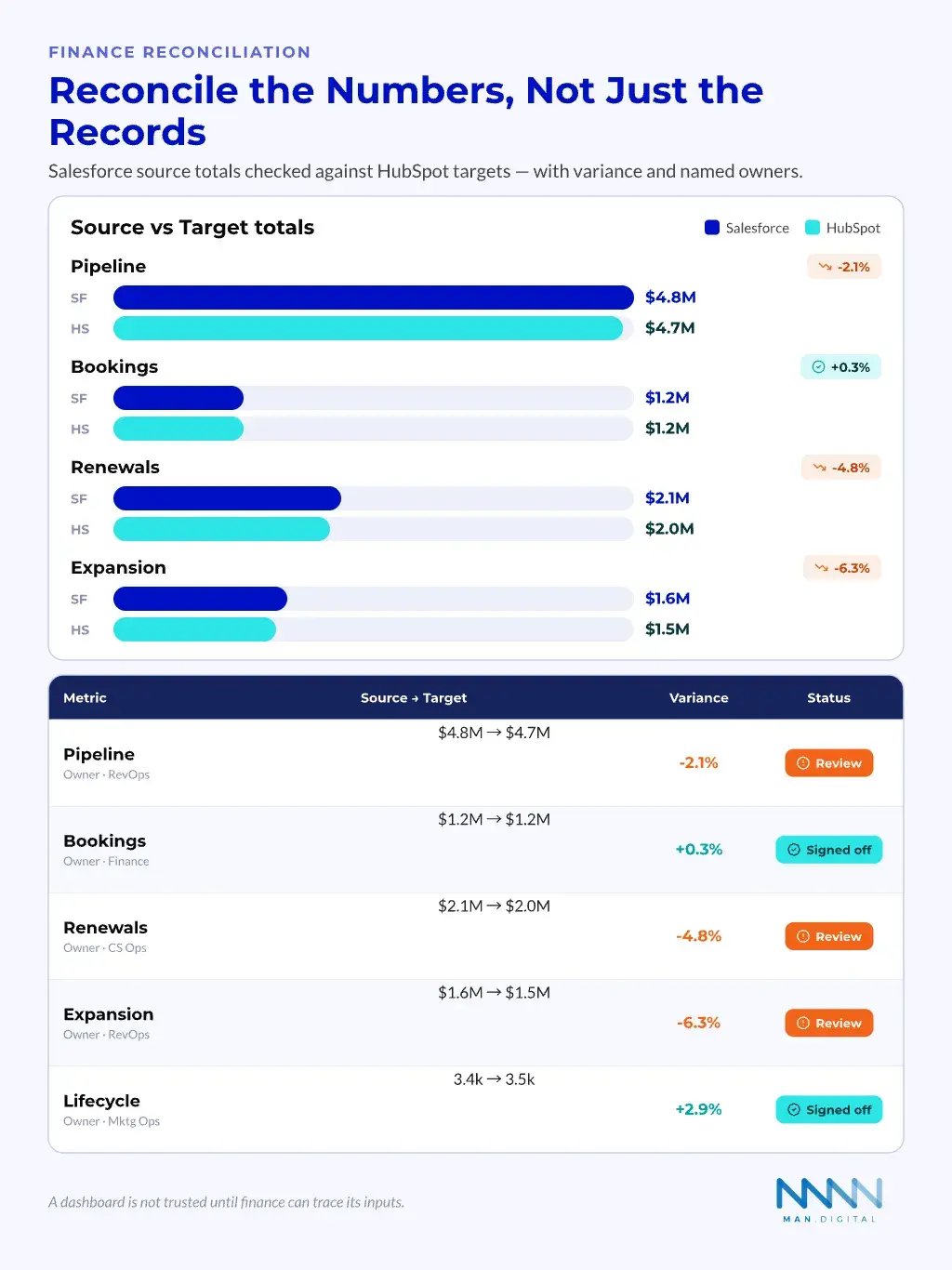
CFOs do not trust a migration because the import succeeded. They trust it when key numbers reconcile. That includes pipeline, bookings, renewals, churn risk, and revenue attribution.
A migration should include a finance validation pack. This pack compares Salesforce source reports, HubSpot target reports, and agreed variances. It also names the owner for each difference.
Include these checks in the pack:
- Total open pipeline by period
- Closed-won revenue by month
- Forecast category totals
- Renewal pipeline
- Expansion pipeline
- Sales-sourced and marketing-sourced pipeline
- Lifecycle conversion counts
- Owner and territory views
This is where commercial trust gets rebuilt.
Conclusion
A Salesforce to HubSpot migration can transform CRM work from inherited complexity into a clearer revenue operating system. The teams that get the best results treat it as architecture translation, reporting reconciliation, and adoption work, not a simple data transfer.
Done well, the move can improve governance, rebuild CFO trust, strengthen team adoption, and create a HubSpot model that supports growth. The value comes from simplifying what should be simpler, rebuilding what must be rebuilt, and helping teams trust the system again.
Key Takeaways
- Migration is a RevOps data-model translation project, not a copy of Salesforce.
- Use the move to simplify fields, workflows, reports, and ownership rules.
- Native HubSpot tools help, but architecture and testing decide the outcome.
- Third-party tools should match the migration pattern, not lead the strategy.
- CFO trust depends on reconciled metrics, clear variances, and named owners.
Frequently Asked Questions
Is a Salesforce Lead the same as a HubSpot Lead?
No. A Salesforce Lead is a standalone pre-conversion prospect that converts into Account, Contact, and Opportunity. HubSpot's Lead object is different: it must be attached to an existing Contact and acts as a sales-workspace qualification layer. Most migrations map Salesforce Leads to HubSpot Contacts with lifecycle stages, not to HubSpot's Lead object.
What happens to Salesforce Person Accounts in HubSpot?
HubSpot has no Person Account equivalent. Salesforce Person Accounts store an individual and an organisation in a single Account record, while HubSpot always keeps Contacts and Companies separate. If your org uses Person Accounts, plan to split each record into a linked Contact and Company before cutover, or you will lose data fidelity.
Will I lose activity history when migrating from Salesforce to HubSpot?
You can, if you map only the primary link. Salesforce Tasks and Events use polymorphic WhoId and WhatId fields, and Shared Activities lets one activity link to several contacts. HubSpot models this through flexible associations, so migrate every participant and related-to link, not just the first contact.
Does HubSpot keep Salesforce campaign membership?
Not directly. Salesforce uses an explicit CampaignMember junction that records each Contact or Lead and their member status. HubSpot Campaigns are asset-centric and track participation through marketing events instead. Campaign-response history is valuable marketing data, so decide how to preserve member status and response before you migrate.
How do Salesforce products and pricebooks map to HubSpot?
Salesforce separates pricing across Product2, PricebookEntry, and OpportunityLineItem. HubSpot uses a simpler Product library plus Line Items, where each line item belongs to one record such as a Deal. Map HubSpot Products to Product2 and Line Items to OpportunityLineItem, and add a pricing-normalisation step for pricebooks.
How much field history does HubSpot retain after migration?
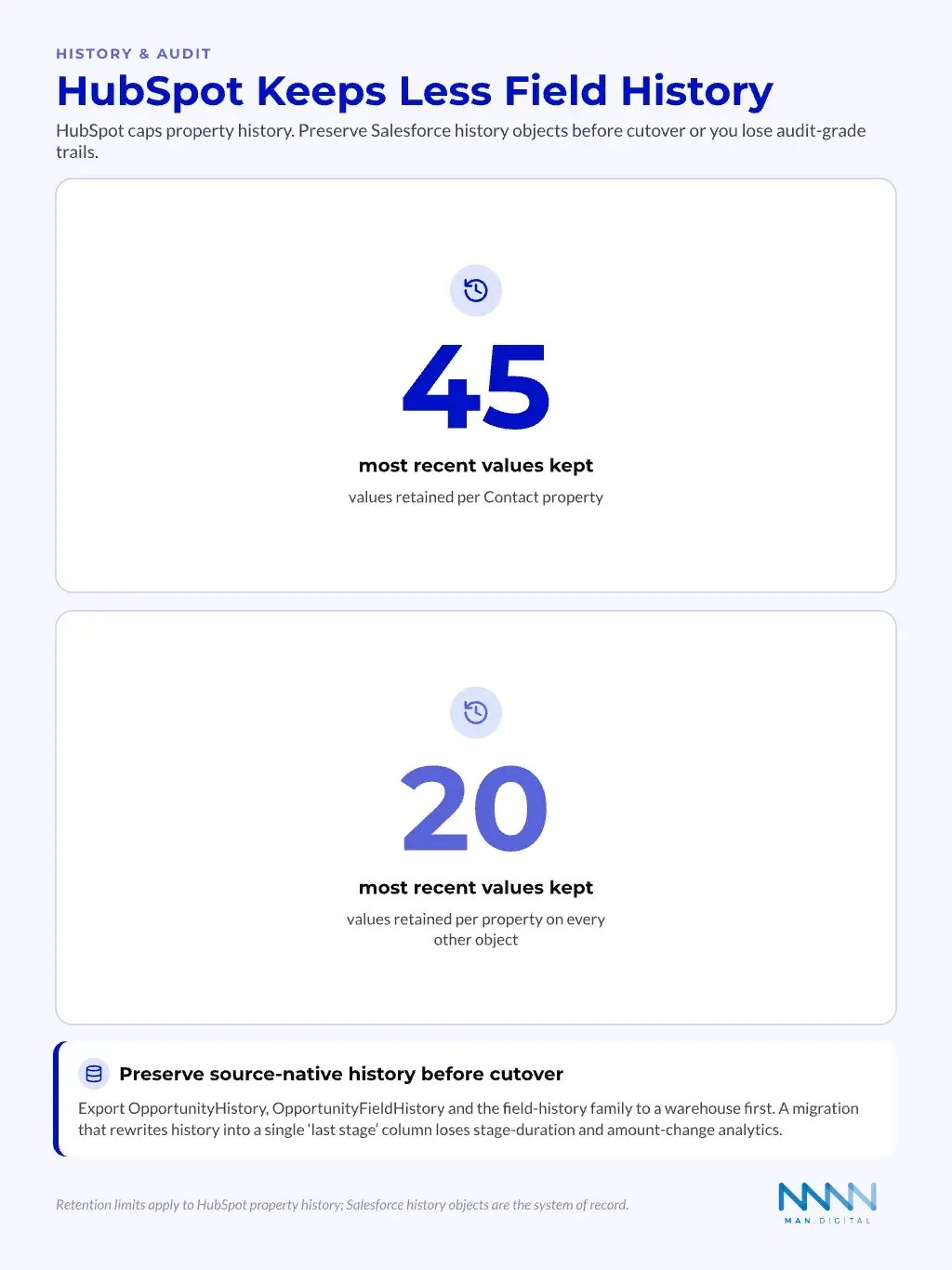
HubSpot keeps a limited property history, roughly the last 45 values for contact properties and 20 for other objects, so it will not mirror full Salesforce field-history tracking. For audit-grade stage and amount history, preserve Salesforce history objects such as OpportunityHistory in a warehouse before cutover.
How long does a Salesforce to HubSpot migration take?
A mid-market migration typically runs 8 to 14 weeks. The first four weeks cover design: discovery, schema triage, logic review, and reporting design before any data moves. Weeks five to fourteen cover build, test migration, business validation, cutover, and post-launch governance. Data volume and stakeholder speed drive the final timeline.