
August 2, 2026
10 min read
Teams with unified revenue ops gain ground every quarter.
Most B2B companies still work in silos. Marketing creates leads that sales ignores.
Sales closes deals that customer success struggles to retain.
This guide covers the basic RevOps HubSpot setup—not the full framework—that gets your teams working together.
If you want conceptual depth first, start with the four core pillars.
Why RevOps in HubSpot Matters Now (Not Later)
RevOps shifted from "nice-to-have" to must-have. The numbers tell the story.
48% of companies now have a RevOps function, up 15% from last year.
The VP of RevOps title grew 300% in just 18 months (per Clari).
Three forces drive this urgency:
1. Buyer journeys are non-linear
- Prospects research across channels before talking to sales
- Marketing, sales, and service all touch the same customer
- Broken data means missed signals and lost deals
2. AI and automation require clean data
- Garbage in, garbage out applies to every workflow
- Breeze Agents and automation amplify bad habits at scale
- Foundation work now enables AI tools later
3. Budget pressures demand results
- Do more with existing headcount
- Cut duplicate tools and wasted effort
- Prove ROI on every tech investment
HubSpot enables RevOps by keeping your data in one system. No more syncing between scattered tools.
No more "the CRM says one thing, but marketing automation says another." Starting late means fixing bad habits at scale. Bad habits compound as companies grow.
What RevOps Foundations Actually Include
Revenue operations foundations consist of three layers that work together in HubSpot:
Data Model Layer: How contacts, companies, and deals relate to each other. Get associations right, and reporting becomes easy. Get them wrong, and you won't trust your numbers.
Process Layer: How leads move through lifecycle stages, who owns each handoff, and what happens when someone stalls.
Measurement Layer: How you track conversion rates, speed, and volume across the buyer journey. The Bowtie Data Model tracks metrics from first touch through growth.
Here's what foundations are NOT:
- The full RevOps framework (see RevOps Framework)
- The complete growth journey (see RevOps Maturity Model)
- Full setup timeline (see HubSpot Onboarding Checklist)
Foundations are what you need to start tracking and improving. Think of them as the floor before the building.
Key HubSpot Setup for Week 1
The first week establishes good data habits. Every day you wait, bad data grows.
Here's the reality: 90% of companies know CRM data is the core of their work.
Yet 76% say less than half of their CRM data is correct (Validity 2025).
Lifecycle Stages vs. Lead Pipelines
HubSpot offers two approaches for pre-deal tracking. The debate matters for B2B SaaS teams with $30K+ deal sizes.
The classic approach uses lifecycle stages we recommend: : Subscriber → Lead → MQL → SQL → Deal → Customer → Impact → LTV
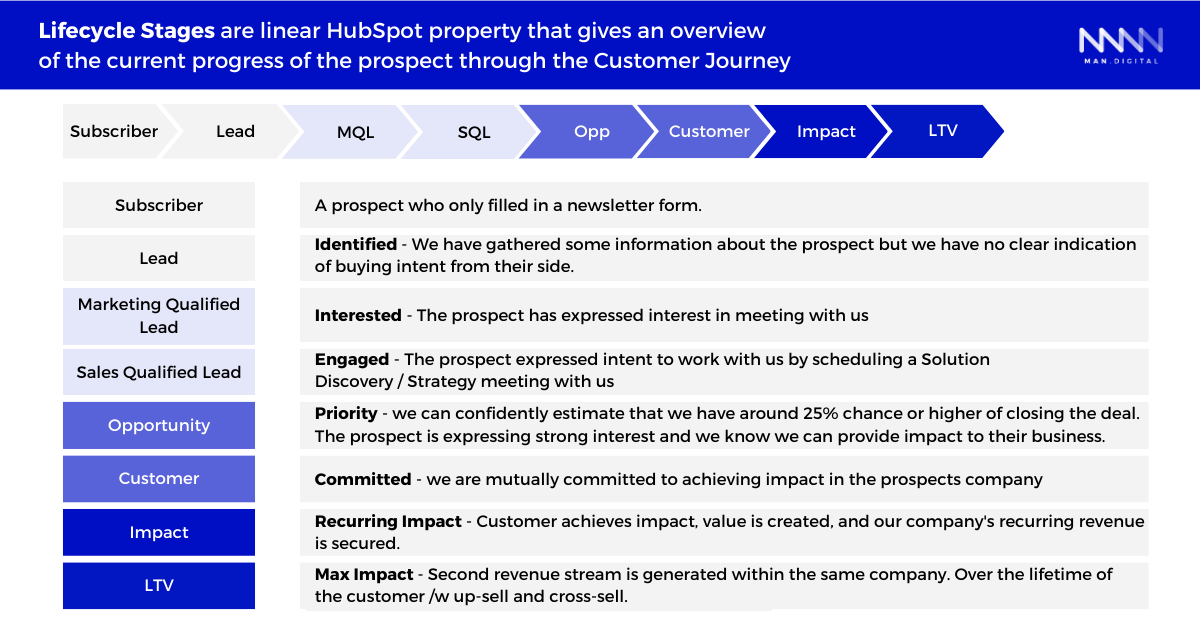
Marketing tracks MQL, and sales pick up at SQL.
HubSpot's newer Lead object, with the Prospecting Workspace, offers another path.
Sales teams track pre-sales work through a lead pipeline. SQLs move through lead stages before becoming deals.
For most teams starting out, use lifecycle stages for marketing-to-sales handoff, then consider lead pipelines as your sales process matures. Don't over-engineer early—pick one approach and commit.
HubSpot provides default lifecycle stages, but you must customize them to match YOUR buyer journey.
For each stage, define three things:
- Entry criteria — What triggers movement into this stage?
- Owner — Who is responsible at this stage?
- Automation — What workflow moves contacts forward?
Navigate to Settings → Properties → Contact Properties → Lifecycle Stage to configure these.
Lead Statuses: Used within lifecycle stages. They show who's ready for sales.
Example statuses for lead objects stage:
- Raw (MQL as lifecycle)
- Assigned Contact
- Working
- Qualified (SQL)
- Pipeline
- Won
- Nurture
- Unqualified
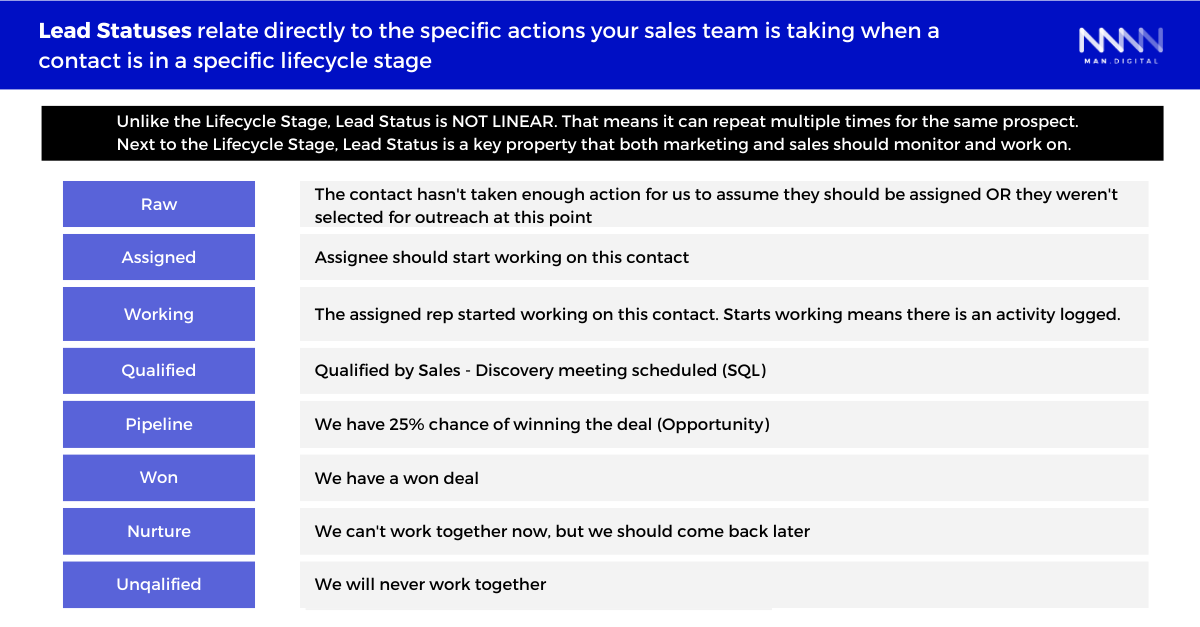 Each status needs a clear meaning. "Attempting Contact" means 3 calls and 2 emails over 5 days.
Setting Up Your Sales Pipeline
Pipelines are where DEALS live—not contacts. They show revenue chances and forecast what's coming.
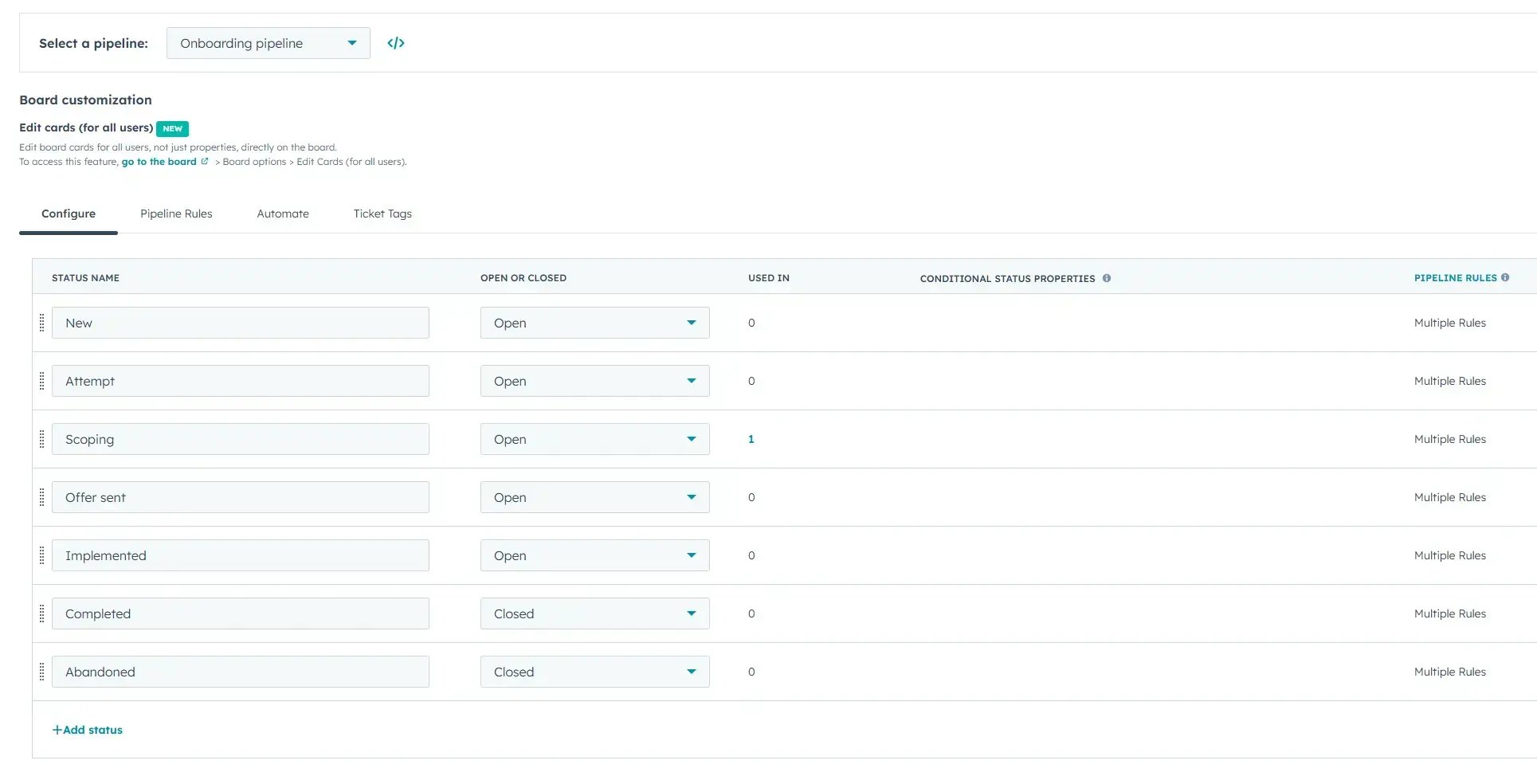
Three pipeline types:
- New Business — Net new customer winning
- Expansion — Upsells and cross-sells to existing customers
- Renewals — Retention revenue (if applicable)
For each stage, define:
- Stage name
- Win chance (as a percent)
- Required fields before moving forward
- Forecast bucket
Baseline stage example:
| Stage | Win Chance | Required Before Moving |
|---|---|---|
| Qualification | 10% | Budget confirmed |
| Discovery | 20% | Pain points documented |
| Proposal | 40% | Buyers found |
| Negotiation | 60% | Proposal sent |
| Closed Won | 100% | Contract signed |
| Closed Lost | 0% | Loss reason captured |
The "required fields" setting stops deals from moving until you capture needed data. This removes most pipeline clean-up issues.
Why Stage Probability Alone Isn't Enough
CROs need accurate forecasts. Stage win chance gives you a baseline, but it's not the full story.
HubSpot's Forecast Category property adds a second layer. Reps update this after each call based on deal reality—not just which stage the deal sits in. Two deals in "Proposal" stage might have very different outlooks.
Set up both: deal stage win chance AND forecast category. Require reps to update forecast category weekly. This combo gives CROs the view they need without making things complex.
Navigate to Sales → Deals → Pipeline Settings to configure your pipeline.
Multi-Touch Attribution and Campaign Architecture
RevOps falls apart without clear attribution. You need to know which channels drive leads that become revenue—not just which channel touched a lead last.
Why Attribution Matters for RevOps
40% of marketers say proving ROI remains their top challenge. Without multi-touch attribution, you're guessing which efforts work.
Sales blames marketing for bad leads. Marketing points to conversion numbers. Finance doubts both.
HubSpot's attribution reporting (Marketing Hub Enterprise) connects campaigns to closed deals. You can see exactly how every ad click, email, and page view added to a won deal.
Choosing Your Attribution Model
HubSpot offers several models. Each answers a different question.
For B2B with long sales cycles, W-Shaped works best. It credits the first awareness touch, the moment someone became a lead, AND when the deal was created.
Campaign Architecture That Scales
Most teams treat campaigns as "email buckets." This breaks attribution.
Build campaigns as anchor points instead. Each major initiative (product launch, event, content campaign) gets one parent campaign. All assets tie back to it: emails, ads, landing pages, workflows.
UTM Strategy for Clean Attribution
Messy UTMs create messy reports. Set up rules before you launch:
| Parameter | Purpose | Example |
|---|---|---|
| utm_source | Platform | linkedin, google, newsletter |
| utm_medium | Traffic type | cpc, organic, email |
| utm_campaign | Initiative name | q1-product-launch |
| utm_content | Asset variant | banner-a vs banner-b |
Use lowercase only. No spaces—use hyphens or underscores.
Keep names short and clear. Create a UTM template your whole team uses.
What HubSpot Tracks Automatically
- Page views and form submissions
- Email clicks (opens excluded due to privacy changes)
- CTA clicks and ad clicks with tracking URLs
- Chat and meeting bookings
- Workflow-triggered events
What Needs Configuration
- UTMs for paid ads
- Webinar attendance
- Offline events
- Custom product usage events
Navigate to Marketing → Analytics → Attribution Reports to set up your first multi-touch report.
Building Your First 30-Day RevOps Roadmap
Knowing what to configure is one thing. Sequencing it correctly is another.
Workers spend 13 hours per week hunting for basic CRM info (per Salesforce).
Proper setup removes most of that waste.
Days 1-7: Data Foundation
- Configure lifecycle stages with clear definitions
- Map each stage to buyer journey
- Assign ownership per stage
- Set up lead statuses within each stage
- Define core contact and company properties
- Set up link rules
Days 8-14: Pipeline Foundation
- Create deal pipelines for each revenue stream
- Set win chances and required fields
- Set up forecast buckets
- Build pipeline views by rep and team
Days 15-21: Process Foundation
- Write down marketing-to-sales handoff rules
- Set up basic lead routing workflows
- Set SLAs for lead response time
- Create automated alerts
Days 22-30: Measurement Foundation
- Build conversion dashboards
- Track stage-to-stage conversion rates
- Add time-in-stage metrics
- Set baseline metrics for each stage
- Train teams on where to find their numbers
- Set up weekly review rhythm
This 30-day plan prepares you for the full HubSpot Onboarding Checklist and RevOps Framework.
The Data Model That Makes RevOps Work
The data model drives all of it—reports, workflows, and AI.
Avoid the Salesforce Mindset Trap
Teams migrating from Salesforce often want to recreate complex custom object structures. Resist this urge. HubSpot's native objects handle most B2B use cases out of the box.
Custom objects make sense when you need separate lifecycle tracking or links that properties can't handle. For foundations, stick to native objects and properties. Add layers only when you hit real limits.
Here are HubSpot's core objects that make RevOps possible:
- Contacts — Individual people
- Companies — Firms or groups
- Deals — Sales chances
RevOps needs these three objects to link correctly. Deals and contacts must link to companies.
Labels clarify how they relate.
The Bowtie Data Model: This model tracks three metric types across the entire buyer journey:
- Conversion rates — What percent moves between stages?
- Time metrics — How long does each stage take?
- Volume metrics — How many contacts or deals at each stage?
The data model powers the reports that drive RevOps decisions. Without clean links, you're guessing at what's happening.
Quick Wins: Proving RevOps Value in Week 2
Quick wins build buy-in by showing value fast. They earn trust for deeper work.
Here are three wins you can ship in Week 2:
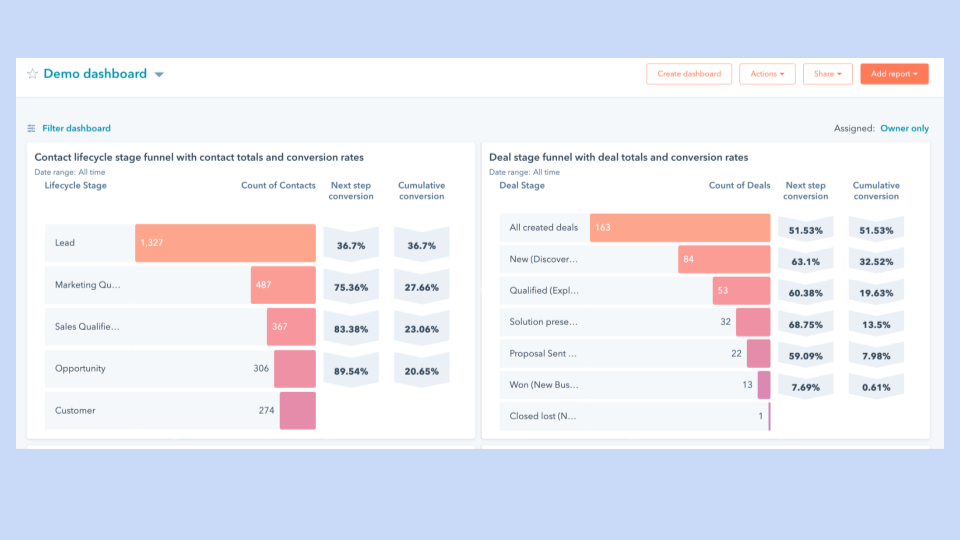
Quick Win 1: Lead-to-Customer Conversion Dashboard — Show exactly where leads drop off by creating a simple funnel view.
- Create a funnel report by lifecycle stage
- Add a week-over-week compare view
- Share with leaders right away
Quick Win 2: Basic Lead Routing Workflow — Even simple round-robin saves hours of manual work.
- Route by region, company size, or product interest
- Start with simple round-robin
- Add depth as patterns emerge
- Set up alerts when leads arrive
- Track assignment-to-contact time
Quick Win 3: Sales-to-Marketing Feedback Loop — Capture insights when deals are lost to improve future campaigns.
- Create required "Closed Lost Reason" field
- Route lost deal alerts to marketing
- Build monthly closed-lost review report
Quick wins aren't about perfect—they prove value fast. The CREDIT method applies here: cheer early wins to drive buy-in.
Aligning Your Teams Before You Automate
This step gets skipped too often: team buy-in BEFORE automation.
Teams that use RevOps grow revenue 3x faster than those without (per Forrester). That growth comes from alignment, not just tech.
Three alignment requirements:
1. Shared Terms: What is an MQL? What does "sales ready" mean? Get it on paper with a doc that answers:
- When does marketing hand off to sales?
- What qualifies a lead for outreach?
- When should a deal be marked Closed Lost vs Disqualified?
2. Handoff Agreements: Create clear SLAs on lead response time and what info passes between teams.
- MQL-to-SQL handoff: Sales responds within 4 hours
- SQL-to-Deal handoff: Required fields completed
- Closed-Won handoff: Customer success notified within 24 hours
3. Shared KPIs: Pick at least one metric all teams own together. Best choice: Lead-to-Customer Rate.
Marketing creates leads, sales closes them, and both answer for it.
Workflows speed up good and bad habits. If your handoffs are broken, workflows break them faster. Fix processes, then automate.
What Comes After Foundations: Your RevOps Path Forward
Foundations are just the start. Here's what comes next:
Foundations (this article) → Framework (RevOps Framework) → Maturity Model (RevOps Maturity Model).
The gains add up: CRM returns $8.71 for every $1 spent (per Nucleus Research).
Decision tree for your next step:
- Just starting HubSpot? → Follow this foundations guide first
- Have HubSpot but chaotic data? → Revisit foundations before moving forward
- Foundations are solid? → Move to framework building
- Framework exists? → Assess your growth level
AI Readiness: Strong foundations let you deploy Breeze Agents later. The metrics you track now become AI training data tomorrow.
Take the 12-question assessment in Revenue Operations Foundations to see where you stand.
Conclusion
Your path to RevOps HubSpot success starts with these four priorities:
Start with clean data by setting up lifecycle stages with clear rules. Define lead statuses and owners. Link your objects correctly.
Build pipeline view by creating pipelines for each revenue stream. Require fields before stage moves. Link pipeline data to forecast buckets.
Align before you automate by writing shared terms. Set handoff SLAs. Create at least one shared KPI.
Prove value fast by shipping a conversion dashboard in Week 2. Set up basic lead routing. Build the sales-to-marketing feedback loop.
RevOps HubSpot foundations take 30 days, not 6 months. The winners started while others planned.
Start now. Let the data show you what's next.