

October 18, 2026
8 min read
The goal is to protect live deals, standardize handoffs, and give finance, sales, and RevOps one shared record of commercial truth.
Most disruption starts when teams move quoting before they map ownership.
HubSpot lists quotes, invoices, payment links, subscriptions, and reporting as connected Commerce Hub capabilities, which shows how broad the revenue layer can become HubSpot Commerce Hub.
HubSpot also describes Revenue Hub as a way to manage quote-to-cash activity in one connected revenue process HubSpot revenue management, while its product announcement frames quote-to-cash as a connected layer across the customer revenue journey HubSpot Revenue Hub.
That scope matters because quote-to-cash touches more than sales.
Why Quote-To-Cash Breaks During CRM Change
The safest path starts with process clarity, then data structure, then phased rollout. Sales needs fast quotes, finance needs clean billing data, and leadership needs trusted revenue visibility. HubSpot can support that flow when workflow design shapes the setup instead of trailing behind it.
Quote-to-cash often looks simple from the outside. A buyer requests a price, sales creates a quote, legal approves terms, finance sends an invoice, and revenue gets tracked. In practice, each step depends on data, approvals, ownership, and timing.
Teams investing in revenue operations see the same pattern across CRM change work. The risk is rarely one missing button. The risk is a chain of handoffs that nobody fully owns.
Revenue Risk Comes From Handoffs
The fragile part is not the quote document.
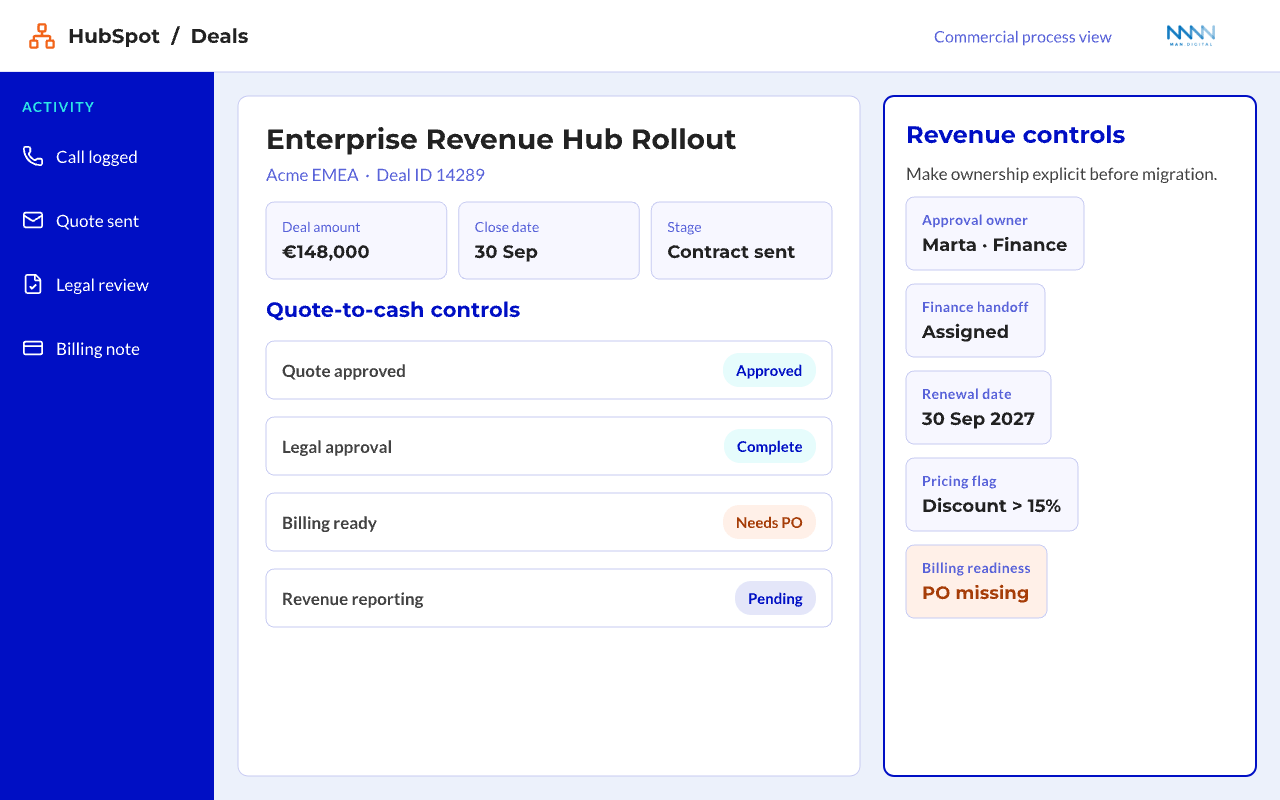
The fragile part is the handoff between teams. A quote can look correct while the deal record, approval status, billing owner, and renewal date tell different stories.
Common handoff gaps include:
- Sales changes pricing but finance misses the update
- Legal approves terms outside the CRM
- Billing starts from a spreadsheet copy
- Customer Success receives no contract context
- Leadership sees revenue only after the deal closes
These gaps create delay at the exact point where buyer intent is highest. The buyer has agreed to terms, but your internal process slows the signature.
💡 Insight
Quote-to-cash disruption usually comes from unclear ownership, not from a missing feature.
Tool Migration Can Hide Process Debt
Moving the workflow into HubSpot can expose years of silent process debt. Old quote templates, manual approvals, side spreadsheets, and custom fields can exist because teams worked around unclear rules.
Do not treat every workaround as a requirement.
Separate process needs from legacy habits:
-
Keep: Approval rules that protect margin
- Discount thresholds
- Payment term controls
- Legal review triggers
-
Question: Manual steps with no clear owner
- Spreadsheet quote trackers
- Duplicate contract status fields
- Email-only approval chains
-
Review: Data that no team uses
- Old quote notes
- Dead product fields
- Expired pricing flags
The first decision is not whether HubSpot can hold the process. The first decision is whether the process is clear enough to move.
For a deeper look, see our guide on Sales Enablement.
MAP the Quote-To-Cash Workflow Before You Move It
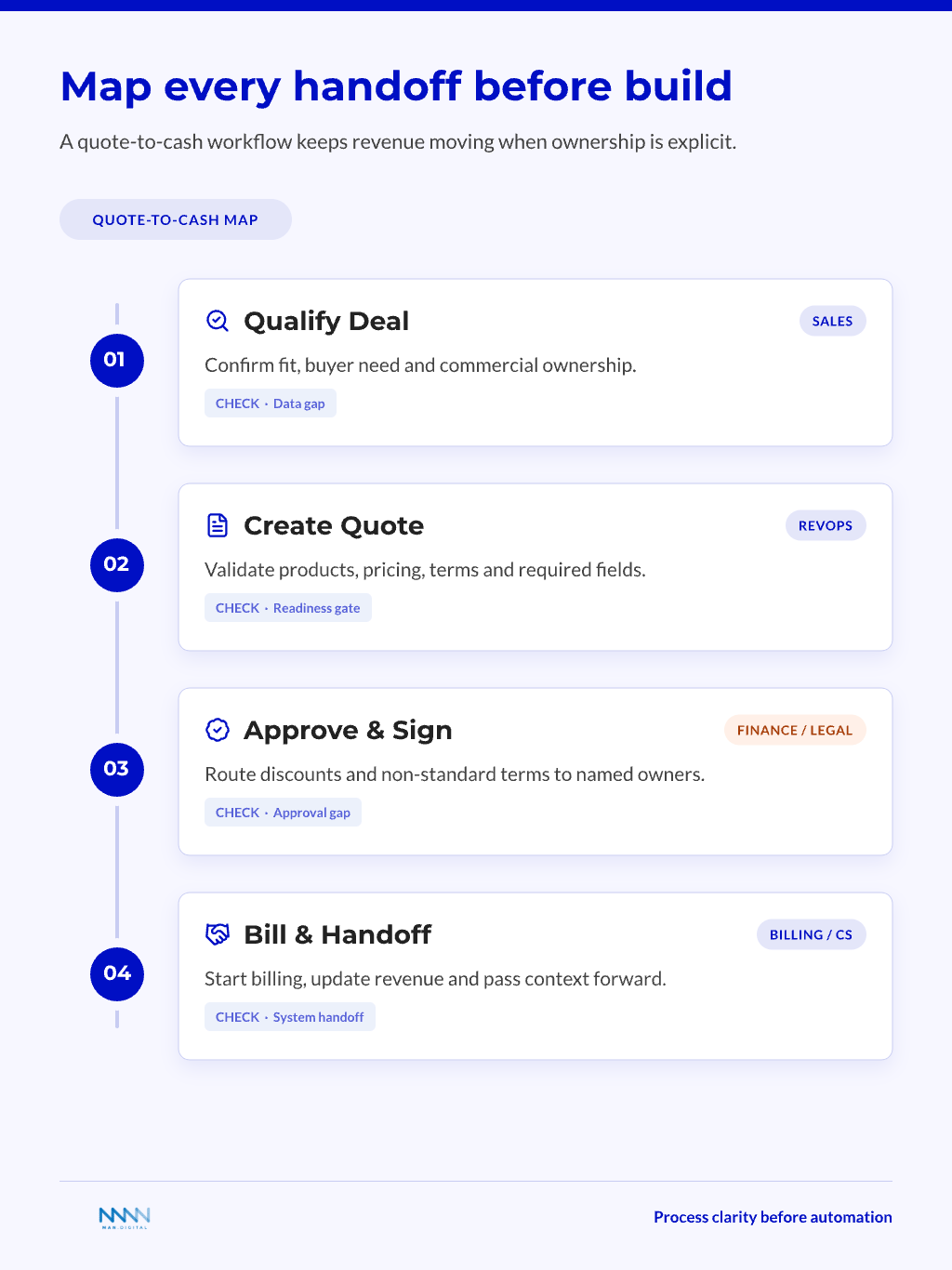
A strong migration starts with a workflow map. This map shows what happens from buyer intent through cash collection and revenue reporting. It also shows which team owns each decision.
Without this map, teams configure around opinions. With it, HubSpot becomes the place where the revenue process becomes visible.
Define the Revenue Path
Quote-to-cash covers the connected path from quote creation to payment and revenue tracking. DealHub defines it as the full process from buyer intent through quote, contract, payment, and revenue recognition quote-to-cash definition.
HubSpot should not become a loose set of disconnected sales tasks.
Map the path in clear stages:
-
Deal qualification
- Buyer need is clear
- Product fit is confirmed
- Commercial owner is assigned
-
Quote creation
- Products and services are selected
- Price, term, and discount rules apply
- Quote owner checks required fields
-
Approval
- Discount review happens when needed
- Legal review covers non-standard terms
- Finance checks payment terms
-
Signature and billing
- Quote is accepted
- Invoice or payment flow starts
- Revenue record updates
-
Handoff
- Customer Success receives context
- Renewal or subscription data is visible
- Reporting reflects the booked deal
This workflow gives your team a shared language. It also gives HubSpot a structure to support.
Identify Breakpoints Before Build
Every company has breakpoints. Some show up in discount approval. Others appear when finance receives incomplete billing data.
💡 Tip
Run a deal audit before setup. Pick recent won deals, stalled deals, and discount-heavy deals, then trace each one from quote to payment.
Look for four breakpoints:
- Data gaps: Required fields are missing before quote creation
- Approval gaps: Review rules depend on memory
- System gaps: Billing tools do not receive clean data
- Reporting gaps: Booked revenue does not match deal data
| Breakpoint | What It Looks Like | HubSpot Design Response |
|---|---|---|
| Missing quote data | Sales asks finance for details after approval | Required fields before quote creation |
| Slow approvals | Discounts wait in email threads | Workflow routing and approval status |
| Billing mismatch | Invoice does not match signed terms | Clear deal-to-billing handoff fields |
| Weak reporting | Closed-won does not equal billable revenue | Separate deal, quote, and revenue views |
A breakpoint review prevents overbuilding. It also keeps the project focused on revenue continuity.
Build the HubSpot Data Model Around Revenue Control
Data model choices decide whether the new system stays clean. If teams cannot trust the record, they will return to side files. This is where RevOps needs to lead the design, not just support the launch.
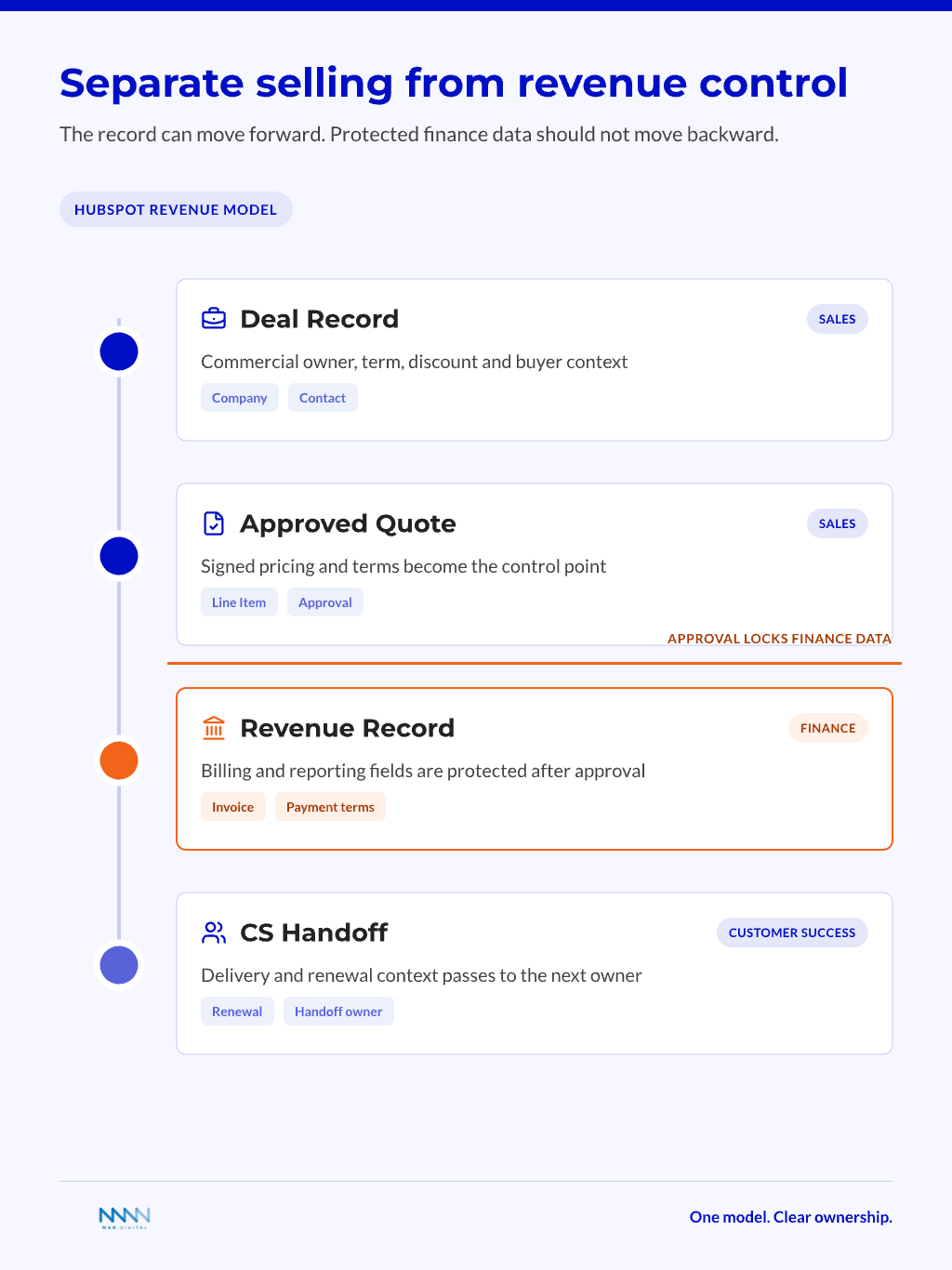
The data model must reflect how revenue moves through the business. It should support sales speed, finance control, and leadership reporting without mixing those needs into one crowded view.
Set the Core Objects and Fields
HubSpot can support quote-to-cash when the records feeding the quote are clear. Those records usually include deal, company, contact, quote, line item, billing, and handoff context.
That means your data model must support the quote before sales clicks create.
Define field groups by business purpose:
-
Commercial fields
- Deal type
- Contract term
- Discount level
- Payment terms
-
Buyer fields
- Legal company name
- Billing contact
- Buying entity
- Invoice details where needed
-
Operational fields
- Implementation date
- Handoff owner
- Renewal date
- Customer Success segment
-
Approval fields
- Approval status
- Approver name
- Review reason
- Approval timestamp
A clean model prevents vague ownership. It also helps each team see only the data they need.
For deeper architecture planning, the HubSpot data model should define objects, associations, and lifecycle meaning before automation begins.
Keep Reporting Separate From Selling
Sales needs speed. Finance needs accuracy. Leadership needs visibility.
Those needs overlap, but they are not the same dashboard.
Create separate views for each role:
- Sales view: Quote readiness, approval status, buyer action
- Finance view: Billing readiness, payment terms, invoice status
- RevOps view: Workflow exceptions, missing fields, approval cycle time
- Leadership view: Booked revenue, pending approvals, cash risk
📝 Note
Do not force one dashboard to serve every user. A single view often becomes too crowded and helps no one.
A useful data model answers:
- What data must exist before a quote is created?
- Who owns each field after the quote is accepted?
- Which fields affect billing and reporting?
- Which fields should sales never edit after approval?
This separation protects pace and control at the same time. Sales can keep moving, while finance keeps the revenue record clean.
Phase the Migration Without Stopping Live Deals
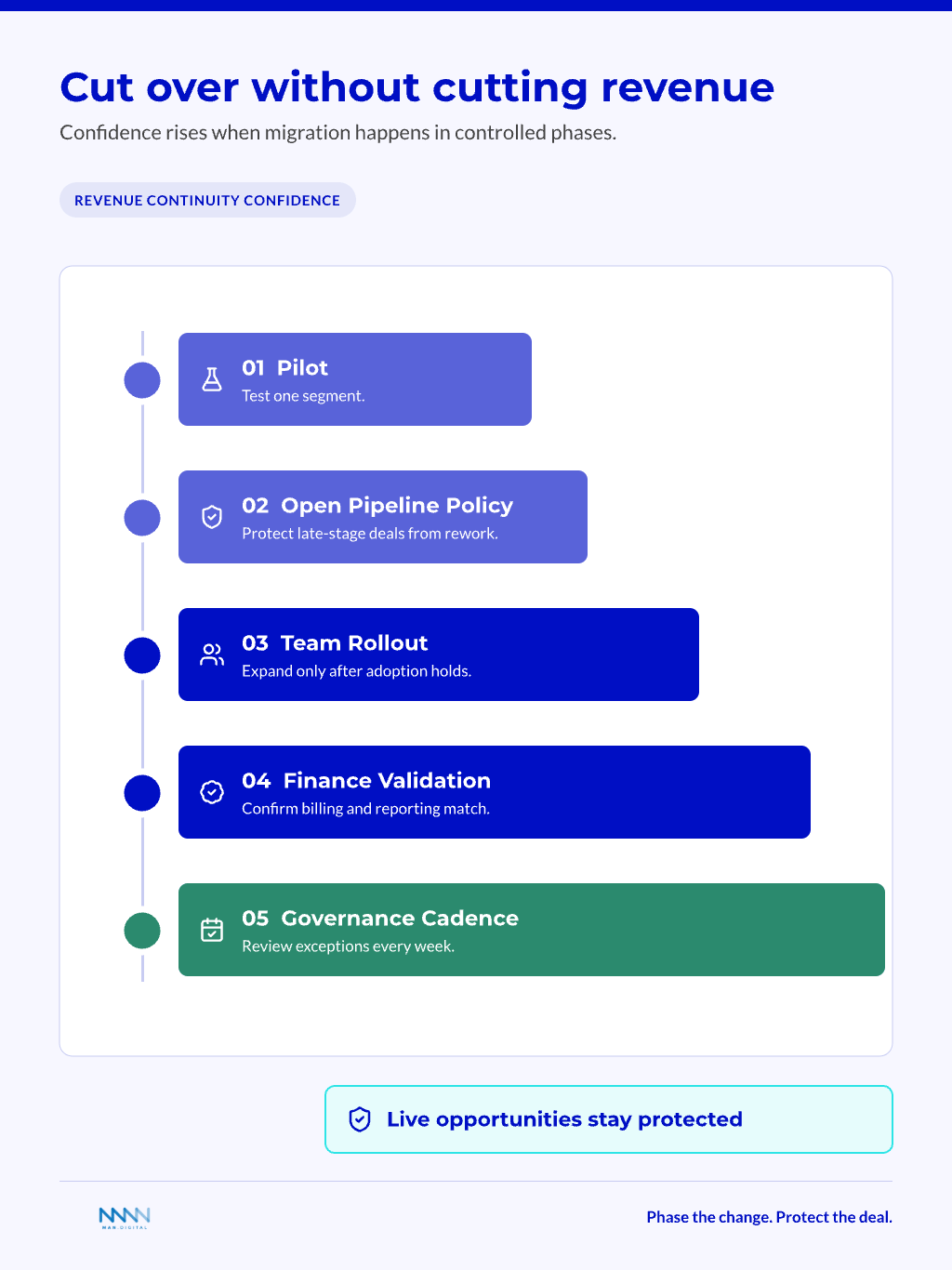
The safest way to move quote-to-cash into HubSpot is through controlled phases. Do not switch every product line, market, and team on the same day. Protect live revenue while you test the new path.
A phased rollout also gives RevOps better evidence. You can see where users struggle, where data breaks, and where automation helps.
Start with a Pilot Segment
A pilot reduces risk because it gives RevOps a smaller process to observe. Choose a segment with enough quote volume to test the workflow, but not so much complexity that every edge case appears at once.
Good pilot choices include:
- One sales team
- One market
- One product family
- One standard contract type
- One simple billing path
Avoid the most complex segment first. Complexity hides basic design flaws and makes early feedback harder to read.
Pilot success criteria should cover:
- Quote creation time
- Approval completion
- Billing handoff quality
- Sales adoption
- Finance exception count
This keeps the pilot grounded in revenue operations. It also stops the project from becoming a tool demo.
Protect Open Pipeline During Cutover
Open deals need special care. A late-stage buyer should not wait because internal teams are changing systems.
Create rules for active opportunities before launch.
Use a simple cutover policy:
-
Early-stage deals: Move into the new HubSpot flow
- Low disruption risk
- More time to fix data gaps
-
Late-stage deals: Keep current quote path if needed
- Protect buyer momentum
- Avoid rework near signature
-
Renewals: Move only after ownership is clear
- Customer Success needs context
- Finance needs contract history
-
Exceptions: Review daily during rollout
- Assign one owner
- Track every issue in HubSpot
Conga describes quote-to-cash as a connected process across quote creation, contract work, order management, billing, and payment quote-to-cash process. That wide scope explains why cutover needs more than a CRM checklist.
It needs a revenue continuity plan.
For a deeper look, see our guide on HubSpot Breeze AI.
Automate and Govern After the Process is Stable
The Process is Stable
Automation should support a proven workflow. If you automate unclear rules, the system will move errors faster. Start with simple controls, then add more as the team gains confidence.
Governance keeps those controls useful after launch. Pricing, packaging, terms, and buyer needs keep changing, so the system needs a steady owner.
Use Automation for Routing and Readiness
The best first automations are boring. They check fields, route approvals, and alert owners before revenue gets stuck.
Boring is good here.
HubSpot’s quote guidance shows that quotes depend on records, line items, buyer details, and sharing steps inside the sales process HubSpot quote setup. HubSpot’s payments guidance also shows how payment links and commerce tools connect payment collection to CRM records HubSpot commerce tools. That makes readiness checks more useful than flashy automation.
Useful first automations include:
- Quote readiness checks
- Discount approval routing
- Missing billing data alerts
- Legal review triggers
- Closed-won handoff tasks
- Renewal date creation
- Finance exception notifications
These rules reduce manual chasing. They also help each team trust that HubSpot reflects the next step.
📊 Fact
Automation should start with checks and routing because quote-to-cash errors often begin before the quote is sent.
Avoid early automation that changes commercial data automatically:
- Auto-changing payment terms
- Auto-applying discounts
- Auto-closing billing tasks
- Auto-overwriting legal notes
Those actions need strong governance first.
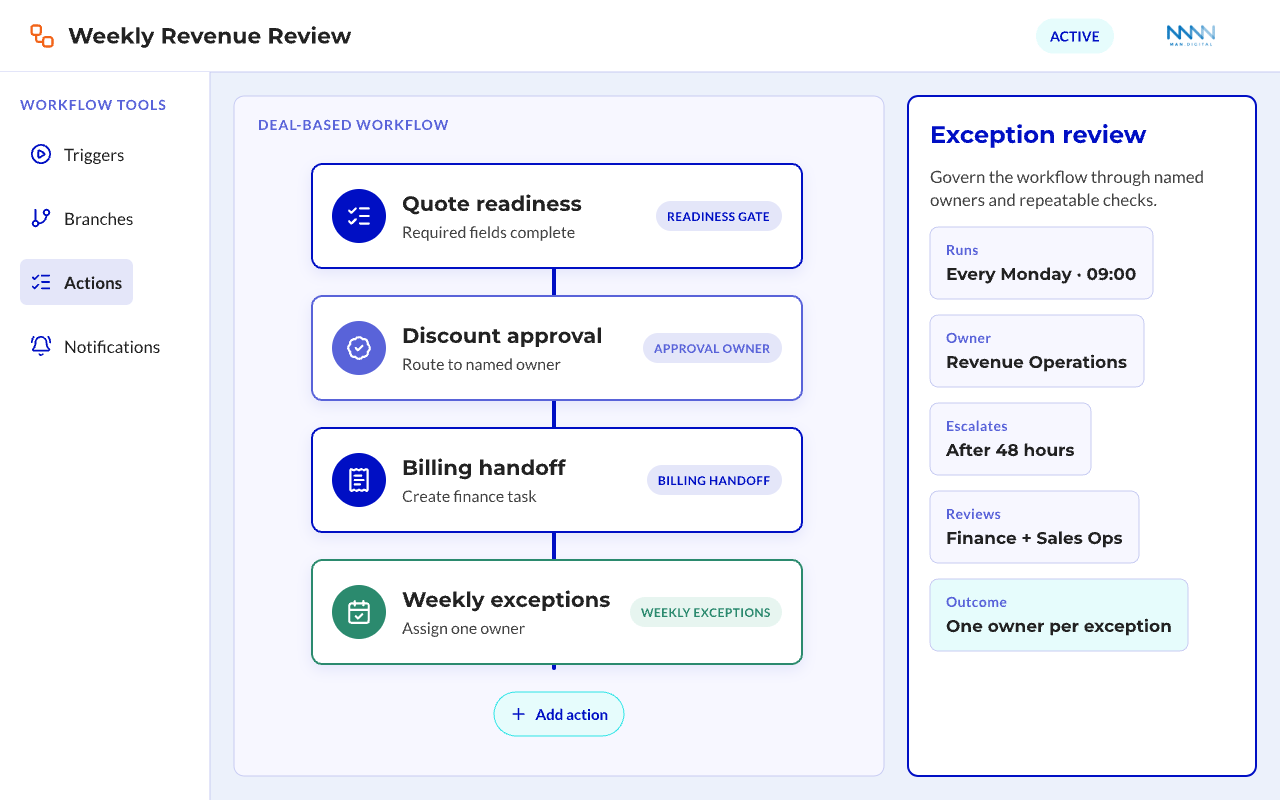
Create a Weekly Revenue Review
A weekly review helps teams catch issues before they become revenue leakage. It should focus on exceptions, not general status updates.
Review these items each week:
- Quotes waiting for approval
- Deals blocked by missing billing data
- Discounts outside policy
- Signed quotes not ready for invoice
- Finance exceptions by owner
- Customer Success handoffs missing context
This review should include Sales Ops, Finance Ops, RevOps, and a sales leader. Legal can join when non-standard terms create delays. HubSpot’s contract setup guidance reinforces why contract records, terms, and ownership need clear control before teams scale the process HubSpot contracts.
Keep the review practical:
- Use one HubSpot dashboard
- Assign one owner per exception
- Track repeated problems
- Change the process only when the pattern is clear
You need metrics that show both usage and business impact. Usage alone does not prove that the migration worked.
Track adoption metrics first:
- Quote creation inside HubSpot
- Approval completion in HubSpot
- Required field completion
- Workflow task completion
- Exception count by team
Then track revenue health metrics:
- Approval cycle time
- Billing handoff quality
- Quote error rate
- Time from accepted quote to invoice
- Revenue reporting confidence
When these metrics improve together, the system is working. If adoption rises while finance exceptions also rise, the workflow needs correction.
For teams exploring later automation, workflow automation explains why AI fails when process design is not ready. Implementation guidance from HubSpot partners makes the same practical point: the platform works best when process, data, and ownership are defined before configuration expands HubSpot implementation guidance and Revenue Hub quote-to-cash planning.
Frequently Asked Questions
This FAQ section answers buyer questions that often come up before a quote-to-cash migration. These answers are written for practical evaluation, not feature comparison. Use them to clarify timing, ownership, and risk.
What is Quote-To-Cash in HubSpot?
Quote-to-cash in HubSpot is the workflow that connects sales quotes, approvals, buyer acceptance, billing readiness, and revenue reporting. It uses HubSpot records and workflows to keep teams aligned. The exact setup depends on your pricing model, finance process, and integration needs.
How Long Does It Take to Move Quote-To-Cash Into HubSpot?
A simple rollout can start with a focused pilot, then expand by team, market, or product line. More complex revenue models take longer because pricing, approvals, billing, and reporting need deeper validation. The safest timeline depends on live pipeline risk and data quality.
Should Finance Own Quote-To-Cash or Should RevOps Own It?
Finance should own billing accuracy, payment terms, and revenue controls. RevOps should own workflow design, data model structure, automation, and cross-team adoption. Sales owns commercial execution, so each team needs clear control without splitting the revenue record.
What is the Biggest Risk During Migration?
The biggest risk is disrupting late-stage deals. Buyers should not feel the impact of internal system change. Protect open pipeline with a cutover policy, keep complex exceptions visible, and avoid forcing every deal into the new path at once.
Can HubSpot Replace a CPQ or Billing Tool?
HubSpot can support many quote-to-cash workflows, especially when quoting, payment, and reporting needs are clear. Some companies still need specialist CPQ, billing, or ERP tools. The decision depends on product complexity, pricing rules, contract terms, and finance requirements.
When Should I Hire a HubSpot Partner?
Hire a HubSpot partner when the migration affects several teams, revenue reports, billing workflows, or integrations. A partner is most useful when internal teams can operate the current process but lack time to redesign it. The goal is process stability, not extra configuration.
Conclusion
When you move quote-to-cash into HubSpot with care, you turn a fragile handoff chain into a controlled revenue workflow. Sales gains speed, finance gets cleaner data, RevOps gains visibility, and leaders trust the numbers more.
The best result comes from building the operating model first. Map the workflow, protect live deals, automate stable rules, and strengthen governance after launch so the system keeps improving.
Key Takeaways
- Move quote-to-cash into HubSpot as a phased revenue workflow, not a quick tool migration.
- Map approvals, billing handoffs, and ownership before you configure quotes or workflows.
- Protect late-stage deals with a clear cutover policy that keeps buyer momentum intact.
- Use automation for readiness checks, routing, and exceptions after the process is stable.
- Build weekly governance so the system can improve without disrupting revenue.