
August 2, 2026
The real promise is a revenue system where AI works from trusted context, while people keep control of judgment.
The shift is already visible in sales teams.
Salesforce reports that 87% of sales organizations now use some form of AI, and 54% of sellers say they have already used AI agents, according to its State of Sales 2026 research.
That matters because AI has moved from trial projects into daily commercial work.
Most HubSpot teams do not need another disconnected AI tool. They need a clear operating model where AI can read CRM context, follow rules, and stop when human review is needed. This article explains what must be true before assistant-style support can become agent-style execution, and what RevOps leaders must redesign first.
What Changes When Assistants Become Agents
The assistant era helped teams write, summarize, and ask better questions. The agent era adds a different operating pattern because systems can respond to signals, retrieve context, use tools, and complete defined tasks within clear boundaries. This section explains the operating shift before we look at value, metrics, and governance.
Teams investing in customer success operations see measurable improvements here.
From Prompt Support to Workflow Execution
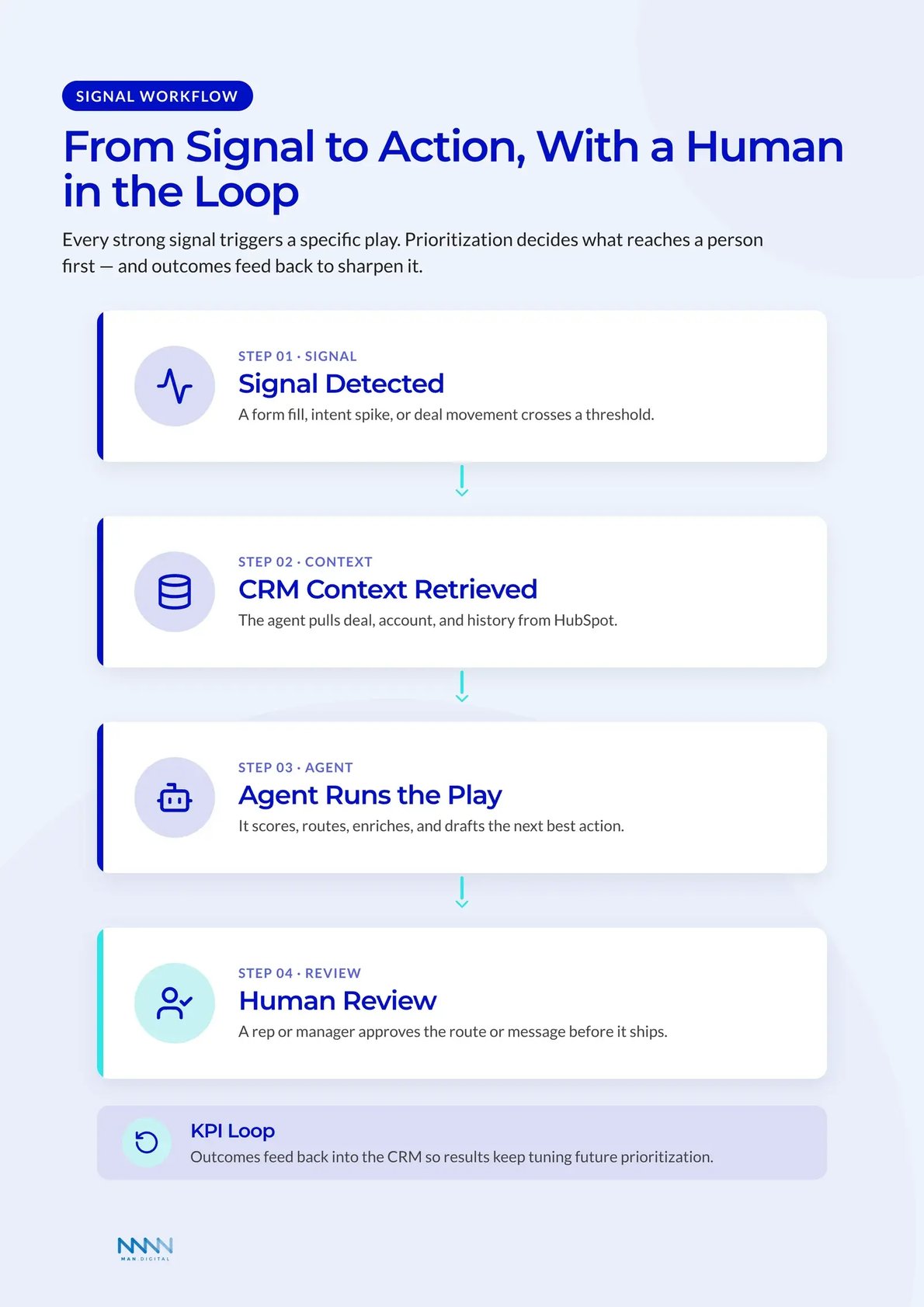
An assistant waits for a person to ask for help. An agent starts from a signal and moves through a workflow. That signal can be a form fill, meeting transcript, deal movement, missing field, or support question.
In HubSpot, this changes the shape of work.
Assistant-style work usually includes:
- Summarizing call notes
- Drafting emails
- Explaining CRM records
- Suggesting campaign ideas
Agent-style work usually includes:
- Updating deal fields after a meeting
- Add next step
- Adjust close date
- Flag missing decision maker
- Enriching account records
- Fill firmographic fields
- Add buying context
- Flag data gaps
- Routing leads based on fit and intent
- Match owner rules
- Apply SLA logic
- Create follow-up tasks
This does not remove RevOps ownership.
It changes where RevOps spends time. Leaders move from fixing every field to defining the rules that let agents act safely. They decide which sources agents can trust, which actions need approval, and which workflows must stay human.
💡 Insight
The biggest change is not speed alone. It is the move from personal productivity to shared operating logic.
Why HubSpot Becomes the Operating Layer
HubSpot is useful here because the CRM holds customer context. AI becomes more useful when it can work from deals, contacts, companies, tickets, calls, emails, campaigns, and workflows. Without that shared base, it becomes another disconnected tool.
The platform direction is clear. HubSpot is adding assistant features, task-specific agents, smart properties, data enrichment, buyer intent, and workflow generation into one customer layer. For teams studying HubSpot Breeze AI, the better question is not which feature looks best.
The better question is which workflow has enough structure for agent support.
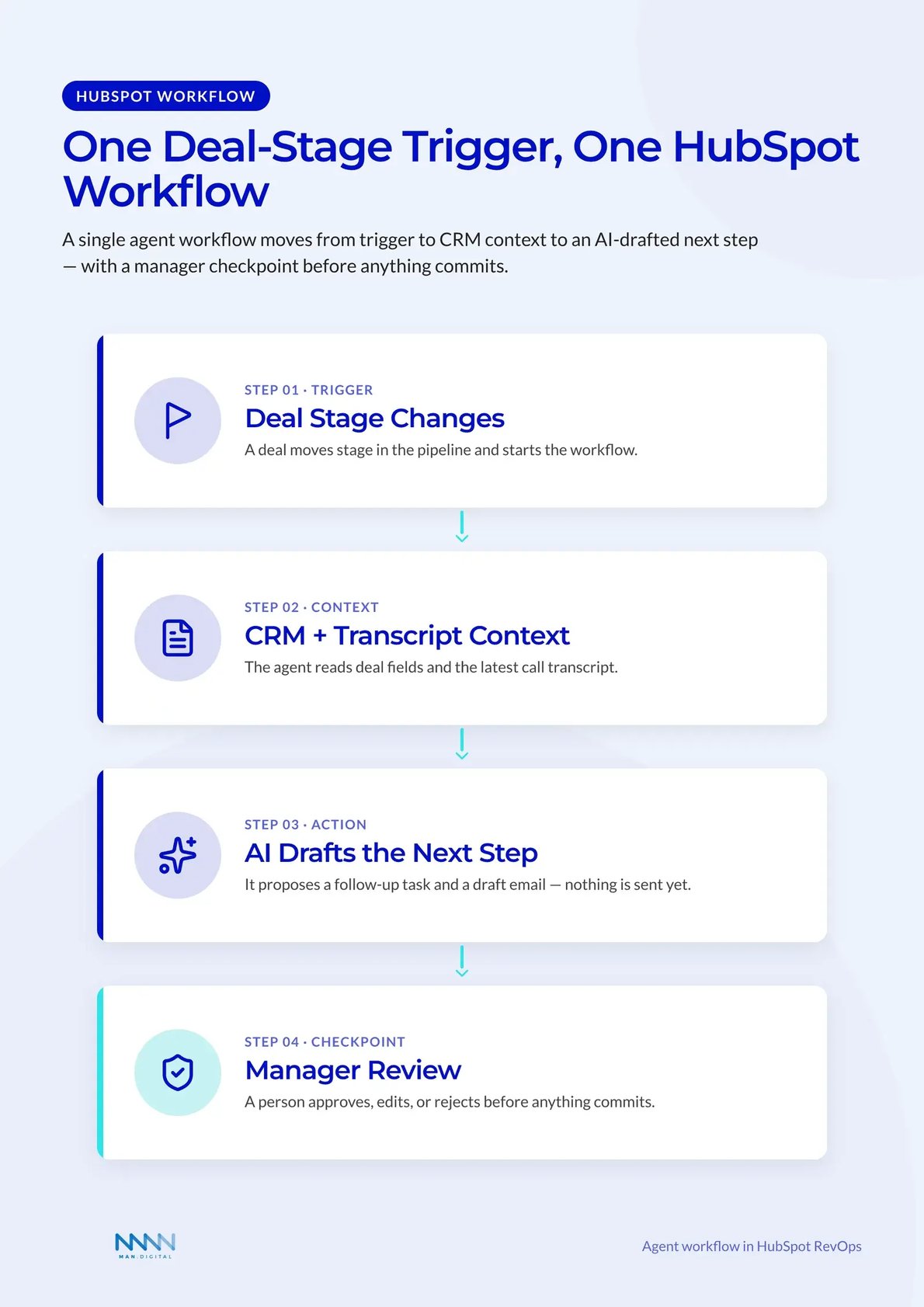
Strong candidates usually have:
-
A clear trigger
- Meeting completed
- Form submitted
- Deal stage changed
- Ticket created
-
A defined context source
- CRM fields
- Transcript notes
- Website visits
- Support history
-
A bounded next action
- Update a property
- Draft a follow-up
- Assign a rep
- Create a task
-
A visible review point
- Manager dashboard
- Approval step
- Audit log
- Exception queue
Where AI in RevOps Creates Value First
That includes research, enrichment, routing, follow-up, ticket triage, and pipeline hygiene. These tasks slow teams down, but they do not always need senior judgment.
The Middle Layer of Work Gets Automated
RevOps teams spend too much time in the middle layer. This is the work between strategy and selling. It includes checking account fit, cleaning fields, preparing lists, and updating deal records.
None of these tasks define the revenue strategy. Each one still affects execution quality. If the middle layer breaks, reps chase weak accounts and managers stop trusting reports.
BCG argues that AI fits RevOps because the function connects prediction to execution across the revenue engine, as explained in its RevOps execution analysis. That framing fits HubSpot well. The CRM is where signals should turn into actions.
High-value use cases include:
-
Data enrichment
- Fill missing company fields
- Standardize industry and size bands
- Add account context for routing
-
Lead and account prioritization
- Score fit and intent together
- Flag hot accounts for reps
- Push low-fit records into nurture
-
Post-meeting administration
- Summarize calls
- Suggest deal updates
- Draft next-step emails
- Create follow-up tasks
-
Customer support handling
- Answer simple questions
- Escalate complex issues
- Attach context to tickets
Predictive Prioritization Becomes Operational
Classic scoring often lives in a spreadsheet or hidden model. Agentic workflows make prioritization visible. A score can influence routing, sequence enrollment, rep alerts, SLA checks, and dashboard health.
A deal score can shape coaching conversations and forecast checks. A customer health signal can trigger CS outreach before renewal risk becomes obvious.
| Signal | Agent Task | Human Review | RevOps Metric |
|---|---|---|---|
| High-fit form fill | Enrich and score account | Rep accepts route | Speed to lead |
| Meeting transcript | Suggest deal update | Manager reviews risk | Stage hygiene |
| Buying intent spike | Draft outreach angle | Rep approves message | Meeting rate |
| Support ticket trend | Classify and summarize issue | CSM reviews risk | Time to resolution |
| Missing account data | Research and fill fields | Ops checks exceptions | Field completion |
This matters because prioritization protects human attention. Reps and CSMs should spend less time searching for what matters next. The system should surface the next best action when the signal is strong enough.
For a deeper look, see our guide on Salesforce HubSpot migration.
How HubSpot RevOps Teams Should Redesign Workflows
The tool layer should not lead the redesign. RevOps should start with the workflow, define the data model, and then decide where an agent belongs. That keeps automation from creating faster chaos inside HubSpot.
Start with the Revenue Process
Many teams begin with the question, “What can this agent do?” That is the wrong starting point. The better question is, “Which revenue process has clear inputs, clear rules, and measurable waste?”
Once that answer is clear, the team can decide whether the agent should draft, recommend, enrich, route, or execute. This sequence protects the CRM from random automation. It also keeps leaders focused on revenue outcomes.
A process-first review should cover five areas:
- Trigger clarity: What event starts the workflow?
- Context quality: Which records and sources support the decision?
- Action limits: What can the agent do without approval?
- Exception handling: What happens when confidence is low?
- KPI impact: Which metric proves the workflow improved?
This is where HubSpot Data Agent becomes more than an enrichment feature. Its value depends on whether the team has already defined data, routing, reporting, and follow-up rules around it.
💡 Tip
Pick one workflow with a clear owner, one object, and one KPI. Expand only after the first workflow works.
Build Guardrails Before Scaling
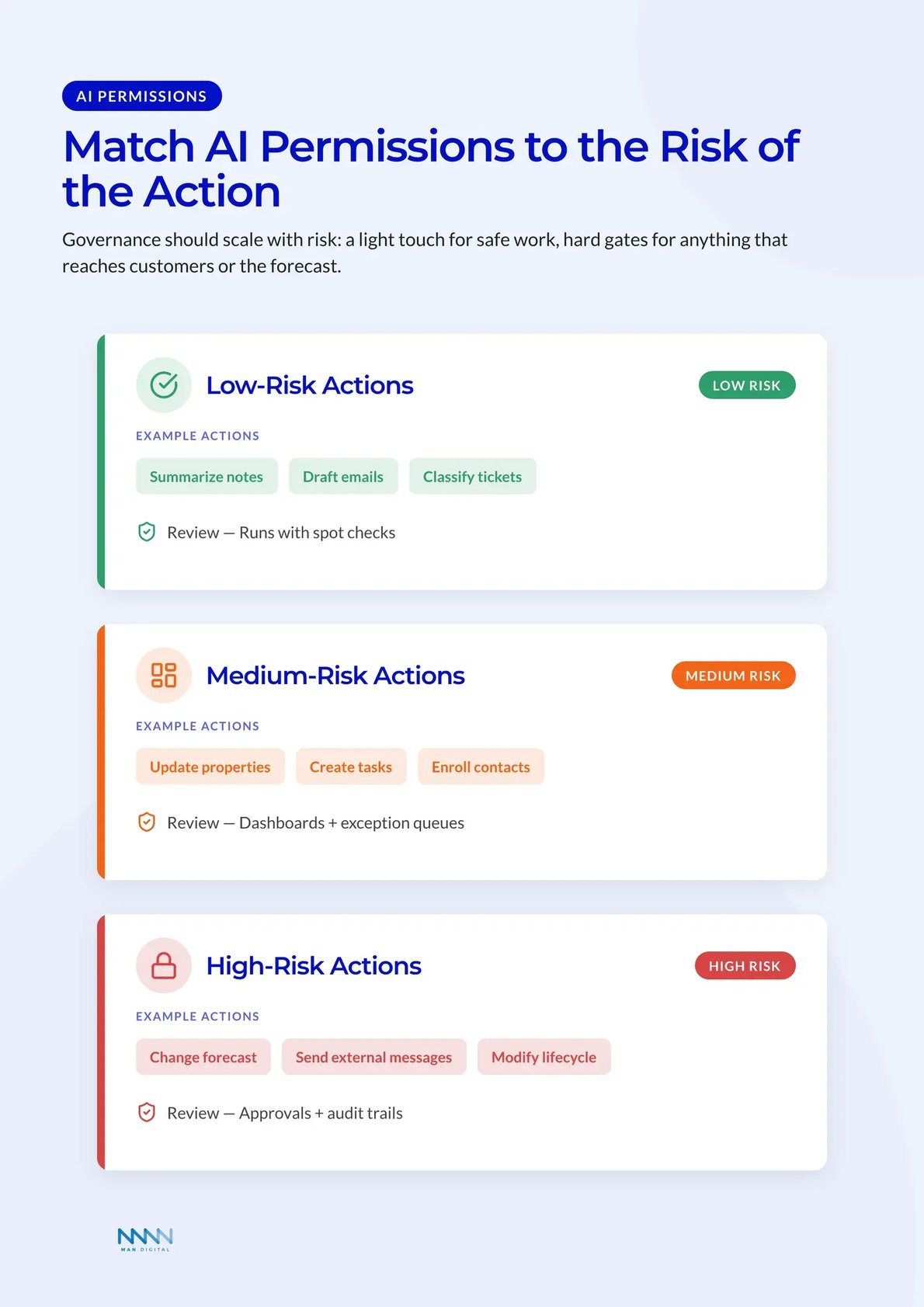
Agents need room to act, but not unlimited freedom. Governance should match the risk of the task. A support agent answering a simple policy question carries one risk profile.
An agent updating forecast categories carries another risk profile. An agent sending pricing language carries even more risk. RevOps needs different controls for each workflow.
IBM defines AI agents as systems that can reason, plan, and use tools to complete goals in its guide to agent systems. That tool-use ability is powerful. It also raises the cost of poor permissions.
A practical governance model includes:
-
Low-risk actions
- Summarize notes
- Draft emails
- Suggest missing fields
- Classify tickets
-
Medium-risk actions
- Update non-critical properties
- Create tasks
- Enroll contacts in safe workflows
- Recommend lead owners
-
High-risk actions
- Change forecast fields
- Send external messages automatically
- Modify lifecycle stages
- Trigger renewal or pricing actions
Each level needs a different review rule.
Low-risk work can run with spot checks. Medium-risk work often needs dashboards and exception queues. High-risk work should include approvals, audit trails, and strict permission design.
The Metrics That Prove AI in RevOps Works
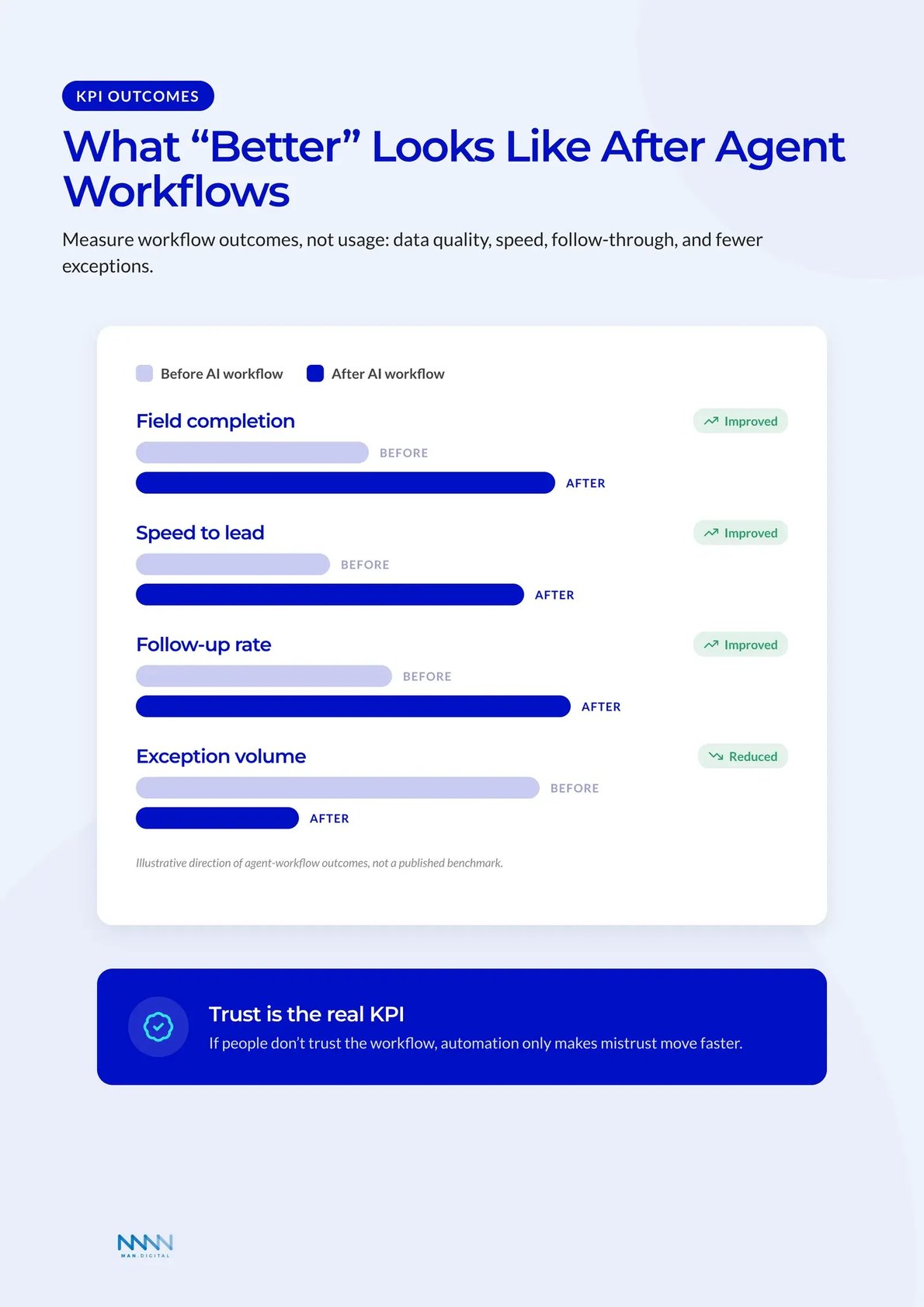
AI in RevOps should be measured as a workflow investment, not a general software rollout. Usage alone proves little because teams can generate more activity without improving revenue quality. The better metric set tracks speed, data quality, conversion, and human review load.
Measure Workflow Outcomes
A weak dashboard counts prompts, drafts, and generated summaries. A strong dashboard measures whether the workflow improved. The question is not, “How often did the team use AI?”
The better question is direct: did the workflow reduce waste, improve handoffs, or create better revenue decisions? That makes the metric useful to RevOps and to senior leaders. It also stops teams from confusing activity with progress.
McKinsey reports that marketing and sales are among the functions where companies most often see revenue gains from AI, according to its State of AI research. The lesson is not to automate everything.
The lesson is to connect AI work to commercial outcomes.
Useful KPI groups include:
-
Data quality
- Field completion rate
- Enrichment match rate
- Duplicate rate
- Required field exceptions
-
Sales execution
- Speed to lead
- Meeting-booked rate
- Follow-up completion rate
- Sequence response rate
-
Pipeline quality
- Stage aging
- Deal score accuracy
- Forecast change frequency
- Close-date slip rate
-
Customer success
- Automated resolution rate
- Ticket time to close
- Escalation rate
- Renewal risk response time
Track the Human Work That Remains
AI does not remove judgment from RevOps. It exposes where judgment matters most. Humans still need to inspect edge cases, refine scoring rules, and fix broken data flows.
HubSpot reports that marketing teams use AI across content, personalization, research, and campaign work in its marketing research. RevOps should translate that activity into operating metrics. Otherwise, adoption becomes a vanity metric.
This matters for teams building a RevOps stack around agentic workflows. The stack should reduce tool switching and admin load. It should not create five more places where agents act without clear ownership.
Watch these warning signs:
- Agents create tasks that reps ignore
- AI updates fields managers do not trust
- Scores change without clear reasons
- Teams override routes by habit
- Reports show more activity but no better outcomes
📝 Note
If humans do not trust the workflow, automation will not fix adoption. It will only make mistrust move faster.
What RevOps Leaders Must Own in the Agent Era
The future RevOps leader is not replaced by AI. The role becomes more important because agents need clear rules, trusted data, and business judgment. Someone must decide which work should be automated, which work needs review, and which work should stay human.
RevOps Becomes the Control Plane
RevOps is a business function, not a product feature. It coordinates process, data, tools, and reporting across the revenue engine. That makes RevOps the right control point for agentic workflows.
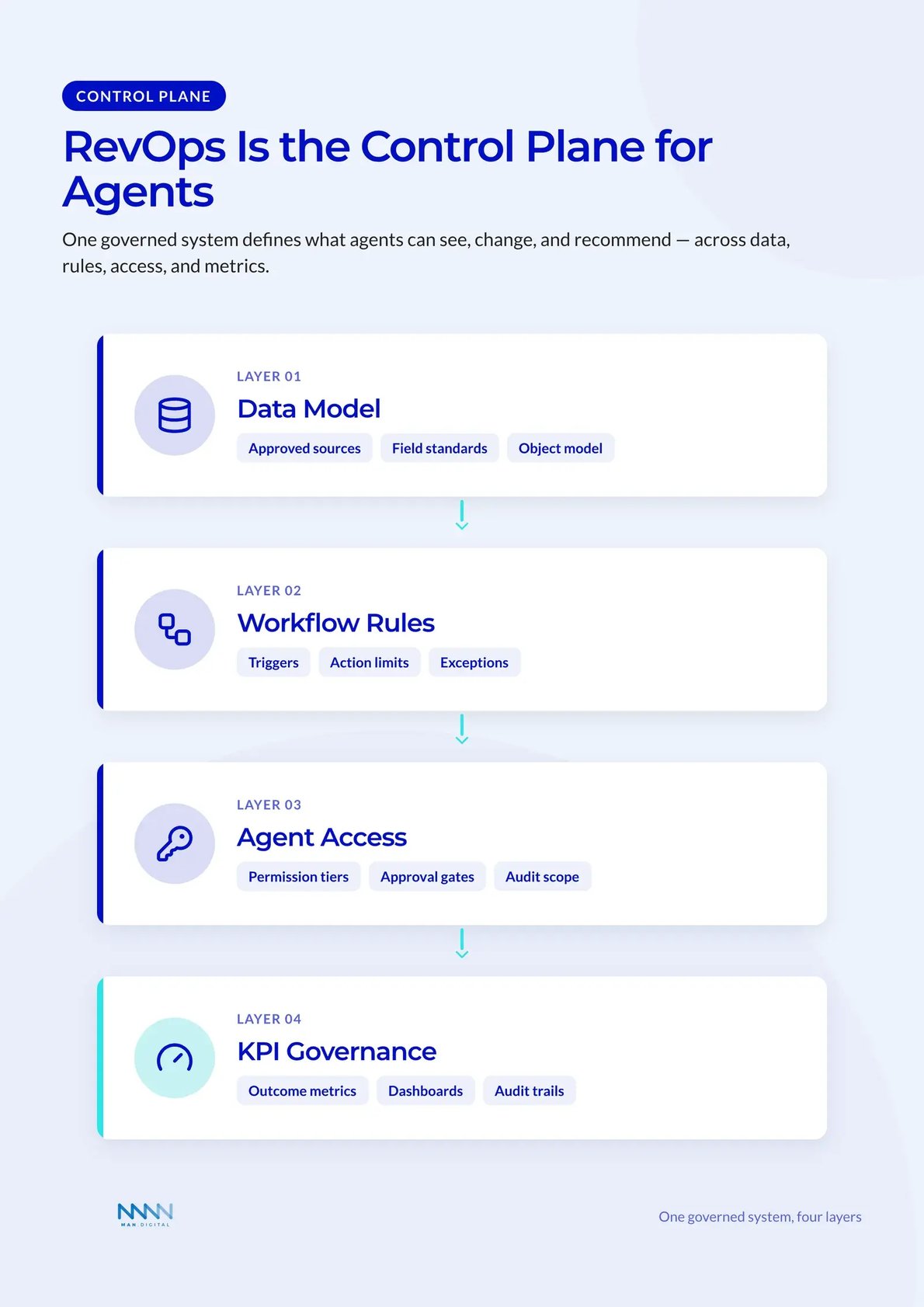
The control plane defines what agents can see, change, and recommend. It also keeps the revenue operating model stable. Sales, marketing, CS, and leadership can all want to add AI in different ways.
RevOps turns that interest into one governed system.
The control plane should define:
- Workflow ownership
- Data source approval
- Permission tiers
- Review rules
- Audit trails
- KPI standards
- Exception handling
- Enablement plans
RevOps leaders should also set language standards for AI-generated work. Outreach, meeting notes, ticket summaries, and campaign drafts should match the company’s voice. Without standards, scale creates brand drift.
Treat Agents Like Junior Operators
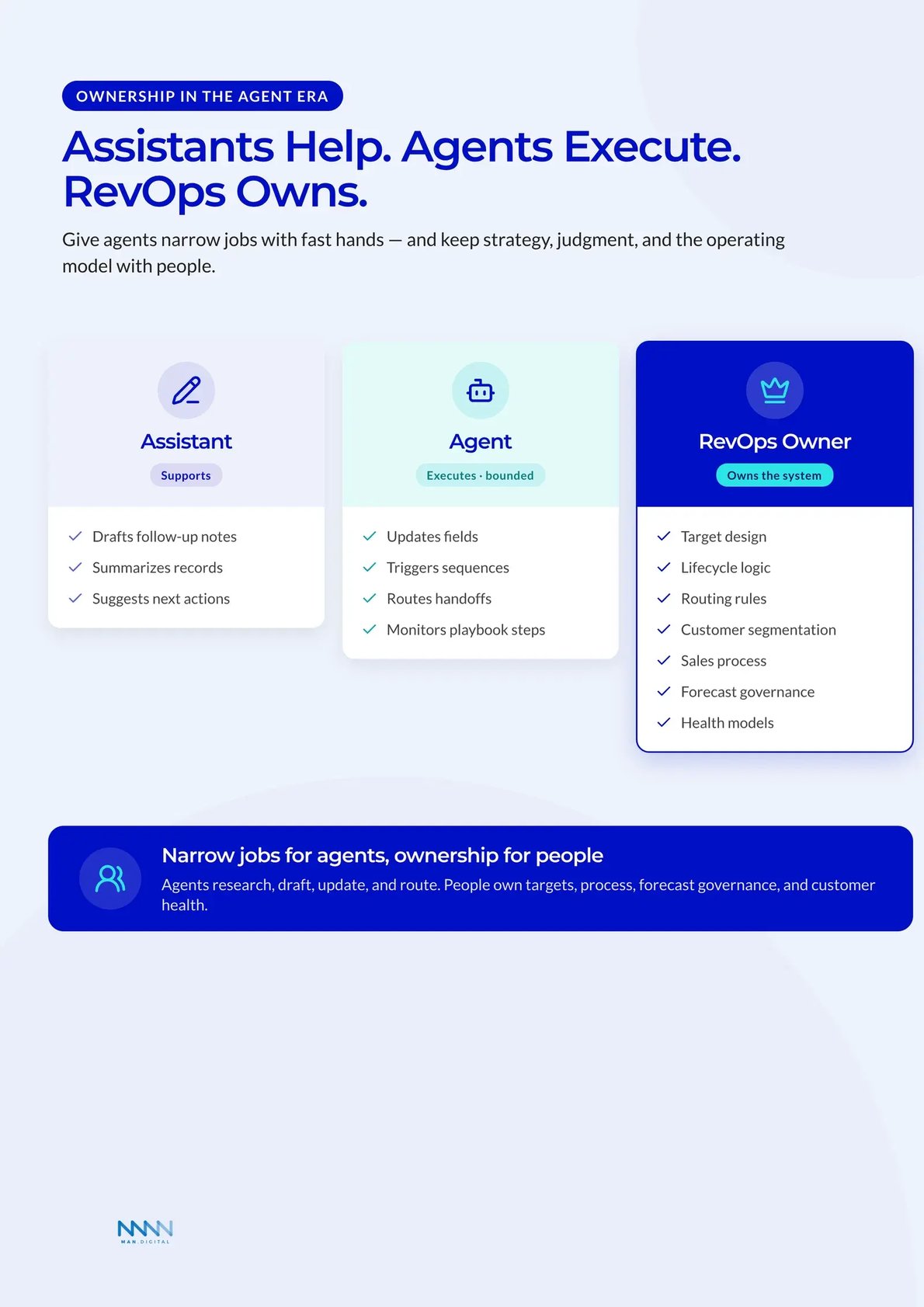
A useful mental model is simple. Treat agents like junior operators with fast hands and narrow judgment. They can research, draft, classify, update, and suggest.
They should not own strategy, pricing judgment, account politics, or final forecast calls. This boundary helps leaders use AI without pretending it has full business context. It also makes training and governance easier.
A strong operating model gives agents narrow jobs:
-
Prospecting agent
- Finds signals
- Drafts outreach
- Suggests account angles
-
Data agent
- Enriches records
- Flags missing fields
- Structures research
-
Customer agent
- Handles simple questions
- Escalates risk
- Adds ticket context
-
Deal progression layer
- Suggests updates
- Creates tasks
- Drafts follow-up notes
The human team owns the wider system. That includes target design, lifecycle logic, routing rules, customer segmentation, sales process, forecast governance, and customer health models. These are not tasks to hand over lightly.
Frequently Asked Questions
What is the difference between an AI assistant and an AI agent in HubSpot RevOps?
An assistant waits for a person to ask for help, summarizing calls, drafting emails, and explaining records. An agent starts from a signal such as a form fill or deal-stage change and completes a bounded workflow within set rules, stopping when human review is needed.
Why is HubSpot well suited to AI agents?
HubSpot holds the customer context agents need to act reliably: deals, contacts, companies, tickets, calls, and workflows. Working from that shared CRM base, an agent can read context, follow rules, and route work instead of behaving like another disconnected tool.
Where does AI create value first in RevOps?
The fastest wins sit in the middle layer of work: data enrichment, lead and account prioritization, post-meeting administration, and support triage. These repetitive tasks slow teams down but rarely need senior judgment, so they are safe places to start.
How should RevOps teams govern AI agents?
Match controls to risk. Low-risk actions like summarizing notes can run with spot checks, medium-risk actions like updating properties need dashboards and exception queues, and high-risk actions like changing forecast fields require approvals and audit trails.
Which metrics prove AI in RevOps is working?
Measure workflow outcomes, not usage. Track data quality, sales execution such as speed to lead, pipeline quality such as stage aging, and customer success such as automated resolution rate, alongside the human review load that remains.
Conclusion
AI in RevOps can give HubSpot teams a practical way to connect trusted CRM data with governed workflow action. The teams that gain the most will build clean workflows, clear permissions, and metrics that show real operating improvement.
The goal is to turn scattered AI activity into a stronger revenue operating model. That shift can support faster handoffs, improve data quality, strengthen forecast trust, and keep people focused on judgment instead of admin.
Key Takeaways
- AI is shifting HubSpot RevOps from assistant-style support to agent-style execution.
- The strongest use cases start with clear triggers, trusted CRM context, and bounded actions.
- RevOps leaders must own governance, permissions, workflow design, and KPI standards.
- Success depends on workflow outcomes such as speed, data quality, conversion, and exception volume.
- The best teams use agents for repeatable execution while humans keep control of strategy and judgment.