
August 2, 2026
8 min read
It helps teams create content, find answers, prepare for meetings, improve workflows, and automate customer tasks inside HubSpot.
The value is not the AI itself, but how it connects people, process, data, and customer context.
The timing matters because AI has moved from pilot work into normal operations.
RevOps teams need a clear model before AI becomes another tool layer nobody governs.
Most teams do not need another disconnected assistant. They need AI that works with the revenue process already inside the CRM. That means clean data, clear permissions, strong prompts, and human review where the risk is high.
What HubSpot Breeze AI Means Now
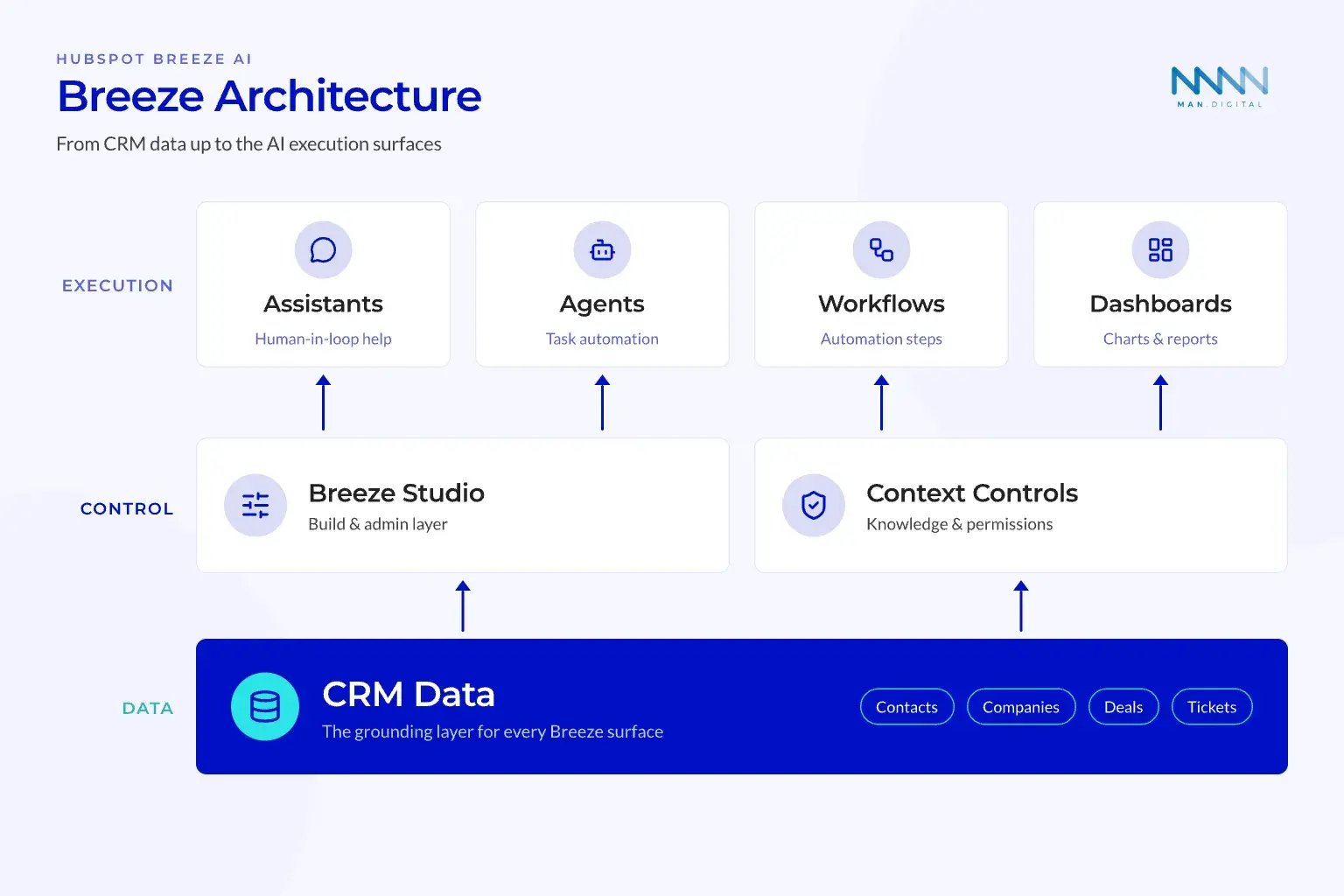
HubSpot Breeze has grown from a launch package into a broader AI layer across HubSpot. For RevOps leaders, the main point is simple: Breeze now combines assistance, embedded AI features, agents, context tools, and admin controls.
Teams investing in revenue operations see measurable improvements here.
From Copilot to Operating Layer
HubSpot now presents Breeze as its AI system across the customer platform.
It is a set of surfaces that work across marketing, sales, service, content, and operations. Some features help humans move faster. Others automate parts of work with less direct input.
The practical split:
-
Assistive AI:
- Answers questions
- Drafts content
- Summarizes records
- Prepares meetings
- Suggests workflow steps
-
Agentic AI:
- Handles customer questions
- Supports prospecting tasks
- Uses approved tools
- Works from assigned knowledge
- can touch credits, customers, or connected systems
💡 Insight
The biggest shift is not from manual work to automation. The shift is from generic AI output to CRM-grounded work.
Why Context Changes the Risk Profile
Breeze becomes more useful when it can use CRM data, customer conversations, files, web activity, campaigns, and connected apps. That context makes answers more relevant than a generic prompt tool.
It also raises the cost of weak governance.
If access settings are too broad, AI can surface data to the wrong team. If CRM data is messy, AI can create confident answers from weak inputs. If prompts lack owners, teams can copy bad habits at scale.
Context quality depends on four inputs:
-
Data hygiene:
- Clean CRM records
- Clear lifecycle stages
- Updated ownership
- Reliable associations
-
Permission design:
- Role-based access
- Limited connector scopes
- Clear admin ownership
- Audit paths for changes
-
Knowledge setup:
- Approved files
- CRM objects for context
- Specific knowledge vaults
- Clear update cadence
-
Process clarity:
- Defined triggers
- Human review points
- Escalation rules
- Success metrics
💡 Tip
Start with one revenue process before turning Breeze on broadly. A narrow rollout shows where data and permissions break first.
Use RevOps agencies to validate this part of the rollout before teams operationalize it.
Core Breeze Components RevOps Leaders Should Know
The platform includes admin layers, assistant surfaces, agent capabilities, and context tools. Each part carries a different level of risk and value. RevOps leaders should understand these parts before assigning owners or measuring results.
Breeze Studio, Assistant, and Projects
Breeze Studio is the builder and admin layer. Teams use it to shape assistants, assign context, configure behavior, and manage how AI supports work.
Breeze Assistant is the conversational surface.
It supports prompts, saved prompts, suggested prompts, clarifying questions, file attachments, meeting prep, memories, and source references. HubSpot’s Knowledge Base explains how teams can use Breeze Assistant in workflows, which makes the assistant more useful for operations work.
Breeze projects help organize related chats, files, instructions, and HubSpot content. That makes them useful for repeatable workstreams like campaign planning, sales plays, enablement, and RevOps implementation.
Use these tools first when the work needs human judgment:
- Meeting preparation
- Campaign brief drafting
- Sales play research
- Workflow planning
- Customer handoff summaries
- Report explanation
- Content editing
These use cases have lower risk because a human still checks the output.
Agents, Knowledge Vaults, and Mcp Connectors
Agents are different from assistants. Assistants help people complete work, while agents can perform defined tasks with more automation.
HubSpot says Breeze Agents can also work with external systems through its MCP client. That means teams can customize Breeze Agents with HubSpot MCP and connect agent work to approved tools.
Knowledge vaults add curated context for specific assistants or agents.
Default context gives general business context across AI features. Knowledge vaults are more controlled. They can include files or CRM objects, and they help keep outputs tied to approved information.
| Component | Main Role | RevOps Risk | Best First Use |
|---|---|---|---|
| Breeze Assistant | Human-in-the-loop help | Low | Summaries, prompts, drafts |
| Breeze Studio | Admin and setup layer | Medium | Assistant and agent control |
| Knowledge vaults | Approved context source | Medium | Product, sales, or CS knowledge |
| Breeze Agents | Task automation | High | Narrow process automation |
| MCP connectors | External tool access | High | Controlled cross-system actions |
📝 Note
Treat MCP-connected agents like integrations, not simple chat tools. They need the same review as workflow automation and API access.
What's New in Breeze for 2026?
HubSpot shipped a wave of Breeze updates in 2026. Here are the new capabilities RevOps leaders should know, with where each one is available so you can map them to the right teams and tiers.
Breeze Assistant: everyday productivity
- Breeze Assistant on mobile — meeting prep, file uploads, and suggested prompts from your phone, connected to CRM context. (Free, all hubs & tiers)
- Advanced data visualizations — generate charts and graphs directly in the conversation. (Free, all hubs & tiers)
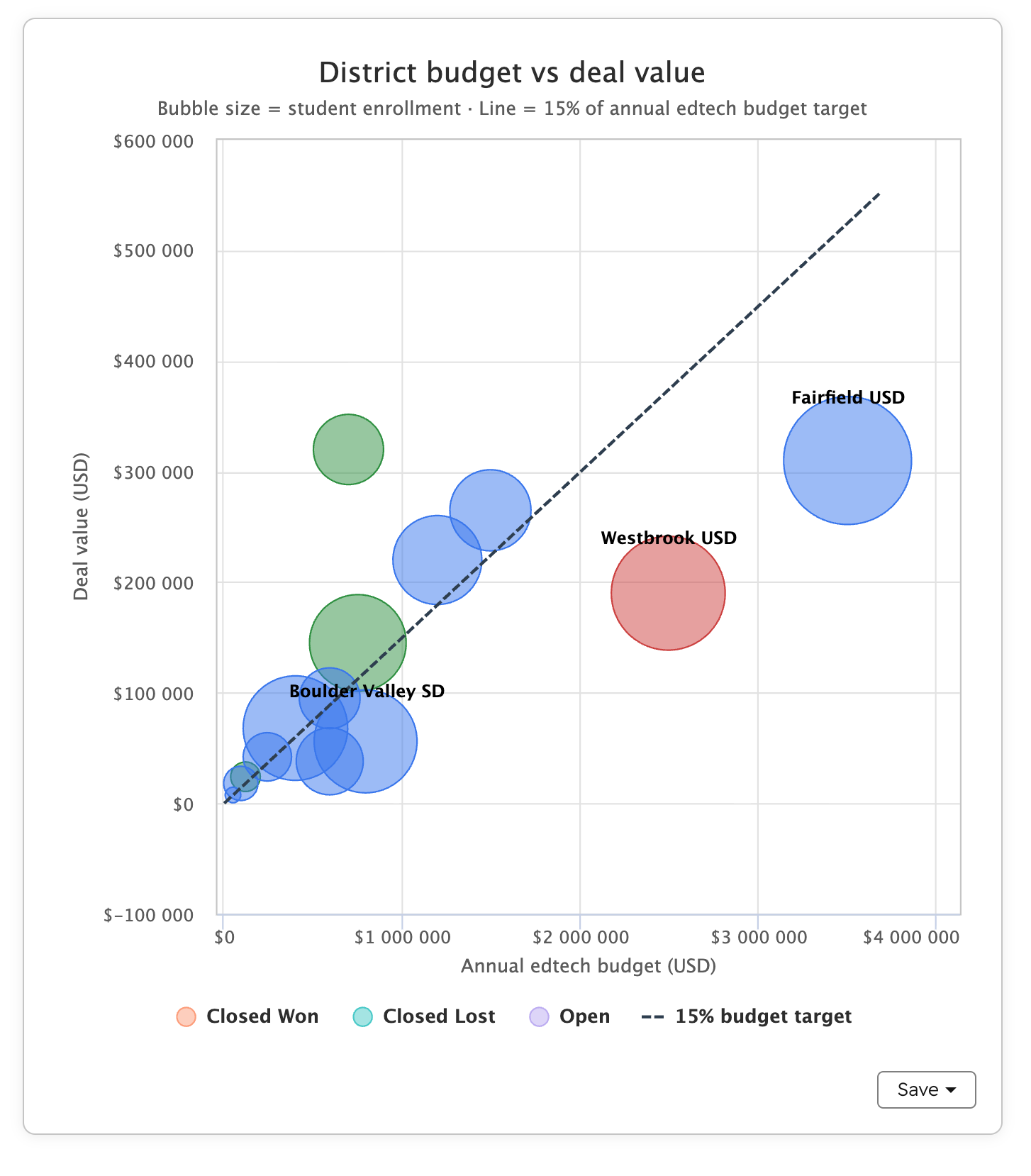
- Create and iterate on documents — draft documents, emails, and custom HTML pages in a dedicated canvas panel. (Free, all hubs & tiers)
- Focused clarifying questions — Breeze now asks for missing context before answering instead of guessing. (Free, all hubs & tiers)
- Create and refine email — draft and edit 1:1 emails in a canvas alongside the chat. (Free, all hubs & tiers)
- Create, edit, and analyze products — manage product records directly from the Assistant sidebar. (Free, all hubs & tiers)
- Breeze Assistant: Projects — dedicated workspaces that group related chats, instructions, and connected knowledge. (Free, all hubs & tiers)
- Breeze Assistant in Slack — @-mention Breeze in Slack to query CRM data and summarize conversations. (Free, all hubs & tiers)
Revenue and service workflows
- Prioritize invoices — rank open invoices by revenue impact and send personalized collection emails. (Free, all hubs & tiers)
- Access campaign data — ask Breeze about campaign goals, performance, assets, and budget. (Marketing Hub Pro & Enterprise)
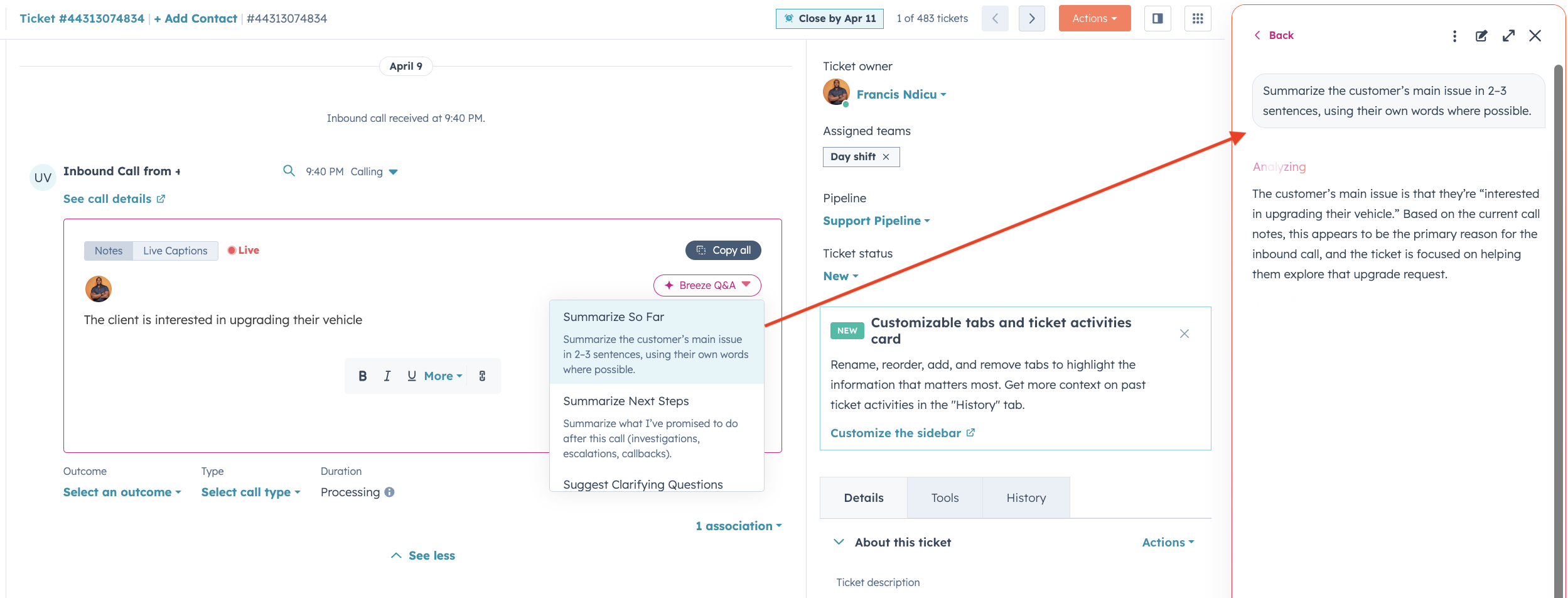
- Live captioning & call assist in Help Desk — voice AI with live captioning and Breeze Q&A in support calls. (Service Hub Pro & Enterprise)
- Calculation properties — generate calculated-property formulas in natural language. (All hubs, Pro & Enterprise)
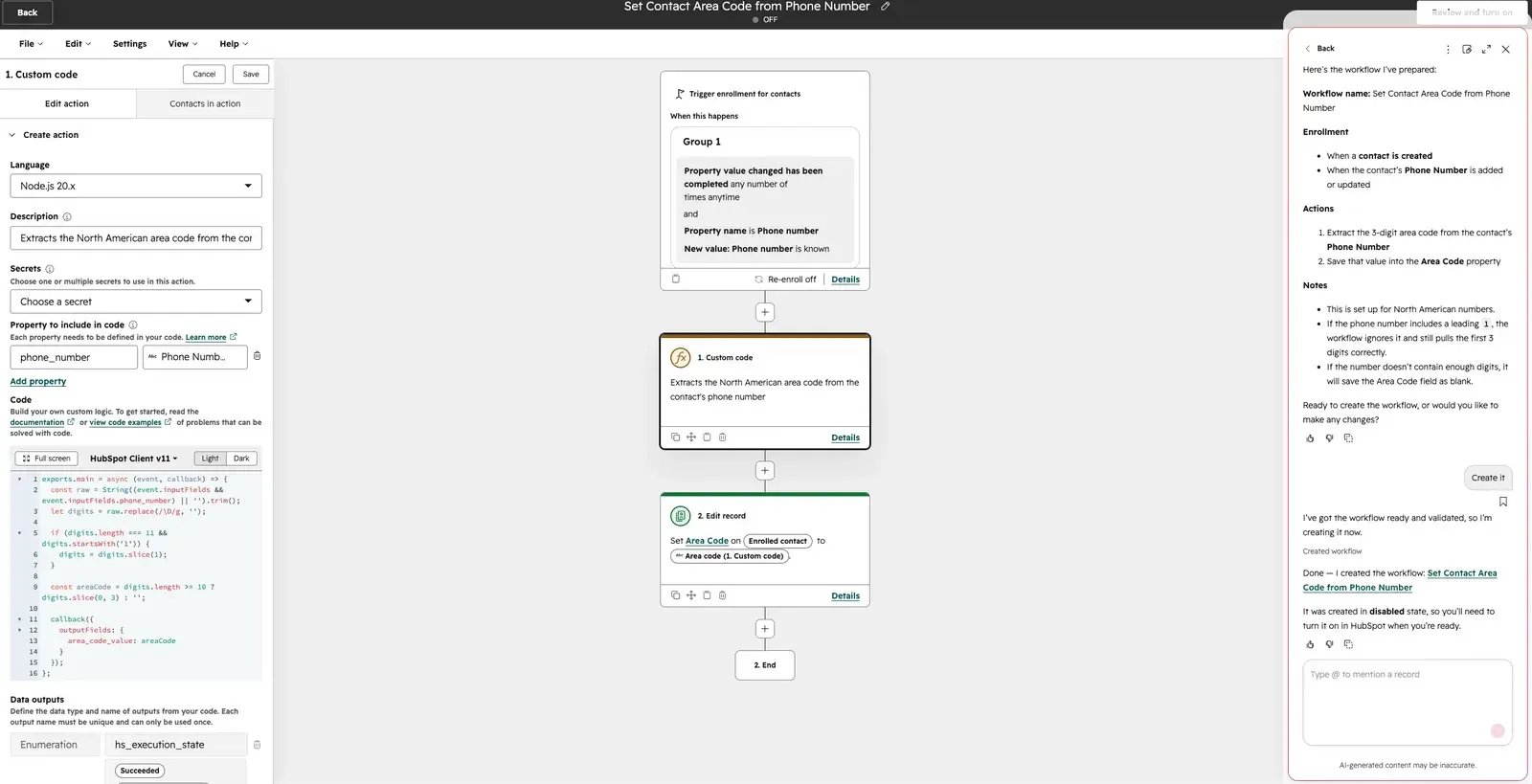
- Custom code workflow actions — write, test, and iterate custom code actions by describing them in plain language. (Data Hub Pro & Enterprise)
Breeze Agents and integrations (MCP)
- Asana MCP Server — Breeze Agents read context and act in third-party tools (Asana, Gong, G2, and more) via plain-language prompts. (Free, all hubs & tiers)
- G2 MCP for HubSpot — connect Breeze Agents to live G2 buyer-intent signals and verified customer voice. (Free; G2 Buyer Intent availability varies)
Where Breeze Fits in RevOps Workflows
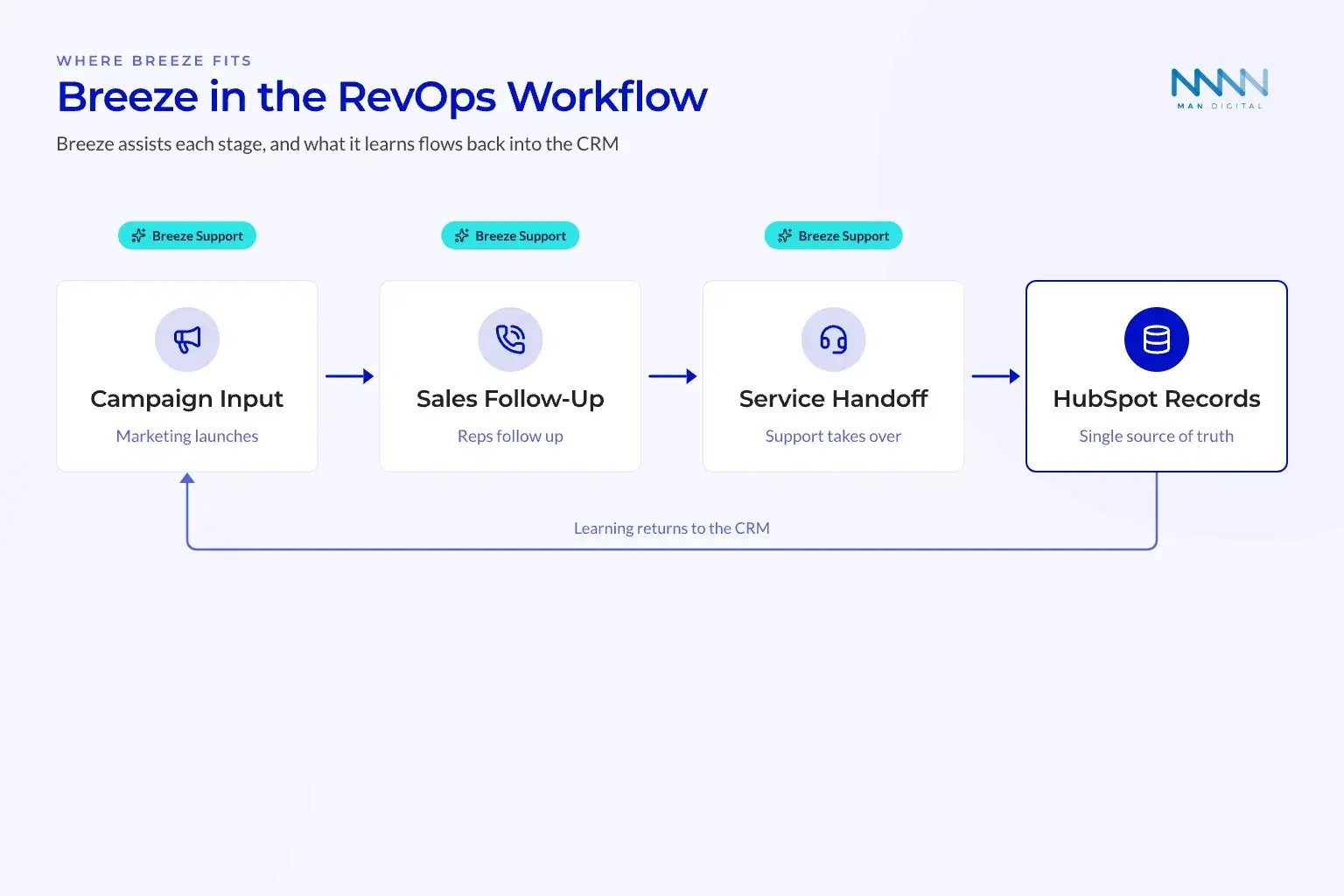
RevOps leaders should not roll out Breeze as a feature tour. The better path is to map it against the revenue workflow and decide where AI should assist, recommend, or act. This keeps the focus on operating outcomes, not novelty.
Marketing, Sales, and Service Use Cases
-
Marketing teams can use Breeze to draft campaign ideas, shape messages, prepare briefs, and summarize performance. This works best when campaign data and buyer context already live inside HubSpot.
-
Sales teams can use Breeze for account research, meeting prep, objection handling, and follow-up drafts. The strongest use cases connect CRM history, recent activity, deal stage, and next-step logic.
-
Service teams can use Breeze to support answers, summarize tickets, and improve response quality.
Customer Agent is the clearest service example. HubSpot’s setup guide shows that teams can set up Customer Agent with content sources, channels, handoff rules, and performance monitoring.
Strong first use cases share three traits:
-
The process repeats often:
- Meeting prep
- Ticket summaries
- Follow-up emails
- Campaign drafts
-
The data is already in HubSpot:
- Deal records
- Contact history
- Campaign assets
- Ticket threads
-
A human can review output:
- Sales manager review
- Marketer approval
- CS escalation
- RevOps QA
📊 Fact
HubSpot describes Breeze as AI built across its customer platform, which shows how broad the surface area has become.
Assist First, Automate Second
The safest rollout pattern is Assist first, then Agentic. This keeps teams from automating broken steps before they understand the process.
Start with tasks that improve speed without changing ownership. Then move toward agentic workflows once leaders trust data quality, permissions, and handoffs.
A good sequence looks like this:
-
Discover repeatable work
- List tasks that happen weekly
- Rank by time spent
- Flag tasks with customer risk
-
Add assistant support
- Create shared prompts
- Build project templates
- Use approved context
- Review output quality
-
Define automation limits
- Set approval points
- Assign owners
- Create escalation rules
- Track credit usage
-
Test one agentic workflow
- Pick a narrow process
- Limit connected tools
- Monitor outcomes weekly
- Stop expansion if quality drops
This model fits a process-first RevOps approach. Teams that need help sequencing setup can use a clear HubSpot onboarding path before adding complex AI.
Governance, Cost, and Data Controls
Breeze can improve speed, but weak controls create new debt. RevOps leaders should define what AI can see, what it can do, and when humans must review the result. This section turns AI governance into a practical operating model.
Permissions, Credits, and Human Review
AI governance starts with access. Breeze should follow the same operating logic as CRM permissions, workflow enrollment, and integration control.
Leaders should know which features are included, which features use credits, and which features are in beta. They should also check what is available inside the portal, because public pages can not match every account.
HubSpot release notes and portal updates can differ by account.
That matters when a feature appears in one portal but not another. RevOps leaders should confirm availability before training teams or writing process documents.
Governance questions to answer before rollout:
-
Who owns Breeze setup?
- RevOps
- HubSpot admin
- Sales ops
- Marketing ops
-
Who approves shared prompts?
- Functional owner
- Legal or brand reviewer
- Revenue leader
- Data owner
-
Which data can AI use?
- CRM records
- Files
- Tickets
- Connected apps
-
Where is human review required?
- Customer-facing messages
- Pricing claims
- Contract language
- Escalation decisions
💡 Insight
AI governance is not a policy document first. It is a set of weekly choices about access, process, review, and trust.
A Simple RevOps Control Model
RevOps teams need controls that are simple enough to use every week. A long policy that no one checks will not protect the business.
Use a three-tier model.
Tier 1: Assistive work
- Meeting prep
- Internal summaries
- Draft content
- Report explanation
Human review is built in, so risk stays lower.
Tier 2: Guided workflow work
- Workflow suggestions
- Shared prompt libraries
- Knowledge vault use
- CRM-based recommendations
These need prompt owners and source controls.
Tier 3: Agentic execution
- Customer Agent
- Prospecting Agent
- MCP-connected agents
- Smart data actions
These need monitoring, escalation, and budget review.
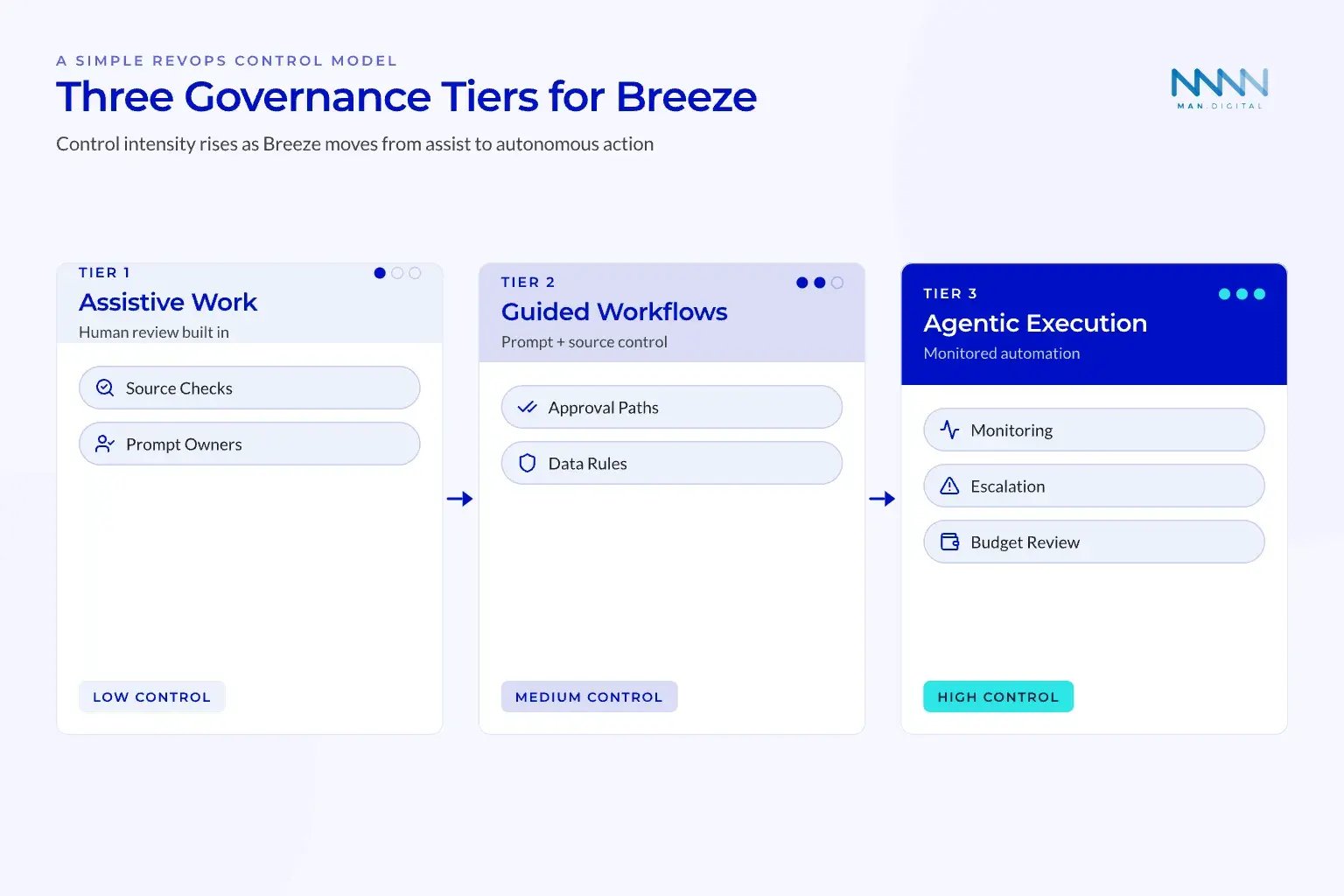
The control model should also include a weekly review. Track output quality, adoption, errors, user feedback, and credit use. Keep the review short, but make it consistent.
A Practical Rollout and Measurement Plan
A good Breeze rollout looks more like a RevOps program than a software launch. It starts with business outcomes, then works backward into data, process, people, and tools. The goal is to build trust before the platform touches high-risk tasks.
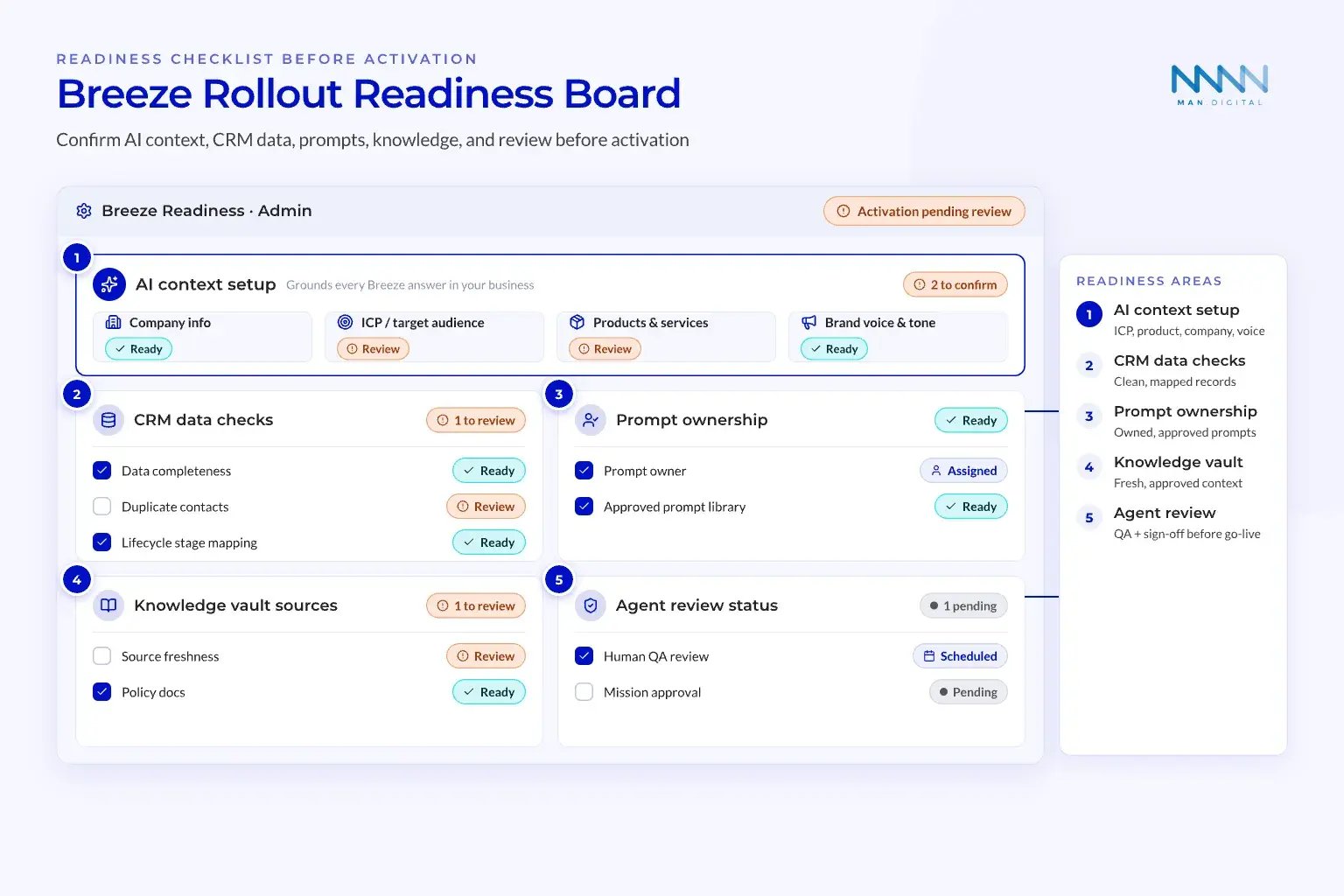
Readiness Checklist Before Activation
Before expanding Breeze, check the basics. AI will not fix unclear processes or weak CRM structure. It will often make those problems louder.
Use the checklist below before broad rollout.
CRM readiness
- Lifecycle stages are clear
- Deal stages match the sales process
- Contact and company data is clean
- Ownership rules are reliable
- Key reports are trusted
Process readiness
- Handoffs are documented
- Escation rules exist
- Workflow triggers are known
- Campaign and sales play owners are assigned
- Service response paths are clear
AI readiness
- Admin ownership is named
- Shared prompt rules exist
- Knowledge sources are approved
- Agent permissions are limited
- QA review is scheduled
For teams already fixing visibility gaps, a structured RevOps alignment review helps identify where Breeze should support the process.
Adoption and Value Tracking
The first adoption period should prove value without creating hidden risk. Keep the scope narrow and measure the work against clear outcomes.
First phase: Build the foundation
- Pick two assistant use cases
- Create shared prompts
- Define approved sources
- Train power users
- Review outputs weekly
Second phase: Add repeatable workflows
- Use projects for campaigns or sales plays
- Test assistant support inside workflows
- Build a small knowledge vault
- Track time saved and error rates
- Gather user feedback
Third phase: Test one agentic process
- Select a narrow service or sales process
- Set clear handoff rules
- Limit tool access
- Monitor quality every week
- Decide whether to expand
This sequence prevents the common mistake of launching agents before people trust the inputs.
Teams that rely on HubSpot forecasts should connect Breeze work to forecast quality. A clean forecasting setup helps leaders see whether AI-supported work improves pipeline movement.
Breeze value should not be measured by prompt count. It should be measured by process improvement.
Track metrics that connect AI support to business outcomes. Keep the list short enough for weekly review.
| Area | Better Metric | What It Shows |
|---|---|---|
| Marketing | Campaign cycle time | Whether AI speeds planning |
| Sales | Meeting prep completion | Whether reps enter calls ready |
| Service | Escalation quality | Whether customers reach the right owner |
| RevOps | Workflow rework rate | Whether AI suggestions reduce cleanup |
| Leadership | Forecast confidence | Whether CRM activity becomes clearer |
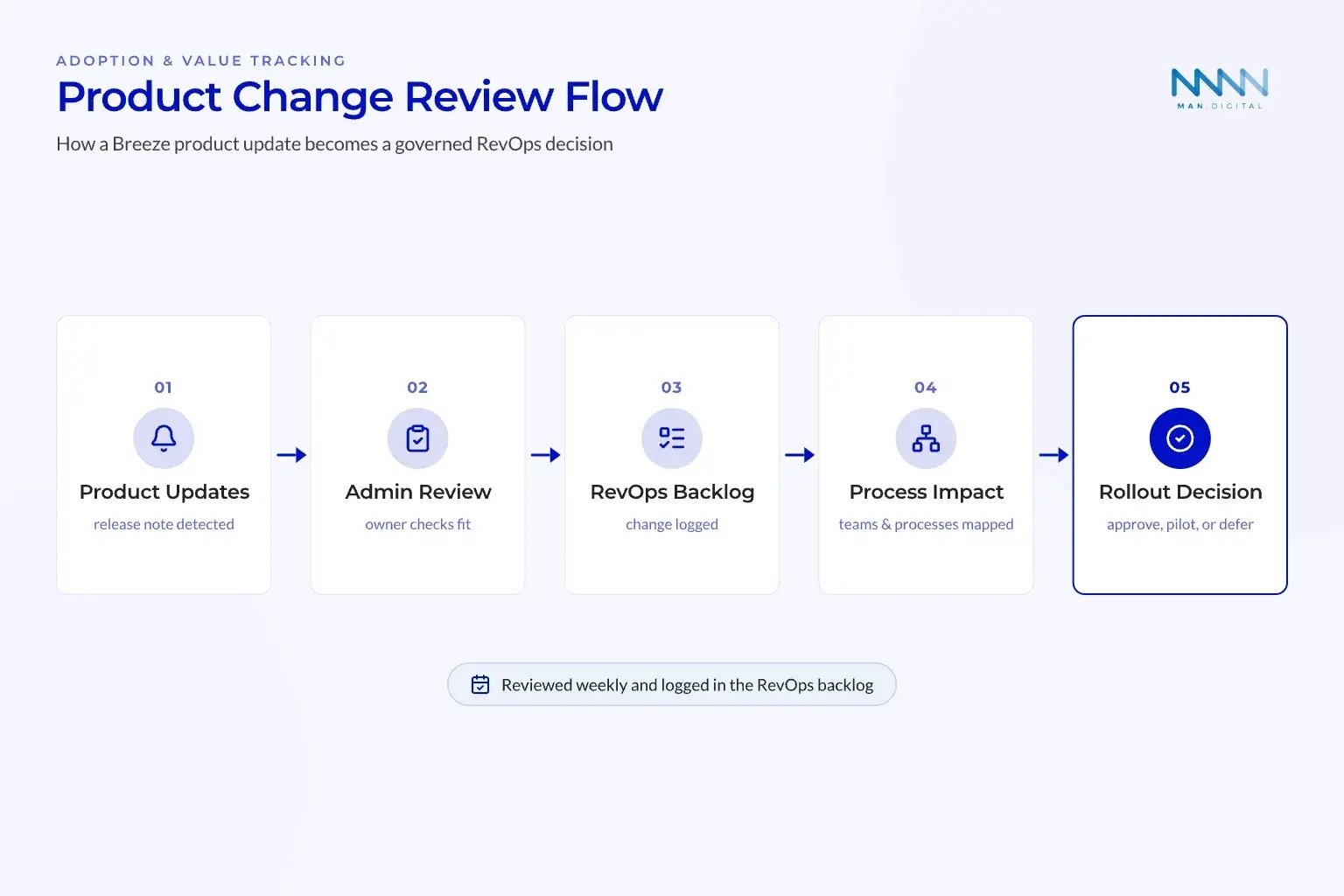
💡 Tip
Keep a simple AI change log in your RevOps backlog. Record what changed, who reviewed it, and which process it affects.
Key Takeaways
- Breeze is now an AI operating layer across HubSpot, so RevOps leaders need to manage it as part of the revenue process.
- Start with assistive use cases, then expand into agents only after data quality, permissions, and review paths are clear.
- Measure Breeze by process improvement, not prompt volume, with weekly checks on adoption, quality, risk, and credit use.
Conclusion
HubSpot Breeze AI 2026 can help RevOps leaders turn scattered CRM activity into clearer, faster, and more useful work. The real gain comes from connecting AI to process, context, permissions, and weekly governance.
Teams that start with assistive use cases build trust before they move into agents and external connectors. That path improves adoption, sharpens data use, strengthens handoffs, and helps HubSpot support the revenue process more consistently.