
September 6, 2026
10 min read
The value is simple: reps know what to do next, managers know what to inspect, and leaders can see whether the system improves revenue quality.
AI-assisted selling has shifted from novelty to standard practice across B2B revenue teams. In 2025, only 8% of sellers reported not using AI at all in their role, according to HubSpot’s sales research — AI is now woven into everyday tasks like research, drafting, and follow-up.
That matters because modern revenue teams need a playbook that guides both human judgment and AI-supported execution.
Most teams do not need another content library first. They need a revenue operating model that makes the right behavior easy inside HubSpot. The framework below connects sales enablement to process, data, coaching, and measurable revenue work without turning it into another side project.
What Changed in Sales Enablement
Modern enablement has moved from “give reps assets” to “help reps perform.” This section explains why that shift matters for HubSpot teams. It also shows why this work belongs inside the RevOps operating model, where process, data, coaching, and outcomes stay connected. Teams investing in revenue operations see measurable improvements here.
From Content Library to Operating System
Old enablement often meant one folder of decks, a few training sessions, and a quarterly update.
That model breaks under modern buying pressure.
Gartner’s enablement guidance frames the discipline around seller effectiveness, buyer engagement, and commercial outcomes. That definition matters because it moves ownership beyond assets. It also makes teams accountable for behavior change.
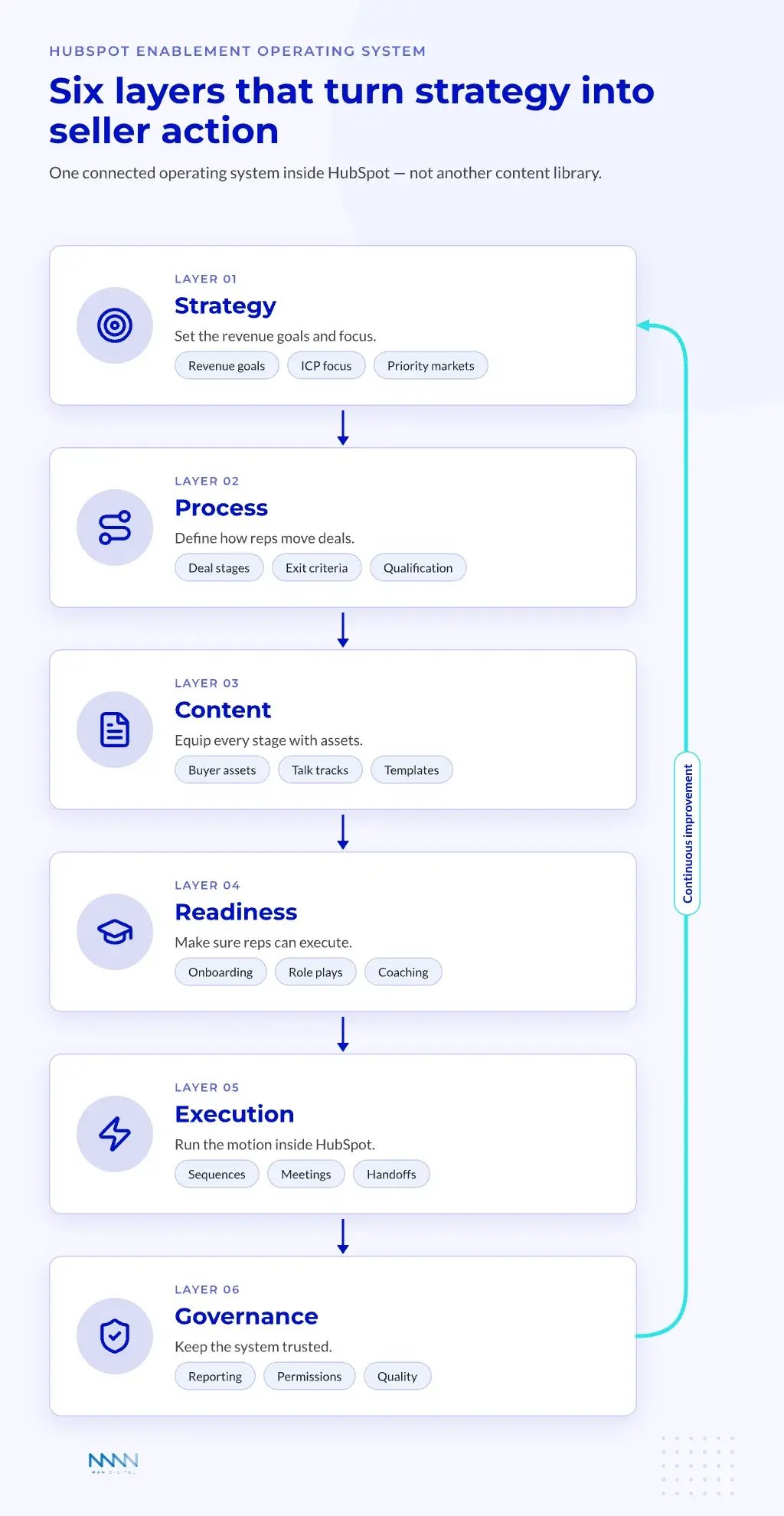
A HubSpot revenue team should design the system around six connected layers:
-
Strategy
- Revenue goals
- ICP and segment focus
- Priority offers and markets
-
Process
- Deal stages
- Exit criteria
- Qualification rules
-
Content
- Buyer-facing assets
- Internal talk tracks
- Proposal and quote templates
-
Readiness
- Onboarding paths
- Role plays
- Coaching reviews
-
Execution
- Sequences
- Meetings
- Deals and handoffs
-
Governance
- Reporting
- Permissions
- Quality checks
💡 Insight
The strongest teams do not start with a platform choice. They start with the seller behavior they need to repeat.
Content still matters, but it only works when it changes the next sales action. Training still matters, but it only works when managers inspect the skill in live deals. The operating system links both to revenue outcomes.
Why HubSpot Teams Need a RevOps Lens
HubSpot gives revenue teams one connected customer platform. That creates a real advantage when the operating model is clear. It also creates noise when teams add objects, workflows, and reports without design rules.
RevOps brings the missing structure.
The goal is not to make HubSpot more complex. The goal is to make each seller action easier to inspect, coach, and improve. That requires shared definitions across marketing, sales, CS, and leadership.
The RevOps lens asks five simple questions:
- Which buyer signal should trigger seller action?
- Which CRM property proves the action happened?
- Which playbook guides the next step?
- Which manager view confirms quality?
- Which business metric shows impact?
Teams with messy CRM foundations should fix the data model before adding more layers. Our guide to the HubSpot data explains how objects, properties, and associations support that structure.
A weak foundation turns every new tool into another source of confusion. A clean foundation turns HubSpot into the place where strategy becomes execution.
Build the HubSpot Enablement Framework
A useful framework turns broad goals into daily rules. This section maps the six layers to HubSpot capabilities and team owners. It also gives a simple way to separate adoption metrics from business impact, which prevents teams from mistaking activity for progress.
MAP the Six Layers to HubSpot
The six layers work best when each one maps to a clear HubSpot capability. Smart CRM holds the shared data model. Sales Hub supports seller execution.
Content Hub and documents support asset management. Commerce Hub supports quotes and commercial flow. Breeze and workflows support assistance and automation.
A practical HubSpot mapping looks like this:
| Enablement Layer | HubSpot Area | Main Question | Owner |
|---|---|---|---|
| Strategy | Smart CRM | Who are we selling to? | CRO or VP Revenue |
| Process | Sales Hub | What should reps do next? | RevOps and sales leaders |
| Content | Content Hub and documents | Which asset supports this stage? | Marketing and enablement |
| Readiness | Playbooks and coaching views | Can reps execute the motion? | Enablement and managers |
| Execution | Deals, sequences, meetings | Is the playbook used in real work? | Sellers and managers |
| Governance | Reports, permissions, approvals | Is the system still trusted? | RevOps |
This table is not just a software map. It is an accountability map. Each layer needs one owner, one rhythm, and one metric family.
The Sales Hub overview shows how prospecting, sequences, playbooks, forecasting, and automation sit close to seller work. That closeness matters. Reps adopt guidance faster when it appears where work already happens.
Define Roles Before Tools
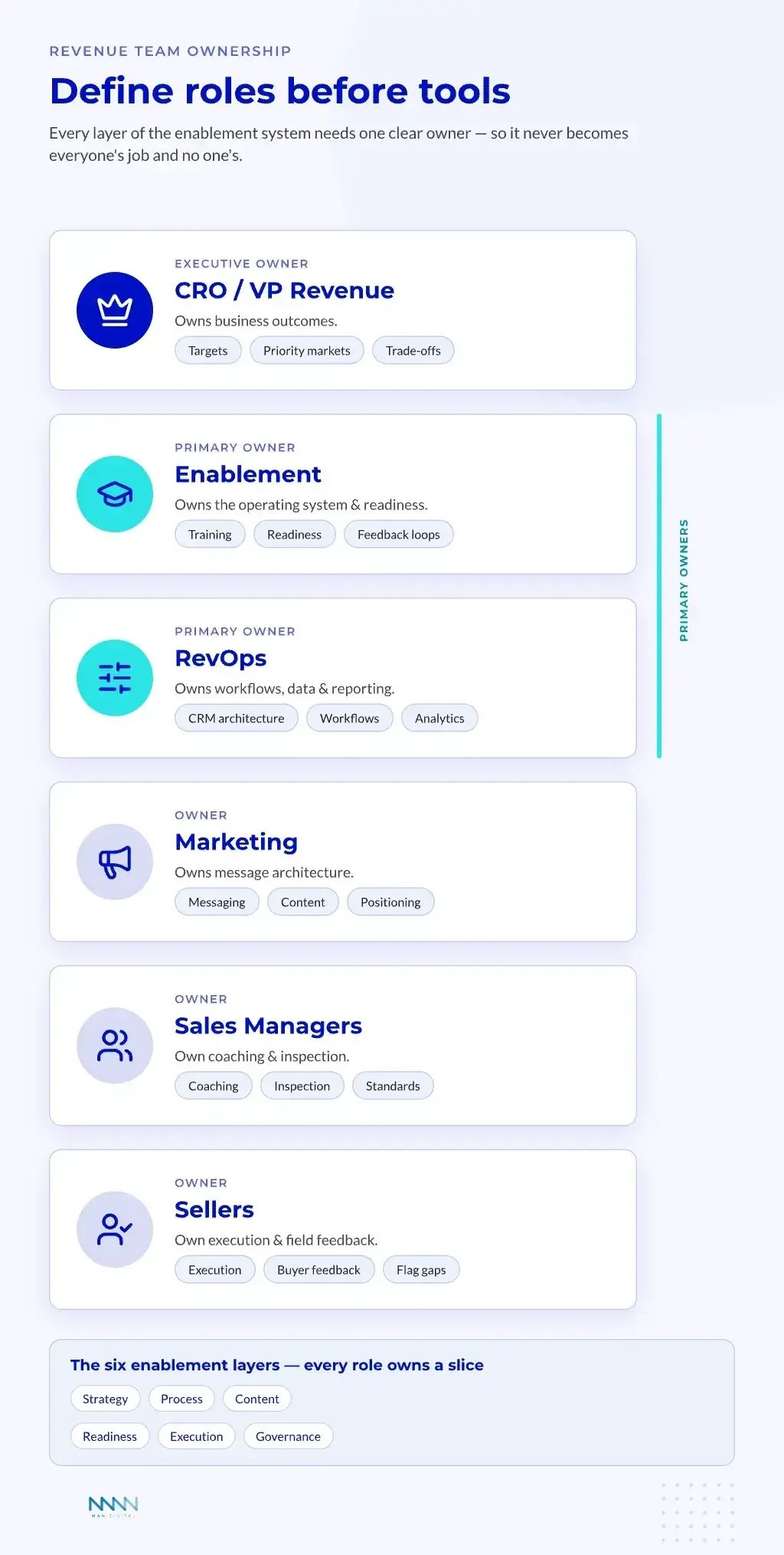
Role clarity prevents enablement from becoming everyone’s job and no one’s job.
The CRO or VP Revenue owns business outcomes. Enablement owns the operating system, readiness model, and feedback loops. RevOps owns workflows, reporting, integrations, and data quality.
Marketing and product marketing own message architecture. Sales managers own coaching and inspection. Sellers own execution and field feedback.
A clean role model should include:
-
Revenue leadership
- Sets commercial targets
- Defines priority markets
- Approves trade-offs
-
Enablement
- Builds training paths
- Runs readiness programs
- Turns feedback into improvements
-
RevOps
- Designs CRM architecture
- Maintains workflows
- Measures adoption and impact
-
Managers
- Coach calls and deals
- Inspect process quality
- Reinforce standards
-
Sellers
- Use the system
- Share buyer feedback
- Flag broken steps
💡 Tip
Put role ownership in the same operating document as your lifecycle stages. If ownership lives elsewhere, teams stop using it.
The best ownership model also prevents tool sprawl. RevOps can ask whether a new platform improves a named bottleneck. Enablement can ask whether it changes a named seller behavior.
Turn Playbooks Into Daily Seller Action
Playbooks make strategy usable only when they appear inside seller workflows. This section shows how to build them around deal stages, buyer signals, and manager coaching. It also explains why playbooks should guide behavior instead of acting like static scripts.
Design Playbooks Around Moments
A strong playbook answers a moment-based question. It does not try to answer every seller question. The best version guides one decision at one stage.
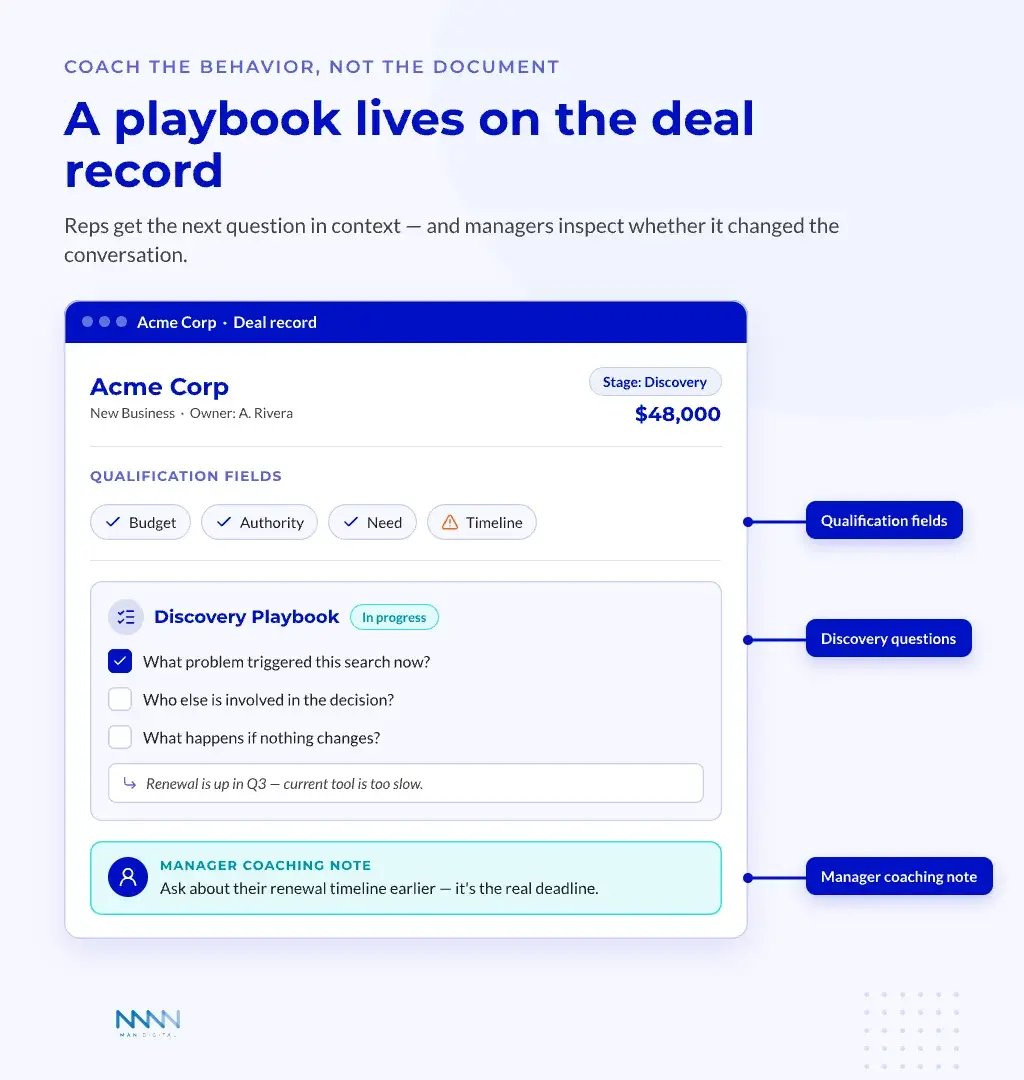
HubSpot’s playbooks documentation shows how teams can create notes, questions, and guided content inside CRM records. That matters because reps do not need more tabs during a sales call. They need clear prompts in context.
Useful playbook moments include:
-
Discovery
- Confirm business pain
- Capture current process
- Identify decision group
-
Qualification
- Check fit
- Confirm urgency
- Mark missing data
-
Demo
- Tie product value to pain
- Record objections
- Confirm next step
-
Proposal
- Align price to value
- Confirm legal path
- Track buying risk
-
Handoff
- Share promised outcomes
- Pass success criteria
- Flag account risk
Each playbook should connect to a CRM field or manager review. Otherwise, it becomes a note template with no operational value.
The point is cleaner execution.
Coach the Behavior, Not the Document
Managers should not ask only whether a playbook was opened. They should inspect whether it changed the deal conversation. Usage proves exposure.
Quality proves value.
📊 Fact
AI and automation save time when teams apply them inside clear work patterns, not when they replace manager judgment.
A simple coaching loop works well:
- Review two calls or meetings per rep each week
- Compare the conversation against the playbook moment
- Flag one behavior to improve
- Update the playbook when the same gap appears often
- Track whether the gap falls over time
This loop makes playbooks living tools. It also keeps enablement close to revenue reality. If managers never inspect the behavior, reps will treat playbooks as admin work.
Teams should connect coaching to a short list of sales KPIs. The sales KPIs guide is a useful base for linking behavior to pipeline, win rate, and cycle time.
For a deeper look, see our guide on HubSpot Consulting.
Choose Native HubSpot or Specialist Platforms
Tool choice depends on scale, governance needs, and sales motion complexity. This section gives a practical way to decide when HubSpot is enough. It also explains when a specialist layer makes sense, so the team buys for a real constraint instead of a vague feeling.
Start with Native Capability
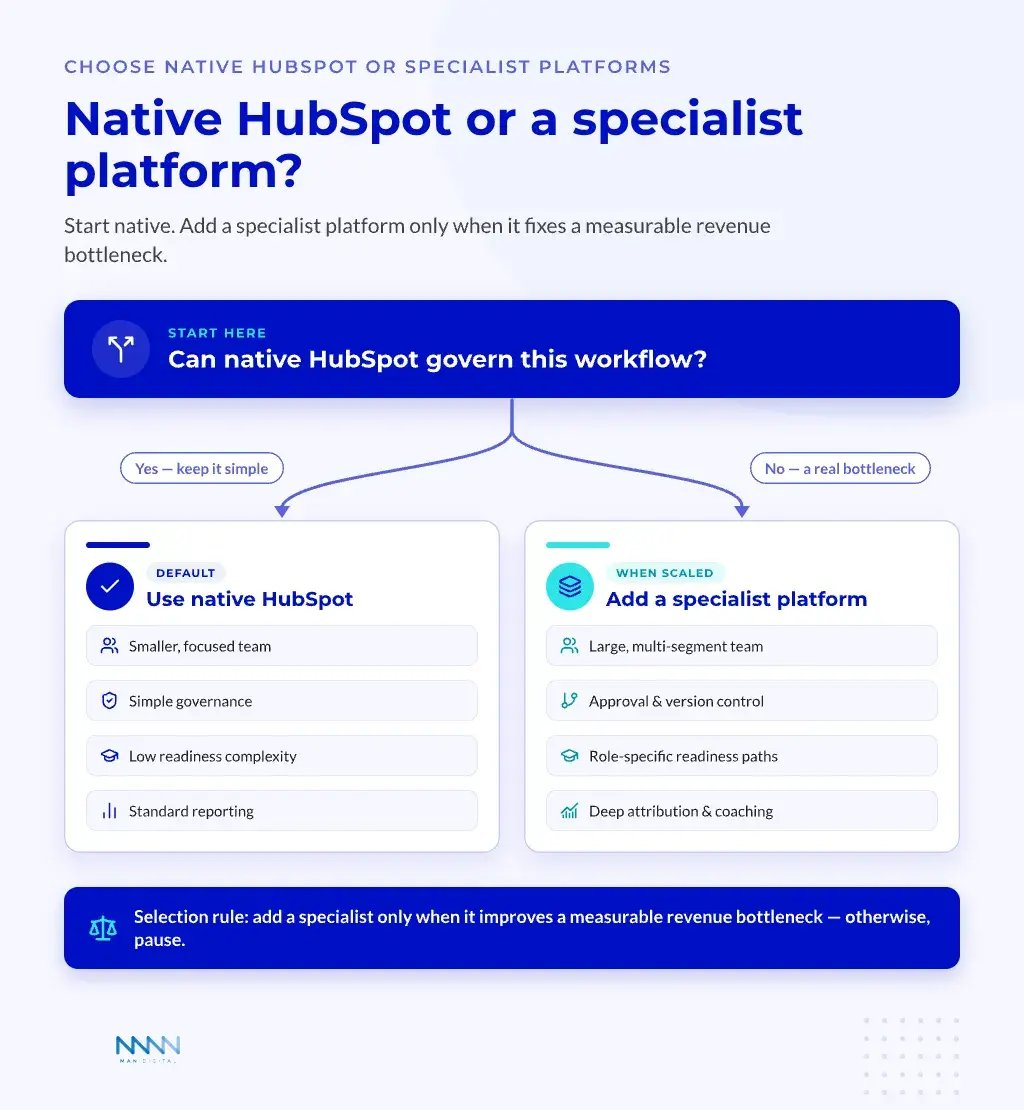
HubSpot-first SMB and lower-mid-market teams should usually exhaust native capability before buying a separate platform. The native stack now covers more of the daily seller workflow than many teams realize. That includes sequences, documents, playbooks, forecasting, AI support, quoting, and reporting.
Native HubSpot works best when the team needs:
- Faster setup
- Lower admin burden
- One CRM-native workflow
- Basic content tracking
- Simple coaching loops
- Connected reporting
This is where many teams can reduce tool sprawl. Fewer systems often mean better data and higher adoption. The real constraint is usually process design, not feature volume.
Teams moving from Salesforce should also review their operating model before recreating old complexity. A structured migration playbook helps teams decide which fields, processes, and reports deserve to survive.
📝 Note
Native does not mean basic. It means the workflow stays close to the CRM, where seller behavior and revenue data already live.
Add Specialists for Clear Bottlenecks
Enterprise teams can need specialist platforms when scale changes the problem. Large teams often need formal readiness programs, regulated content approval, advanced analytics, digital sales rooms, and complex coaching workflows.
The key is to buy for the bottleneck.
Match the tool layer to the constraint:
-
Governed content
- Use when approval, version control, and asset discovery are painful
- Look for permissions, audit trails, and usage analytics
-
Readiness and certification
- Use when ramp quality differs too much by team
- Look for practice, scoring, coaching, and role-based paths
-
Buyer experience
- Use when deals need shared rooms
- Look for engagement tracking and buyer-side analytics
-
Conversation intelligence
- Use when managers need call review and forecast discipline
- Look for coaching workflows and risk signals
-
Revenue analytics
- Use when leadership needs stronger links between behavior and outcomes
- Look for stage movement, cycle time, and conversion analysis
Seismic describes enablement as a discipline that connects content, training, coaching, and tools in its enablement explainer. That broad scope helps explain why specialist platforms still matter. Enterprise teams often need deeper governance than a CRM-native setup can provide alone.
"Sales enablement is a strategic, cross-functional process that equips sellers with the content, coaching, tools, and insights they need to effectively engage buyers and close more deals."
— Seismic, What is sales enablement?
The selection rule is simple. If the specialist platform improves a measurable revenue bottleneck, consider it. If it only adds another place for reps to log work, pause.
Use AI and Measurement Without Losing Control
AI now shapes seller research, content, follow-up, forecasting, and coaching. HubSpot reports that reps who effectively partner with AI tools are 3.7x more likely to hit quota than those who do not — but that lift depends on keeping AI inside a governed system. Measurement decides whether those changes improve revenue outcomes. This section explains how to use AI inside governed workflows and how to measure what changes, without losing human control.
Put AI Inside Governed Workflows
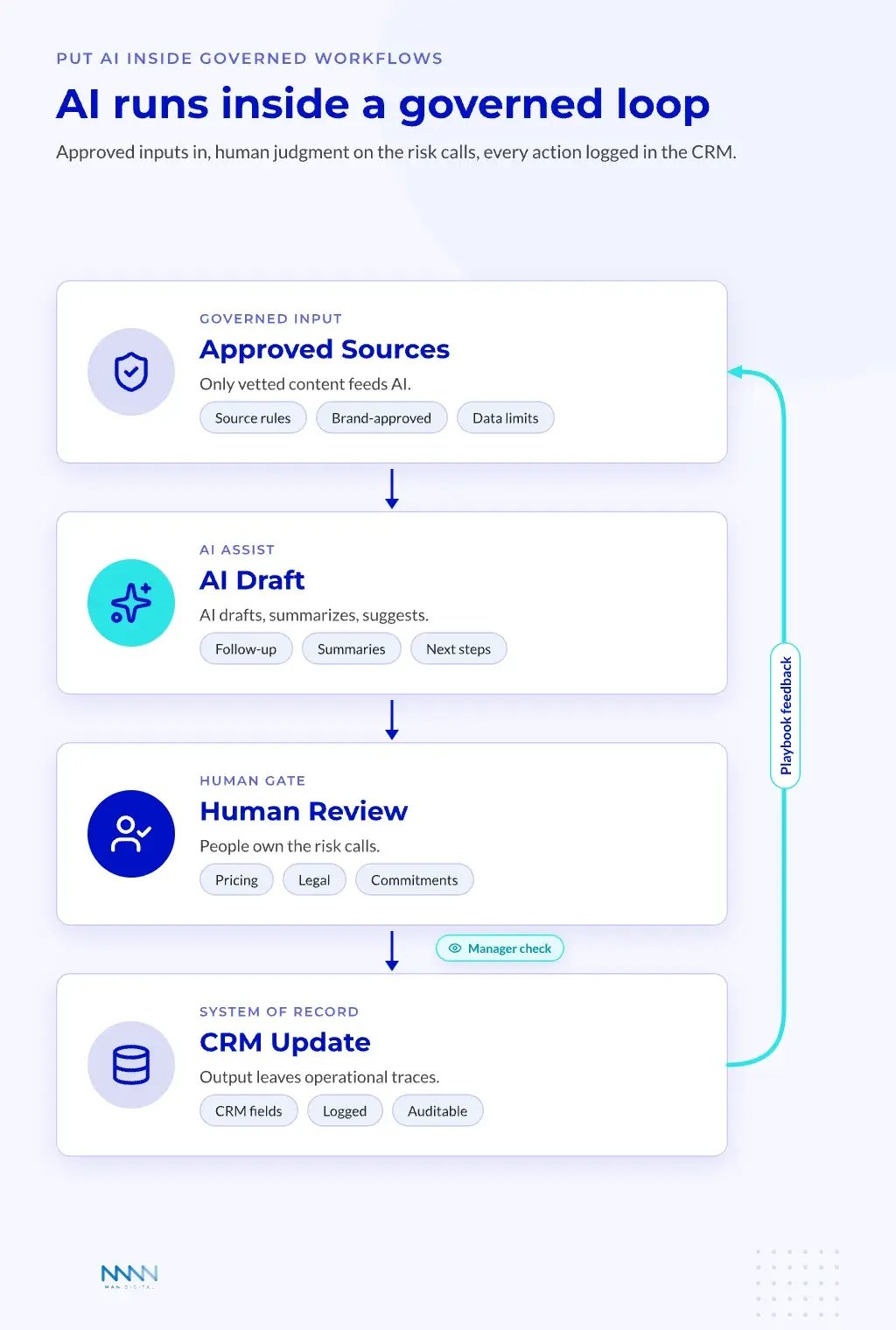
AI creates the most value when it reduces friction around a clear job. It can draft follow-up, summarize calls, find account context, surface risks, and suggest next steps. It should not decide the sales strategy alone.
The strongest B2B growth teams combine digital tools, clean data, and commercial discipline. That pattern fits AI well: HubSpot’s research found that 64% of sales professionals say AI automation saves them one to five hours per week. The tool helps most when the commercial system already knows what good looks like.
Useful AI-assisted workflows include:
-
Prospecting
- Research account context
- Draft first-touch emails
- Suggest buying triggers
-
Discovery
- Summarize meeting notes
- Extract pain points
- Identify missing stakeholders
-
Deal management
- Flag stalled opportunities
- Suggest next steps
- Highlight close-date risk
-
Content
- Adapt messaging by persona
- Draft follow-up assets
- Reuse approved language
-
Coaching
- Surface objection patterns
- Compare talk tracks
- Support manager review
Teams using HubSpot AI should connect these workflows to clear CRM fields. Otherwise, useful output disappears into notes and chat history. AI must leave operational traces.
A practical governance model should define what AI can draft, suggest, summarize, and automate. It should also define what requires human approval. This matters most for pricing, legal language, compliance claims, and customer commitments.
Set these controls before rollout:
- Approved prompt patterns
- Source content rules
- Human review steps
- Data privacy limits
- CRM fields AI can update
- Manager inspection rhythm
- Error reporting process
For deeper AI architecture in the HubSpot ecosystem, the Breeze AI guide explains how teams can connect assistance, automation, and governance.
Measure Adoption and Business Impact Separately
Adoption metrics matter, but they are not the final goal. A team can complete training and still miss its forecast.
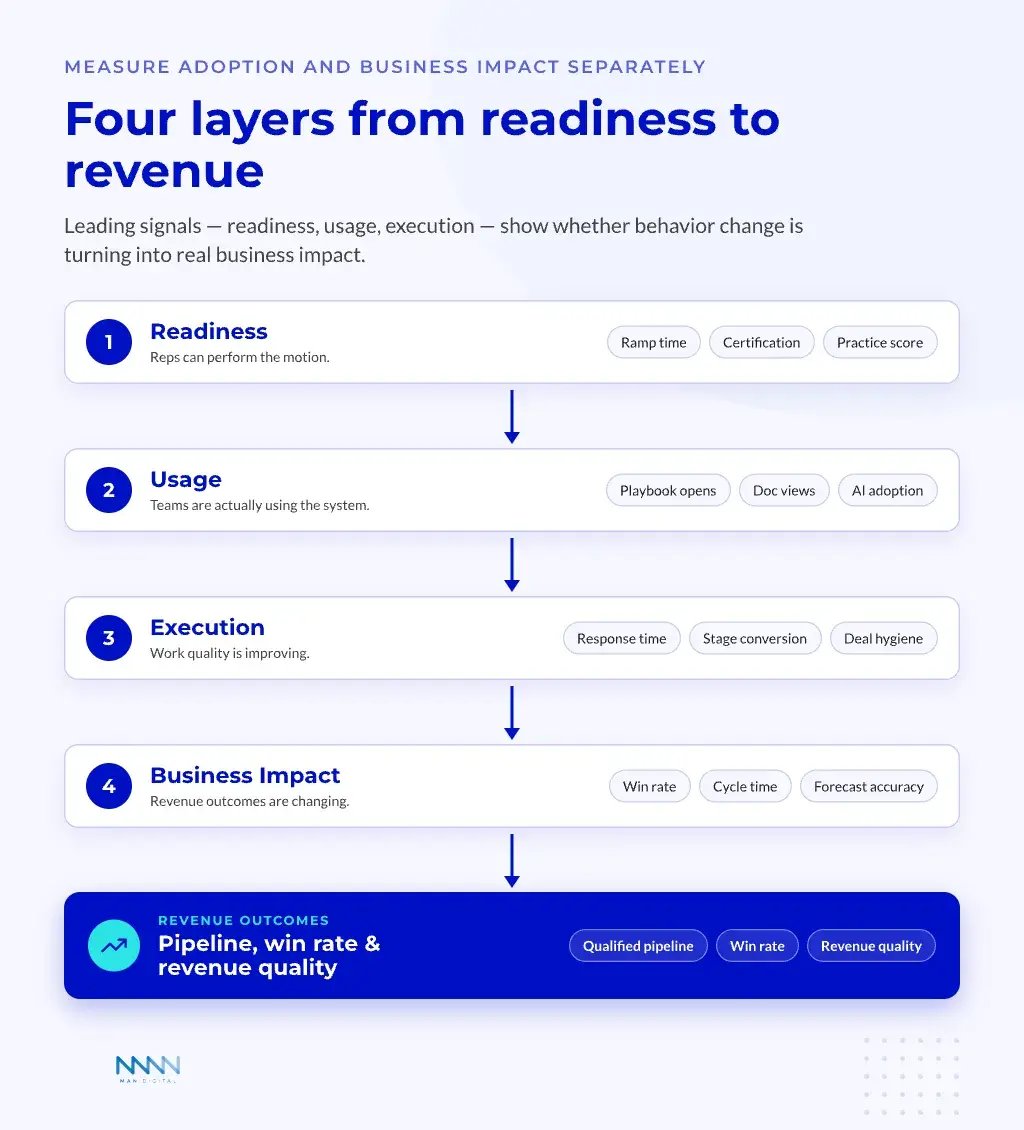
The better model separates four metric groups:
| Metric Group | Examples | What It Proves |
|---|---|---|
| Readiness | Ramp time, certification, practice score | Reps can perform the motion |
| Usage | Playbook opens, document views, AI adoption | Teams are using the system |
| Execution | Response time, stage conversion, deal hygiene | Work quality is improving |
| Business Impact | Win rate, cycle time, forecast accuracy | Revenue outcomes are changing |
This structure stops teams from overvaluing easy metrics. Usage tells you whether the system reached the field. Business impact tells you whether it changed results.
Review these signals together:
- Training completion plus ramp time
- Playbook usage plus stage conversion
- Document views plus buyer engagement
- Manager coaching plus win rate
- AI adoption plus forecast quality
A monthly review should bring together sales leadership, enablement, RevOps, marketing, and frontline managers. The meeting should not become a report readout. It should produce decisions.
A useful monthly rhythm includes:
-
Review
- Which metrics improved?
- Which gaps repeated?
- Which teams need support?
-
Diagnose
- Is the problem content, skill, process, or data?
- Is the issue broad or segment-specific?
- Is the workflow clear inside HubSpot?
-
Decide
- Which playbook changes this month?
- Which training gets updated?
- Which report or property needs cleanup?
-
Reinforce
- Which managers inspect the change?
- Which reps pilot it first?
- Which KPI confirms progress?
💡 Insight
The best metric model does not ask whether enablement happened. It asks whether sellers changed behavior in ways that improved revenue quality.
This rhythm prevents post-launch decay. It also keeps the system connected to the real sales motion. Over time, leaders trust the numbers because they can see what changed and why.
Frequently Asked Questions
What is sales enablement in 2026?
In 2026, sales enablement works best as a connected revenue operating system rather than a content library. It links strategy, process, content, readiness, execution, and governance inside HubSpot so reps know what to do next, managers know what to inspect, and leaders can see whether the system improves revenue quality.
What are the six layers of a HubSpot enablement operating system?
A HubSpot revenue team should design enablement around six connected layers: Strategy, Process, Content, Readiness, Execution, and Governance. Each layer maps to a HubSpot capability and needs one owner, one rhythm, and one metric family, so enablement becomes an accountability map instead of a loose collection of assets and training sessions.
Who should own sales enablement on a HubSpot revenue team?
Ownership should be defined before tools. The CRO or VP Revenue owns business outcomes, Enablement owns the operating system and readiness, RevOps owns workflows and data quality, Marketing owns message architecture, sales managers own coaching and inspection, and sellers own execution and field feedback. Clear roles stop enablement from becoming everyone's job and no one's.
Should we use native HubSpot or a specialist enablement platform?
Most SMB and lower-mid-market teams should exhaust native HubSpot capability first, since the native stack now covers sequences, documents, playbooks, forecasting, AI support, quoting, and reporting. Add a specialist platform only when it improves a measurable revenue bottleneck, such as governed content, formal readiness, or advanced revenue analytics. If it only adds another place to log work, pause.
How should revenue teams use AI in sales enablement without losing control?
Put AI inside governed workflows. Let it draft follow-up, summarize calls, surface risk, and suggest next steps, but keep human approval for pricing, legal language, compliance claims, and customer commitments. Define approved prompts, source rules, data limits, and the CRM fields AI can update, so useful output leaves operational traces instead of disappearing into notes.
How do you measure sales enablement effectiveness?
Measure adoption and business impact separately across four layers: readiness (ramp time, certification), usage (playbook opens, AI adoption), execution (response time, stage conversion, deal hygiene), and business impact (win rate, cycle time, forecast accuracy). Usage shows whether the system reached the field; business impact shows whether it actually changed revenue outcomes.
Conclusion
Sales enablement now works best as a connected revenue system, not a support function on the side. HubSpot revenue teams can build stronger execution when strategy, data, content, coaching, AI, and reporting work in one operating rhythm.
The real transformation comes from making good seller behavior easier to repeat. When teams build the right framework, they create clearer coaching, improve forecast trust, strengthen rep readiness. And build a cleaner path from buyer signal to revenue action.
Key Takeaways
- Build enablement as a connected HubSpot revenue system, not a content folder.
- Start with native HubSpot capability before adding specialist platforms.
- Use AI inside governed workflows where human judgment still owns key decisions.
- Measure readiness, usage, execution, and business impact as separate layers.
- Strengthen the system through a monthly rhythm that turns field feedback into better execution.