


October 29, 2026
10 min read
For RevOps leads and HubSpot owners, the goal is a bill they can explain, not just a filled amount field.
Billing errors put profit at risk.
About 60% of respondents estimated that billing and monetization errors put profit equal to at least 2% of revenue at risk (DigitalRoute report).
These estimates describe potential harm, not audited losses or a HubSpot-specific finding.
The Contract record should show who agreed, what they bought, what they owe, and when the terms apply. It also needs links to billing records and named owners.
What HubSpot Subscriptions Explain, and What the Contract Must Explain
Invoices, payments, and usage events can stay in their source systems, linked to those terms. Here, subscriptions means recurring plans sold to buyers, not your HubSpot plan or email preferences.
A recurring billing plan describes how charges repeat. The Contract record explains the agreement behind them, including terms that an amount or status cannot show.
Separate the Agreement From the Billing Arrangement
An active subscription does not explain every promise your team made.
Scope, discounts, notice deadlines, and service duties can need more detail. The team needs to know which terms apply before it can judge whether a charge is right.
HubSpot’s contract guide describes a way to track committed revenue, including recurring and one-time products. The Contract record does not replace the signed legal agreement.
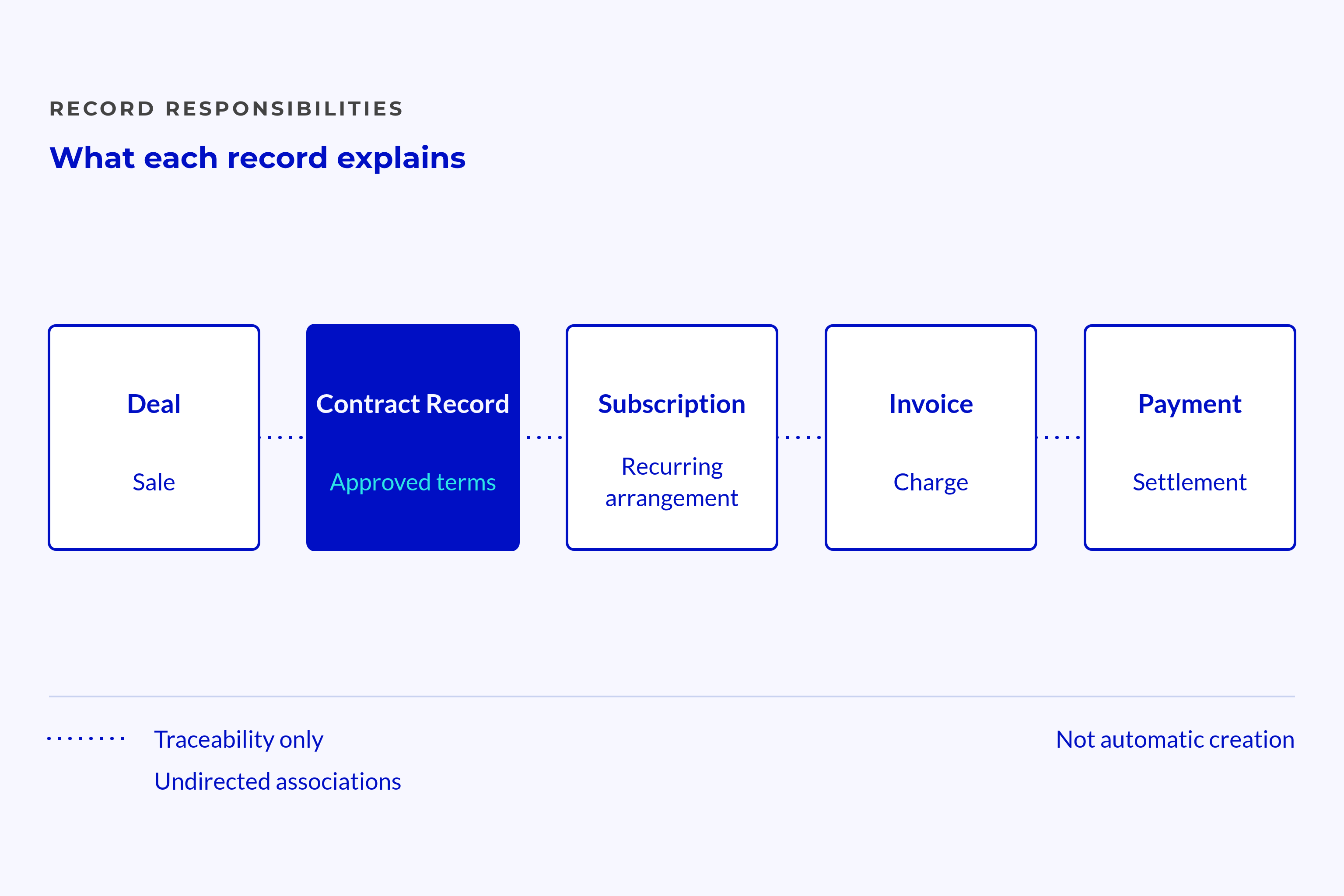
Keep the roles distinct:
- Deal: Tracks the sales opportunity and outcome.
- Contract record: Explains approved terms.
- Subscription: Represents the recurring billing plan.
- Invoice: Records a charge for a set period or event.
- Payment: Records payment or an attempt to collect it.
These roles do not mean that creating one record creates the next.
A closed-won deal can trigger a handoff before billing details are complete. If teams treat “won” as “ready to bill,” finance inherits unresolved sales questions.
Define the Commercial Role Before Choosing the Object
“Contract record” names a role in the data model, not a feature set that every portal supports. Check which native features, editing options, and limits apply before choosing the design. The record must fit the terms your team needs to track.
The contract’s commercial revenue context should show which terms apply now and why. Those terms can guide revenue decisions without moving every charge or payment into HubSpot.
Keep setup choices open:
- Use verified portal features that fit the agreement model.
- Keep external billing where it already runs the billing process.
- Preserve access to the signed agreement and approved changes.
- Check limits before relying on record links or automated updates.
The record needs to explain the charge even when another system creates the invoice.
Which Facts Must Sit on the Contract Record?
Store approved terms in structured fields when teams need them for decisions, reports, or billing checks. Link billing records rather than copying them all. Label calculated totals so users can tell them apart from agreed terms.
Identity, Scope, and Recurring Value
Start with a stable contract ID, an approved version, and a link to the signed document. Name the legal entity that signs and the entity that receives the bill separately, even when they match.
The company record gives customer context, but it cannot safely hold every agreement’s terms. A customer can buy different services with different renewal dates. Those terms need to remain distinct.
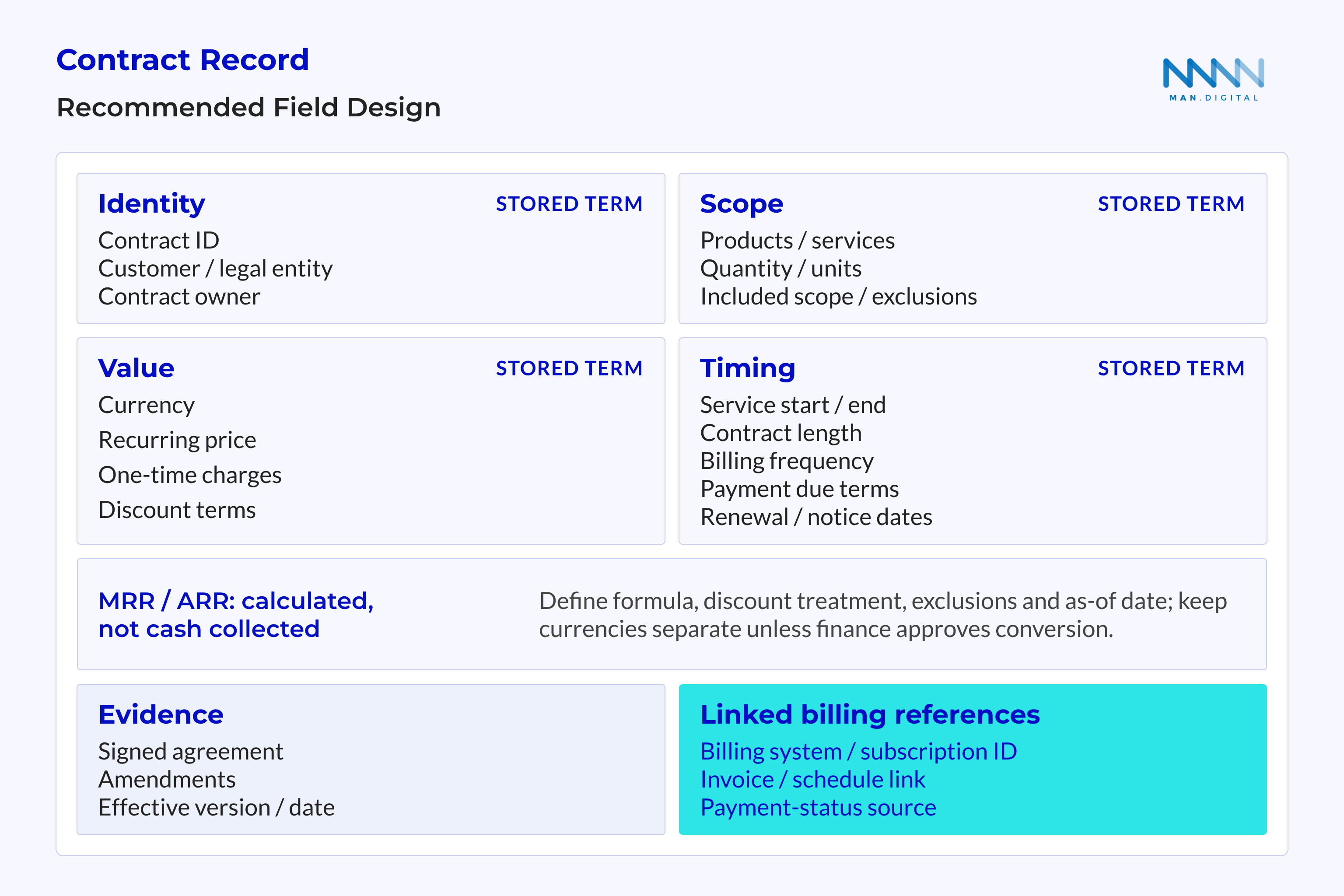
These field groups are a recommended design, not a list of native HubSpot fields.
| Fact Group | Purpose | Source of Truth | Owner | Check Before Billing |
|---|---|---|---|---|
| Contract ID, version, and document. | Shows which agreement applies. | Contract register and signed agreement. | RevOps and sales owner. | ID is unique; evidence is linked and matches. |
| Signing party, bill-to party, and contact. | Shows who agreed and who receives the bill. | Agreement and approved billing details. | Sales owner and finance. | Parties and billing contact are confirmed. |
| Products, services, and quantities. | Defines what the customer pays for. | Approved agreement and line items. | Sales owner. | Each charge matches approved scope. |
| Price, recurring charge, currency, and discounts. | Explains the amount due. | Agreement or approved change. | Sales owner and finance. | Charge basis and currency match. |
| One-off charges. | Keeps setup or project fees distinct. | Approved order. | Sales owner. | Recurring totals exclude these fees. |
| Service dates and billing schedule. | Shows what each charge covers and when. | Agreement and approved schedule. | Service and billing owners. | The billing period is clear. |
| Term, renewal, notice, and cancellation. | Defines the commitment and exit rules. | Agreement and approved changes. | Sales or renewal owner. | Rules, deadlines, and owner are visible. |
| Payment terms and billing links. | Connects agreed terms to billing. | Finance policy and billing system. | Finance and billing owner. | Due terms are clear; IDs link to the right records. |
| Changes and proof of approval. | Explains current and future terms. | Controlled change register. | Sales owner. | Approved version and effective date are clear. |
| Recurring-value totals. | Gives reports a shared basis. | Agreed rules for each total. | RevOps with finance. | Formula, exclusions, currency, and date are clear. |
A document link shows where a term came from. A billing check still needs a structured field if it must read and compare that term.
Preserve product-level detail:
- Scope and quantity
- Identify the covered product or service.
- Keep the agreed unit and quantity.
- Price and discount
- Record how the charge works.
- Keep discount rules and expiry.
- Charge type and schedule
- Separate recurring and one-off items.
- Keep different product schedules distinct.
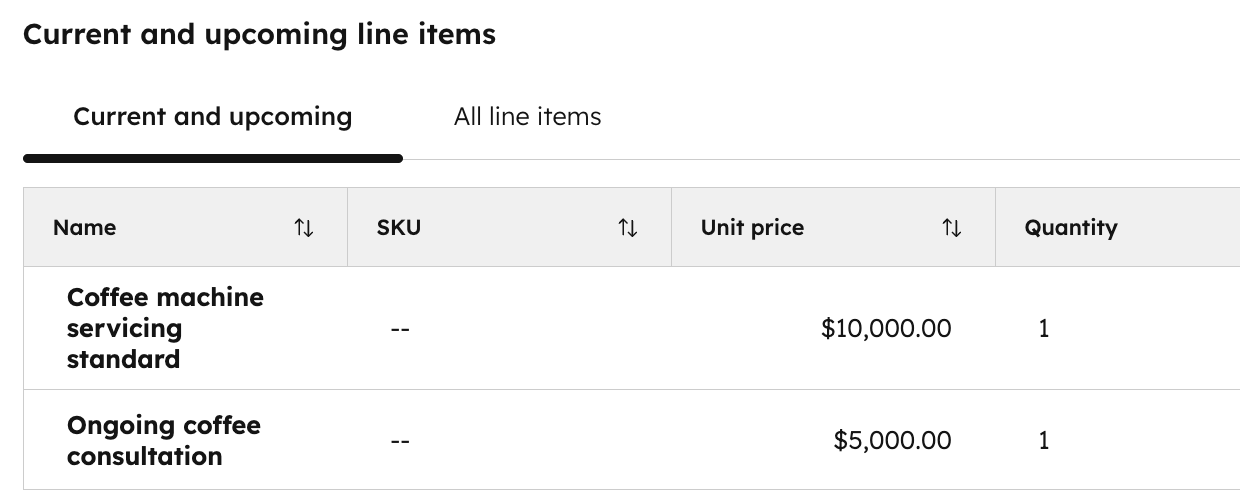
Use linked line items when products have different quantities, prices, or billing cycles. A single contract total should not hide those differences.
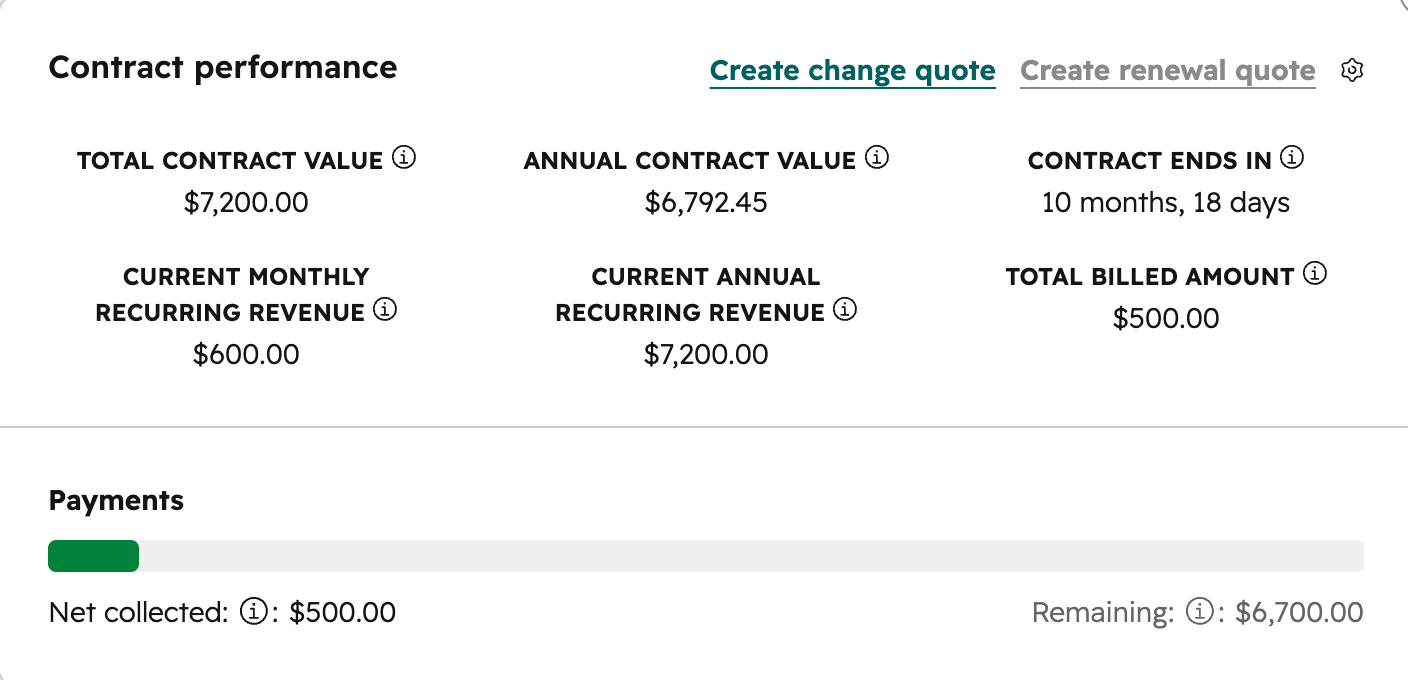
Monthly recurring revenue and annual recurring revenue are calculated totals, not collected cash.
Define the formulas, how discounts affect them, what they exclude, and their as-of dates. Keep currencies separate unless finance approves a rule for converting them.
Dates, Subscription Terms, and Billing Context
Billing frequency, contract length, and payment due terms answer different questions. A generic “subscription term” field blurs them and makes the next invoice harder to explain.
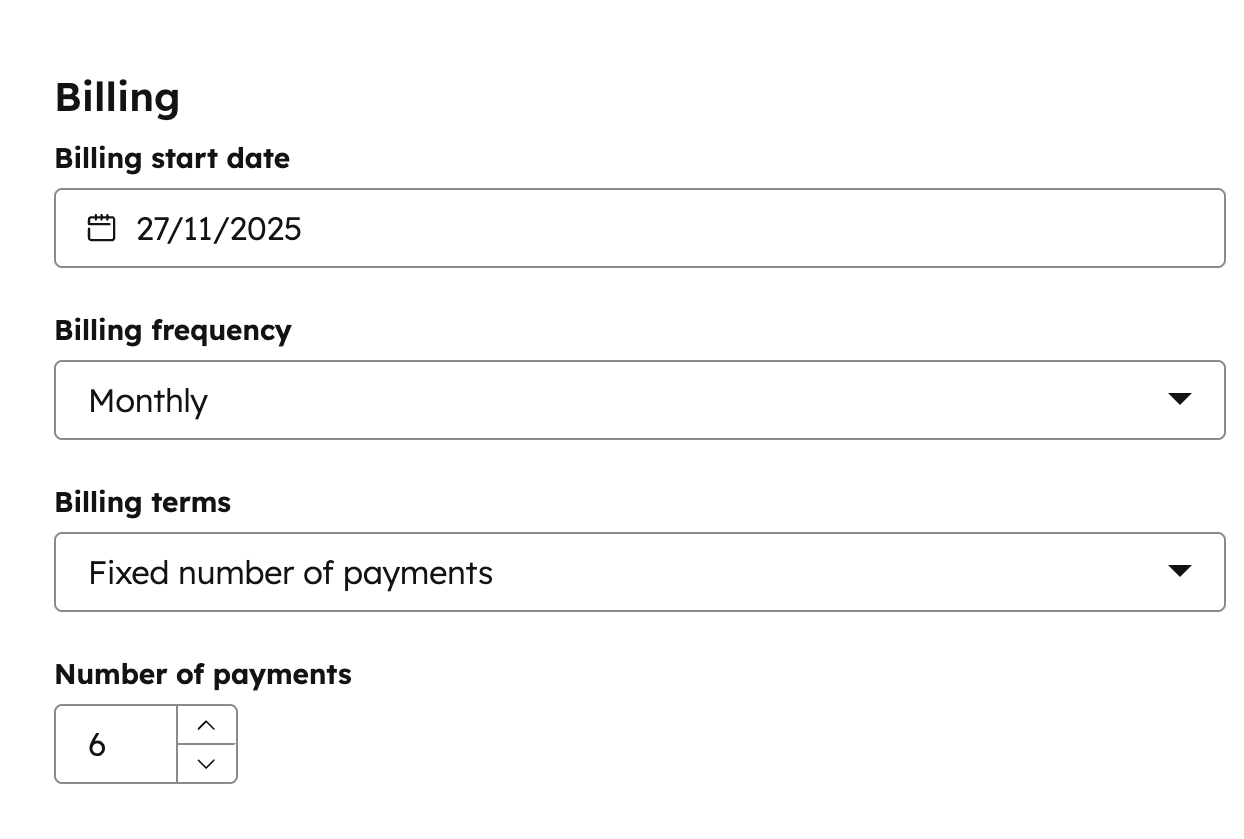
Contract length also gives context when comparing recurring revenue. SaaS Capital reports median net revenue retention of 103% for multi-year contracts versus 101% for annual contracts (retention benchmarks). This comparison does not prove that longer commitments caused better retention.
Separate the timing rules:
- Agreement dates
- Signature date records when the parties signed.
- Effective date records when terms apply.
- Service and billing dates
- Service start records when coverage begins.
- Billing start records when charging begins.
- Contract and payment terms
- Term, end date, and notice deadline define the commitment.
- Payment terms define when an invoice becomes due.
Consider a hypothetical annual service agreement billed monthly. Service begins in January, but an approved delay moves billing start to February. The agreement must explain whether January is free, deferred, or covered elsewhere.
The date gap alone cannot answer that question.
Keep the billing cycle, anchor date where needed, coverage-period rule, renewal rule, and cancellation terms. Add the external customer and subscription IDs, the billing-system owner, and a link to the last approved change.
How Should Contracts Connect to Subscriptions and External Billing?
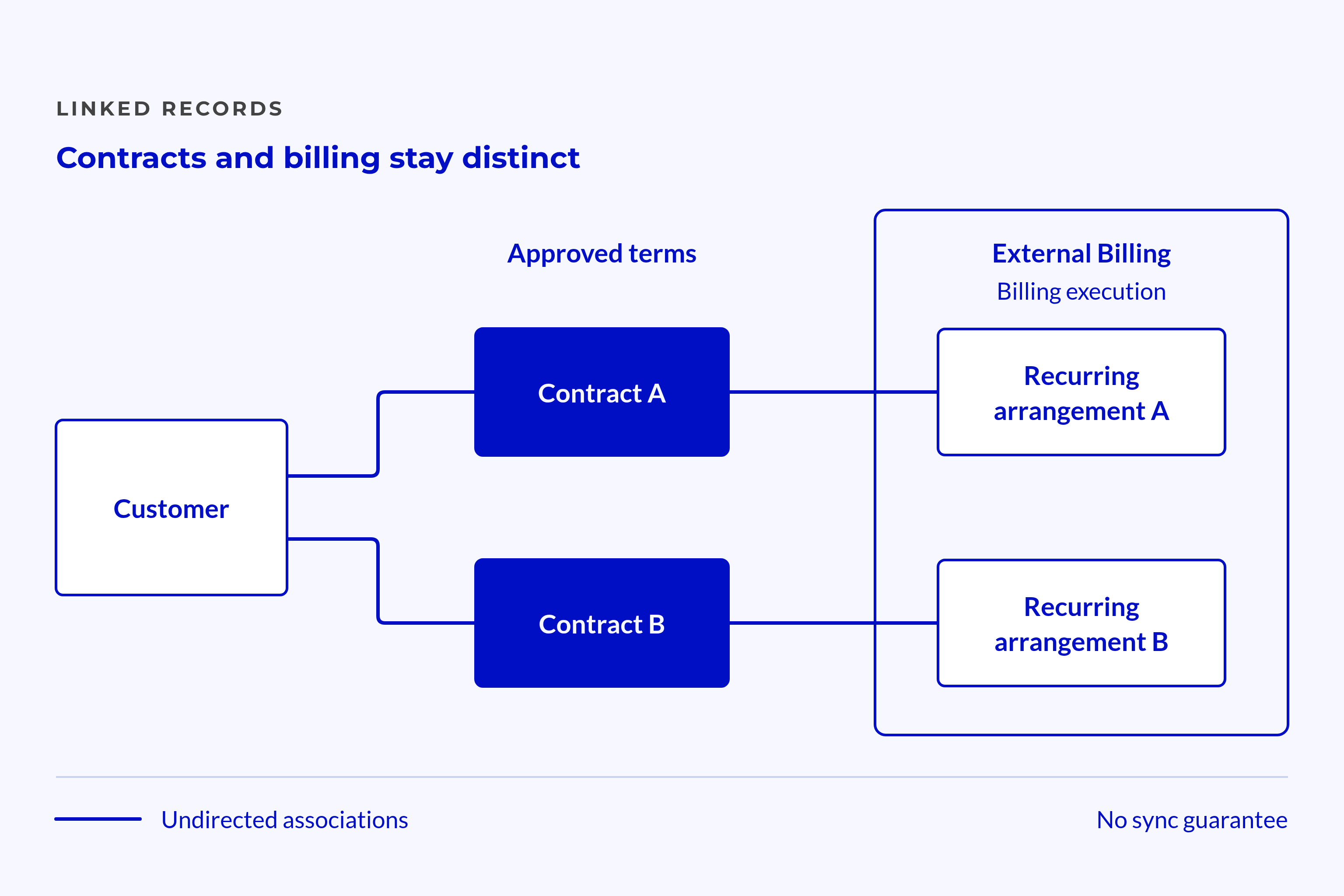
A customer can have several contracts, and a contract can support several subscriptions or schedules. Keep those links clear. Linking records does not mean their data stays in sync.
Assign Authority Before Connecting Records
Choose a source of truth for each field group. Agreed terms should trace to the approved contract, while charges and payments should trace to the systems that handle them.
The contracts data model needs clear record links, owners, and rules for values that conflict. A clear contract data model sets those rules before teams commit to a setup.
Define which source owns each type of data:
- Agreed terms
- Keep the approved agreement and proof of changes.
- Show current terms in structured Contract fields.
- Billing
- Keep the billing platform’s customer and subscription IDs.
- Link the right schedule and invoice records.
- Payments and issues
- Keep collection events in the chosen finance system.
- Show unresolved issues with a named owner.
The Contract record does not need a copy of every invoice.
Users need a reliable path from the agreement to the right billing plan and charge. That path keeps terms readable without turning the record into a ledger.
Treat Synchronization as a Separate Responsibility
A link shows that records relate. It does not define which system updates each field. Nor does it define when updates run or how teams recover from failures.
For HubSpot subscriptions, define the handoff direction, timing, matching keys, and route for failed updates. Check connector behaviour and portal limits before promising that updates will run on their own.
Linked status, last successful sync time, and unresolved mismatches can help teams spot gaps. These are suggested fields or views, not assumed defaults.
💡 Insight
A record can show current contract terms while its linked billing system still holds an older schedule.
The billing owner needs to resolve that gap before charging proceeds. RevOps keeps the model consistent, but should not silently take over every finance or sales decision.
How Do Amendments Change the Recurring-Revenue Record?
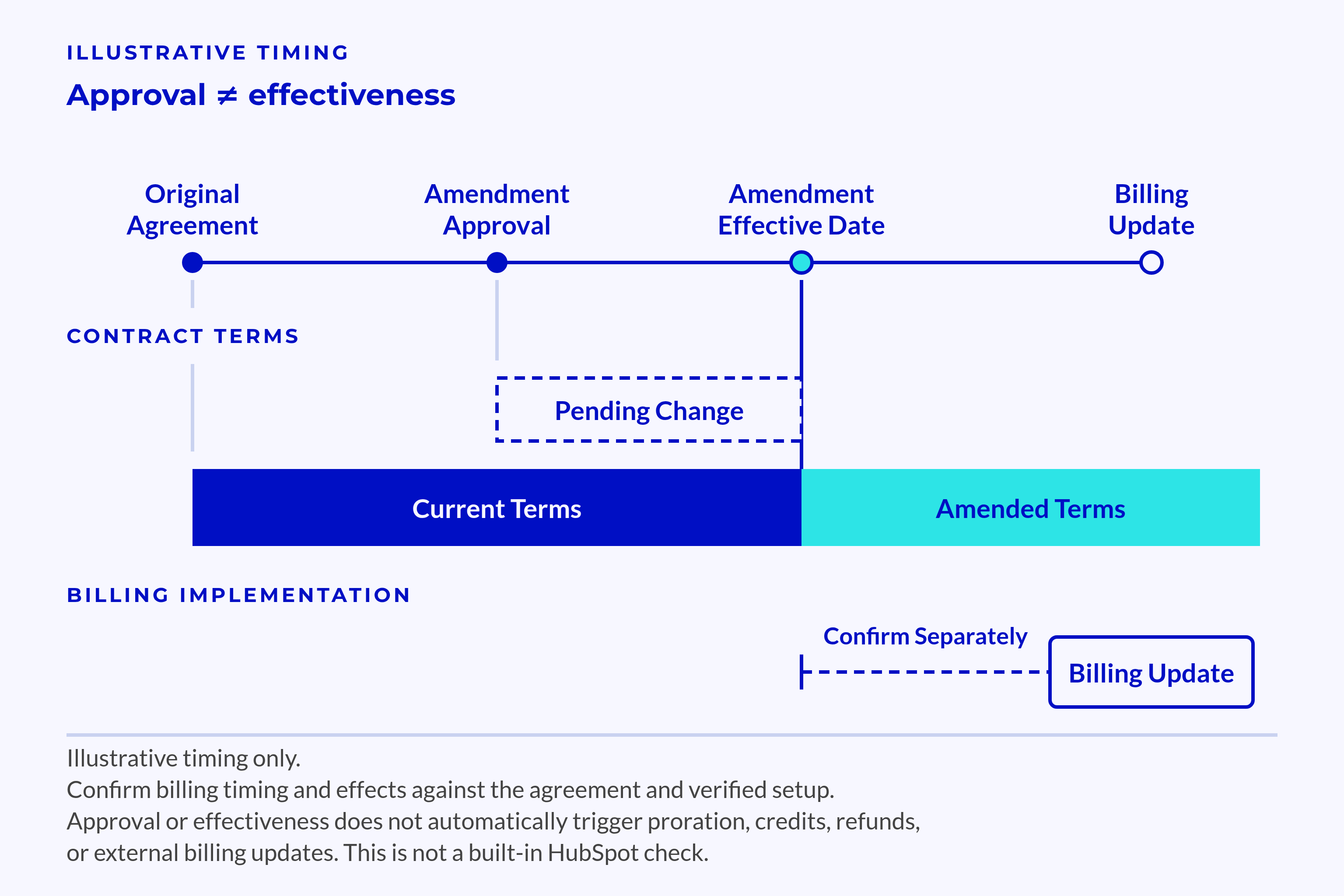
Overwriting the current amount removes the reason a later invoice differs. Keep the approval, dates, old terms, new terms, and affected billing links together. Teams then have evidence for both the change and its timing.
Preserve Current Terms and Future Changes
Approval date and effective date need not match. A signed change can apply later, so current reports must not adopt it too soon.
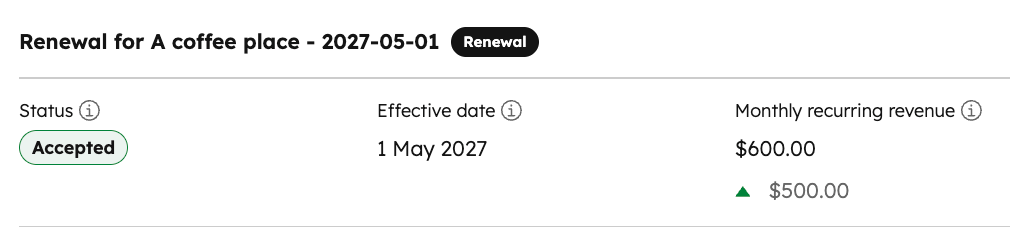
Keep the prior terms alongside their approved replacement.
Link both to the amendment evidence and each affected product, subscription, or schedule. This lets teams trace which terms apply to which charges.
📊 Fact
Chargebee reports that 80% of companies adding AI to their products were also changing their pricing (recurring revenue report).
That finding covers companies adding AI within the report’s survey group. When price rules change, an overwritten amount cannot explain which rule applies to a charge.
Keep the change traceable:
- Approval
- Keep the amendment ID and evidence.
- Name the owner who approved the terms.
- Scope and timing
- Record the effective date and affected scope.
- Separate current terms from terms that apply later.
- Billing update
- Identify billing changes still pending.
- Record completed checks and unresolved issues.
For usage or credit-based agreements, store the agreed charge basis, allowance, and rules for usage above that allowance. McKinsey’s software business-model analysis discusses payment structures and overage treatment.
The need to record those terms does not prove native support for every pricing model.
Separate Commercial Changes From Collection Events
An upgrade changes approved scope or value. A temporary discount changes specified charges for a set period. A pause needs clear terms about both service duties and billing.
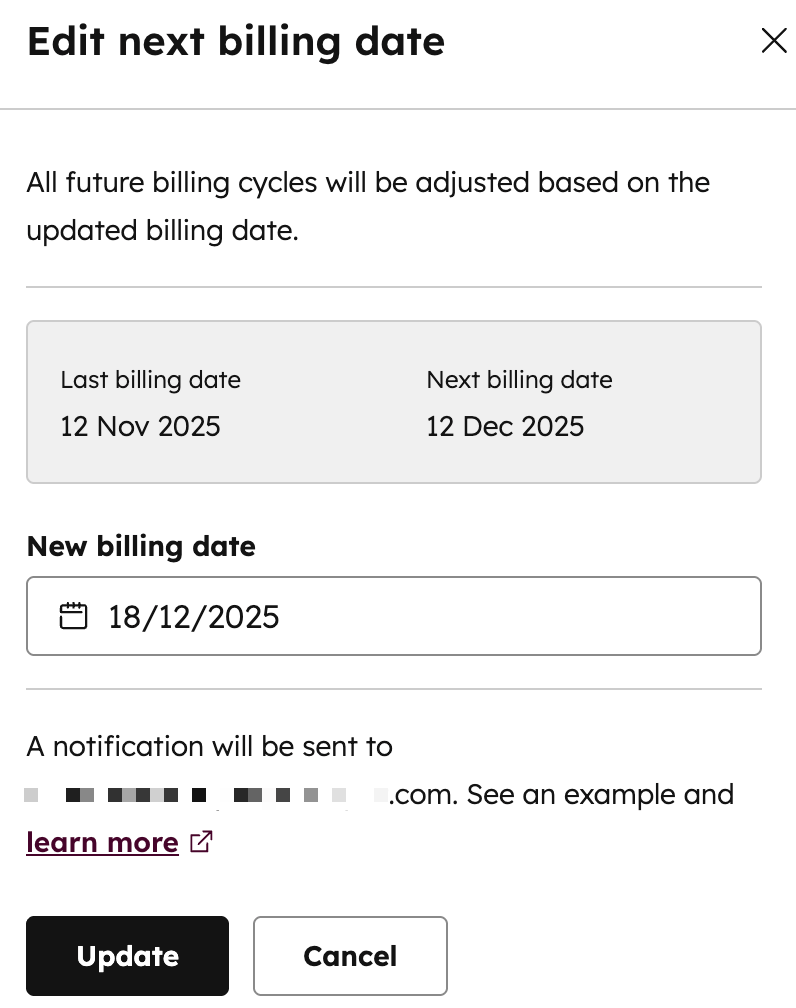
Ask what each event changes:
- Upgrade: Which quantity, scope, price, and effective period apply?
- Discount: Which charges qualify, and when does it expire?
- Pause: Does billing stop, move later, or stay unchanged?
- Cancellation: When does the contract end, and which future charges cease?
- Renewal: Which term and price replace the earlier agreement?
- Failed payment: Who owns collection, and has any agreed term changed?
A failed payment alone does not prove that the contract has ended.
Finance should own collection issues, while the contract owner resolves disputed terms. The billing owner then applies the approved change through the agreed process.
Do not assume that the system will prorate charges, issue credits or refunds, or update external billing.
Each effect depends on the agreement and the verified behaviour of the setup. A change to contract terms and a change to billing are separate steps to confirm.
What Must Pass the Billing-Readiness Check?
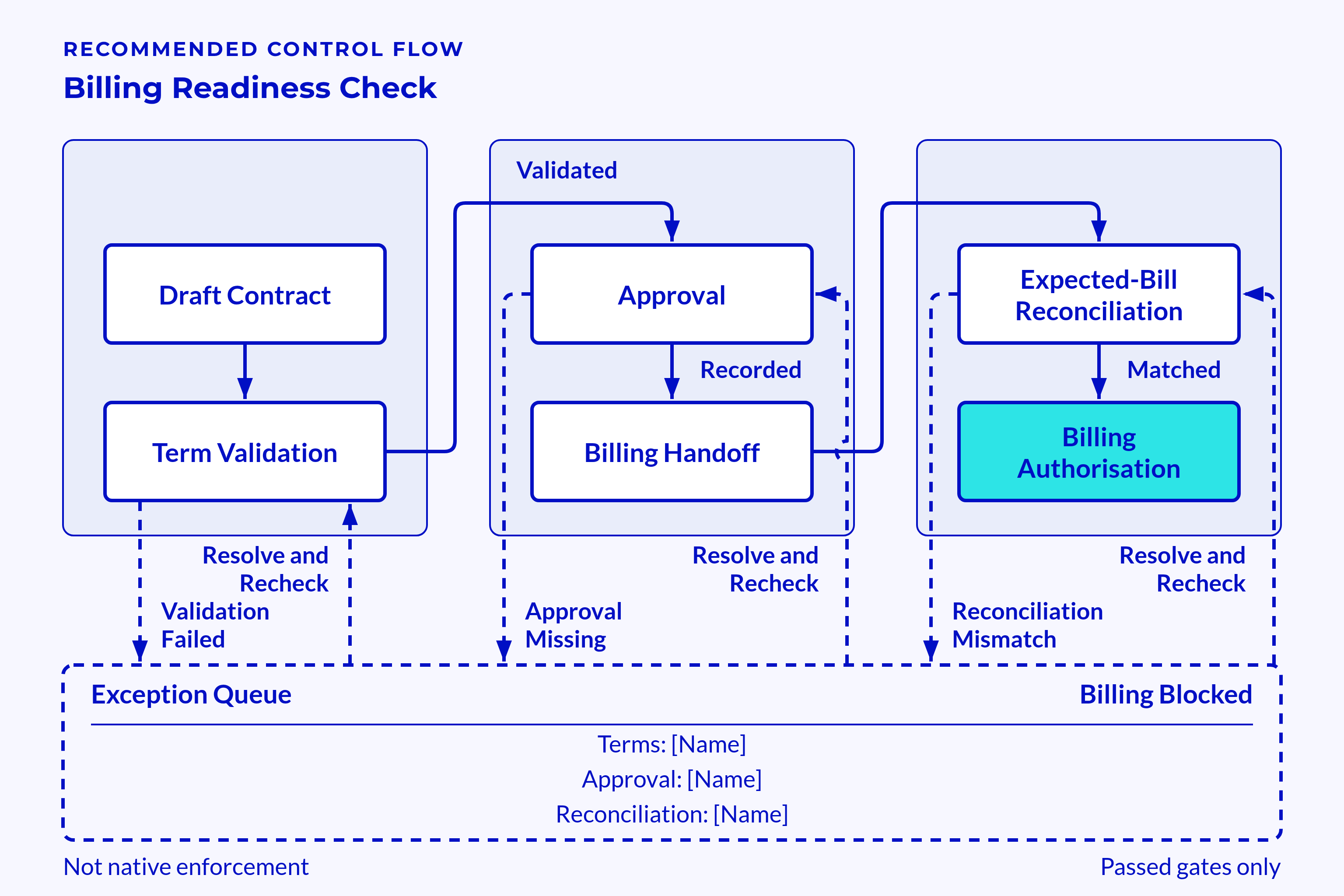
Billing readiness means the team can explain the expected charge using approved terms and linked billing records. This is a suggested process gate. It does not describe HubSpot’s required fields or built-in checks.
Check the Explanation, Not Just Field Completion
A filled amount can still be wrong. An agreement that users can open can still conflict with the billing schedule.
Require a clear answer for each check:
- Customer: Are the signing party, bill-to party, and record links correct?
- Scope: Do services, quantities, and one-off items match approved terms?
- Value: Do price, discounts, recurring charge, and currency agree?
- Timing: Are service start, billing start, billing cycle, and coverage clear?
- Destination: Are the billing contact and rules for sending invoices confirmed?
- Payment: Are due terms distinct from billing frequency?
- References: Do customer and subscription IDs link to the right records?
- Change: Are current and future terms separate?
- Approval: Does evidence identify the approved version?
- Ownership: Can a named person resolve each issue?
Include purchase-order rules and the customer’s invoice submission steps where needed. An invoice can match the agreement yet fail the customer’s checks for accepting it.
💡 Tip
Give every failed check a reason, an owner, and a route to resolve it instead of filling unknown values with defaults.
The readiness status should show when someone last approved the terms behind it. A later amendment can make that decision stale. Without that date, users can mistake an old check for a current one.
A readiness field displays a decision; a billing control acts on it.
For external billing, the control must sit in the actual handoff or billing process. A HubSpot workflow that updates a status does not, by itself, prove that billing will stop.
Test a Representative Contract Before Scaling
Use a hypothetical annual service agreement with monthly recurring charges and a separate setup fee. Give it different service and billing starts, plus a later approved quantity change.
Trace each term from the signed evidence to the line item, subscription link, and expected invoice period. Resolve how to treat service before billing begins. Do not assume a free period or catch-up charge.
Test failure conditions as well as the expected path:
- Remove a required service or billing date.
- Introduce a duplicate external ID.
- Create a currency conflict.
- Submit a change without proof of approval.
- Apply a future amendment before its effective date.
- Leave a billing update stale after approval.
The test passes when teams can trace the terms, follow the links, name the owners, and explain the expected bill. A separate control test must show what happens when readiness fails at the billing step.
For HubSpot subscriptions, verify how the chosen setup creates and updates records before relying on it as a working control. Apply the same test to external connectors.
The record should answer what is active, what the customer is paying for, and why the charge applies. It should also show the next approved change, notice deadline, and owner of each unresolved issue.
Keep contracted value, invoiced value, and collected cash distinct.
A renewal owner needs the term and notice deadline to act on the agreement. A payment status cannot supply those facts.
Frequently Asked Questions
Clear boundaries help teams decide whether a billing issue needs a contract decision or a change in the billing system.
What is the Difference Between a Contract Record and a Subscription?
The Contract record explains approved scope, value, dates, renewal and exit terms, and ownership. A subscription represents the recurring plan in the chosen billing setup. Linking them helps teams explain a charge while keeping the agreement and proof of approval distinct.
Can External Billing Stay in Place When HubSpot Holds Contract Context?
Yes, external billing can keep running charges while HubSpot holds structured contract terms and reliable links. The design needs stable IDs, a source of truth for each field group, and a defined handoff.
A visible readiness status is not enough. Teams also need a control that prevents billing when required data fails checks.
Conclusion
Well-governed HubSpot subscriptions link recurring charges to approved terms, effective dates, and named owners. A billing owner can trace the expected charge without guessing which document or amendment applies.
That context supports trusted revenue visibility without replacing every finance system.
Renewal owners can see notice deadlines, and finance can distinguish a changed agreement from a failed payment. The contract explains what the customer owes; billing and payment records show what the team charged and collected.
Key Takeaways
- Structured contract terms support billing checks; linked evidence shows who approved them.
- Contract length, billing cycle, service dates, and payment terms answer different questions.
- Subscriptions, invoices, and payments have distinct roles, even when their records link.
- Amendment history explains prior charges, while effective dates separate current terms from future changes.
- Readiness controls act at the billing step; a displayed status alone does not stop a charge.