
October 17, 2026
8 min read
First seller contact moved from 69% of the buying journey in 2024 to 61% in 2025, finds the 6sense buyer report.
That finding covers considered purchases, not every sales process.
Problems start when these fields share a job. Marketing marks a handoff, sales logs a call attempt, and a workflow counts both as funnel progress.
Why These Three Fields Get Confused, and What It Costs
Field overlap often grows through separate projects, with no shared check on how the fields work together.
That shared check usually belongs to Sales Operations, which owns the working rules reps follow, while the fields get changed by whoever built the last workflow.
Recognise Where Each Field Has Taken Another Job
The common failure modes:
- Lifecycle becomes a work queue.
- Reps change relationship milestones after each outreach attempt.
- Follow-up needs erase the record’s past sales checks.
- Lead Status becomes another funnel.
- Values such as MQL and Customer repeat lifecycle stages.
- Reports disagree because each field follows different rules.
- Deal stage becomes an activity log.
- Sending a proposal counts as buyer progress.
- Managers can’t tell whether the buyer has agreed to anything.
- Definitions lose an owner.
- Each team adds values for its own needs.
- Nobody checks the effect on shared reports.
These errors create rejected leads, false handoffs, and workflows that fire when the wrong field changes.
📊 Fact
The average seller spends 40% of their time selling, according to the Salesforce research announcement.
That finding doesn’t mean all other time goes to data entry. It does make it harder to justify asking reps to keep fields with the same purpose up to date.
Assign a Question Before Changing a Value
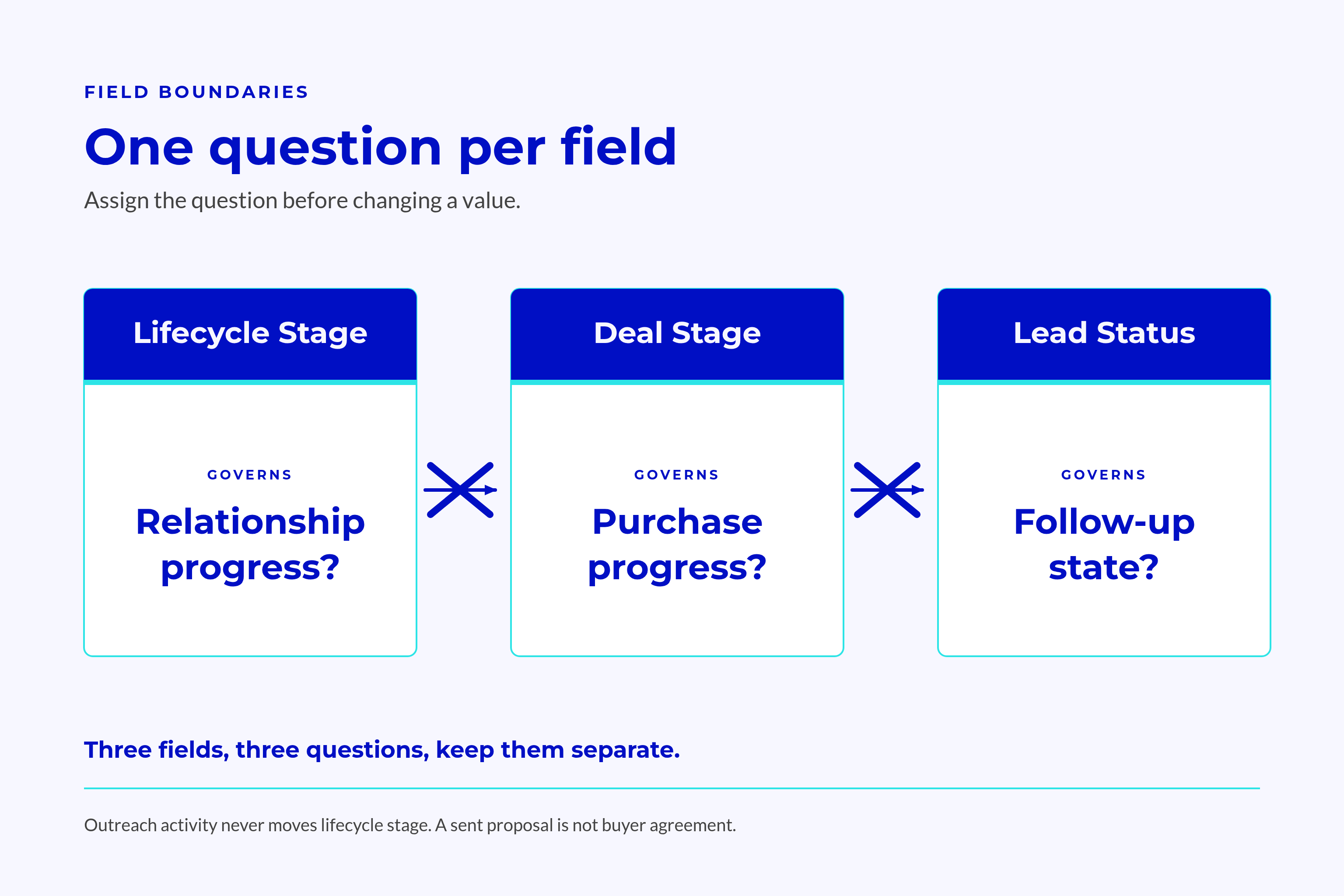
The boundary test: what question does this field answer?
- Lifecycle stage: how far has the relationship progressed?
- Deal stage: where does this purchase decision stand?
- Lead Status: what is the team doing about this contact now?
Each field change needs evidence that answers its own question and that the next team can check. Changing another field to make the values match hides the cause of the mismatch.
Last reviewed: 17 October 2026. HubSpot’s stated product behaviour and your team’s working rules aren’t the same thing. A default label still needs a clear meaning in your sales process.
What HubSpot Lifecycle Stages Should Govern
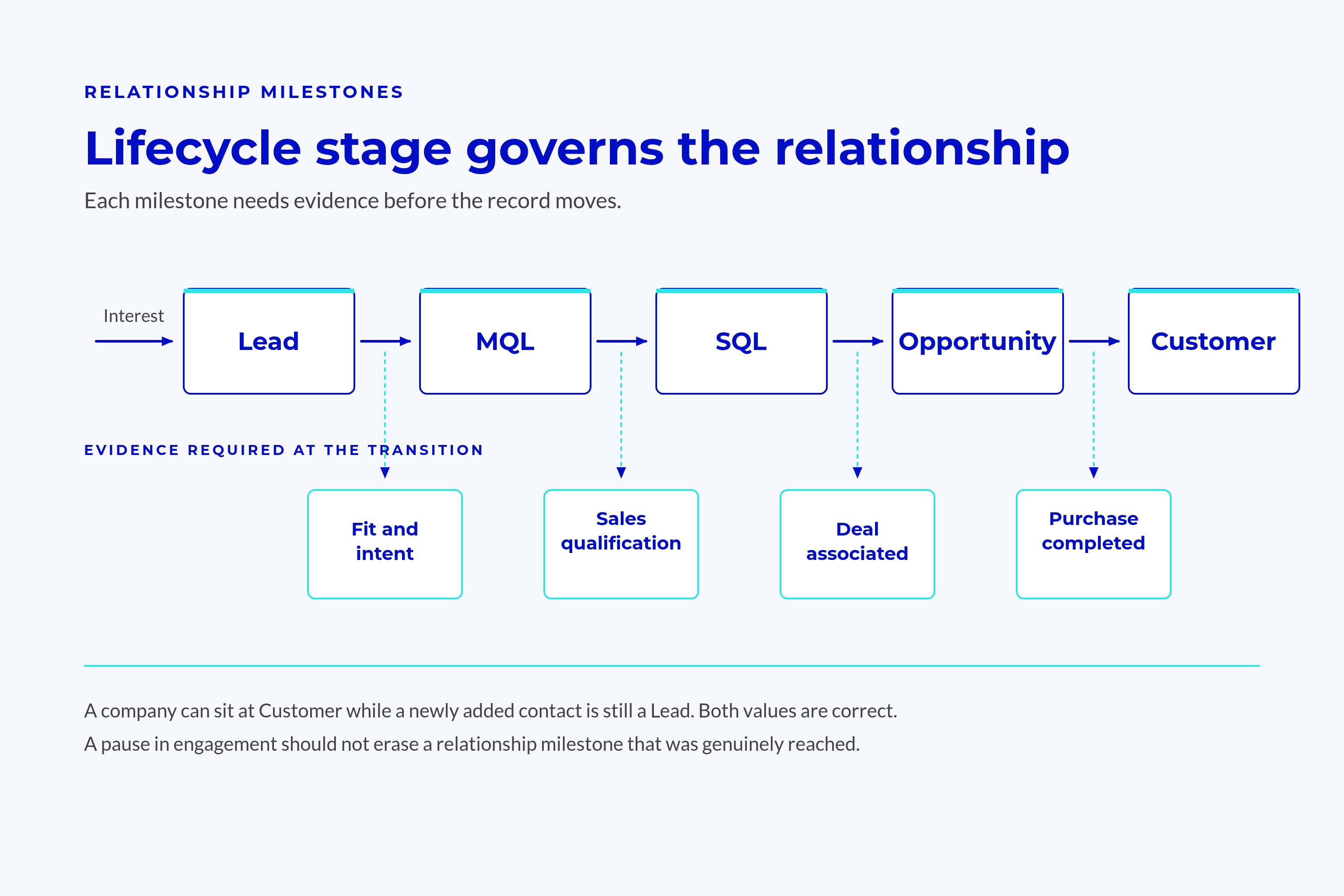
Lifecycle stage marks how far a contact or company has progressed in its relationship with your business. It should record key milestones and group records by that relationship, not track daily tasks.
Default Lifecycle Stages and Where Their Boundaries Actually Sit
The HubSpot lifecycle documentation defines the default labels and distinguishes marketing-qualified leads from sales-qualified leads.
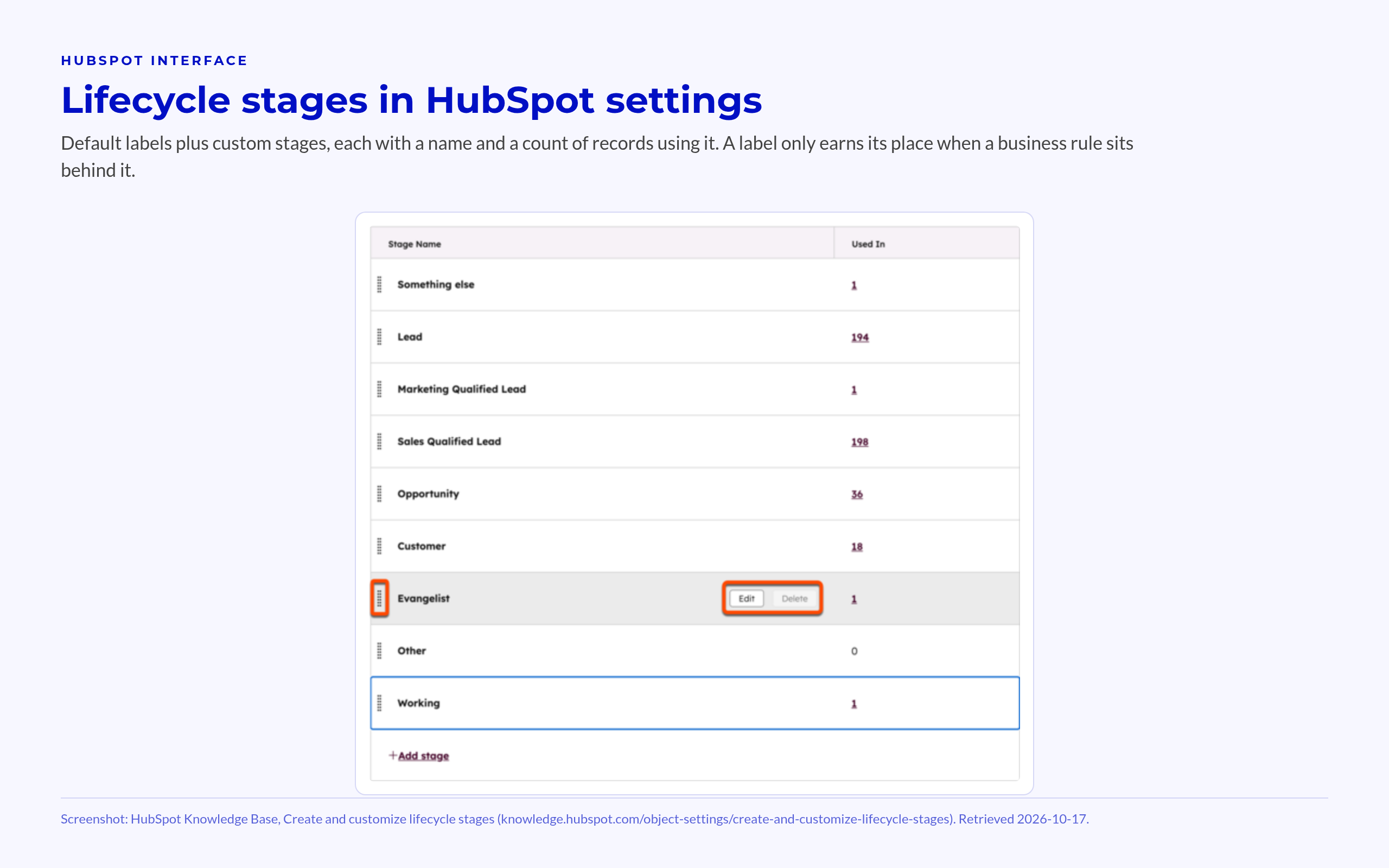
These labels give teams a starting point. They don’t require every record to pass through every value.
Boundary tests for the default stages:
- Subscriber: the person subscribes to updates.
- Lead: the record shows interest beyond subscribing.
- Marketing Qualified Lead: marketing confirms readiness for sales.
- Sales Qualified Lead: sales confirms fit as a potential customer.
- Opportunity: the record has an associated deal.
- Customer: the relationship includes a completed purchase.
- Evangelist: the person actively advocates for the business.
- Other: the relationship falls outside the defined path.
Evangelist marks advocacy, not a required step after Customer. Other isn’t a holding queue for records nobody has reviewed. Each custom stage also needs a distinct business decision behind it.
Online interest alone doesn’t prove readiness for sales: Gartner reports that 67% of B2B buyers prefer a rep-free experience, while 45% used AI during a purchase.
Exit criteria turn labels into rules:
- Before marketing declares an MQL:
- Record the evidence of fit.
- Record the intent that warrants sales follow-up.
- Before sales declares an SQL:
- Record the sales conversation that supports the change.
- Confirm the need and agreed next action.
A new lead scoring model can support those checks without replacing sales judgement. The score should supply evidence for a handoff, not silently declare one.
Lifecycle Stage on Contacts and on Companies
A company can be a Customer while a newly added contact remains a Lead. The values describe different records, so the difference can be valid.
Recommended source ownership: contact lifecycle should guide person-level funnel reports and rules for who receives outreach. Company lifecycle should guide account groups and safeguards for customer accounts.
Lead routing rules should check contact readiness alongside the company’s existing relationship and owner. This keeps a new contact at a customer account out of an unrelated new-business queue.
Syncing every value across both records removes useful distinctions.
A named RevOps owner should maintain stage meanings and rules for moving records backwards. Approved corrections need a reason and change history. A pause in engagement shouldn’t erase a genuine relationship milestone.
What Deal Stages Should Govern
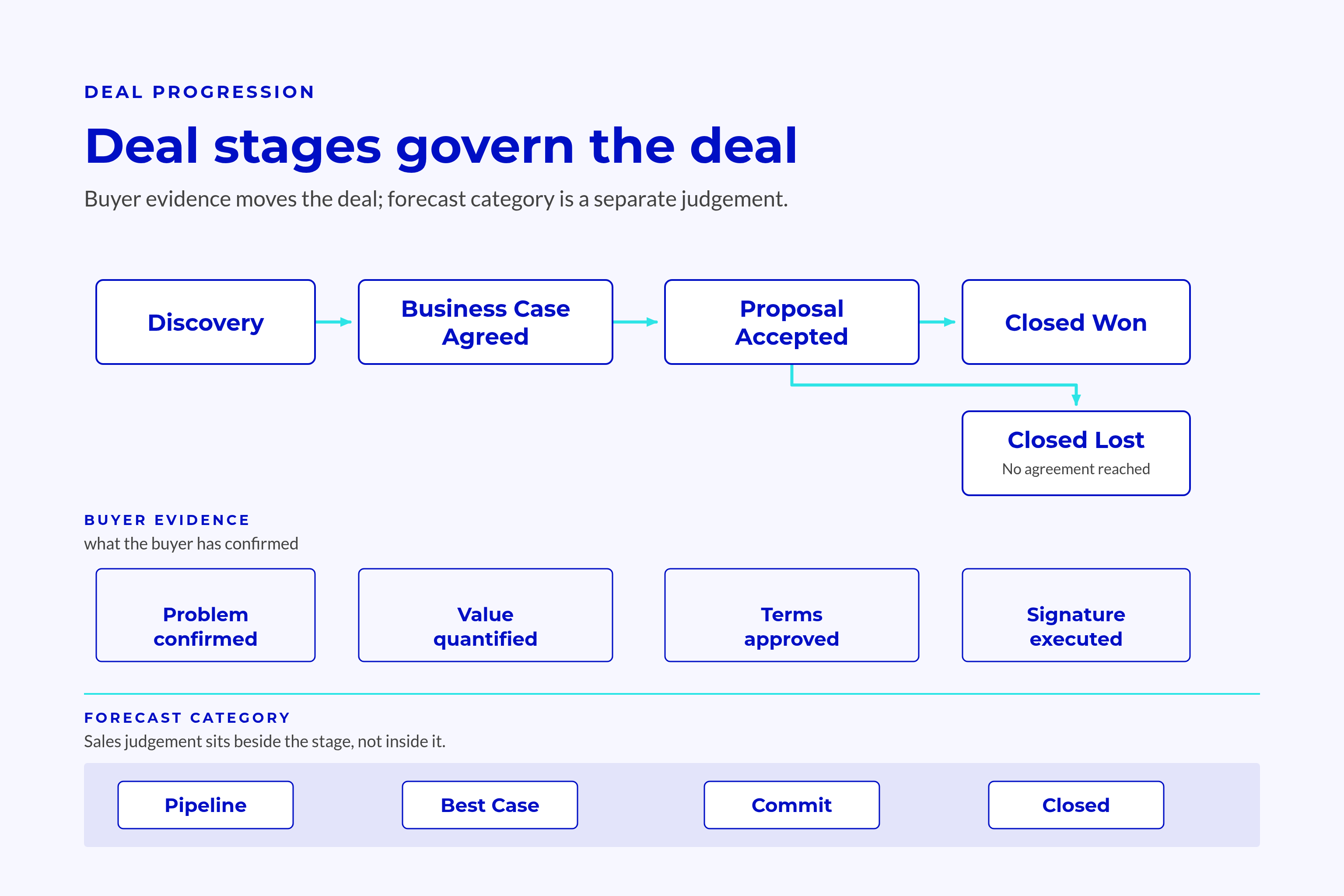
Deal stage tracks a specific purchase through its buying process, not the contact’s overall relationship with your business.
Deal Stage Should Track Buyer Progress, Not Seller Activity
“Proposal Sent” proves that a rep sent something. It doesn’t prove that the buyer accepts the scope, has funding, or can complete the purchase checks.
“Business Case Agreed” marks buyer progress only when the record holds evidence of what the buyer agreed to.
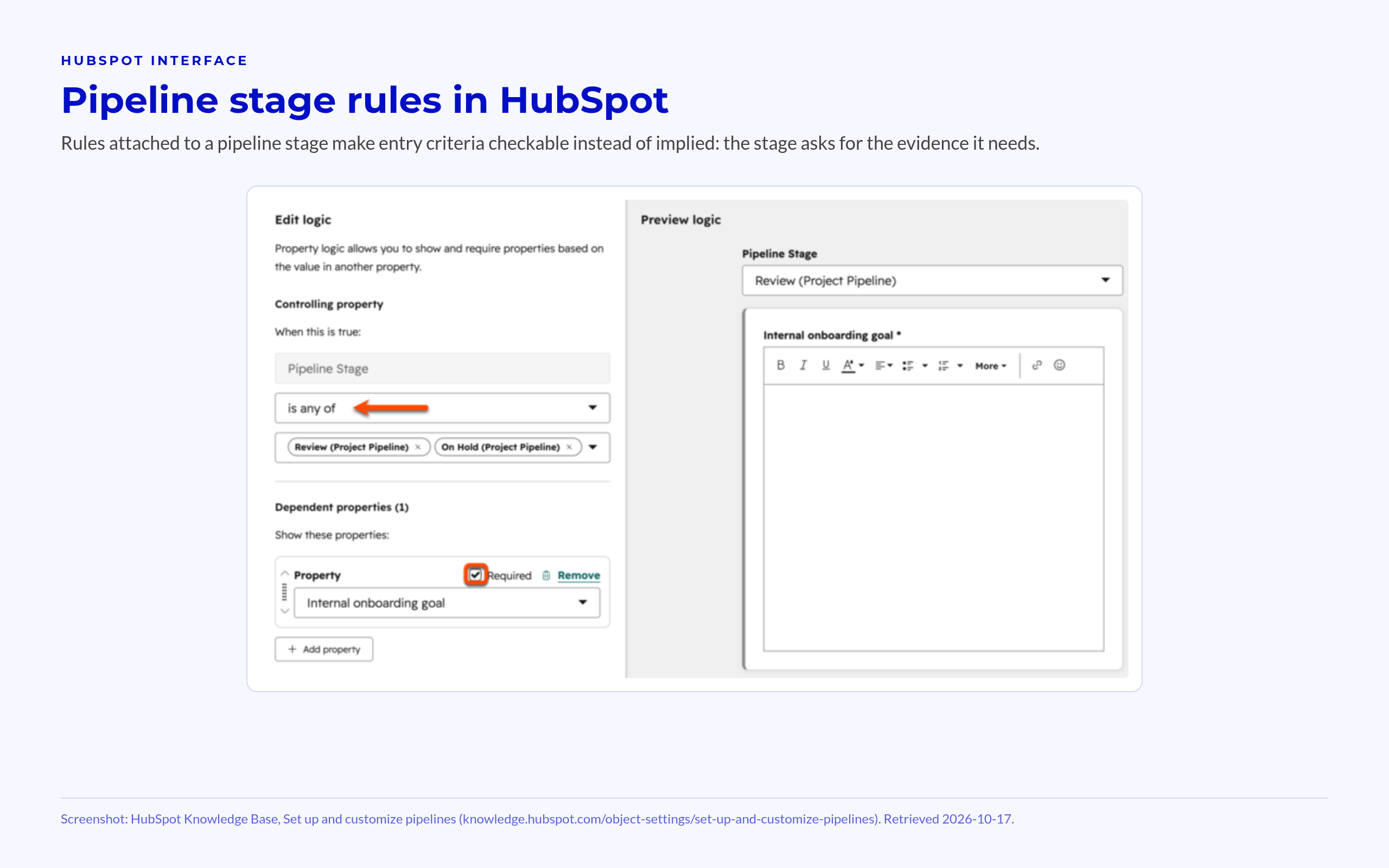
Pipeline review tests:
- What has the buyer confirmed?
- Where does the record show that confirmation?
- What remains before the next buying milestone?
Tasks and activity records should carry the seller’s work, rather than turning each completed task into a deal stage.
A stronger stage name won’t fix weak entry rules. “Business Case Agreed” stays vague if reps can select it without recording the buyer’s decision.
Keep Stage Probability Separate From Forecast Confidence
HubSpot assigns a probability to each deal stage and uses it to calculate weighted amount. Forecast categories let the team make a separate judgement about the expected outcome.
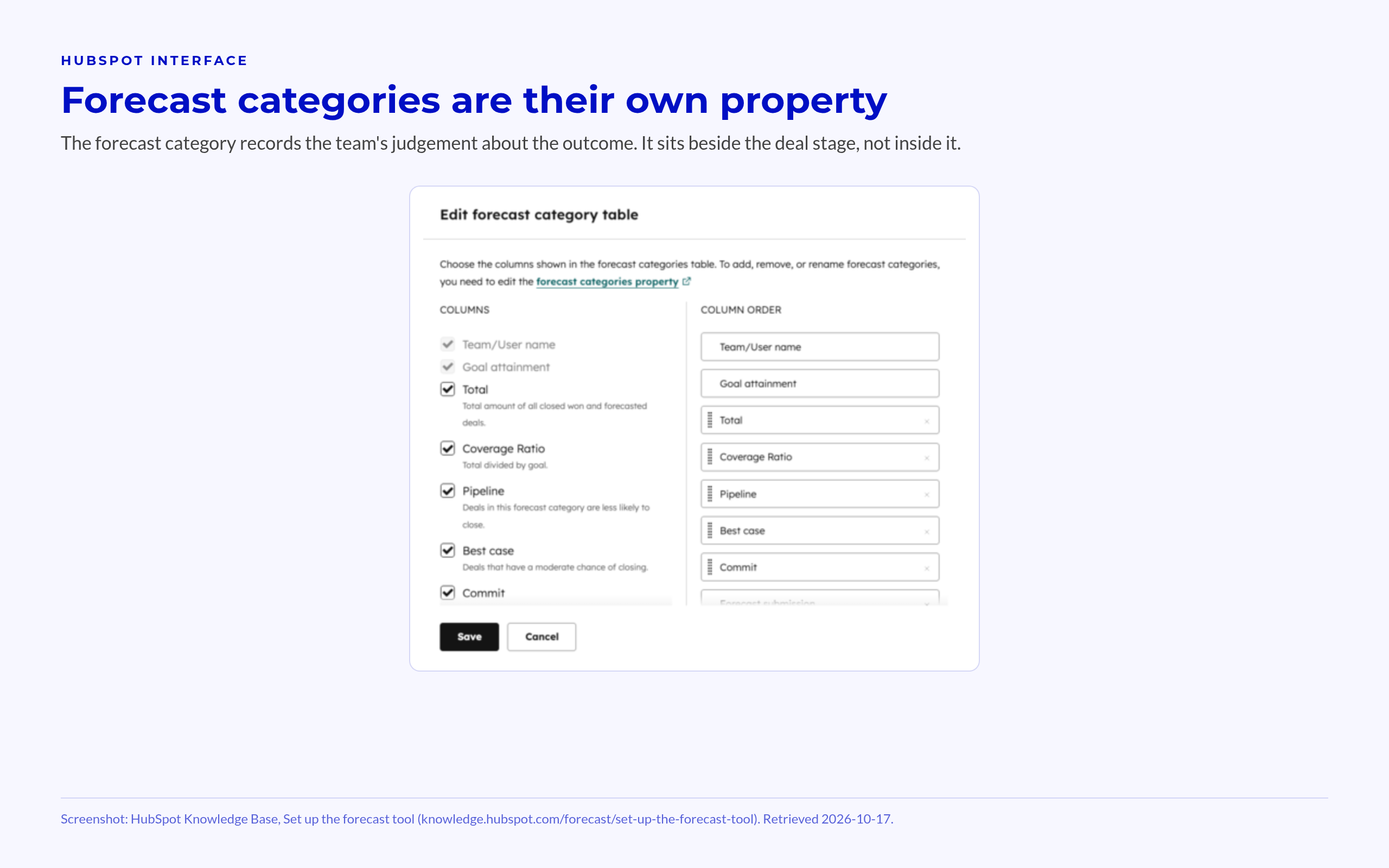
Keep these decisions distinct:
- Stage records the buying milestone.
- Probability supports weighted pipeline maths.
- Forecast category records the team’s forecast judgement.
A deal can reach a late stage while its close date remains uncertain. Moving it backwards to express doubt distorts the record of buyer progress.
Different sales processes can use different pipelines when their buying steps differ. New business and expansion shouldn’t share stages because the same team sells both.
Keep Won and Lost outcomes so sales and revenue reports can process deals correctly. A closed-lost deal doesn’t, by itself, end an existing customer relationship. The deal outcome and account relationship answer different questions.
What Lead Status Should Govern
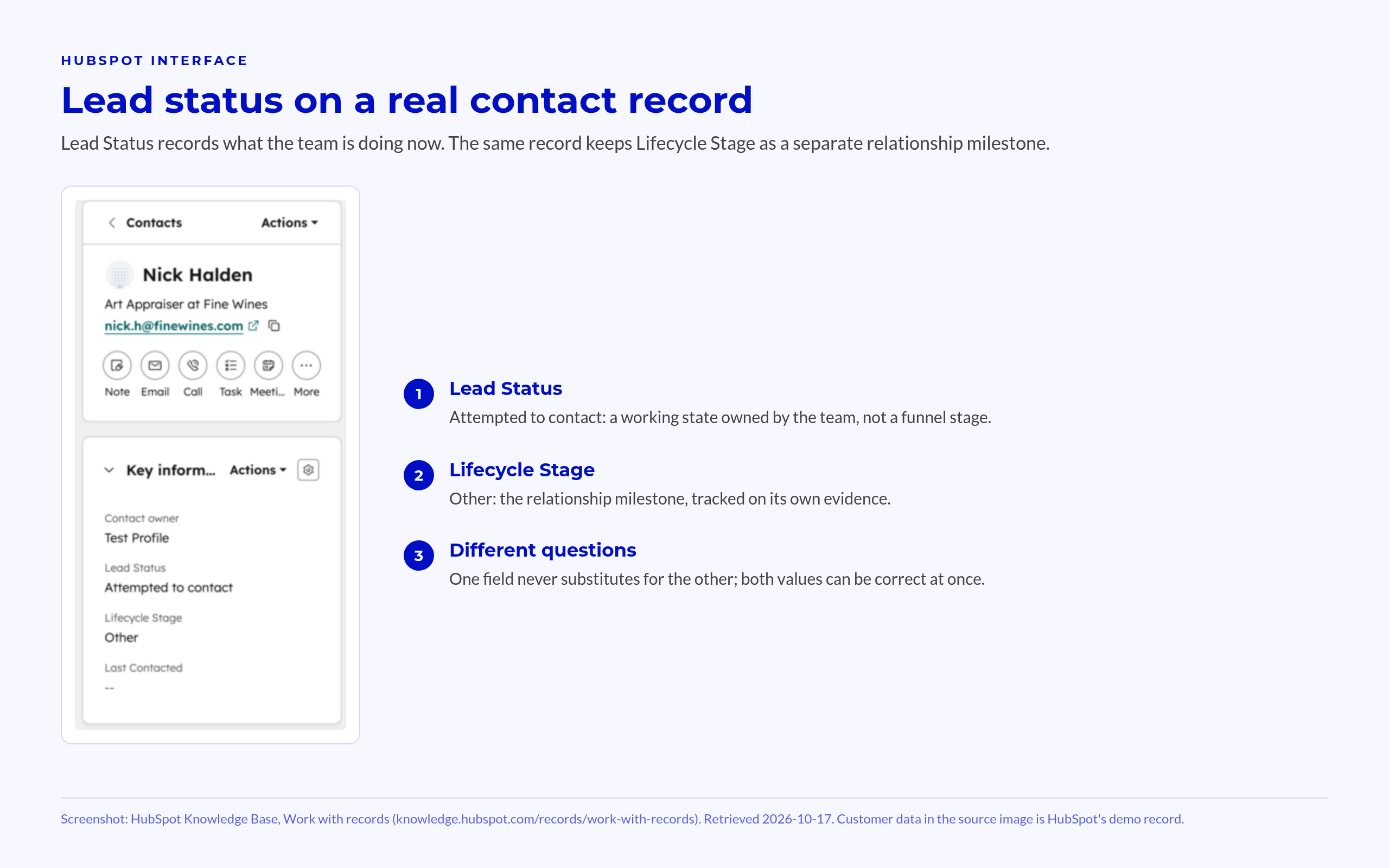
Lead Status records what the revenue team is doing about a contact now. HubSpot describes it as substages within the SQL lifecycle stage, not a second relationship funnel.
Lead Status is a Working State, Not a Funnel Stage
A practical working set can draw from the default options:
- New: nobody has started work.
- In Progress: an owner is actively working the record.
- Attempted to Contact: outreach hasn’t produced contact.
- Connected: the team has established contact.
- Unqualified: the record fails the agreed sales fit test.
- Bad Timing: follow-up needs a later review.
These examples aren’t a required set; each value needs a clear next action and someone responsible for it.
Some teams also use Lead Status before SQL. If an MQL moves from New to Attempted to Contact, document that choice. Don’t present it as HubSpot’s default meaning.
The lifecycle milestone can remain MQL throughout those attempts. If the contact fails the sales checks, record the reason and apply the agreed lifecycle policy on its own terms.
“Nurture” beside “Contacted” mixes a future plan with a current work state. Keep the rules for nurture and the next follow-up date explicit elsewhere.
Separate Lead Status From the Lead Object Pipeline
The separate Lead object has its own pipeline stages: New, Attempting, Connected, Qualified, and Disqualified. That pipeline isn’t another name for the Lead Status property.
HubSpot provides Lead pipeline automation on Sales Hub Professional and Enterprise. Outreach and engagement that meet its rules can move that Lead record through its working stages.
💡 Insight
Lead Status and Lead pipeline stage track work on different records, even when their labels sound alike.
Choose the working authority:
- Name the field reps must update.
- Define whether the other field copies any values.
- Remove workflows that let both fields declare a lead qualified on their own.
The person working the record should own its current status. Sales managers should review unclear values and stalled work during queue reviews. The aim is to settle the next action, not force both fields to match.
How the Three Fields Interlock Across One Revenue Process
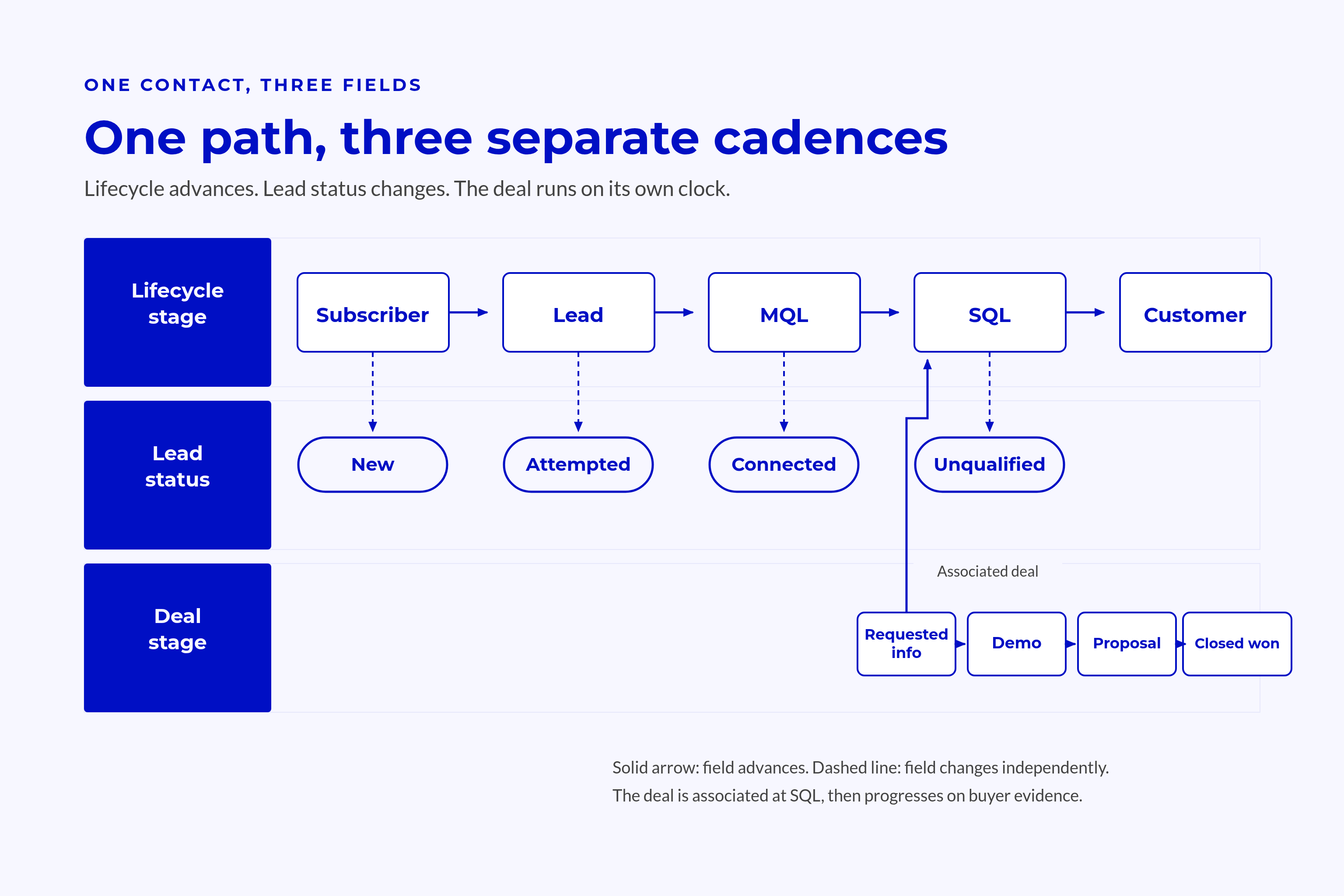
The fields should change at different moments because each governs a different decision.
Follow the Evidence Through Each Handoff
A contact requests information about a service and becomes a Lead. That interest alone doesn’t establish a buying opportunity.
The handoff sequence:
- Marketing confirms readiness.
- Record fit and intent.
- Advance lifecycle to MQL and assign follow-up.
- Sales works and qualifies the contact.
- Record attempts through the agreed working field.
- Advance lifecycle to SQL after sales confirms the lead meets its criteria.
- Sales confirms a buying initiative.
- Create and associate the deal.
- Apply the Opportunity rule to relevant records.
- The purchase closes.
- Record the deal outcome.
- Pass scope, commitments, and ownership to customer success.
Deal stage advances on buyer evidence, not each contact interaction. Lead Status can change without moving the deal or lifecycle milestone.
The field contract:
| Field | Question Answered | Object | Never Use It For |
|---|---|---|---|
| Lifecycle stage | How far has this relationship progressed? | Contact or company | Daily follow-up |
| Deal stage | Where does this purchase decision stand? | Deal within a pipeline | Contact activity |
| Lead Status | What follow-up state applies now? | Contact, primarily in this model | Funnel position |
When values seem to clash, check whether they answer different questions. A Customer with an open expansion deal isn’t a conflict.
A genuine conflict needs a check of the evidence, not a rule that forces the values to match.
Where Automation Should Own Each Field
Write ownership should follow the field’s purpose:
- Lifecycle: evidence-based rules, with logged manual overrides.
- Lead Status: the record worker or clearly defined activity signals.
- Deal stage: the deal owner, with manager checks.
Elapsed time can trigger a review task, but it can’t prove buyer progress or justify advancing a deal.
Don’t link field changes for ease of setup. When a handoff changes multiple fields, each change needs its own condition and purpose.
Every workflow change to a field needs a traceable history. Before launch, record the rule owner, trigger, affected property, and path for handling exceptions. Reviewers then have a way to explain why the value changed.
Migrating, Reporting, and Governing the Model
Changing labels before checking what uses them can break workflows and reports. A safe rebuild starts with agreed meanings, protects existing records, and tests the decisions those fields trigger.
Audit Dependencies Before Replacing Values
Use a dependency-first sequence:
- List current values and what they mean in practice.
- Map old values to approved meanings.
- Find workflows, lists, reports, forms, and integrations that use them.
- Separate clear mappings from records needing review.
- Test changes on records that reflect real cases.
- Update the items that use those fields within a planned change window.
- Check results and keep a rollback path.
Today’s SQL value doesn’t prove when a contact first became qualified, so it can’t supply a missing historical milestone.
💡 Tip
Preserve a pre-change export and mapping log so reviewers can distinguish rebuild changes from genuine funnel movement.
Tests need to cover customer accounts, rejected leads, open deals, and records with missing links between them. These cases reveal whether the rules work beyond the cleanest records.
Reconcile Reporting and Keep Definitions Owned
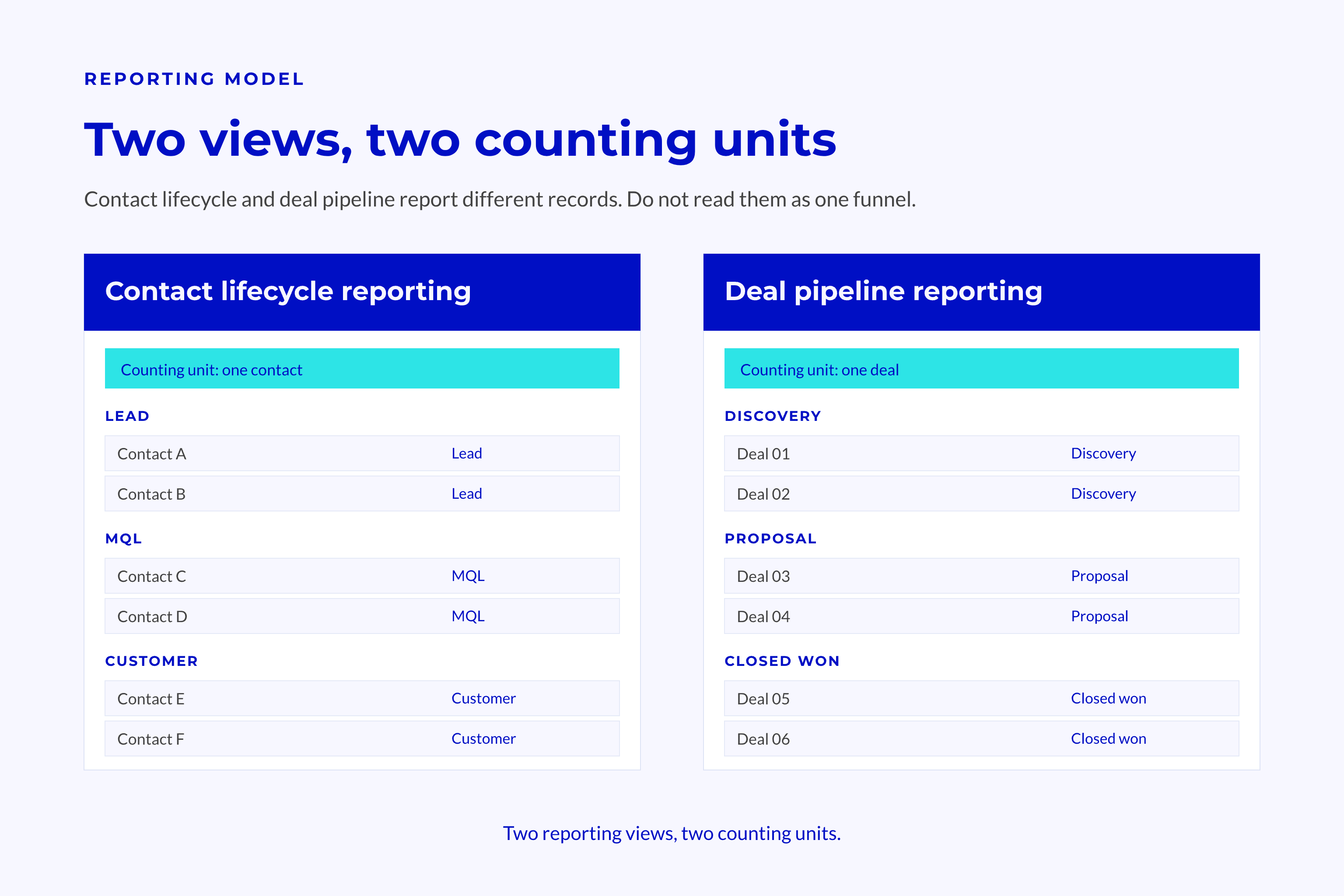
Contact funnel reports count contacts; deal pipeline reports count deals. They should connect through clear links between records, not match by default.
The reporting contract should name the object, included records, date basis, and exclusions. A contact conversion report shouldn’t quietly switch to counting deals halfway through the funnel.
Current stage and past progress need separate reports. Otherwise, corrections and approved backward moves can look like shifts in buyer behaviour. The change log supplies context for those differences.
Ongoing controls:
- Assign a named RevOps owner for field meanings.
- Make sales leaders responsible for deal criteria.
- Review definitions quarterly and log approved changes.
- Require approval before adding stages or statuses.
Queue reviews, pipeline meetings, and onboarding need to use the same field meanings after go-live.
Frequently Asked Questions
Different relationship, work, and buying states can coexist on linked records without signalling a data error.
Should Lifecycle Stage and Deal Stage Always Match?
No, because lifecycle stage describes the contact or company relationship, while deal stage describes one purchase. An existing customer can have an early-stage expansion deal without losing customer status.
The link to the deal and the buyer evidence determine whether different values signal a data problem.
How Should We Change Lifecycle Stages During a Rebuild?
Agree the meanings and evidence rules before editing values or turning on workflows. Map existing values, check what depends on them, test real cases, and keep a rollback path.
Unclear records belong in a review queue, not an invented history of sales checks. Log approved corrections apart from genuine relationship progress.
Conclusion
HubSpot lifecycle stages, deal stages, and Lead Status lose meaning when a workflow treats a call attempt like a buying milestone. The follow-up state can change while the relationship and deal stay where they are. Reports need to preserve that distinction.
Key Takeaways
- Lifecycle stage should govern relationship milestones, not daily follow-up.
- Deal stage should govern buyer progress within a specific deal.
- Lead Status should govern current work without copying lifecycle or the Lead object pipeline.
- Every change needs evidence, an owner, and a clear rule for exceptions.
- A safe rebuild checks what uses each field before changes and keeps those rules in use after launch.