

November 10, 2026
8 min read
A closed-won deal records the sale, but it cannot explain each later change.
Contract mapping keeps term dates, recurring value and renewal duties clear without piecing the history together in spreadsheets.
The finding covers work with signed agreements, not HubSpot adoption.
A stored document alone does not give teams usable contract data.
What the HubSpot Contract Data Model Actually Records
Start with the questions your revenue leader and finance team need answered. Map each answer to a field, source system, record link and named role. Prove the reports on a sample that reflects your contracts before moving records or changing billing.
The contract record links the sale to the terms the customer agreed to.
Keep its role clear whether you use HubSpot’s native object or a custom design.
Contracts as a Custom Object, Not a Deal Property
HubSpot documents a native Contracts object for committed revenue. Direct creation, editing and renewal remain beta features. Quote-based creation has Revenue Hub subscription and seat conditions, with beta exceptions.
Check access in the contracts documentation before choosing your model.
If native access is unavailable, assess custom objects as a fallback. That choice needs clear custom object design, not another set of deal fields.
Deal fields struggle when a customer renews, expands or changes terms. Replacing the original amount with the latest value erases the history behind past reports.
Where Contacts, Companies, Deals and Contracts Stop and Start
A deal records a chance to sell; a contract records the terms for delivery and billing.
The contract record does not replace the signed legal agreement. Link to that evidence through a File or URL property, with access controls suited to the document.
Keep the boundaries clear:
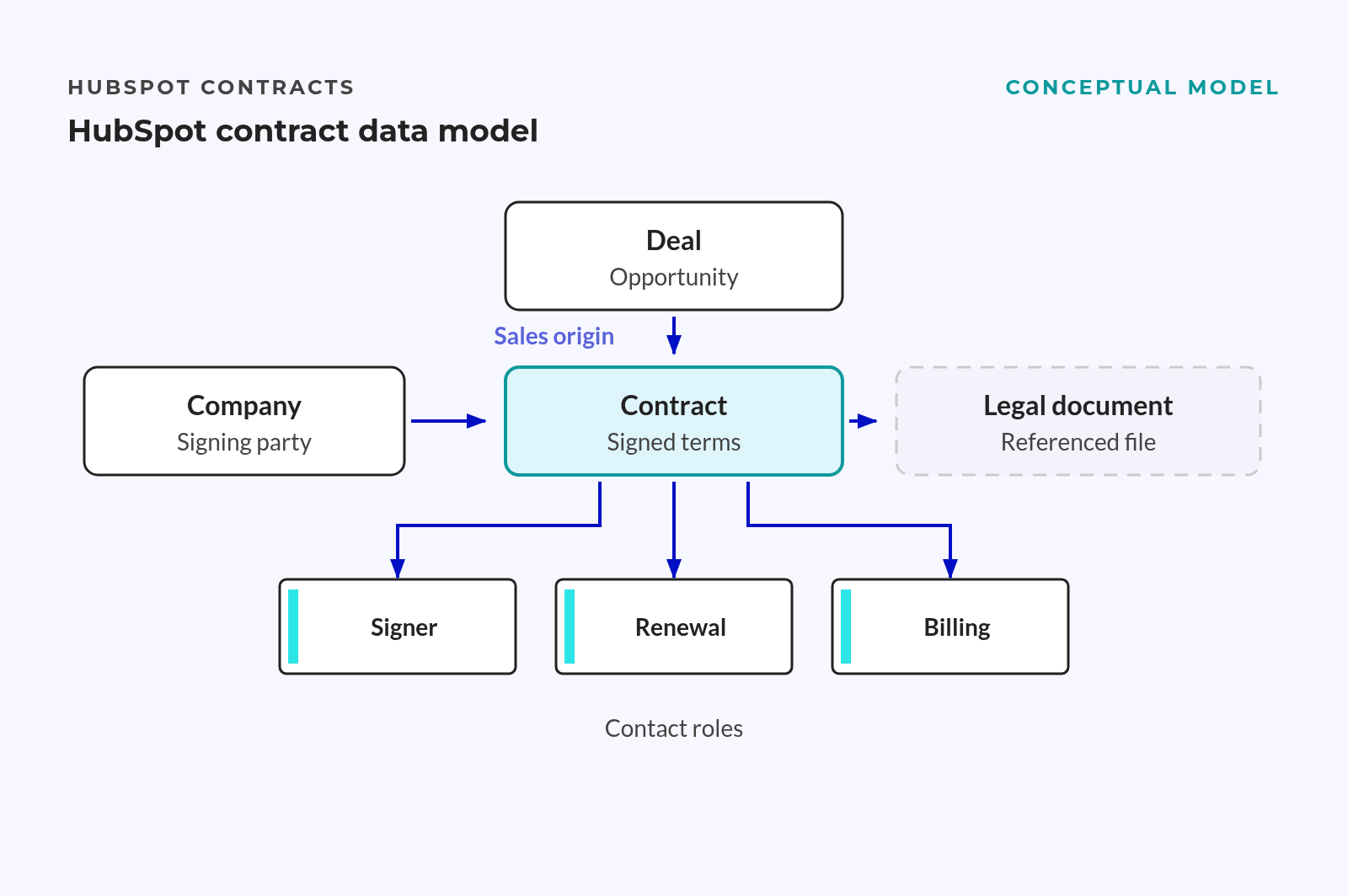
- Company: identifies the customer or party signing the contract.
- Contact: identifies a person and their role.
- Deal: records the sales opportunity and where it began.
- Contract: records the agreed term, value and duties.
- Legal document: provides the signed evidence behind those terms.
A company can hold multiple contracts with different dates and owners. Separate records let teams report each signed commitment. They avoid reducing the whole account to a single amount.
MAP the Reporting Questions Before You MAP a Single Field
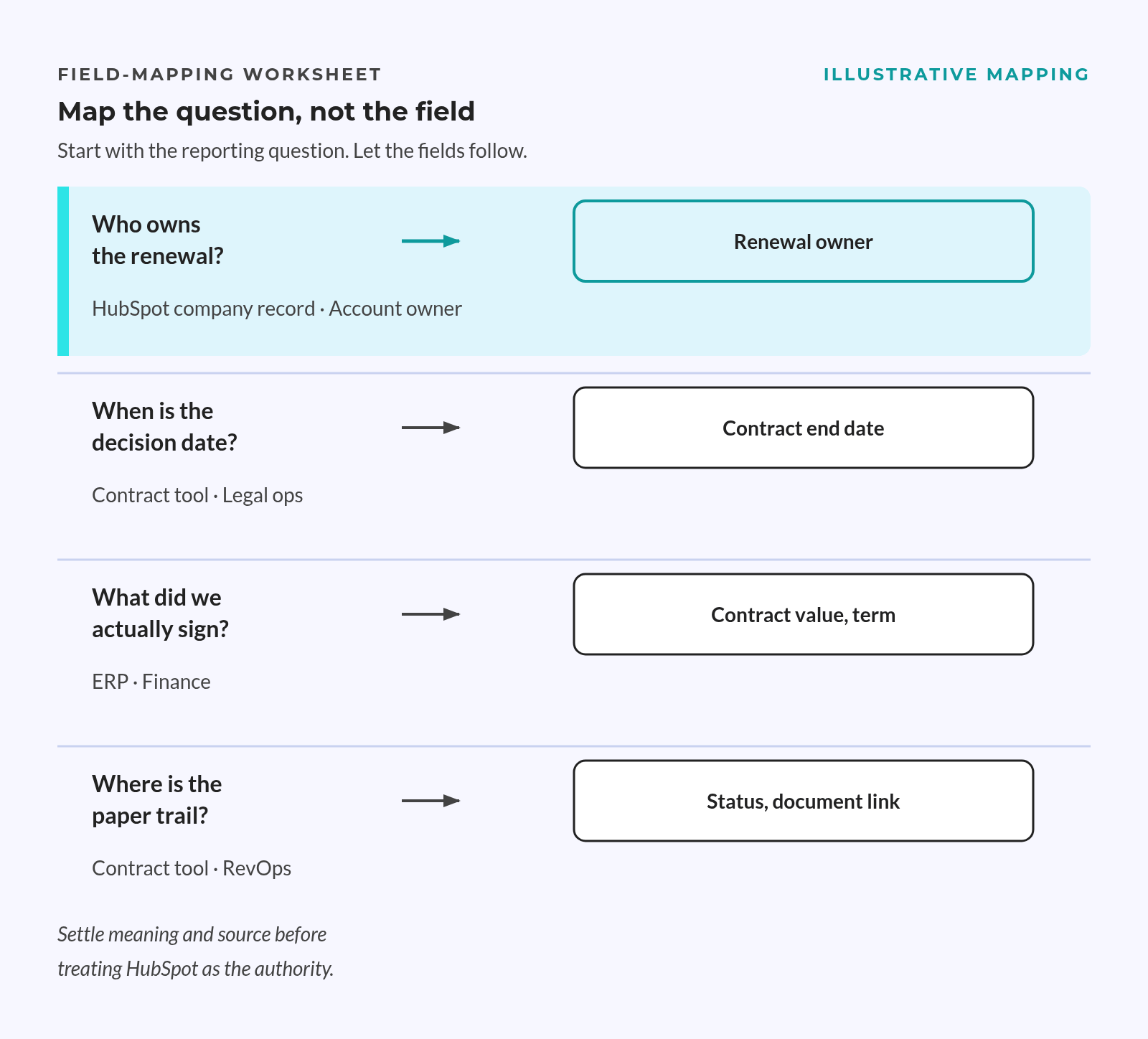
An export shows what people stored, not what leaders need to know. Use reporting questions to decide which fields belong in the model.
The Six Questions a Contract Record Must Answer
Start with questions raised in revenue meetings. Agree what each answer means before choosing its field type or report.
The reporting questions:
- What value is already contracted for the year?
- When does each commitment start, end and require notice?
- Who owns the renewal decision?
- How often does billing occur, and when does it begin?
- What changed after signature?
- Where is there scope for expansion?
“Contracted value” needs a shared meaning. Total contract value, recurring value and billed value measure different things. Matching amounts do not make them the same measure.
A customer’s possible future spend is not committed revenue and must not inflate the contract total.
💡 Insight
A field can be complete and still give the wrong answer if teams disagree about its meaning.
Turning Questions Into a Field Shortlist
Trace each question through the same chain: answer, field, source and owner. Include the report period and filters so another person can get the same result.
For each proposed field, record:
- Meaning
- The business question it answers.
- The values it includes and excludes.
- Control
- The system allowed to change it.
- The role that resolves errors or gaps.
Cut fields that support no report, action or contract duty.
Clear field meanings also matter before adding AI. In February 2025, Gartner predicted organizations would abandon 60% of AI projects lacking AI-ready data through 2026. This was a forecast about AI projects, not a measured result for contract management.
The Core Contract Fields and What Stays in the ERP
If finance disputes a value, settle its meaning and source before treating HubSpot as the authority. Teams can view finance data there without moving control of every field.
Identity, Term and Value Fields
Treat these fields as a design shortlist, not native property names. Map each concept to an existing property before creating a new one.
Core field map:
| Group | Suggested Internal Name | Data Type | Mapping Rule |
|---|---|---|---|
| Identity | contract_reference |
Text | Keep a stable source reference. |
| Identity | contract_name |
Text | Use a clear naming rule. |
| Counterparty | Company association | Relationship | Link the party signing the contract. |
| Term | contract_effective_date |
Date | Record the agreed start. |
| Term | contract_end_date |
Date | Record the agreed end. |
| Notice | contract_notice_period_days |
Number | Use days as the unit. |
| Value | contract_value |
Number | State what the amount covers. |
| Currency | contract_currency |
Controlled code | Keep the source currency. |
| Billing | contract_billing_frequency |
Controlled list | Use fixed billing labels. |
| Renewal | contract_renewal_type |
Controlled list | Distinguish automatic, manual and expiry. |
| Evidence | Signed agreement reference | File or URL | Link to the signed document. |
Use consistent snake_case names for custom fields. Give them plain labels that sales, finance and customer success understand.
Do not merge these dates:
- Contract effective date: records the legal and agreed business start.
- Line-item start date: anchors the recurring billing schedule.
- Billing start override: limits when HubSpot can first bill without resetting that schedule.
Fields That Should Stay in Finance Systems
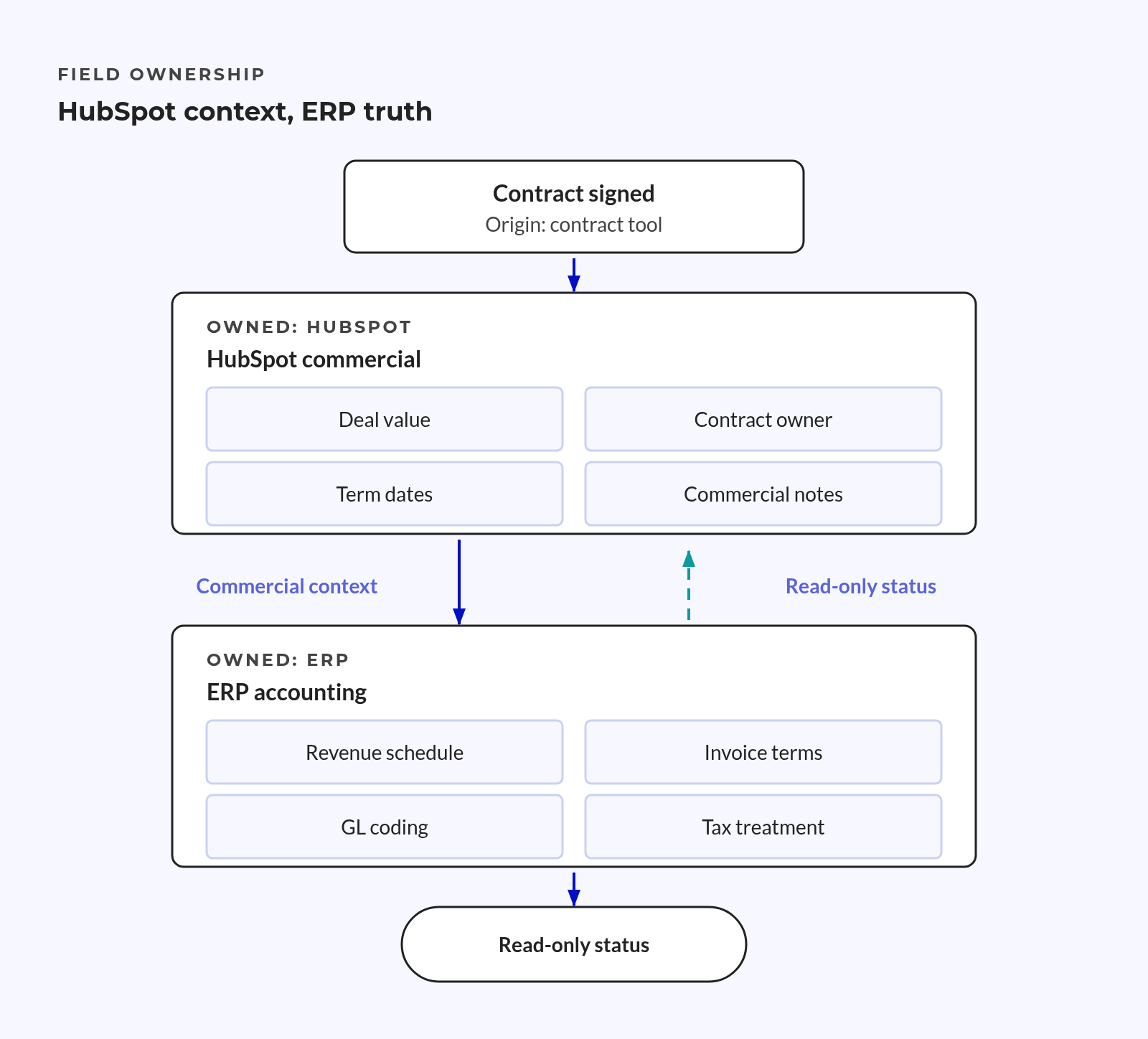
Keep invoice numbers, payment status, tax treatment and journal references under the agreed billing or accounting authority. Apply the same rule to revenue recognition schedules and credit notes.
Mirror only what supports a decision:
- A billing reference for matching records.
- A payment status with its source and refresh time.
- An invoice link for approved users.
A copied status becomes stale if finance corrects the source but the copy stays unchanged. Read-only copies still need a clear sync direction. Name someone to handle failed updates.
Shared data model rules must preserve these source boundaries.
A field meant only for display should not become a rival finance record.
Associations That Make the Contract Record Usable
Correct fields still fail when they link to the wrong customer or person. Define each link’s role and how the records should connect.
Company, Deal and Contact Associations
Use the company that signed the contract as the main customer record for reports. Keep the original deal linked so teams can trace the sale.
A company can hold multiple contracts, and a deal can relate to contracts over time. Contacts can hold different roles on each record.
Define relationship roles:
- Company
- Identify the party signing the contract.
- Distinguish it from other group companies.
- Deal
- Preserve the original sales link.
- Separate later renewal or expansion deals.
- Contact
- Label the signatory.
- Give billing and renewal contacts their own labels.
Use stable labels such as “signatory,” “billing contact” and “renewal contact.” Check which links and labels your chosen object supports before relying on them in reports.
An unlabelled contact link cannot reliably answer who signs, pays or handles renewal.
Renewal, Invoice and Amendment Links
Renewal quotes can create successor contracts linked to earlier contracts. Keep that chain instead of replacing the previous term with new dates.
For amendments, define a linked change record with its own start and end dates. This is a design pattern, not an assumed native amendment object.
Preserve commercial history:
- Link the new contract to the prior contract.
- Keep amendment evidence and effective dates.
- Retain external invoice references where finance owns billing.
These links support reliable contract reporting. Without them, a renewal may appear as unrelated new business or duplicate an existing commitment.
Report joins can multiply rows and inflate totals. Test a contract with multiple linked contacts. Its revenue value must count only once.
Source of Truth and Owner Rules for Every Field
An owner field does not tell you who can approve a change.
Define which system controls the data, who approves changes and who manages the record.
Assigning a System of Record Per Field Group
Choose the source first, the sync direction second and the display last. Avoid open two-way updates that let the latest edit win by chance.
The field register should define:
- The source system and field.
- The allowed update direction.
- The role that approves exceptions.
- The review schedule and last check date.
Keep each copied value visibly linked to its source. If that source is unavailable or stale, flag the issue rather than treating the copy as current.
Example ownership register:
| Field Group | Authoritative Source | Accountable Role | Review Rule |
|---|---|---|---|
| Contract reference and mapping | Approved source register | RevOps lead | Quarterly and after model changes. |
| Billing and payment terms | Agreed billing system | Finance controller | Quarterly and before cutover. |
| Renewal action and contact | Approved customer process | Head of Customer Success | Quarterly and after handoffs. |
These are proposed roles, not default HubSpot settings.
Assigning a Human Owner and a Review Cadence
Assigning someone to a CRM record does not make them responsible for every field’s quality.
📊 Fact
WorldCC’s benchmark reports that 48% of respondents say it is unclear who owns the quality and integrity of contracting or commercial processes.
Keep the contract owner, renewal owner and field steward separate where their duties differ. One person can hold multiple roles. Each role still needs clear duties.
Owner mapping needs its own check:
- Match source owners to active HubSpot owners.
- Route missing or inactive matches for review.
- Define who approves a change of owner.
For API assignment, use the owner id, not userId, according to the HubSpot Owners API guide. Review custom user properties too, since they can grant record-edit rights similar to ownership.
At quarterly reviews, check that the named role still exists and handles issues. Staff changes must trigger a handoff, not leave stale names in otherwise complete records.
Migration Mapping From Spreadsheets and Contract Tools
Keep data migration mapping separate from billing activation.
A clean import does not prove that the next invoice will be correct.
Extract, Normalise, Then Load
List the spreadsheets, contract tools, CRM records and finance exports in scope. Build a mapping register that keeps source references, field meanings and reasons for rejecting rows.
Prepare the load:
- Normalise values
- Use an agreed date format.
- Use fixed currency codes and renewal types.
- Preserve traceability
- Retain original source references.
- Keep rejected rows and their reasons in a permanent log.
Map payment terms explicitly. HubSpot warns in its contract migration guidance that omitting hs_net_payment_terms makes invoices due on receipt.
The same guidance warns against “Create and update” for line items without unique identifiers. Identical lines from different contracts can merge. Use “Create new line items only” where advised.
Proving the Model on a Small Representative Set
Choose cases that cover renewal types, currencies, amendments and billing schedules. Include duplicate-looking products from different contracts, not just records with clearly different names.
Load the sample, check its links and run the agreed reports before scaling.
Initial acceptance checks:
- Check required fields against the agreed status.
- Find duplicate contract references and records with no required links.
- Flag missing owners, invalid dates and absent notice terms.
Reconcile a closed month against the ERP. Contracted and billed value need not match. Finance must explain timing, credits and other differences.
Activation requires a separate finance decision. HubSpot states that activating migrated contracts makes it the billing system of record.
That step cannot be undone, and it does not stop legacy billing.
The release gate:
- Confirm the first future invoice date and legacy billing stop date.
- Obtain finance sign-off on explained differences.
- Clear rejected records or document approved exceptions.
Moving contract data and changing who bills the customer remain separate decisions.
Validation Checks Before You Scale the Model
The model is ready when reports answer the agreed questions and finance can explain the differences. Record checks confirm usable data; finance checks explain how contract and billing totals relate.
Completeness and Duplicate Checks
Required fields depend on a contract’s status. Define what must exist before it enters renewal reports or billing preparation, rather than requiring a value everywhere.
Check the exceptions that block use:
- Missing contracting company or source reference.
- Duplicate references across source systems.
- End dates before start dates.
- Missing notice rules or renewal owners.
- Owner matches that point to inactive users.
Test links as well as fields. A contract can have valid dates but no company link. It can then disappear from an account-level report.
Reconciling the Contract View Against the ERP
Compare matching periods, currencies and value definitions. Do not force a total commitment to match a monthly invoice amount.
Keep a register of explained differences and name an owner for each unresolved item. Limit model changes during the first review cycle so teams can compare results on the same basis.
Before scaling:
- Confirm that contract totals do not multiply through report joins.
- Resolve unexplained billing differences with finance.
- Assign every remaining exception to a named role.
Frequently Asked Questions
Object access and billing scope shape the contract model. Settle both before creating fields or importing records.
Do I Need a Custom Contract Object in HubSpot?
No, not in every case. HubSpot has a native Contracts object, but access and creation paths depend on subscription, seat and beta conditions. A custom object remains a fallback if native features are unavailable or do not fit the agreed process.
The choice rests on reporting needs, supported links and billing scope, not an assumption that contracts always need custom development.
Can I Keep My ERP as the Billing Authority?
Yes, if the design keeps billing there and avoids activating migrated contracts for HubSpot billing. HubSpot can hold the contract details needed for reports while finance controls invoices, payment status and accounting records.
Activation changes that boundary. Before cutover, finance must approve the first future invoice date, legacy stop date and handling of exceptions.
Conclusion
A reliable HubSpot contracts data model keeps signed terms traceable when a customer renews, expands or changes the agreement. Source fields show where values came from, and labelled links show who signs, pays and handles renewal.
The test is whether finance can explain a contract’s value without rebuilding its history in a spreadsheet.
Key Takeaways
- Sales records, contract records and signed documents serve different roles.
- Each field has a reporting purpose, trusted source and named owner.
- Contact roles, renewal links and amendment records preserve contract history.
- Report checks establish whether the data is ready to scale; billing activation remains a separate finance decision.