
October 22, 2026
10 minute read
Each team can calculate its total correctly yet use different terms.
Revenue Operations needs to define approved products, price rules and who approves changes before building another dashboard or importing more records.
Those rules must follow each sale through quotes, signed terms and reports.
📊 Fact
HubSpot’s State of Sales found that 42% identified annual recurring revenue as their most important success metric. A correct deal total, however, does not prove that the recurring revenue beneath it is right.
The library holds the offers your business approves for sale.
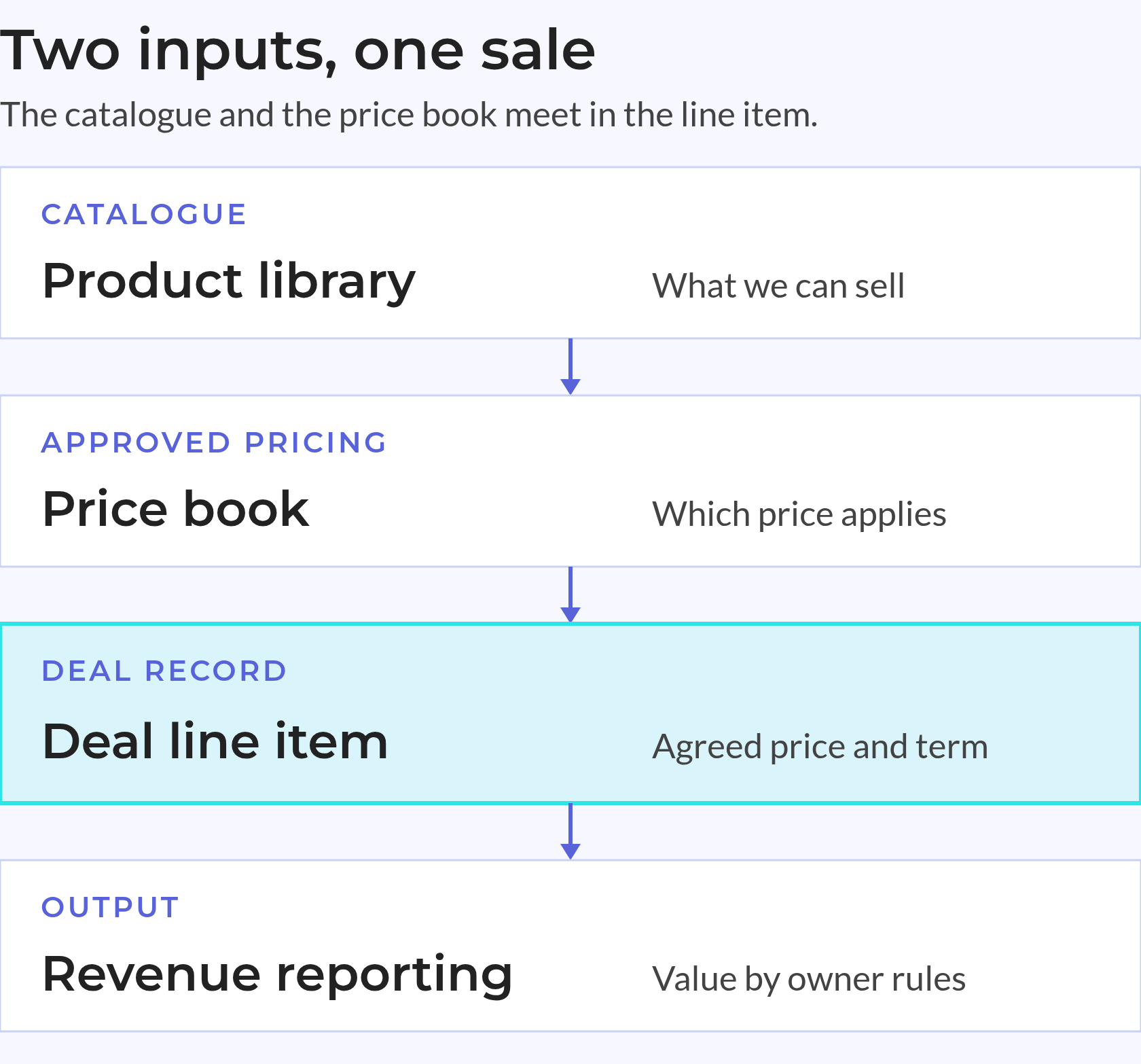
Line items record the terms of each sale, while reports group and calculate those values. Clear rules at each layer tell teams which record to trust.
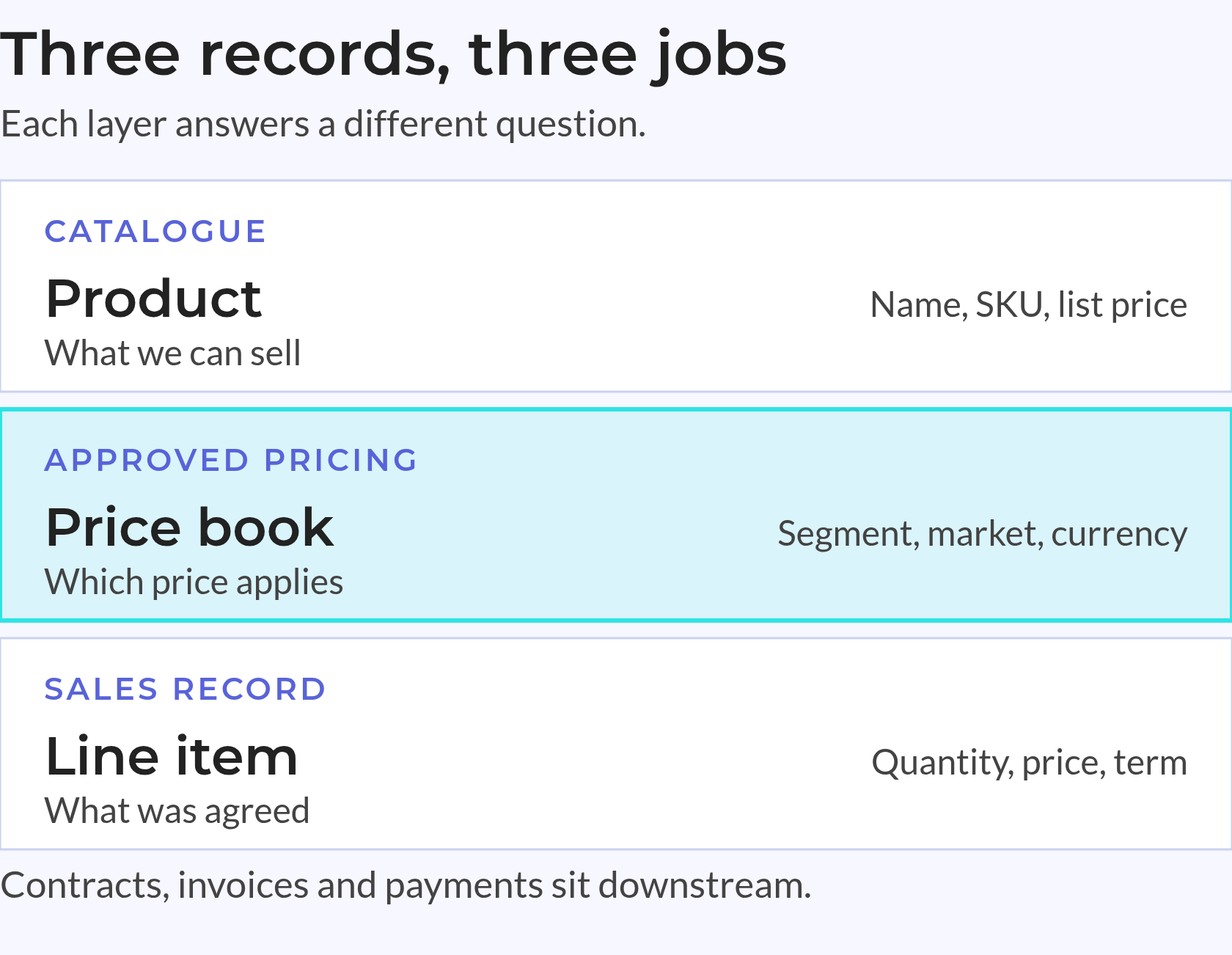
The HubSpot product library is a catalogue of reusable records with names, SKUs, prices and billing frequency. It holds offer details, not completed sales.
A product record supplies the starting details. A line item holds the quantity, agreed price, discount and term for a specific sale. HubSpot’s product guide explains this catalogue layer.
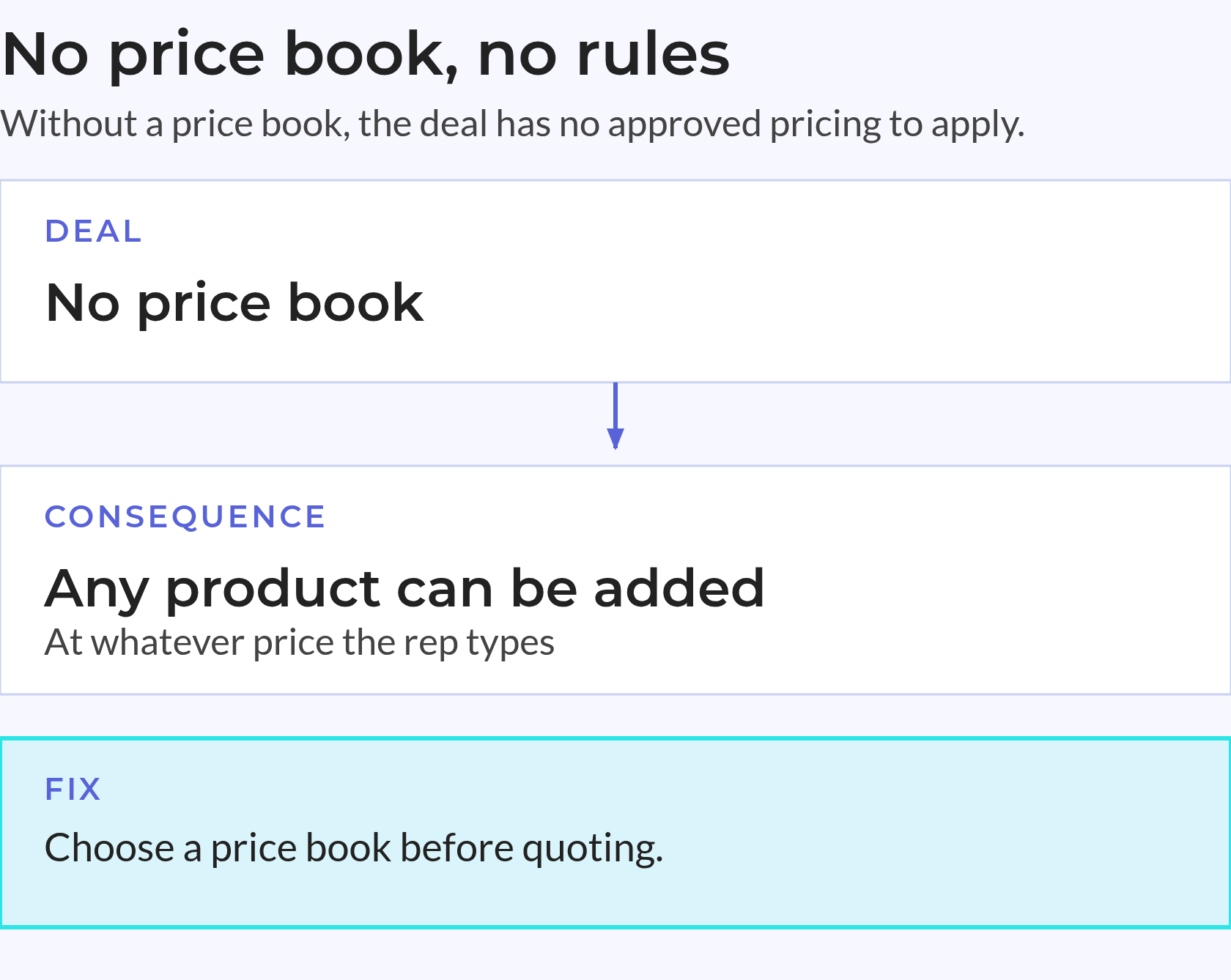
Price books hold approved pricing by customer segment, geography, tier or currency. RevOps can set assignment rules so the right book is applied automatically when a deal is created. Quotes inherit the book’s prices, and reps can only add products included in it. Price books still do not decide packaging, margins or who can approve a discount.
Price Books reached general availability on 4 August 2026, and a public Price Books API is in beta, so pricing catalogues can be created and kept in sync from an ERP or PIM instead of maintained by hand.
Keep The Boundaries Clear
| Record Or Layer | Question It Answers | What It Should Not Replace |
|---|---|---|
| Product | What can we sell? | An agreed sale |
| Price book | Which approved price applies? | Pricing strategy |
| Line item | What terms apply to this sale? | The reusable offer details |
| Revenue report | What value meets this metric’s rules? | The source sales records |
Keep product details separate from the terms of each sale. A sound data model also names the record that owns each value when linked systems disagree.
Contract terms, invoice status, payment status and renewal dates need their own records downstream. The catalogue cannot replace them or answer every revenue question.
Custom line items can exist without an approved product reference.
A clean catalogue therefore does not prove that each deal has complete, approved lines. Both the offer records and the sales records need checks.
Define Source Ownership
💡 Insight
Check catalogue quality and deal completeness as distinct tasks; approved product records do not guarantee complete sales records.
Shortcuts during busy sales cycles can leave gaps in product data. Finance finds them later, when it needs a stable product breakdown or a comparison with an earlier period.
A rushed product request can turn into a lasting reporting fault when sales has no clear approval path.
Watch For These Patterns
A report can change because someone edited its source, even if nobody touched the report itself.
These patterns are audit questions, not proof of faults in your portal. Check linked records and edit history before deciding what needs repair.
Assess the records before rebuilding them. Export the catalogue, check linked deals and log exceptions before changing active products. Keep a record of each gap and proposed repair.
Check The Commercial Record
A custom line needs review, but it is not always an error. A retired product reference can also remain valid on a past sale.
Prioritise Repairs
Compare 2026 results with 2025 using the same rules; a model change can otherwise look like business growth or decline.
The Backbone stage sets shared rules for product identity, pricing and billing periods. Agree on those rules before setting up folders or importing clean records.
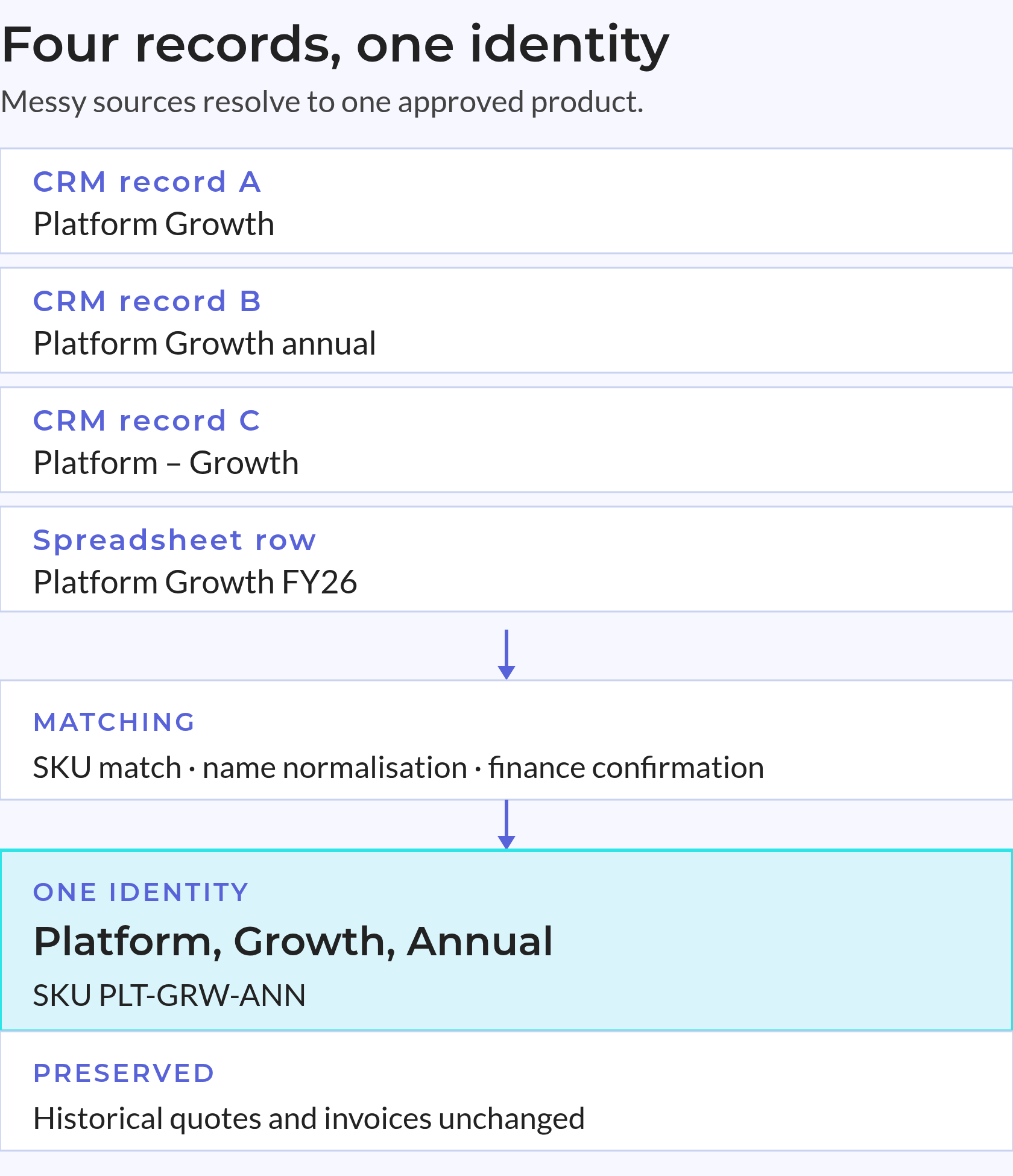
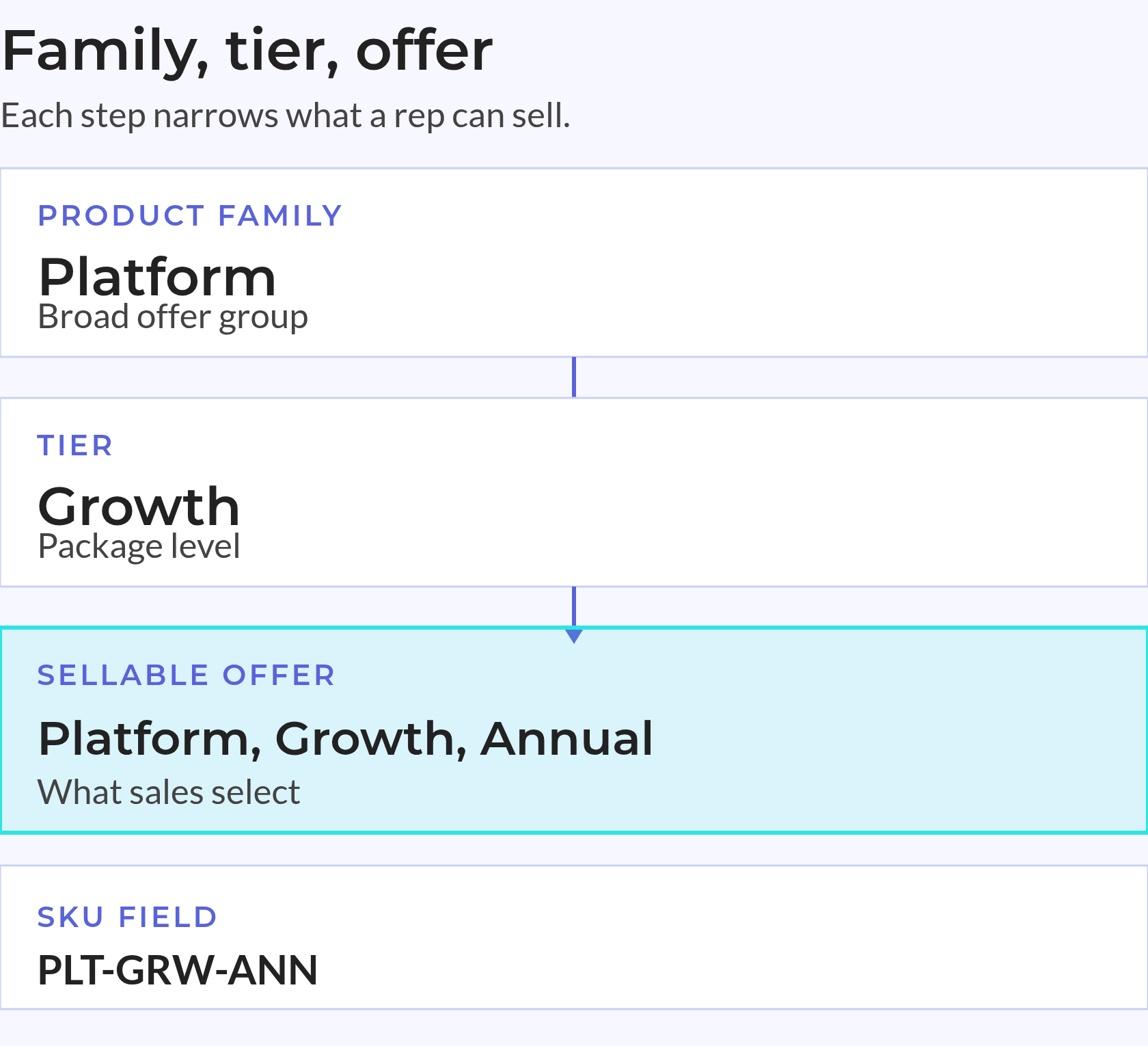
A product family groups related offers for reporting. A variant marks a change in what the customer buys, while a SKU identifies the offer sales can select.
For example, a platform family can include a Growth tier with annual billing. Its display name can be “Platform, Growth, Annual,” with a stable SKU in its own field. The name makes the offer easy to read; the SKU keeps its identity stable.
Define The Variant Rule
A customer’s agreed discount usually belongs on the line item with its approval details, not in a new product record.
Folders make the HubSpot product catalog easier to browse. They do not ensure that sales, product and finance use the same terms.
Use Names That Stay Useful
“Platform Growth, special annual price” mixes the offer with a discount. A clear product name still makes sense when its price changes.
Before importing repairs, keep record IDs and map old values to approved replacements. Test the changes without rewriting the terms of past sales.
Give HubSpot price books named owners and approved pricing rules. Finance should agree on the reporting currency and local pricing policy before setup starts.
Choose The Pricing Approach
| Approach | Main Benefit | Main Trade-Off |
|---|---|---|
| Base prices with conversion | Easier central comparison | Converted prices can not fit local markets |
| Local market prices | Better fit with local selling terms | Combined reports need clear currency rules |
| Base reference plus local prices | Shared reference with local control | Owners and review dates must stay clear |
Record the price source, currency, market, owner and effective date so teams can explain price differences without searching through messages.
Mixed charges need clear rules too. Growth Unhinged’s pricing research found a shift towards hybrid pricing among surveyed software and AI companies. That finding does not cover every B2B business, but it shows why a flat recurring price cannot represent every offer.
Make Cadence Explicit
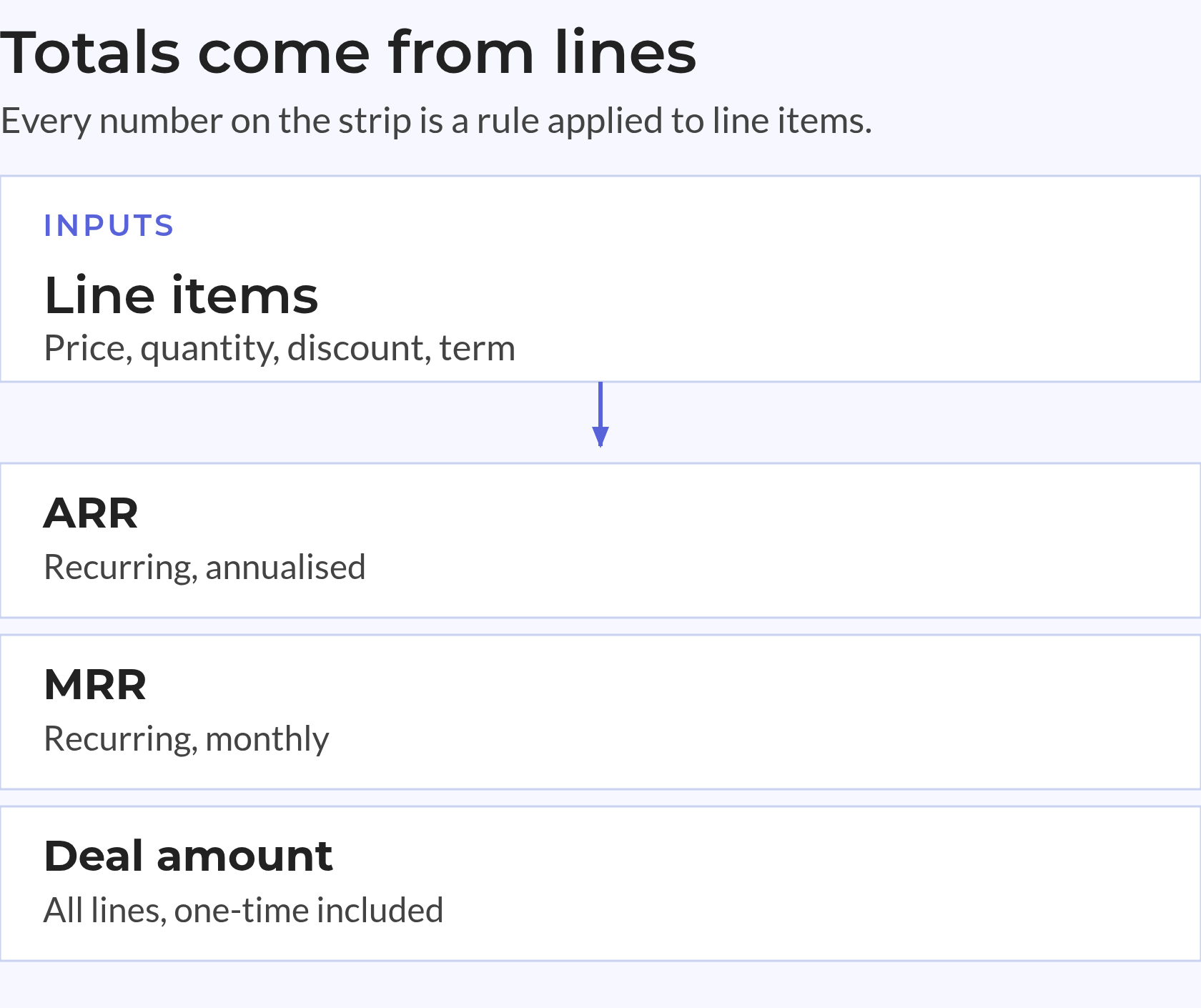
HubSpot calculates deal ARR and MRR from recurring line-item values and term lengths, as its deal property guide explains. Deal Amount is separate, so fixing it alone does not prove recurring totals are right.
Use separate catalogue entries for each billing period or an explicit frequency property that reaches every sale.
A naming rule alone is not enough. Sales and finance need a stored value they can check, not a billing period they must infer from a name.
Future price steps also need effective dates. An agreed increase for a later term must not inflate the customer’s current recurring value.
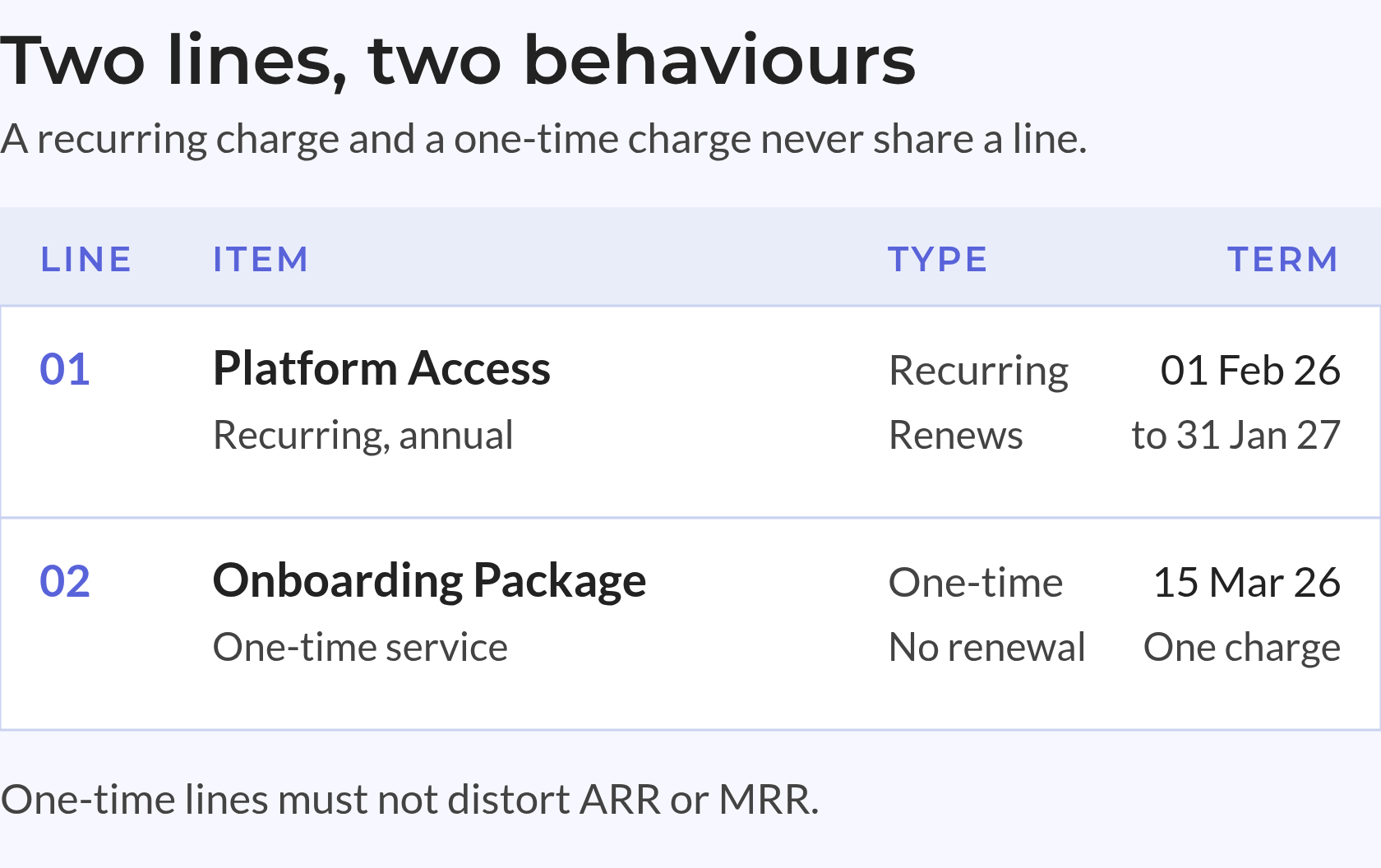
Each sale needs a product reference, agreed price, billing period and term that sales and finance can trace. Approved catalogue values are only the starting point.
Check that terms are complete before approval and remain stable after signature.
A written policy does not create a native field lock. Test required fields, permissions, workflows and system checks against the portal’s actual setup. Confirm what each control blocks and what it only flags for review.
Control The Inputs
A post-signature change needs a reason, an approver and a record of the prior terms. A silent edit leaves downstream teams unable to explain what changed.
If you use visual CPQ or product configurators, review their selection rules alongside the catalogue. Check that product configurators map selected offers to approved product IDs, prices and billing terms.
Keep changes to the sale distinct from data repairs; an agreed expansion and a typo correction need different handling.
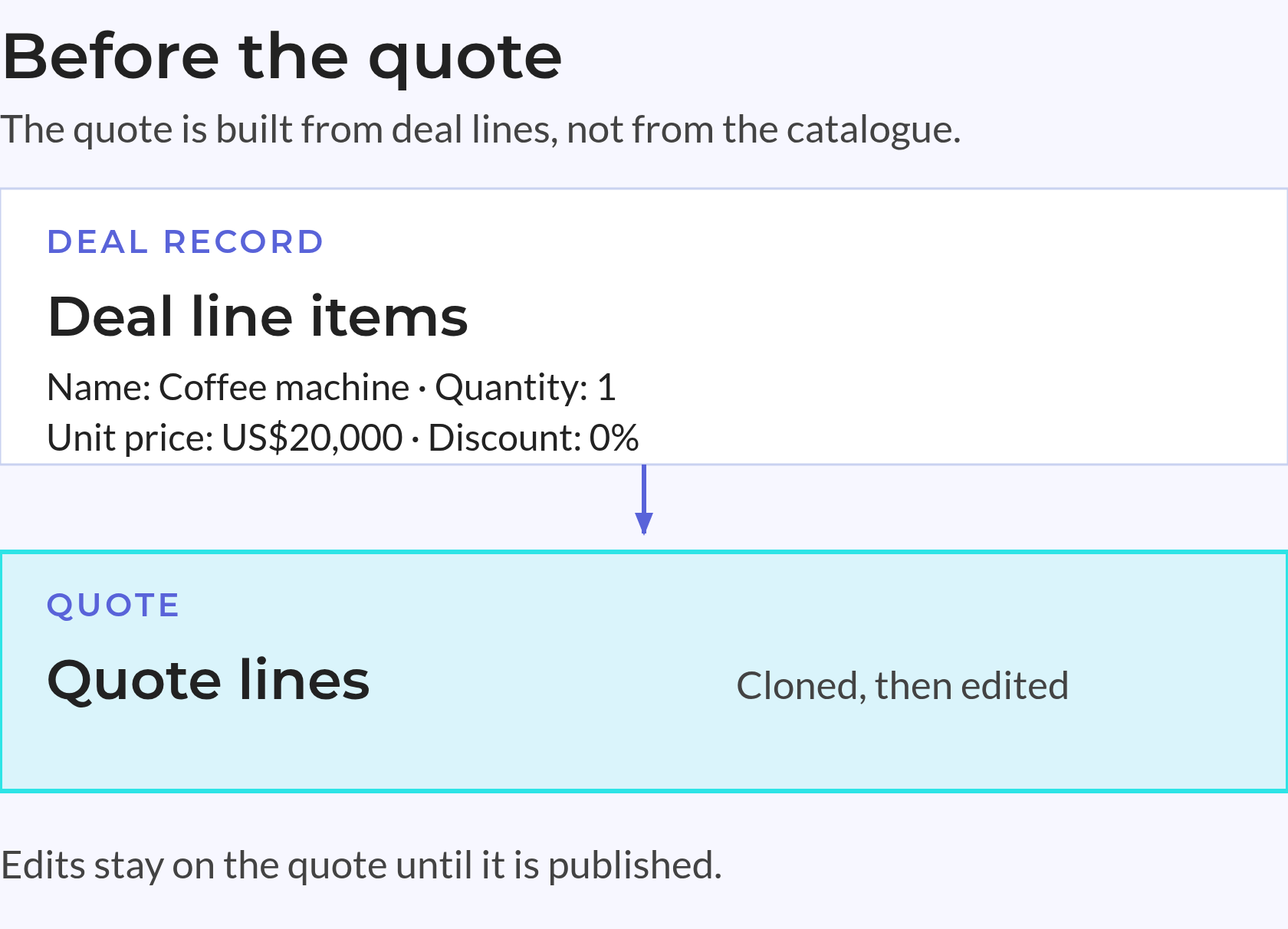
HubSpot’s line-item editor guide explains a key handoff: creating a quote clones deal line items. The quote and deal do not stay in sync.
Finalising the quote syncs its lines back to the deal. During that event, HubSpot removes deal lines absent from the quote. Teams need to compare the resulting deal with the final quote, not assume both stayed aligned throughout.
The final quote is a checkpoint for matching records, not just producing a document.
Check The Handoff
Imports and API updates to line items do not update the associated deal Amount on their own. Include that check in the rules for linked systems.
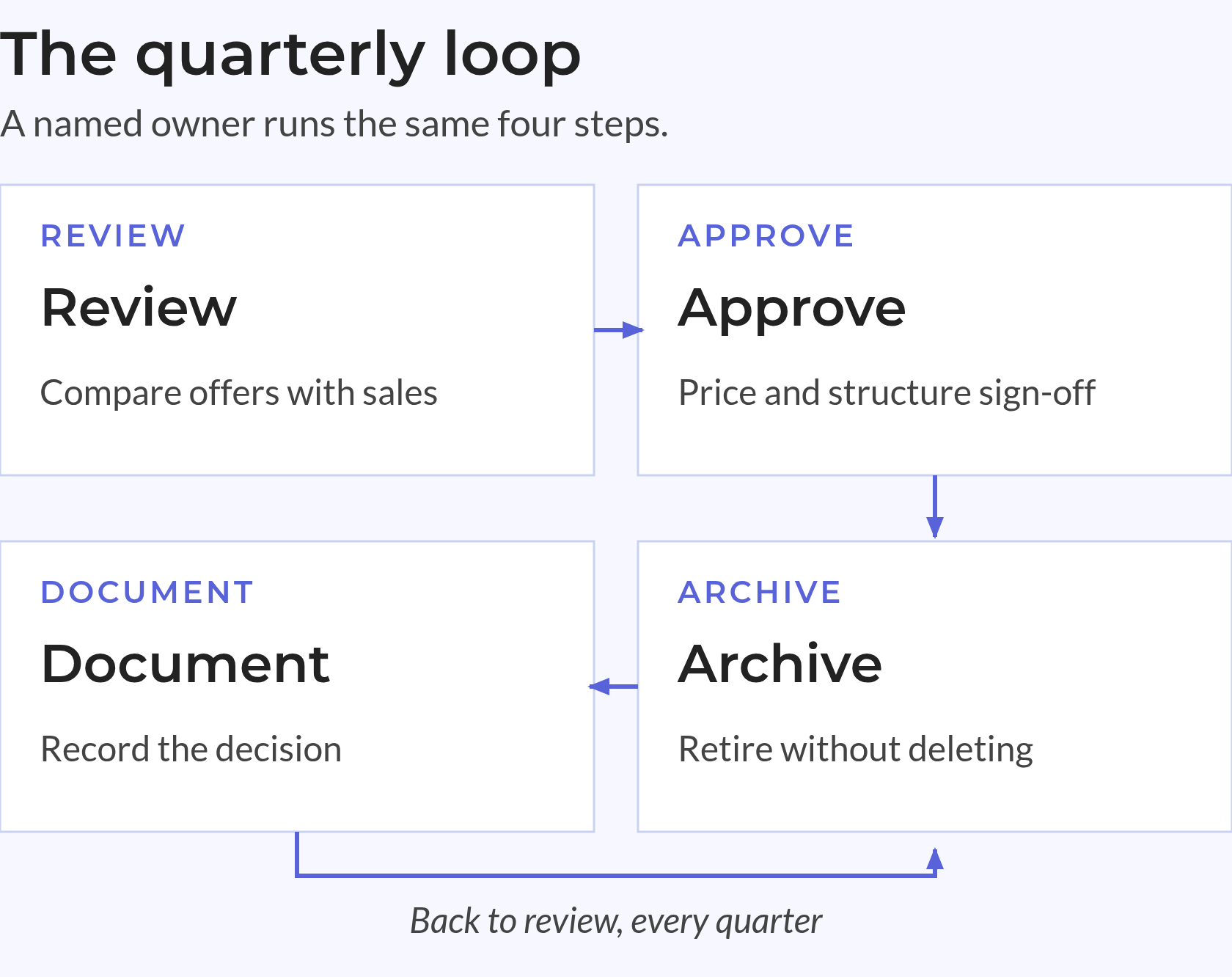
When retiring offers, preserve the product identity used on past sales. Prefer archiving to deletion, and avoid reusing an old product name for a different offer.
Reports also need an agreed date basis: booking date and revenue-effective date answer different questions about the same signed sale.
The Run stage gives the catalogue a named owner, a clear request path and regular reviews. These controls keep new exceptions from turning into lasting reporting gaps after cleanup.
Assign a catalogue owner in RevOps. Finance approves price and tax decisions, while sales operations gathers requests and supports sales teams.
Make Responsibilities Visible
A simple request path has three steps: submit the need, review the structure and price, then approve and publish. Set a service target, such as two business days.
Urgent requests need an exception path, not an unofficial bypass.
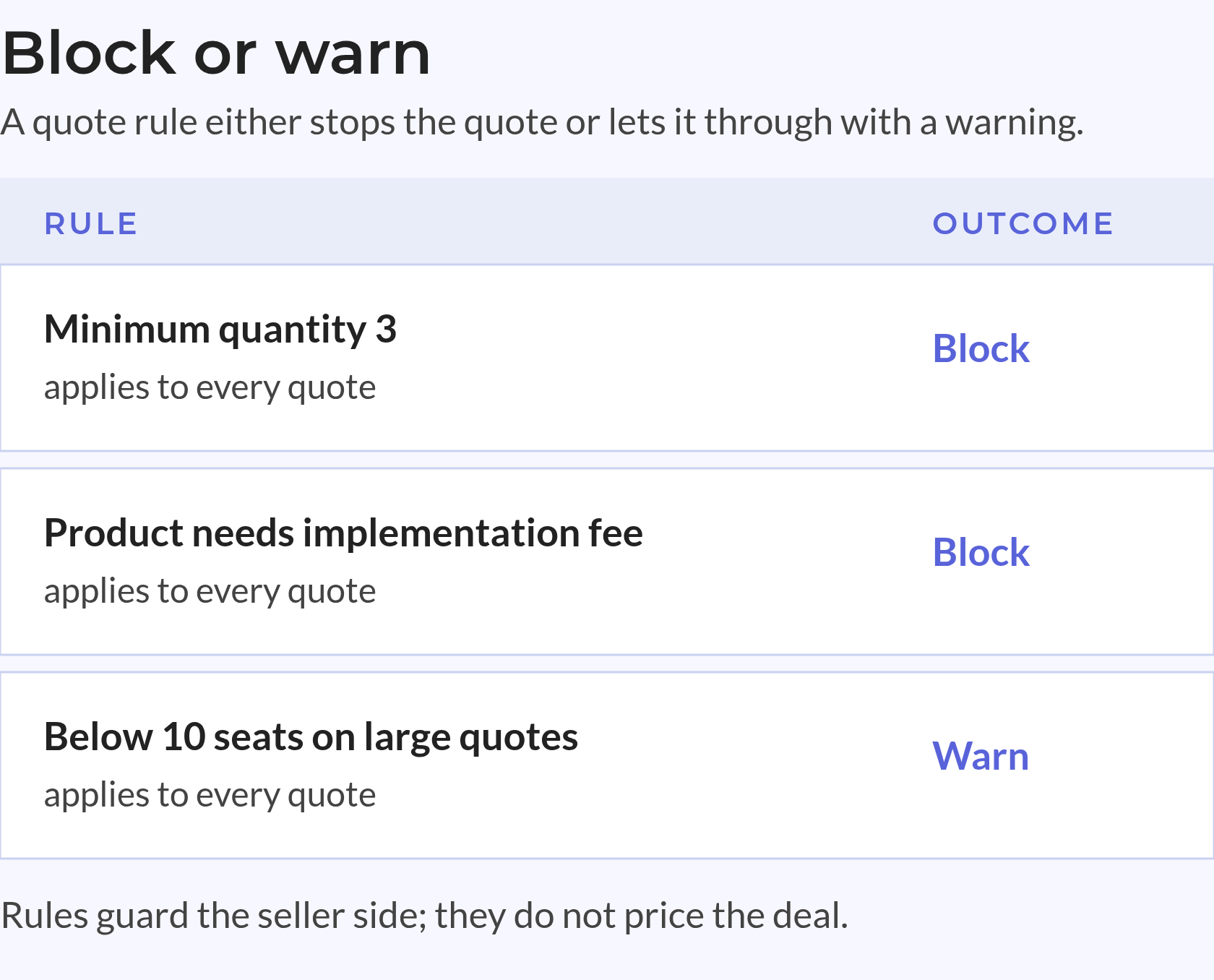
Require approval before a product enters a live deal. When an offer retires, keep its history rather than deleting the record.
Compare active offers with recent sales and inspect changes since the last review. Check deal completeness as well as catalogue quality.
Keep The Review Focused
Track gaps that owners can fix, such as missing billing periods or price overrides with no clear reason. A single cleanliness score can hide which records need work.
Test booked value, current recurring value and invoiced value as distinct measures, then explain their differences.
Keep the revenue context with each number — who approved it, which record set it and which date it uses. If you add AI assistants, include their inputs and outputs in these tests. They still need stable product IDs, approved prices and valid dates. Clear rules for exceptions matter as much; AI does not fix gaps in the source records.
The HubSpot product library remains useful for reporting only while people maintain those rules.
When revenue totals disagree, first check whether teams are comparing the same values. A catalogue price, an agreed sale and current recurring revenue serve different purposes.
A product is a reusable catalogue record for an offer your business sells. A line item holds the terms of a specific sale, including quantity, agreed price, discount and billing cadence. Keeping these roles distinct lets you change future offers without treating today’s catalogue as the full record of past sales.
Deal Amount and recurring revenue fields use different inputs. Recurring totals depend on line-item values, billing frequency and terms, so errors in those fields can hide beneath a correct deal total. The report’s date basis matters too: booked value and value currently in force are not the same measure.
Separate records work when the billing period defines a distinct offer that sales must select. An explicit frequency property can also work if it reaches every sale and drives the right calculations. Either way, sales and reporting need a stored value, not a billing period inferred from a product name or unwritten rule.
RevOps should own structure, naming and product identity, while finance approves standard prices, currency rules and tax treatment. Sales operations should gather requests with enough detail for a clear decision. Post-signature changes also need an approver, a reason and a record of prior terms so teams can trace what changed.
A RevOps team owns the shape of the catalogue: families, SKUs, naming rules and the request path for new offers. Finance owns price, currency and tax decisions. That split is one of the more reliable RevOps best practices because it keeps commercial judgement with the people accountable for margin, and revenue operations services alignment decides who answers when a request crosses both. Write the split down before the next product request, not after a dispute.
RevOps implementation in HubSpot starts with the records, not the tooling: products, price books, line items, quotes and contracts agreed in one model. Only then does automation make sense. That order is what RevOps in HubSpot teams tend to get wrong when they buy a workflow before agreeing a definition. Good HubSpot RevOps work is mostly unglamorous: naming rules, effective dates, owners and a tested link between the HubSpot product library and each sale.
Use the standard HubSpot Data Model while products, line items, quotes and contracts answer the questions you ask. Add HubSpot custom objects when you need a record the standard set cannot express, such as an entitlement or a regional price approval. A HubSpot Custom Integration earns its place when an ERP, PIM or billing system owns a value and HubSpot must agree with it. Every custom object and integration adds a second place to maintain, so name the owner first.
The HubSpot contracts object holds the terms of an agreed relationship: duration, pricing, purchased lines and renewal dates. It is downstream of the quote and upstream of billing, which is why product and line-item data has to be clean before a contract is created. Keep the revenue context with the record — who agreed it, when it started and which offer it covers — so a later change can be explained without guessing.
Start with three: booked value, current recurring value and invoiced value, each with a stated date basis. Those revenue operations metrics disagree for legitimate reasons, and a HubSpot dashboard that hides the difference trains people to distrust all three. Add product-level views only after the records support them. HubSpot forecasting setup then depends on deal stages and line-item completeness rather than on a separate spreadsheet.
A RevOps framework names the records, owners and handoffs; a RevOps roadmap sequences the work: identity first, then pricing, then quoting, then reporting. A RevOps maturity model helps you argue for the next step without rewriting everything at once. Revenue operations foundations are dull by design — one product identity, one pricing source, one agreed date basis — and every later capability rests on them.
In-house ownership is not optional: someone has to own the catalogue after the project ends. RevOps agencies help when the work is bounded, such as a catalogue rebuild or a quote-to-cash change. A HubSpot Partner adds value when HubSpot configuration, data model and commercial process have to change together. Use a HubSpot onboarding checklist to compare proposals on the same terms: records, owners, tests and what "done" means.
Breeze is useful for the work around the data: drafting, summarising, cutting a first version of a dashboard or an import. It is not a substitute for the decision. The honest answer to AI vs human RevOps is that an assistant can propose a product description or tidy a price list, while a person still approves the price, the packaging and the exception. HubSpot Breeze AI makes a documented process faster; it does not create one.
Product identity and line-item history. A Salesforce to HubSpot Migration usually moves accounts and deals cleanly, then struggles with price books, product families and the discounts recorded on old opportunities. Map products and price books first, decide how historical lines will be represented, and test one cohort of closed deals before the full move. Archiving beats deleting when an old offer has to stay readable on past sales.
Reliable product revenue reports need a traceable link between approved offers and signed terms. The HubSpot product library supplies the offer details; complete line items show what each customer agreed to buy.
Key Takeaways
Sales and finance can explain different totals when the records show what each total includes, which date it uses and what changed. That record gives teams a basis for trusting the report.