
August 2, 2026
8 min read
Clear rules and routine checks protect both current records and future updates.
Cleanup lasts only when teams control what enters the CRM next.
Poor CRM data also puts revenue at risk.
CRM users reported those losses; the finding does not measure losses among HubSpot customers alone.
During a rebuild or migration, teams must agree who owns each field and what happens when sources disagree. Without those rules, the next import or sync can undo repairs to old records.
Why HubSpot Data Quality Decays as Revenue Teams Scale
Every new form, connected app, and rep action adds another route into the portal. When those routes follow different rules, small errors spread into workflows and reports.
Find Where Bad Data Enters
A form captures country as free text, while an import uses a fixed list. A sync then writes a third version into the same field.
The routing rule still runs, but the values no longer match its logic.
Common Entry Points
- Forms and imports
- Missing match keys create new records instead of updates.
- Mixed formats split records across filters and segments.
- Integrations and rep actions
- External tools overwrite fields they should only read.
- Reps use shortcuts when field rules are unclear.
Cleanup removes visible errors but leaves their entry routes unchanged.
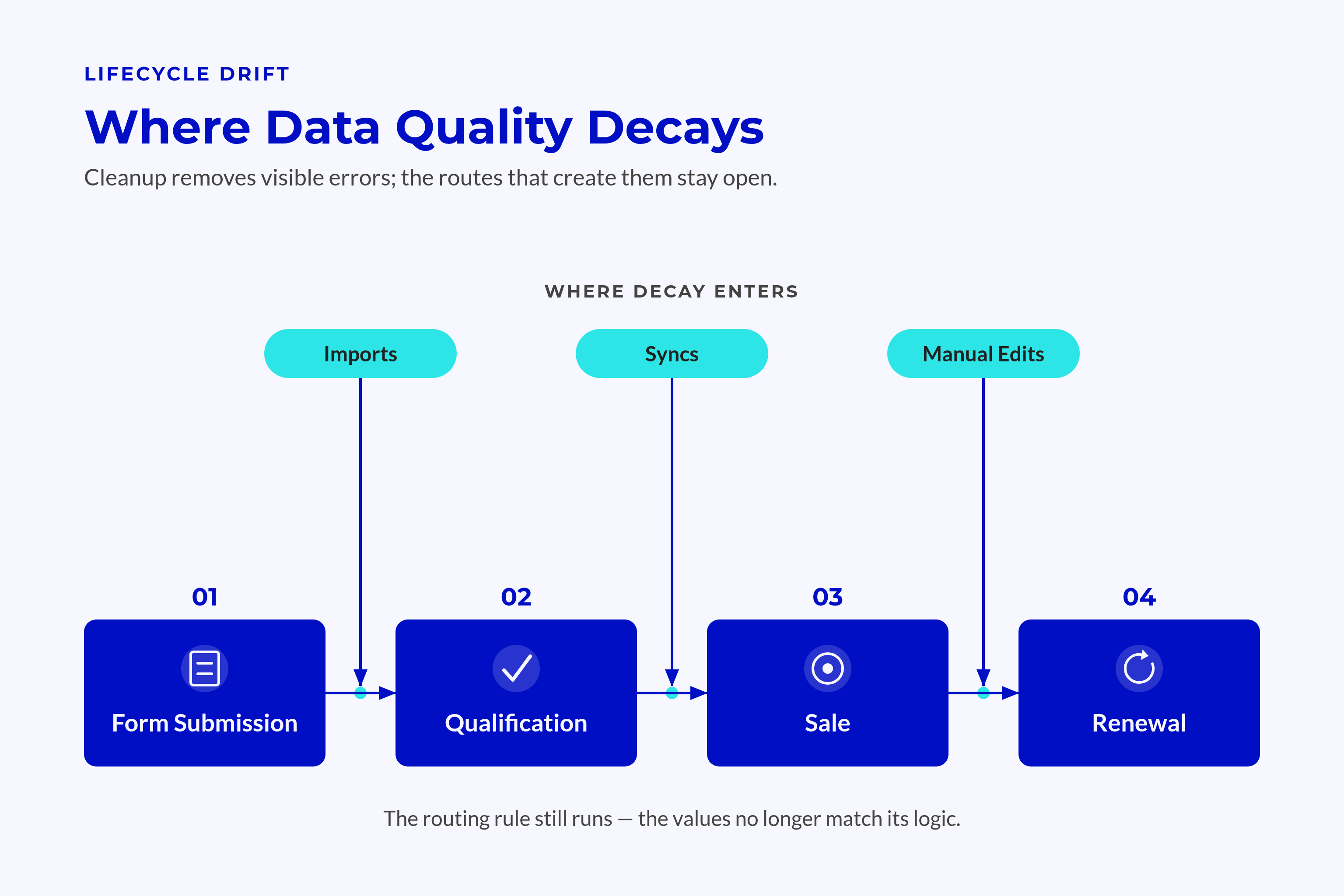
Treat Lifecycle Drift as a Process Fault
Lifecycle stages lose meaning when teams use different entry and exit rules. Marketing sees a qualified lead, while sales sees an account that needs more work.
Customer teams face the same problem when customer status rests on a rep’s memory rather than a known source.
Signs of Drift
- Records stay in a stage after the required next event.
- Workflows move stages without checking agreed evidence.
- Imports overwrite current status with older values.
- Reports count records whose stage no longer reflects their state.
Another bulk update will not settle what the stage should mean. Teams need to agree on the rule behind the field first.
What Data Quality Actually Means in a HubSpot Portal
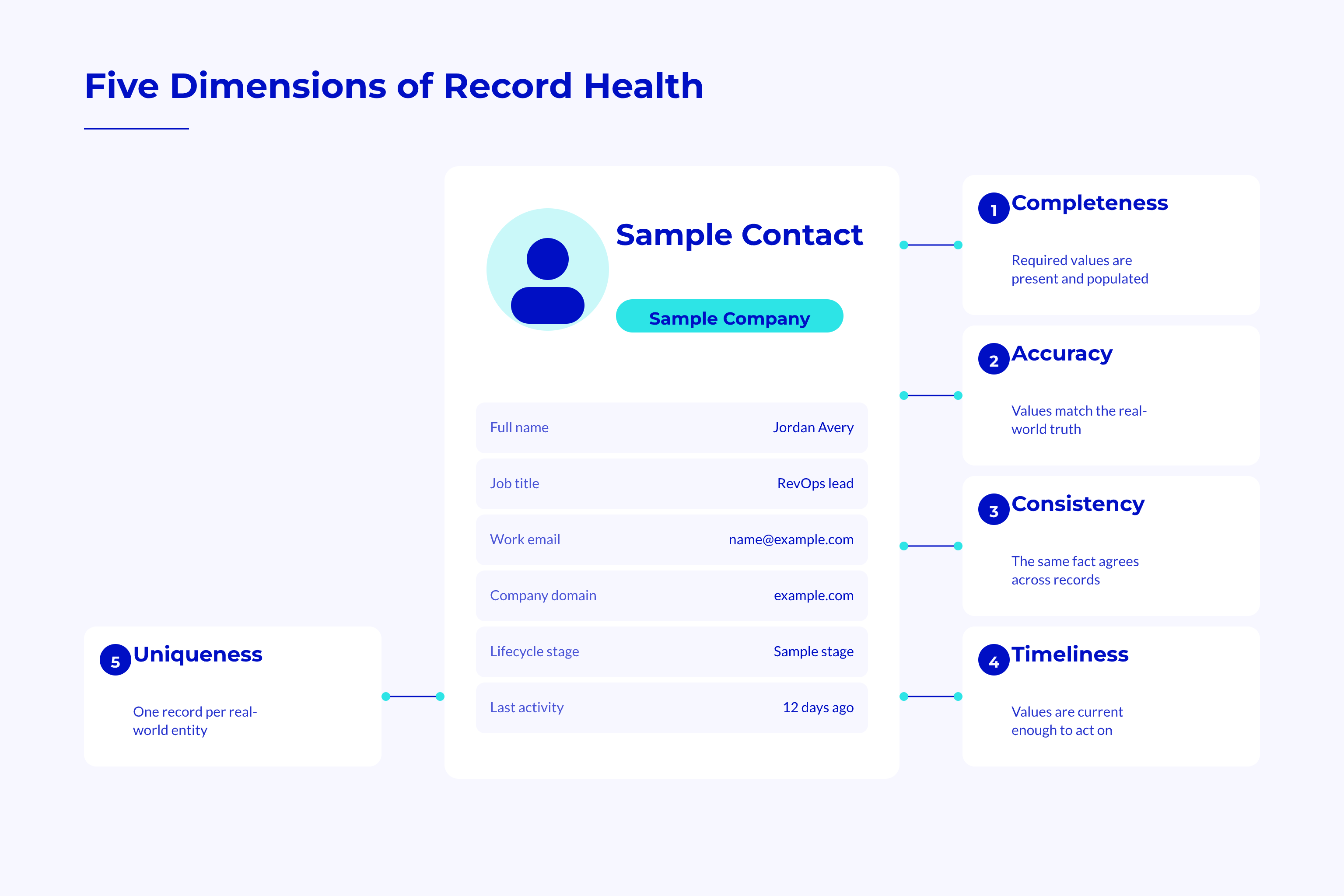
A record can pass one quality check and fail another. Even a complete record can be wrong, stale, or a copy of an existing record.
Diagnose the Five Dimensions of Record Health
Each fault needs its own check and repair. A missing value needs a different response from a value that looks valid but belongs to the wrong company.
| Dimension | HubSpot Example | Governance Question |
|---|---|---|
| Completeness | Deal close date is missing | Which fields must exist before this action? |
| Accuracy | Contact job title is wrong | What source can confirm the value? |
| Consistency | Company country has mixed formats | Which values and formats are allowed? |
| Timeliness | Lifecycle stage no longer fits | What event should refresh this field? |
| Uniqueness | Duplicate company records exist | What identifies the same business? |
Useful Checks
- Review required deal fields before adding deals to the forecast.
- Compare key contact details with an agreed source.
- Check picklist values across forms, imports, and syncs.
- Review status fields against recent business events.
- Inspect suspected duplicate records before merging them.
A filled field proves that a value exists, not that it is true.
Set Standards Around the Decisions Data Supports
Start with fields that drive routing, lead checks, forecasts, and customer actions. Lower-risk fields can follow once those controls work.
Company country, for example, affects which territory receives an account. Its allowed values, source owner, and update rules matter more than cosmetic fixes elsewhere.
💡 Insight
A portal can look clean and still route leads or report forecasts wrongly when teams define key fields differently.
Decision-Based Priorities
- Routing fields need shared values and a fallback owner.
- Forecast fields need clear meaning and timely updates.
- Lifecycle fields need evidence for stage changes.
- Customer health inputs need known sources and rules for keeping them fresh.
A useful standard tells people and workflows what to do when a value is missing, stale, or disputed.
HubSpot's Native Data Quality Tools and the Data Hub Layer
HubSpot provides tools to find issues and move data between systems. Your team still defines what counts as correct and who handles each case that breaks the rules.
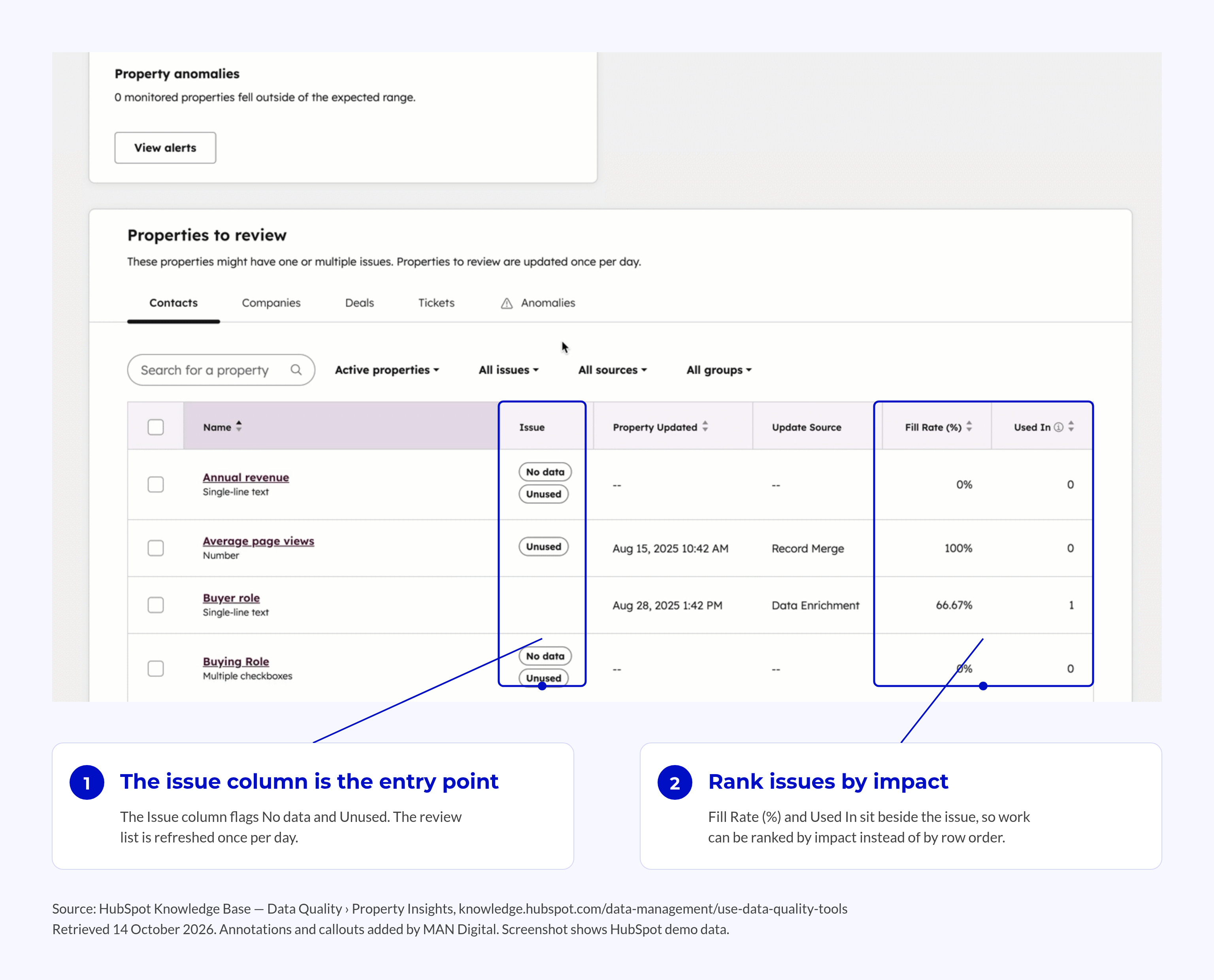
Using Data Quality Tools, Property Insights, and the Weekly Digest
Native data quality tools flag property and record issues. The HubSpot data quality digest gives teams a regular set of issues to review.
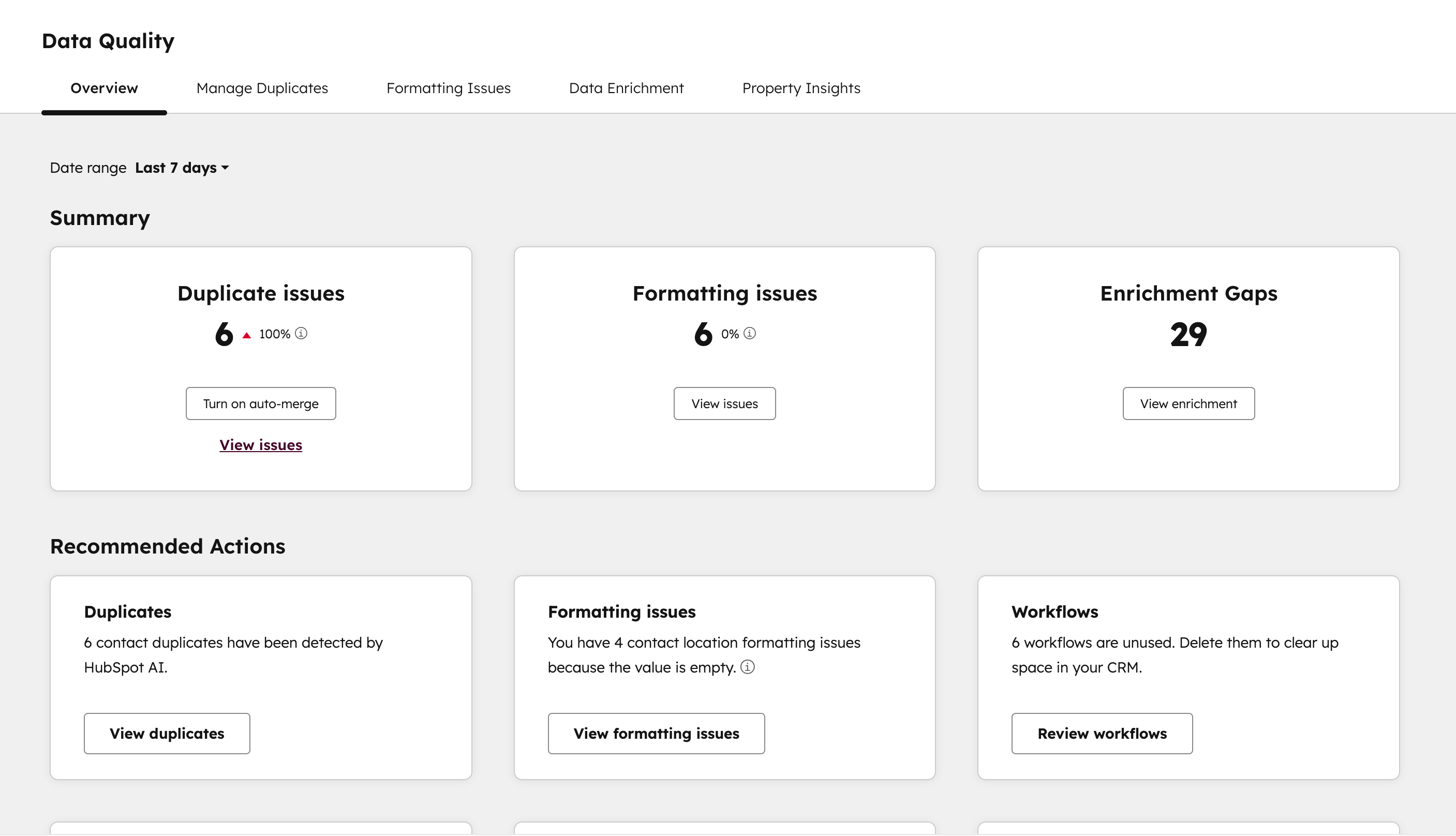
Each signal needs an owner, a priority, and a repair path.
Monitoring Responsibilities
- Assign flagged issues to the role that owns the affected process.
- Separate urgent workflow faults from low-risk record cleanup.
- Trace repeat issues to the route that created or changed them.
- Check that the fix stops the same error from returning.
These rules also matter when AI reads or changes records. In broader research, 89 percent of data and analytics leaders with AI in production had experienced inaccurate or misleading AI outputs. That does not mean the same share of outputs was wrong or that HubSpot records caused those errors.
A data agent needs agreed rules for trusted sources, allowed changes, and review. Those controls give data agent use a clear role and limit which fields it can change.
The HubSpot Data Hub as an Enrichment and Sync Layer
HubSpot Data Hub connects external data with the portal’s working records. That connection needs clear rules for matching records and choosing fields to update.
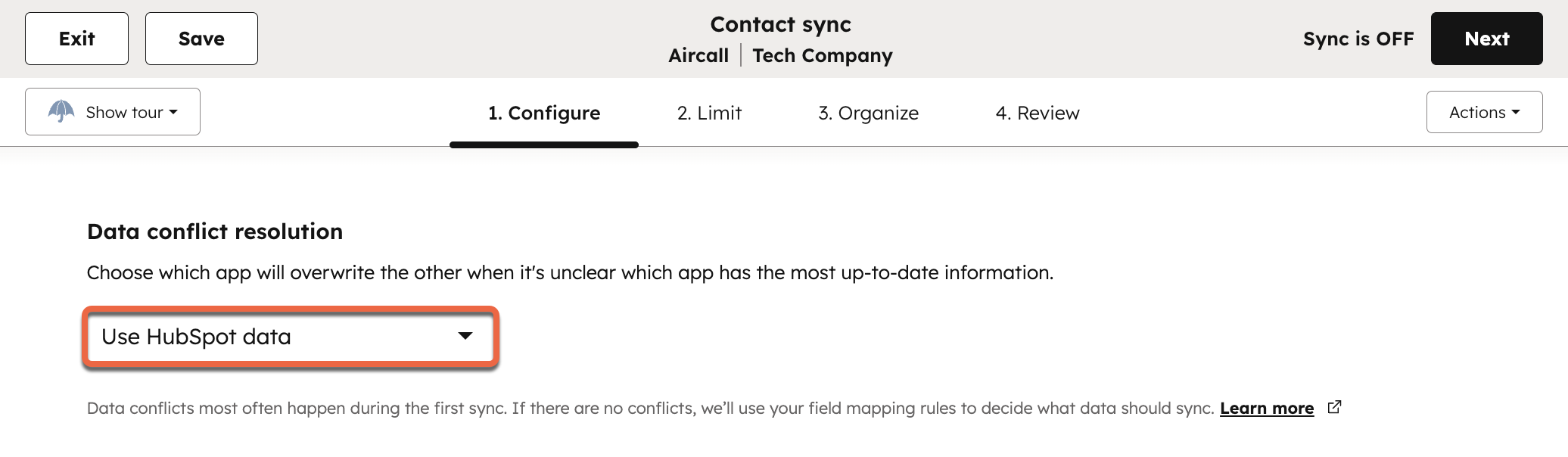
Matching decides which record to update; source priority decides which value to keep.
Sync Decisions
- Record identity
- Define how the incoming record matches an existing contact or company.
- Define what happens when its match key is missing.
- Field ownership
- Define which source wins when values conflict.
- Define whether blank values can overwrite trusted data.
HubSpot data sync stores matched record pairs for later updates. Test the first match and later changes as distinct steps.
Enrichment needs limits on which fields it can change. Governed data enrichment rules protect trusted values from less reliable updates.
HubSpot Data Studio can support views of data health over time when inputs follow shared standards. It cannot make fields with conflicting meanings fit for comparison on its own.
The Governance System: Ownership, Standards, and Operating Cadence
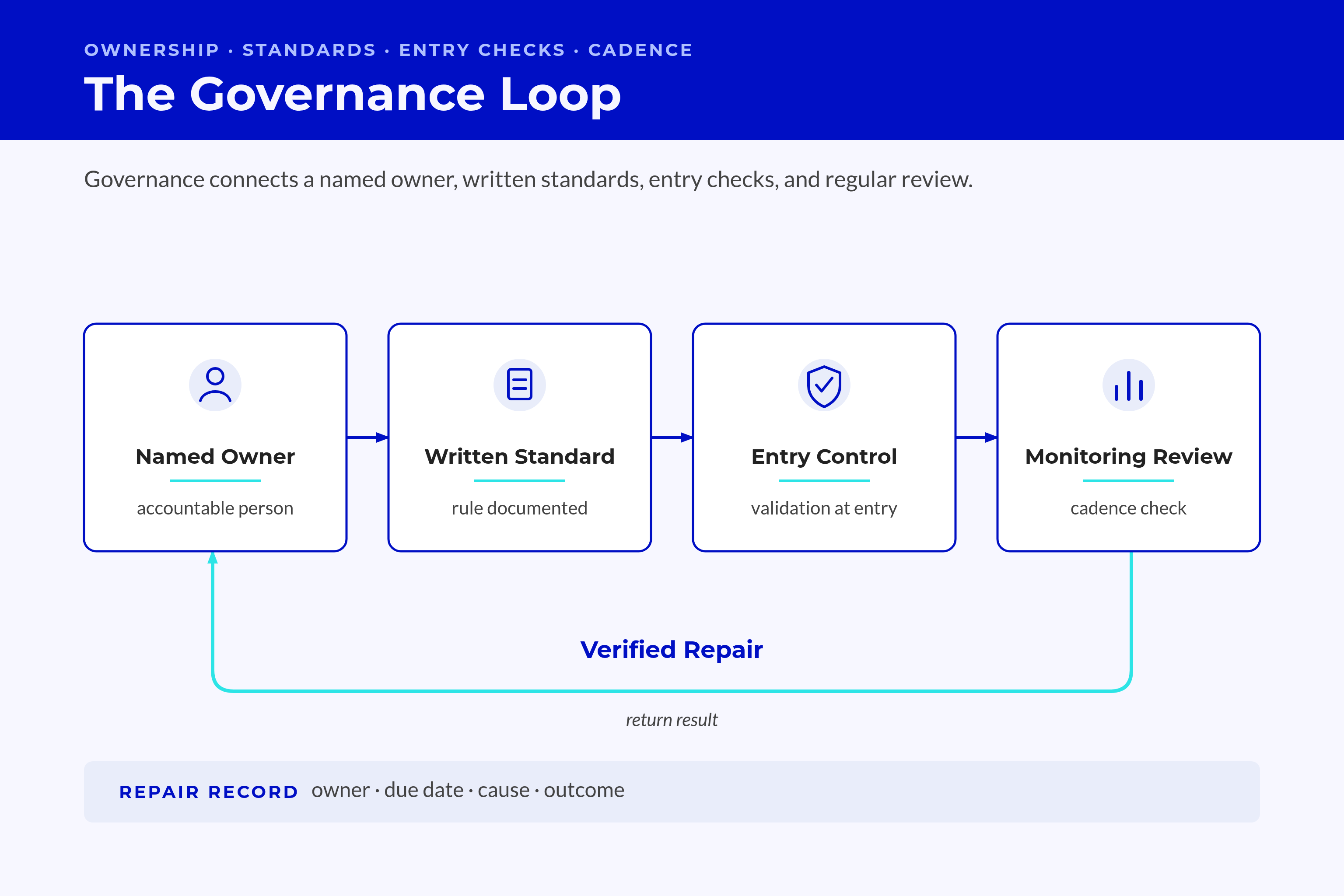
Governance connects a named owner, written standards, entry checks, and regular review. These controls address the causes that record cleanup leaves behind.
Property, Naming, and Lifecycle Standards
Ownership belongs to a role with clear decision rights, not whoever has spare time. Process owners approve field meaning, while the HubSpot owner maintains the controls.
📊 Fact
71 percent report high trust in their data where governance programs exist, versus 50 percent without them. The finding links governance with trust but does not prove that governance alone caused the difference.
Written standards give teams a shared basis for entering data and approving changes.
Standards to Record
- Property rules
- Use clear names such as “Company Billing Country” instead of “Country New.”
- State purpose, allowed values, source owner, and rules for updates.
- Lifecycle rules
- Define the evidence required to enter each stage.
- Define who can correct a stage and how to handle exceptions.
- Picklist rules
- Use an approved set of values across all entry routes.
- Map incoming labels before they reach the working property.
During a rebuild, settle these choices before moving data. Otherwise, the migration carries old disputes into new fields.
The data model should reflect agreed revenue rules. HubSpot settings should apply those rules, rather than decide what a field means.
Deduplication and Validation Rules
Checks before import or sync should test required fields, formats, and match keys. Rows that fail need a review path before they enter the portal.
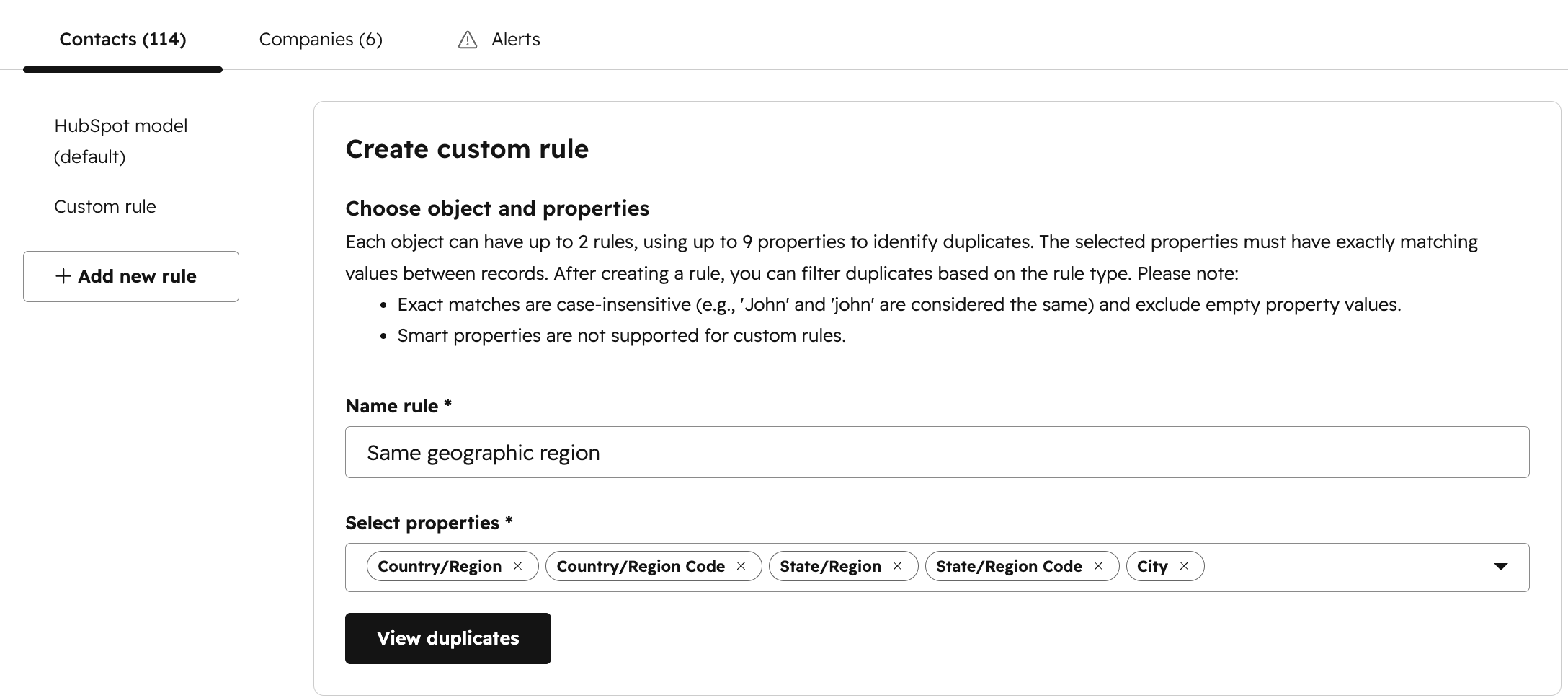
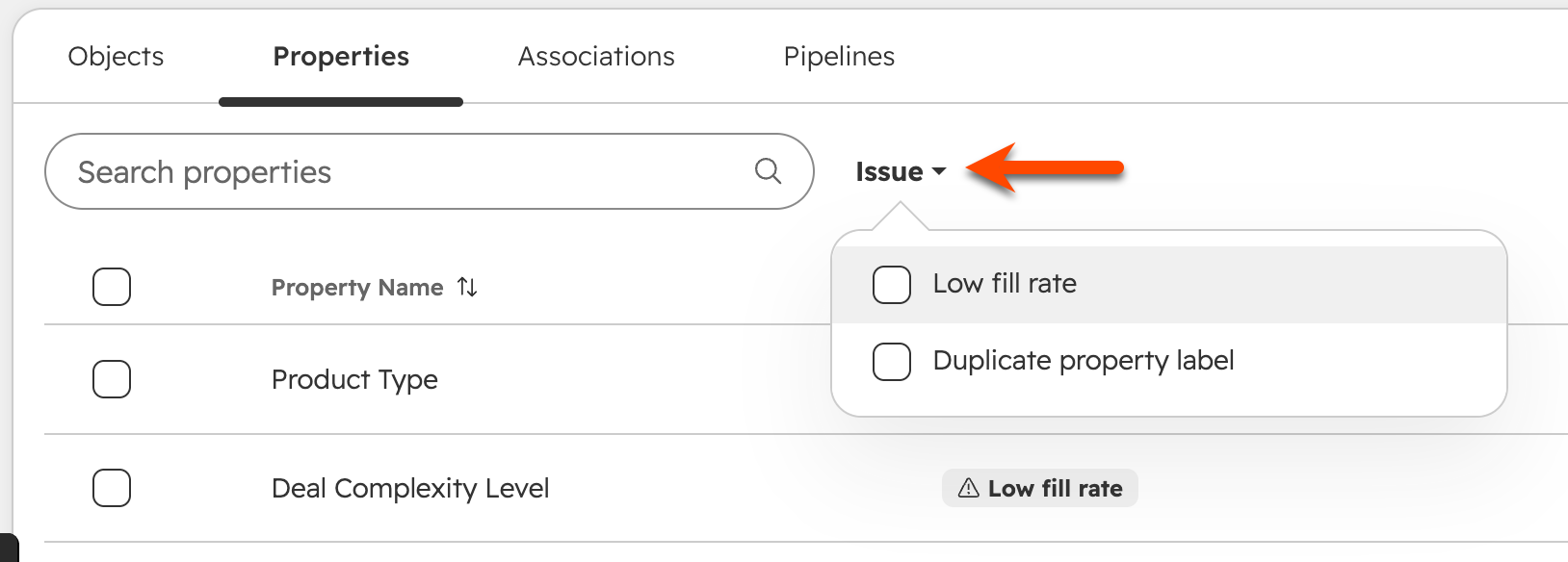
HubSpot’s record deduplication guidance shows that behavior depends on the creation route. API-created companies and installed sync apps do not deduplicate companies by domain on their own.
A name match alone is not enough to merge records without review.
Prevention Controls
- Document the match key used by each import or connected app.
- Test record creation apart from record updates.
- Hold uncertain matches for review.
- Preserve relevant history when merging duplicate records.
Property checks also have gaps that depend on the write route. HubSpot’s listed exceptions include workflows, chatflows, meeting submissions, and legacy-editor forms.
💡 Tip
Test a bad value through each write route before claiming that a property rule protects the whole process.
The weekly review should turn alerts into repairs and test each repair through the route that caused the fault. Track the owner, due date, cause, and outcome.
A Diagnostic Framework for Assessing Your Data Quality Maturity
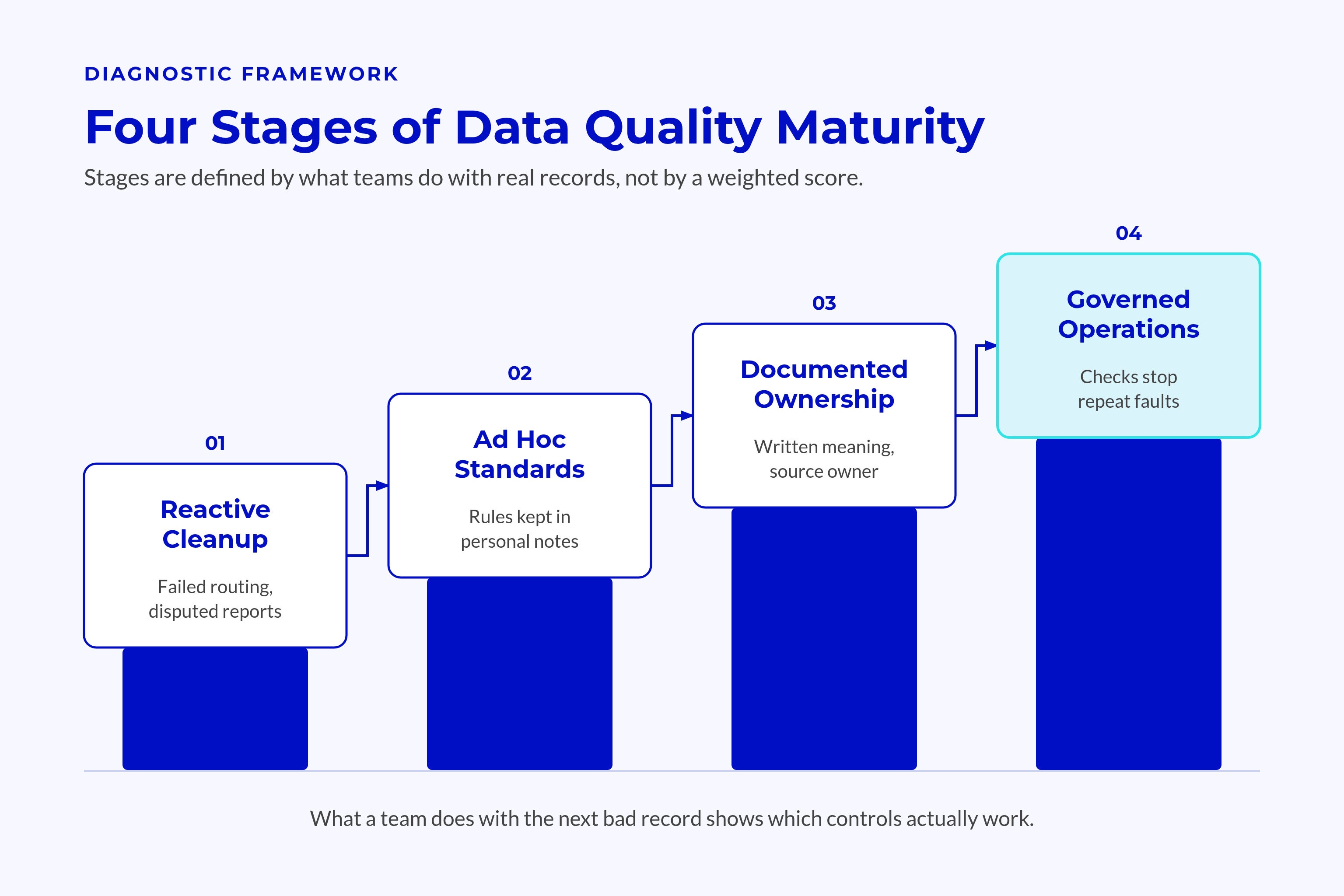
A team’s response to the next bad record reveals more than a tidy portal. Real issues show which controls work, which routes lack checks, and who can resolve a fault.
Locate Your Current Operating Stage
Unclear ownership affects teams beyond CRM work. In dbt Labs’ research, 41 percent of respondents cited ambiguous data ownership as an ongoing challenge. That survey covers people in analytics engineering, not HubSpot users alone.
Use what teams do with real records rather than a weighted score.
Reactive Cleanup
- Errors surface through failed routing or disputed reports.
- Fixes depend on whoever has time.
- Repeat errors keep entering through the same route.
Ad Hoc Standards
- Teams agree on some values but keep rules in personal notes.
- Imports and connected apps follow different rules.
- Exceptions rely on informal approval.
Documented Standards With an Owner
- Key properties have written meanings and source owners.
- Someone approves changes and tracks unresolved faults.
- Entry-route checks exist but do not cover every process.
Governed Operations With Measurement
- Teams review new write routes before launch.
- Weekly checks connect issues to work that stops them returning.
- Health trends stay readable after staff changes.
Processes within the same portal can sit at different stages. Lead routing can have clear ownership while renewal status still depends on manual edits.
Choose the Next Control, Not the Biggest Project
Focus on a process with clear revenue risk, such as lead routing or forecast review. Trace its key fields from entry to the final decision.
Ask the process owner to explain the rule without opening a workflow. Compare that answer with the rule in HubSpot.
A mismatch points to a specific rule or control to fix.
During a rebuild, this evidence helps phase the work. Agree rules first, map and test the migration next, then test workflows and teach teams to handle exceptions.
Adoption continues after go-live. Handover must leave the receiving team able to explain the rules, maintain the controls, and resolve issues.
Measuring Progress and Preventing Data Quality Decay
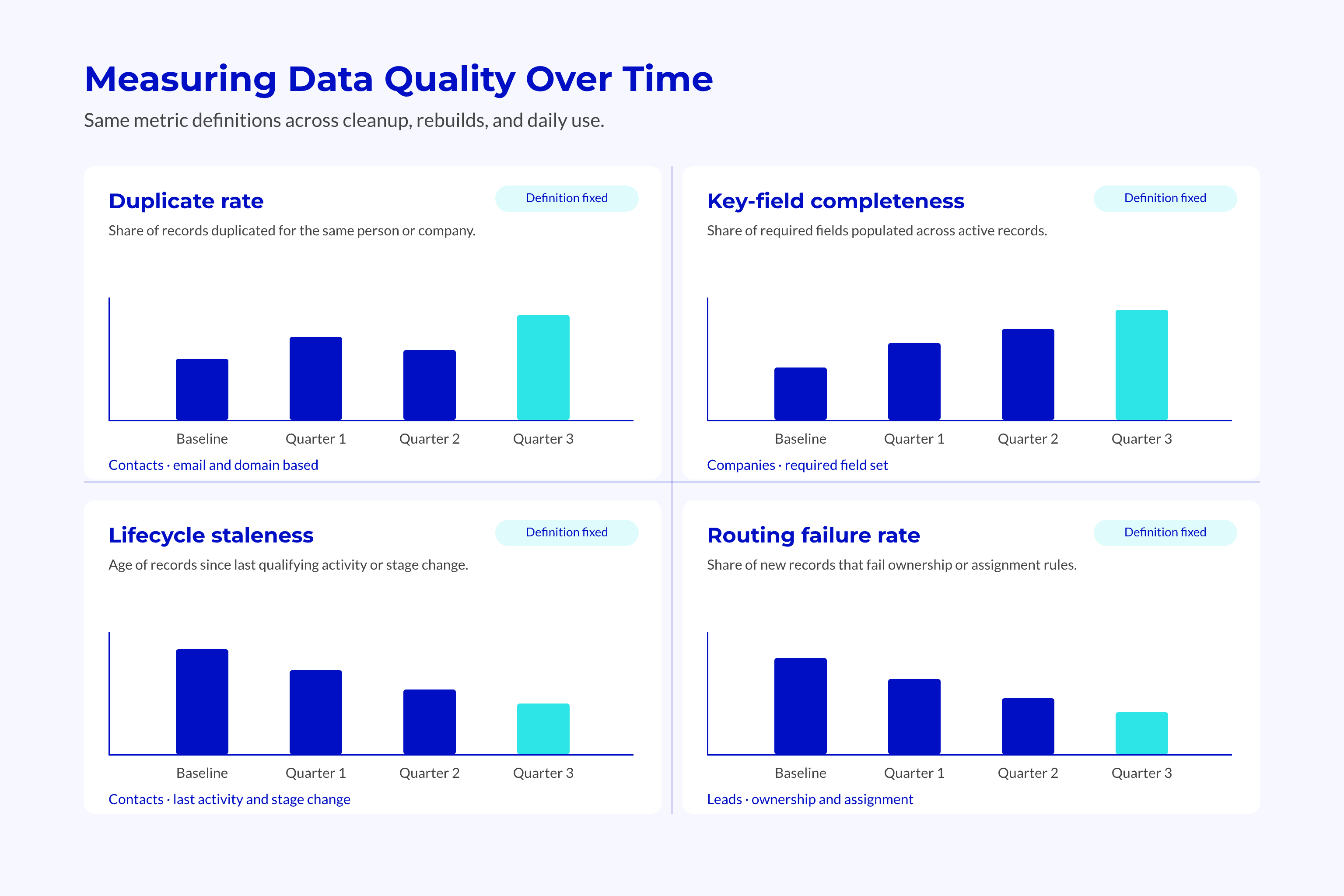
Measure fields that support lead routing, forecasts, and customer work. Keep the rules for each metric stable so teams can tell a real change in data health from a change in counting.
Track a Small Set of Useful Metrics
Define the record group before working out a rate. All contacts, active sales contacts, and customer contacts serve different purposes and need different checks.
Core Health Measures
- Duplicate rate: Records flagged as duplicates within the defined group.
- Field completeness: Records with valid values in the key fields required for their process.
- Lifecycle staleness: Records whose stage lacks the agreed evidence or timely review.
- Routing failure rate: Eligible records that fail to reach the correct owner.
Keep unknown values separate from confirmed errors.
A blank billing country can need research. A country value that conflicts with the approved billing source needs a fix.
For rebuilds, capture a baseline before migration and compare the same measures after testing. A lower error count does not prove progress if the record group also shrank.
Make Review Survive Team Changes
Use the weekly digest to find issues and Data Studio or governed reports to track trends. Neither replaces the task owner or the business rule.
Failed routing needs prompt action. A naming issue in a little-used field can wait in the planned backlog.
Review Outputs
- Assign an owner to each issue that affects the process.
- Decide whether to repair the record, the source, or both.
- Record evidence that the revised rule works.
- Update the standard when business meaning changes.
Spending on these controls fits a broader pattern. Gartner found that organizations reporting successful AI initiatives invested up to four times more in foundational areas, as a share of revenue. The study found a link, not proof of cause, and covered more than data quality alone.
The goal is to catch and control new errors, not to claim that every record is perfect.
Frequently Asked Questions
Data quality rules depend on how records enter the portal and which decisions they support. Those rules should stay consistent across cleanup, rebuilds, and daily use.
Does HubSpot Automatically Prevent Duplicate Records?
HubSpot uses email addresses to deduplicate contacts and domain names to deduplicate companies, but behavior varies by creation route. API-created companies do not deduplicate by domain on their own. Imports also need the right match keys to update existing records.
Teams need matching rules and tests for each route. They cannot assume that HubSpot applies the same protection to all incoming records.
Who Should Own Data Quality During a HubSpot Rebuild?
The HubSpot or RevOps owner should manage standards, controls, and issue tracking. Sales, marketing, and customer teams should define the meaning of fields used in their processes. A revenue leader resolves disputes that cross teams.
Handover should preserve those decision rights, source rules, and review duties so ownership remains clear after the rebuild.
What Should We Agree Before Migrating Data Into HubSpot?
Agree record match keys, field meanings, allowed values, lifecycle rules, and source priority before migration. Define what happens when sources disagree or key values are missing. Test a sample of records against those rules before loading the wider dataset.
Workflow tests should confirm that migrated values support routing, reports, and handoffs as intended.
How Do We Know Whether Data Quality is Improving?
Track duplicate rate, key-field completeness, lifecycle staleness, and routing failure rate within stable record groups. Compare trends using the same rules and review periods. Trace repeat errors to their source and check that repairs prevent new cases.
Fewer repeat faults and more reliable process outcomes show progress. A smaller cleanup queue alone does not.
Conclusion
HubSpot data quality depends on the rules behind each update. Named owners, shared field meanings, tested write routes, and regular review keep imports, syncs, and manual edits under control.
Those controls support routing and reports during a rebuild and after go-live. Written source rules and review duties also let new team members maintain the system without relying on someone else’s memory.
Key Takeaways
- Ongoing governance keeps cleanup work from unraveling with the next update.
- Record health needs separate checks for completeness, accuracy, consistency, timeliness, and uniqueness.
- Matching rules and field ownership must guide imports, syncs, and enrichment.
- Native monitoring needs an owner who reviews and resolves its findings.
- Stable metrics and regular review reveal whether the same faults keep returning.