
October 16, 2026
10 min read
Good design starts with the records your revenue team needs and how they connect.
Unclear data can cost more than time spent fixing reports.
In Validity’s CRM data research, 37% of respondents reported losing revenue because of poor data quality.
That finding reflects their experience, not a measured return from changing a HubSpot model.
Data-model decisions are part of your revenue operations foundations, not just an admin task. Your RevOps team needs to define the revenue context each record carries before deciding which objects and associations should hold it.
During a rebuild, teams still need to sell, serve customers, and review revenue. Agreed terms, clear data owners, and careful record transfers help protect that work. Map how the business works before setting up the records, links, and rules that support it.
Start with Revenue Process, Not Object Configuration
A small team can work around gaps because people know which record to trust. As the team grows, that shared knowledge becomes harder to pass on.
Symptoms of a Fragile Data Model
Local fixes create wider problems when nobody checks how they affect other teams.
Sales adds a renewal field, while customer success creates one with a slightly different meaning. Finance keeps the value it trusts outside HubSpot.
Common warning signs:
- The same customer detail appears in different places with values that don’t match.
- Reports disagree on pipeline, revenue, or account ownership.
- Sales keeps workarounds outside HubSpot.
- Custom objects lack a clear purpose or owner.
- Related records don’t appear where users expect them.
- Workflows depend on fields nobody can safely change.
These signs point to design gaps, not proof that an admin failed.
Fixing them takes more than moving records. Teams must trace workflow links, protect history, rebuild reports, and learn new ways to work. They also need to settle old disputes about what fields mean.
Without that agreement, a new portal keeps the same problems under cleaner names.
A shared model needs rules for records, links, and data sources before anyone builds replacements. These data model patterns connect each object choice to the wider account structure, so a local fix doesn’t create another gap.
Turn Process Questions Into Data Requirements
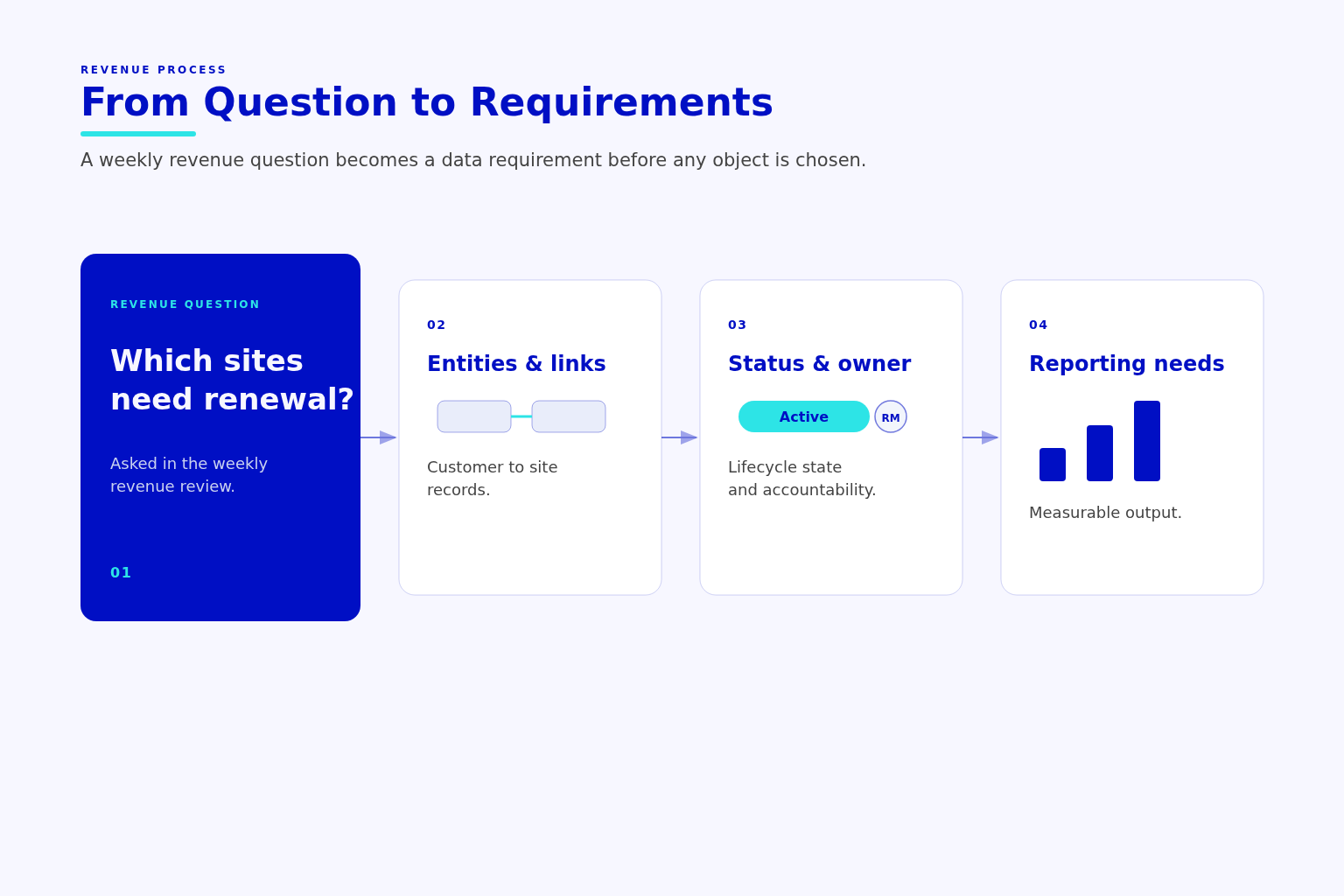
Start with the decisions people make in weekly revenue reviews. Ask sales, marketing, customer success, and finance which questions their reports can’t answer.
A field can hold a valid value and still mislead readers if its business meaning is unclear.
Useful questions include:
- Which accounts are growing, and which show renewal risk?
- Which deals stalled, and at what stage?
- Which assets or subscriptions belong to each customer?
- Which service locations fall under each contract?
- Which marketing source connects to a revenue outcome?
List the things the business manages: customers, contracts, subscriptions, assets, sites, projects, invoices, and tickets. Then note what happens to them: customers buy, renew, expand, or cancel; teams raise issues and carry out work.
Agree on what each thing represents before choosing its home in HubSpot.
For each entity, define what makes it distinct, how it links to other records, and who owns it. Note its states, the reports that need it, and which system controls each key value.
Finance can control billed value while sales controls the value of an open deal. These fields describe different things, so they shouldn’t overwrite each other. Teams can share access without treating every value as if it has the same source.
💡 Insight
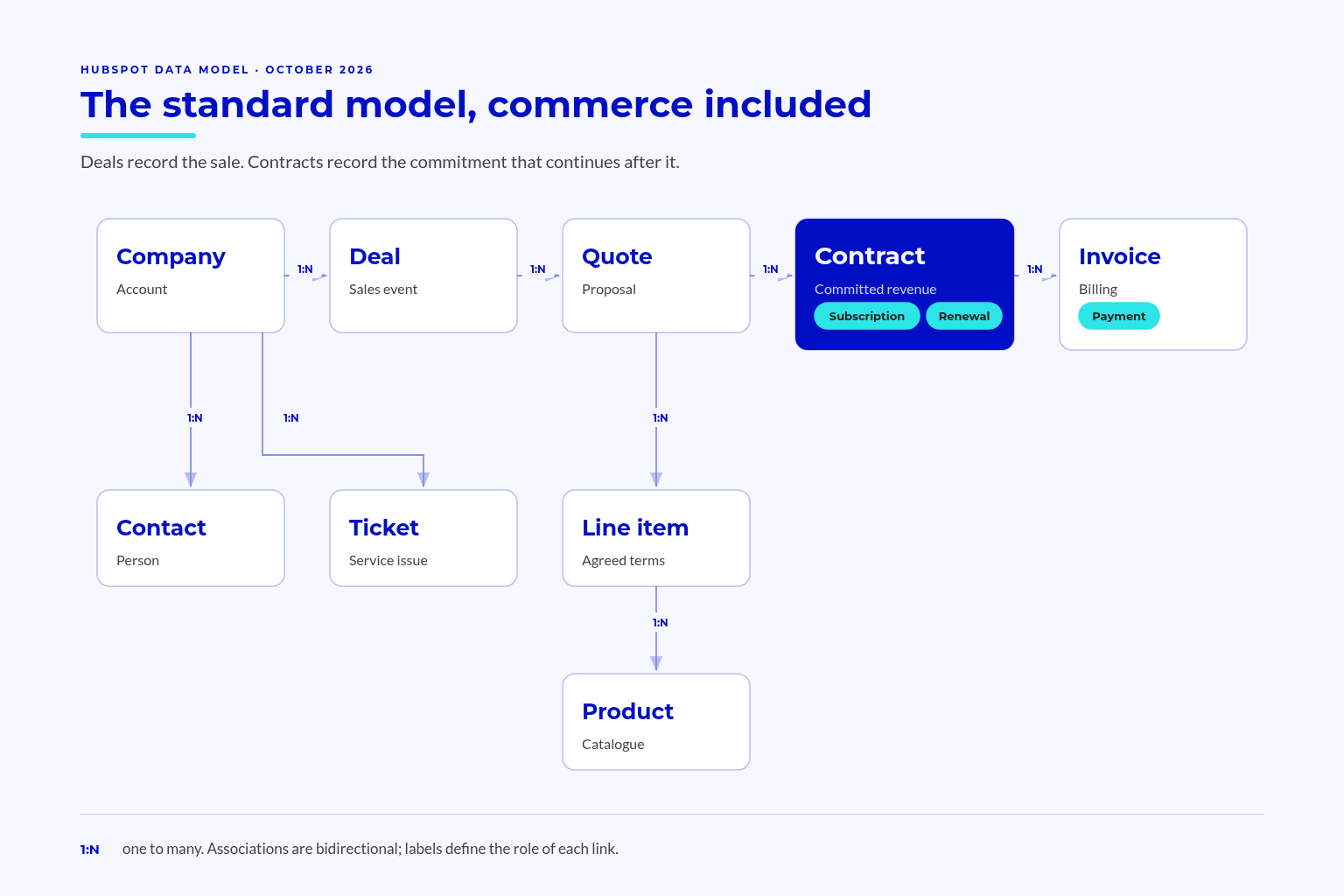
A closed-won deal records a sales outcome, not the full customer commitment that continues after the sale.
Standard Objects: the Backbone You Should Not Rebuild
Native objects give common business records an established home. Replacing them adds work wherever users, reports, workflows, or connected tools expect standard behaviour.
Contacts, Companies, Deals, and Tickets
HubSpot’s object model documentation defines objects, records, properties, and associations. An object defines a record type, properties hold its details, and associations link records to each other.
Keep the core boundaries clear:
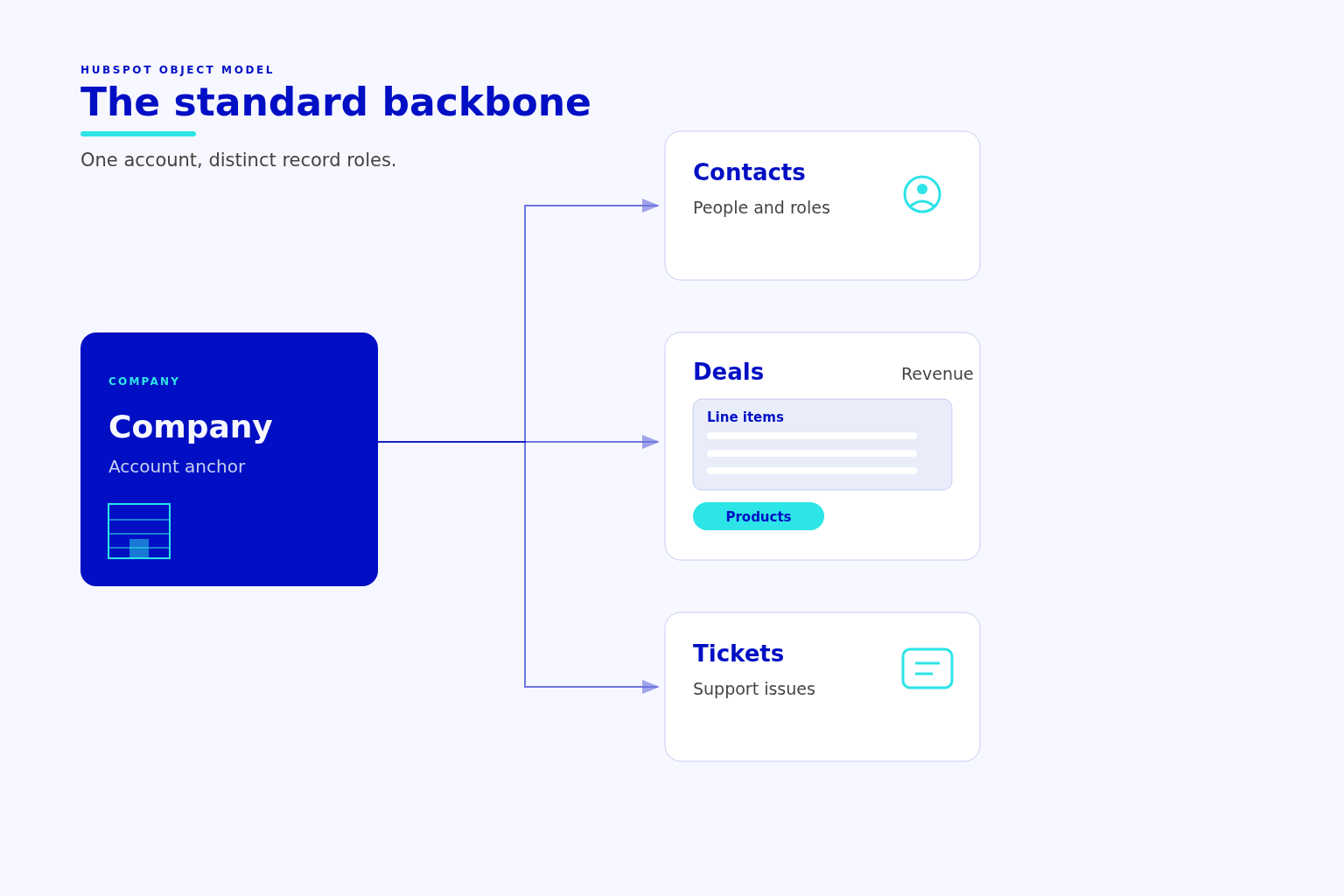
- Contacts represent people, their roles, past activity, and contact history.
- Companies represent accounts, business details, and account ownership.
- Deals represent potential sales, sales stages, and forecast inputs.
- Tickets represent service issues, workload, and customer problems.
A company can remain a customer while its deals open and close. A contact can take part in a purchase without becoming the account itself.
Keep those differences intact when moving data.
If every customer becomes a deal-shaped record, ongoing account work depends on a sales event. If each contact role gets a separate object, teams face more work tracking messages and role changes.
Before replacing a standard record, test the work users need to complete. A missing view or unclear property doesn’t, by itself, justify a new object.
Include the sales workspace when reviewing lead handling. Clear record boundaries support sales workspace setup without asking reps to maintain separate versions of the same person or account.
Products, Line Items, and Custom Behavioral Events
Products and line items can already cover the sales detail teams plan to store elsewhere. A product serves as a reusable library template.
Adding a product to a sale creates a line item, whose details can differ from the template. Changes to that line item don’t change the product. This keeps the terms of a specific sale separate from the reusable catalogue.
| Requirement | Starting Point | Boundary To Preserve |
|---|---|---|
| Store an account’s sector | Company property | A field can hold this detail |
| Track a potential sale | Deal | The sale differs from the customer |
| Maintain an offering for reuse | Product | The catalogue differs from a sale |
| Store pricing for a specific sale | Line item | Agreed terms differ from the product template |
| Track a user action | Custom behavioral event | An action differs from a thing the team manages |
| Manage an installed asset | Assess native fit, then custom object | The asset needs its own identity |
Custom behavioral events track actions rather than business entities. A user action doesn’t always create another thing the revenue team needs to manage.
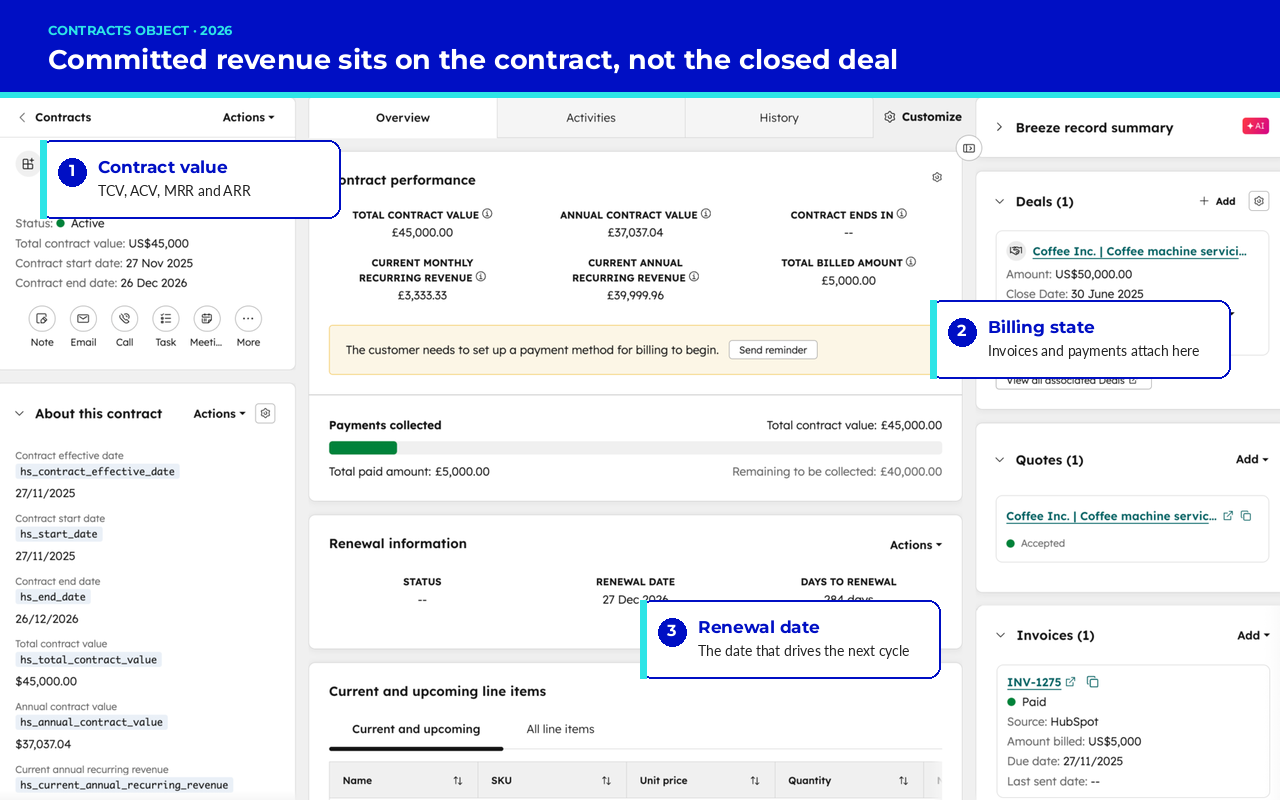
HubSpot also has native options beyond the familiar core objects. The HubSpot contracts object links agreements to companies, deals, and invoices. Check that record type, the native subscription object, and other available record types before building a custom replacement.
Before adding another record type:
- Test existing objects against the real use case.
- Check whether properties can hold the missing details.
- Check whether associations can express the missing link.
- Confirm that users can complete their work without entering the same data twice.
Choose the simplest model that answers the business question without hiding key differences.
When HubSpot Custom Objects Earn Their Place
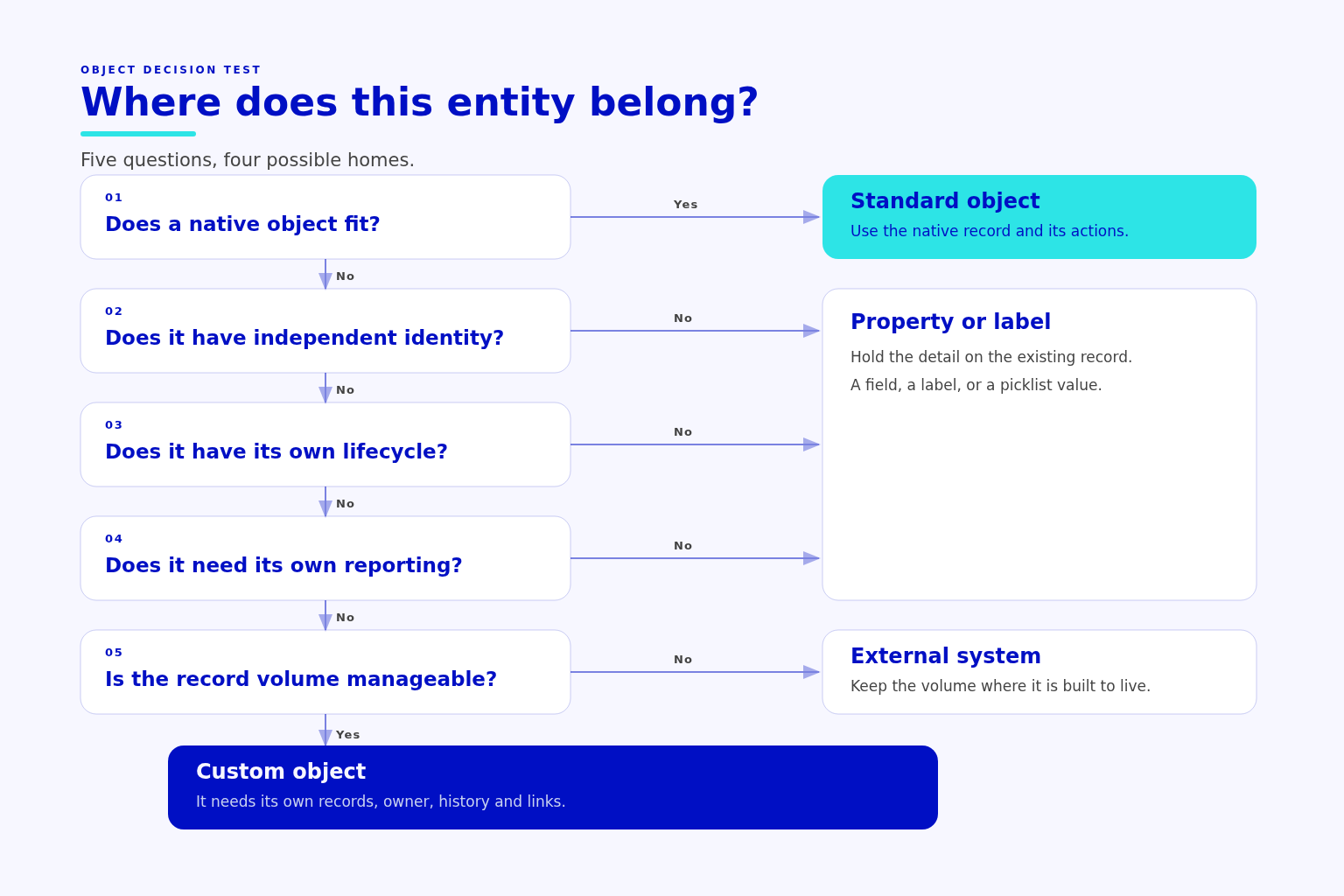
HubSpot custom objects fit distinct business entities that lack a suitable native home. The key question is whether the team needs to manage each one on its own.
RevOps in HubSpot depends on a model the team can defend. Inside a HubSpot RevOps setup, a distinct entity still needs to justify its place. During a RevOps implementation, assess whether the existing HubSpot data model can represent it clearly before adding another object.
Criteria for a New Object
A custom object defines a record type with its own properties and links to other records. Some use cases also need a pipeline.
A strong proposal answers these questions:
- Identity
- What makes each record distinct?
- Which stable ID prevents duplicates?
- Lifecycle
- What changes apart from the company or deal?
- Which changes require someone to act?
- Purpose
- Who manages these records?
- Which reports depend on them?
- Links
- Which other records must connect?
- What does each link mean?
A company property can hold an account-level value. It’s a poor fit when separate entities need their own values, owners, histories, or renewal dates.
Test that boundary with records from the business:
- Subscriptions
- Check the native subscription object first.
- Consider a custom model only when the required sales and renewal process doesn’t fit native behaviour.
- Assets
- Give installed equipment or software instances distinct IDs.
- Link service issues to the affected asset rather than copying its details into tickets.
- Serviceable locations
- Track each site’s service, compliance, or routing needs.
- Link sites to their account and the relevant sales or contract records.
A company field can’t hold a separate service history for each installed asset. An account address can’t describe the service status of every site.
Subscriptions need extra care because HubSpot already has a native subscription object.
The business name alone doesn’t justify a custom subscription object. Compare the native record’s behaviour with your billing process and reporting needs before choosing a custom model.
Some entities belong in another system. Detailed equipment readings, finance records, or large volumes of data can need storage in a tool built for that work. HubSpot needs the signals revenue teams use, not every event behind them.
💡 Tip
Write the report question and sample records before approving a new object; this reveals gaps that a field list can hide.
Custom Object Limits and Plan Constraints
According to HubSpot’s custom object documentation, custom objects require an Enterprise subscription. The plan also sets limits and determines which features you can use.
HubSpot custom objects pricing therefore starts with what your account includes, not an assumed price per object.
Check the design against:
- Object and record limits.
- Property limits and access controls.
- Association types, labels, and limits.
- Workflow and reporting support.
- API behaviour, rate limits, and sync rules.
Check these before approving the design, while the team can still change its approach.
A replacement object can also lack native actions that users rely on. HubSpot warns against using custom records to replace notes or different types of people.
Bulk marketing emails go to contacts, not any object type you choose. A custom object doesn’t remove that boundary.
Designing Associations That Keep the Model Coherent
Objects define what the business manages, while associations define how those things connect. Even well-chosen objects produce poor reports when their links are unclear.
One-To-Many, Many-To-Many, and Labeled Associations
A company can run several service sites, and each site can fall under several contracts. Record names alone don’t explain which links the business allows or requires.
Define each relationship from both sides:
- Company and location
- Which company runs the site?
- Can the site’s operator change?
- Commercial record and location
- Which sites does the agreement cover?
- Can agreements overlap at the same site?
- Ticket and asset
- Which asset has the fault?
- Which contact reported the issue?
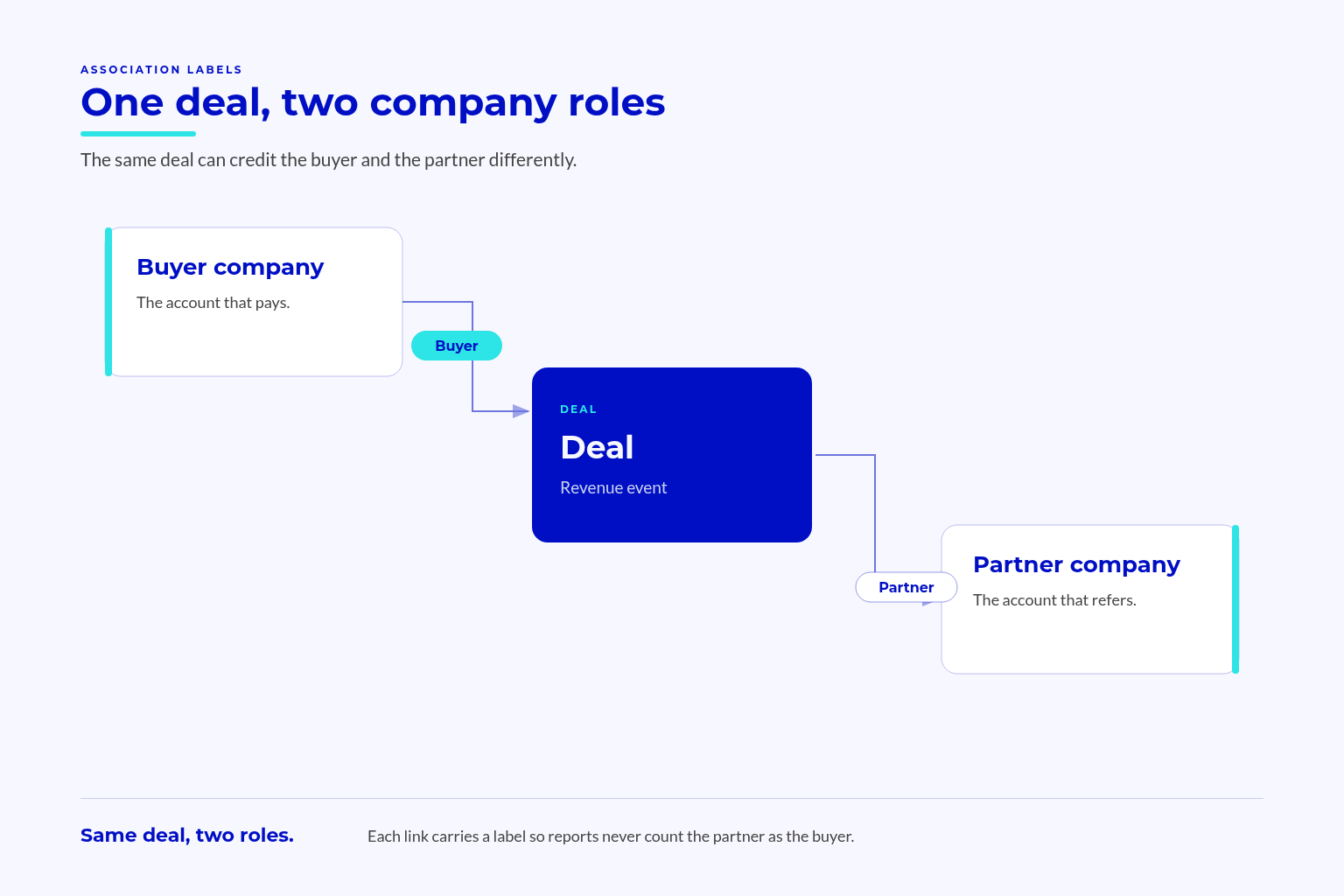
HubSpot associations connect records in both directions. Labels explain what each link means, such as buyer, reseller, reporter, or affected item.
HubSpot’s association label documentation explains paired labels and which plans support them. It also notes that custom labels don’t apply to every object type.
A label describes a specific link, not another property of the company.
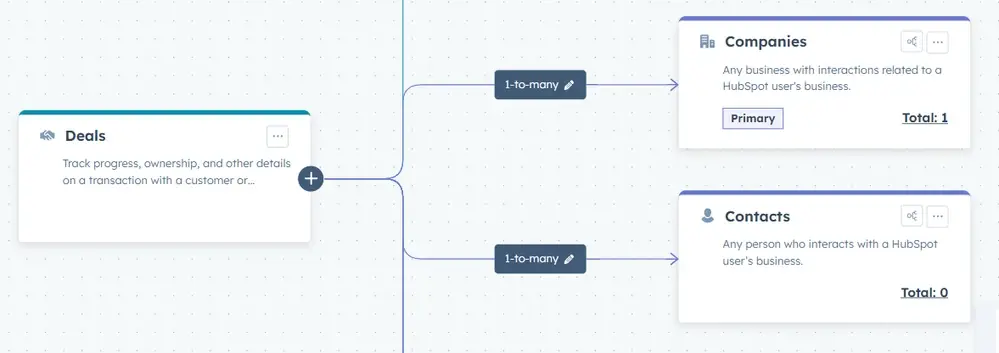
That distinction matters when HubSpot uses associations to calculate scores. HubSpot’s walkthrough of its lead scoring beta starts with a data model check: deals must be primarily associated with companies, not contacts.
The beta scores web pages using historical conversions from companies that visited and reached a chosen goal stage. Without that primary association, conversion history cannot be attributed to companies, leaving the page scores without a basis.
Association Labels and Pipeline Logic
A deal can link to both the buyer’s company and a partner’s company. Without a clear distinction, reports can credit the sale to the wrong account.
A ticket can likewise link to the contact who reported an issue and the asset with the fault. Each link serves a different purpose.
Define those meanings before building workflows.
For each workflow, state which link it follows. Set rules for missing links and conflicting connections, so the team knows how to handle both.
Review association rules for:
- Required links before a record advances.
- Allowed numbers of related records.
- Missing or conflicting labels.
- Changes in ownership or service coverage.
- Report totals that count the same value across related records.
Check association limits in both directions and for each relevant label. A label with a higher limit doesn’t override a stricter overall association limit.
Labels describe links; they don’t enforce every rule around them.
Write down how users, imports, connected tools, and any HubSpot custom integration create each link. Test those paths to check whether they follow the intended rules.
Keep deal value, recurring value, and billed revenue separate in reports. Each measure answers a different question. Adding them together can blur those differences rather than give a fuller revenue figure.
Build, Test, and Roll Out the Model Without Disrupting Revenue
A rebuild needs clear owners and a staged rollout. Sales, service, and revenue reviews must continue while the team changes records and workflows.
Naming, Ownership, and Change Control
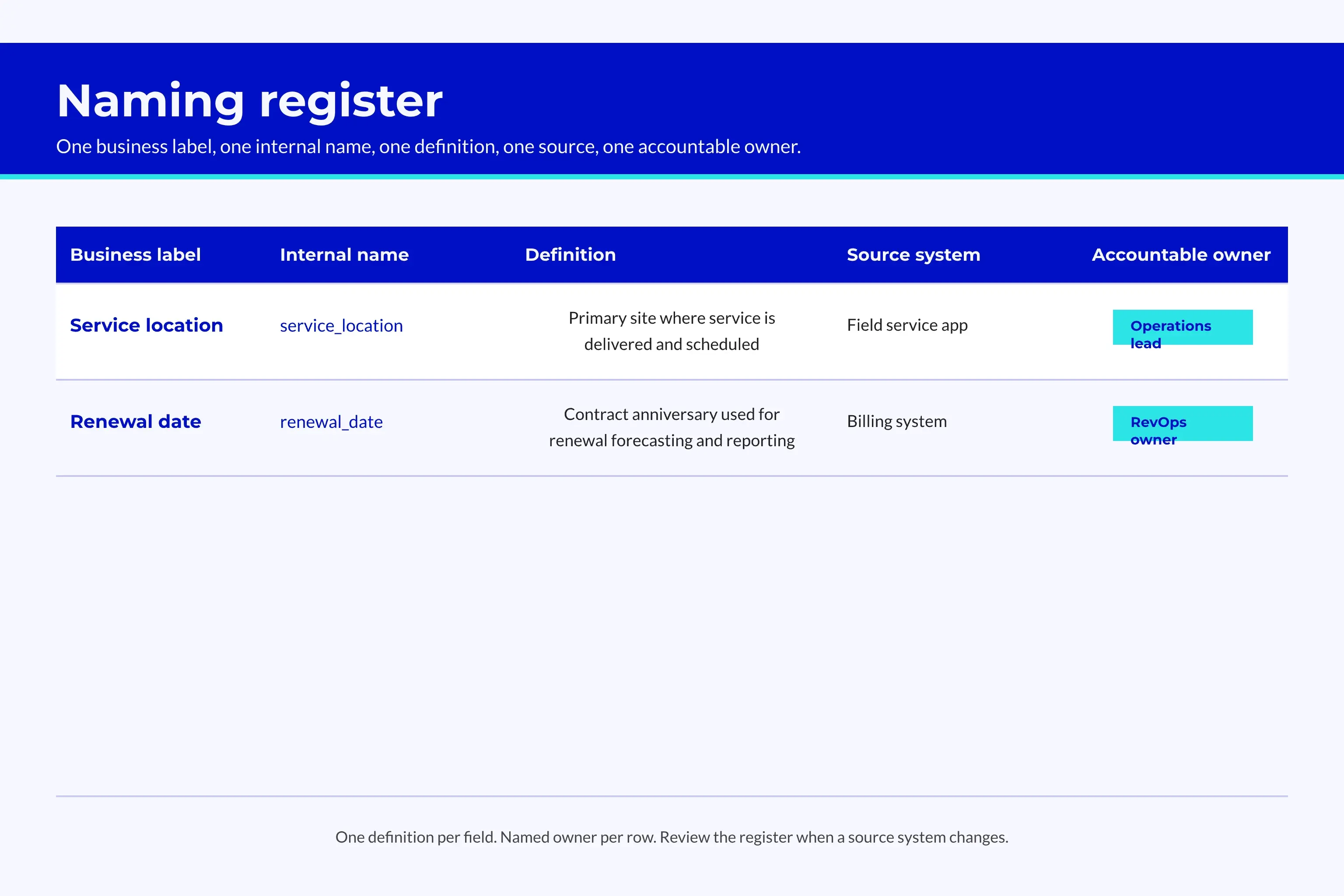
Use names the business understands, such as “Service location”. Avoid project codes that only the build team knows.
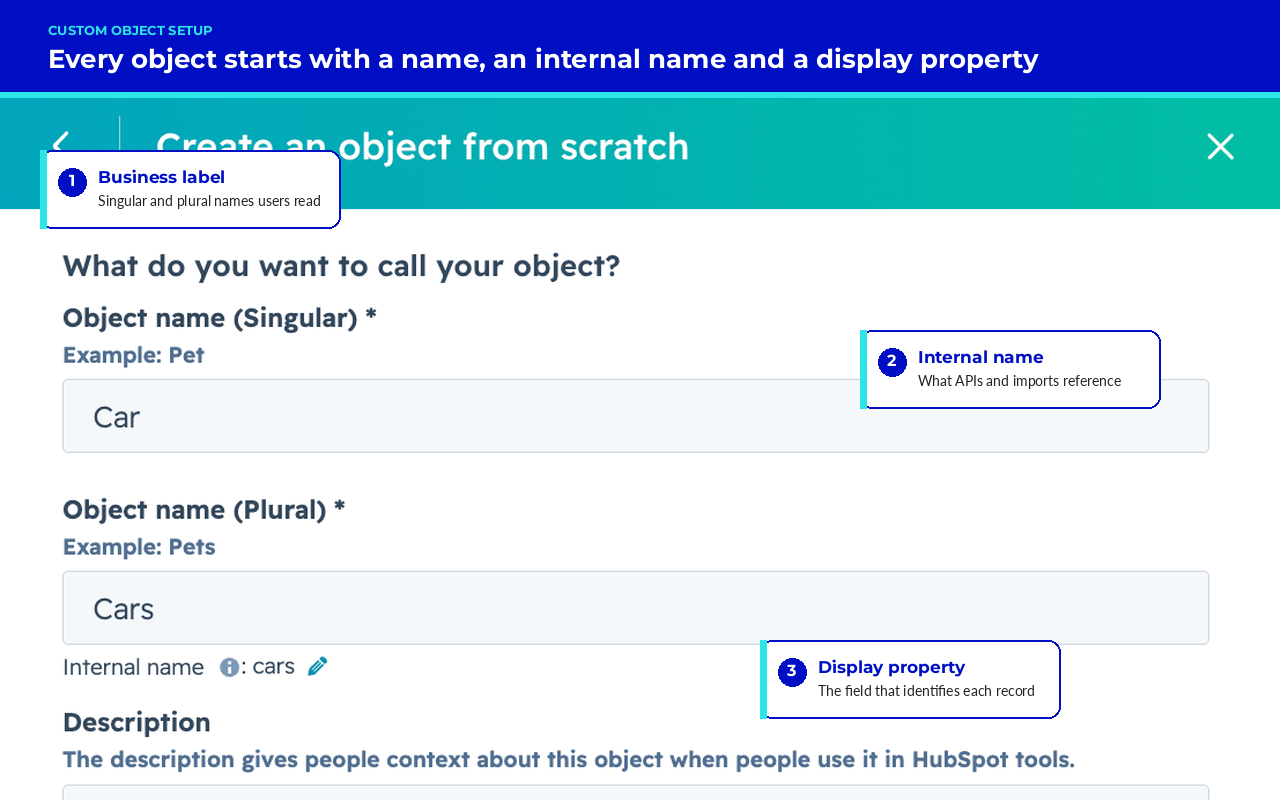
Keep display labels separate from internal names that connected tools use. Record both names, their meaning, allowed values, source, and owner.
Fields such as “Renewal date new” leave users guessing which value to trust. Team-specific copies of the same detail create a similar problem. Clear names need clear rules for who updates each field.
Consistent naming and clear ownership help keep revenue operations metrics trustworthy. They also give your HubSpot forecasting setup stable definitions to work from. RevOps best practices matter here because unclear field meanings can carry through into reports and forecasts.
📊 Fact
In dbt Labs’ analytics engineering research, 41% of respondents identified ambiguous data ownership as an ongoing challenge.
That finding concerns data teams, not HubSpot users alone. It supports naming an owner for each definition rather than assuming another team handles it.
Assign distinct roles:
- Model owner: approves changes that affect the wider model.
- Object owner: maintains the purpose and rules for a record type.
- Data steward: resolves data quality issues and questions about meaning.
- Change reviewers: check effects on sales, service, finance, and connected systems.
Existing team members can take these roles. The work needs named owners, not a large committee.
Require a written use case, reporting need, owner, and plan for record links before approving a new custom object.
Build Order and Migration Sequence
Agree on business terms before creating records. Map entities to native or custom objects, then define their links, properties, names, and access rules. A Salesforce to HubSpot migration, or any move off a legacy CRM, goes wrong when the team copies fields before settling what each record means.
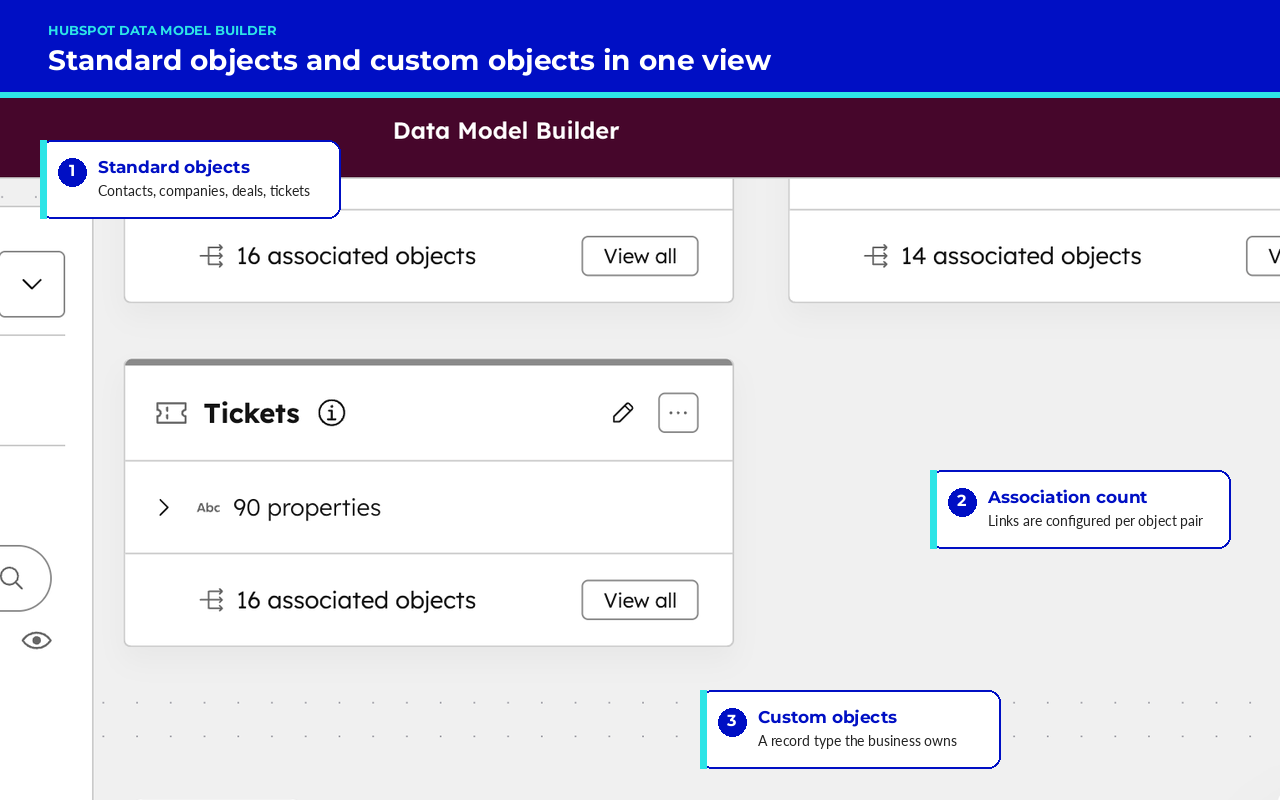
Build in a sandbox or test portal where available. HubSpot’s data model builder lets the team review the model it has set up.
Test a small sample before moving the full dataset.
Include ordinary records alongside difficult cases, such as missing owners, overlapping site coverage, and customers with several active contracts. Check reports and workflows against results the team already knows to be correct.
Before expanding the rollout:
- Confirm every object’s purpose and owner.
- Match imported records against their source records.
- Check required properties and links.
- Test workflows against normal cases and exceptions.
- Confirm that reports answer the agreed revenue questions.
- Test access for each relevant user role.
- Write down correction and rollback steps.
- Set a post-launch review date.
Keep source IDs so teams can trace each record they move. Decide how to carry live changes into the new model without overwriting valid updates.
Retain the old model for agreed checks until the team finishes matching and checking the records.
Pilot with a team that can test real work. Ask users to qualify leads, update deals, raise tickets, and review accounts rather than inspect record layouts.
Training must continue as new staff join and unusual cases appear. The handover should cover field meanings, source owners, workflow links, and a change log. Teams that buy revenue operations services should expect that handover as part of the scope, not as an extra. Name who handles issues after the build team leaves.
Frequently Asked Questions
A property holds a detail about a record; an object gives a distinct thing its own record. During a rebuild, the team also needs a way to move that data while sales keeps working.
When Should We Use HubSpot Custom Objects Instead of Properties?
Use a custom object when a distinct business entity needs its own records, links, owners, and history. Use properties for details of records you already manage.
Check native options first. Extra fields can’t replace separate histories for multiple assets, sites, or customer commitments.
Can We Rebuild the Data Model Without Stopping Sales?
A staged rebuild lets sales continue while the team tests the new model. Agree on terms, map workflow links, and move a small sample before adding more records.
Define how live updates reach the new model and how the team corrects errors. Keep training and issue ownership in place after launch.
Conclusion
A useful HubSpot data model gives each record a clear purpose and links it to the right account, sale, or service issue. Standard objects retain native behaviour, while HubSpot custom objects give distinct entities a home when native options don’t fit.
The data model is one layer of a wider RevOps framework. Teams often revisit it as they progress through a RevOps maturity model, and most RevOps roadmaps reach the model first because every later stage depends on it. A HubSpot partner can help review whether its structure still reflects the revenue process.
The model also needs rules that staff can use after the build team leaves. Clear labels, named data owners, and tested record transfers help teams trust reports and manage later changes.
Key Takeaways
- Revenue questions and source ownership shape record design.
- Standard objects, properties, and associations need testing before custom objects earn approval.
- Association labels need clear business meanings, controls, and owners.
- A wider rollout depends on tested data transfers, workflows, access, and reports.
- Training, written guidance, and change control remain part of the work after go-live.