
November 21, 2026
8 minute read
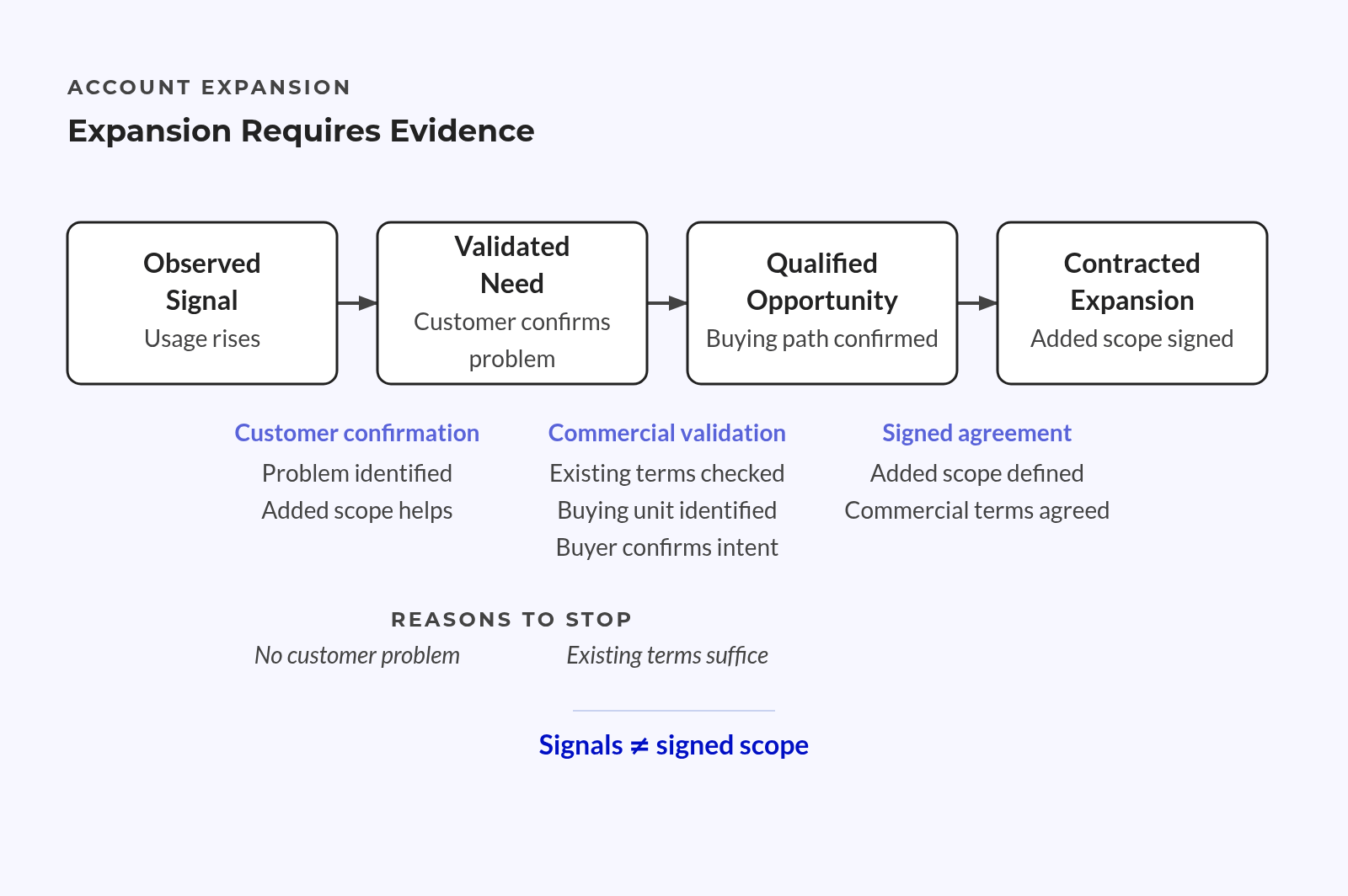
An account expansion signal flags a change worth checking, not proof that a customer will buy.
Gartner reported that 73% of chief sales officers prioritised growth from existing customers for 2025. To qualify a deal, teams need an unmet need, product fit, checked rights, buyer input and workable timing. A named owner must accept the next sales step.
Check whether the change reveals an unmet need that current rights do not cover.
A usage trend shows what changed, not whether the buyer needs more than current terms allow. Keep evidence separate from a sales commitment.
Use An Evidence Ladder
This model is not an official HubSpot method. Research on checked deals does not show how likely a raw alert is to become a sale.
A healthy account can renew without growing. Active use can leave need, budget and buying authority unknown. Show those gaps rather than label the account “ready to buy”.
Upsell adds scope within an offering; cross-sell adds another offering. Renewal extends signed terms, but its date does not prove demand.
Keep The Motions Distinct
A product question is not proof of demand. Ask whether it stems from unclear rights or a service gap, and what problem an added product would solve.
💡 Insight
A useful expansion record shows what would rule out a deal, not just what makes the account look promising.
Show who needs what, what they own and why sales should act. HubSpot does not require this proposed set of fields.
Find the legal customer and buying unit behind the signal. Confirm who uses, pays and signs; a group name does not establish whose rights apply.
| Field Group | What the Record Must Show | Decision It Supports |
|---|---|---|
| Identity | Account ID, legal customer, parent and buying unit | Does this evidence belong to this customer? |
| Current scope | Active contract, products bought, rights, recurring value and currency where relevant | Is there added scope to sell? |
| Usage evidence | Metric, baseline, period, trend, source and refresh time | Has the change lasted, using the same measure? |
| Need | Unmet goal, requested feature or capacity limit | What problem would added scope solve? |
| Buyer check | Contact who confirmed the need, role, check date and source | Has the customer confirmed the need? |
| Constraints | Term dates, notice and change rules, renewal context, service and payment risks | Can the deal progress now? |
| Ownership | Reviewer, sales owner, status, next action and due date | Who must act or close the review? |
Current entitlement means the rights in force, including changes to the original terms. A past closed-won deal does not establish them; review the terms now in force.
Use contract record facts to plan where subscription terms belong. Keep recurring value, scope and dates with the signed terms. Use separate contracts when products, terms or buying entities differ.
Review Contract Scope
Keep distinct allowances separate. A group total can hide a local limit or imply rights another group company cannot use. Show which signed terms govern the change.
Record the buyer’s stated problem, not a label such as “high potential”. Name who confirmed it and their buying team. Confirm their budget authority rather than assume it; flag any gap.
Preserve The Evidence Trail
Keep activity and refresh dates distinct: a new import can contain old activity. Missing budget details do not prove there is no budget. A failed feed does not prove zero use.
Check supported links and access in HubSpot’s record association guidance before choosing a design. Link to restricted sources rather than copying private terms or messages into shared fields.
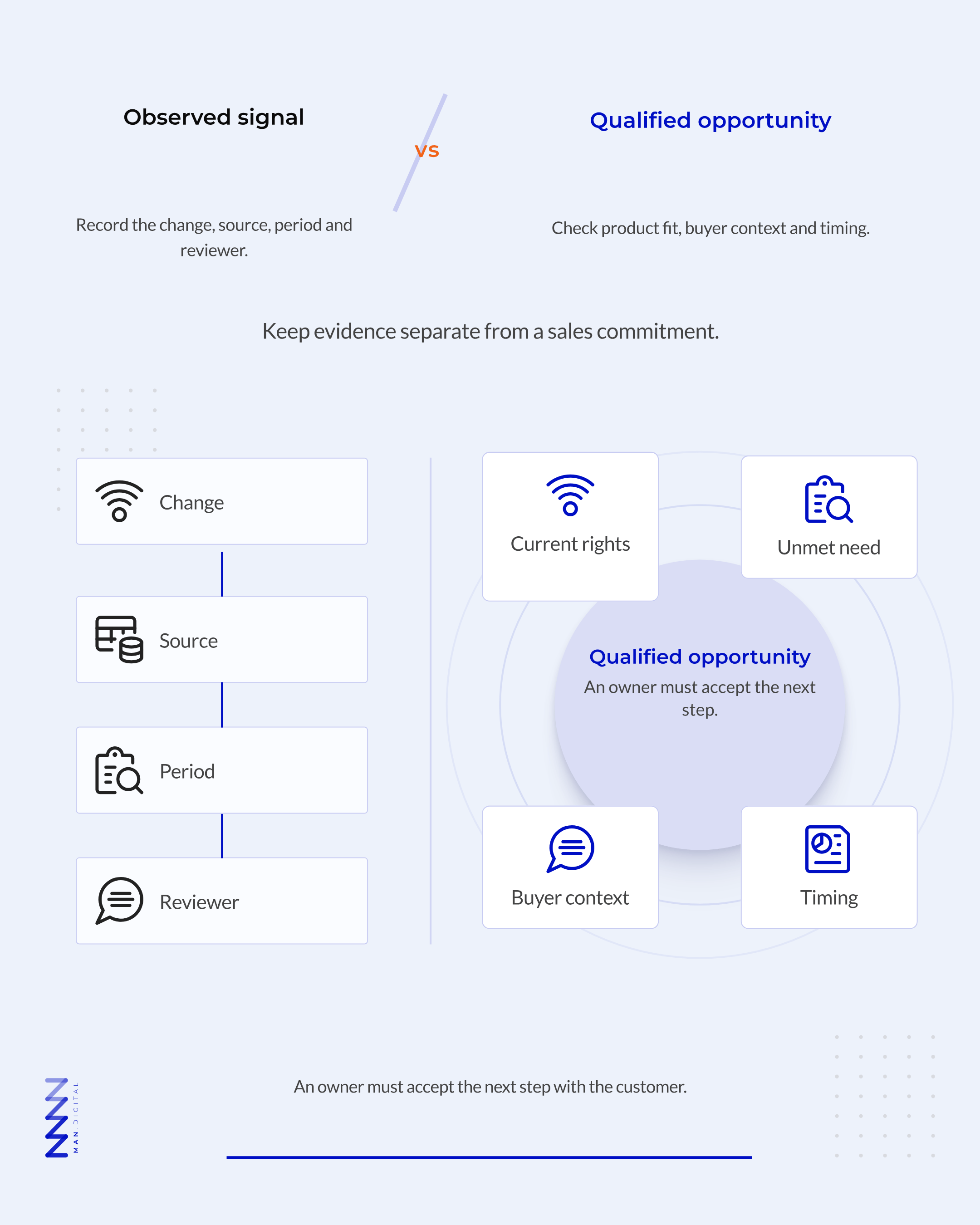
Review changes that suggest a need beyond current rights. Ask the customer whether added scope would solve it.
Keep capacity bought, capacity assigned and meaningful use separate. Compare paid capacity with actual use, even in a busy account.
| Observation | Missing Proof | Possible False Positive |
|---|---|---|
| Lasting capacity pressure | Current allowance, like-for-like use and buyer-confirmed demand | Seasonal peak or rights already purchased |
| Request for an unowned feature | Unmet goal, product fit and buying team | Included feature or work owed under current terms |
| Use in a new buying unit | Correct entity, distinct need and authority to buy | Test workspace or shared-domain mix-up |
| Confirmed scope change | Added scope, workable timing and accepted owner | Automatic true-up or flat renewal |
| High activity during a service issue | Service context and meaningful use | Retries or tests to fix the issue |
Review lasting demand that appears to exceed what was bought. Capacity pressure is not grounds to forecast revenue until the buyer confirms need and the buying path is clear.
Look Beyond The Usage Total
Unused seats and low use point first to adoption work. For a support request, confirm what service the current terms require before treating it as a sale.
Before planning a cross-record report, check supported sources and combinations in HubSpot’s custom report builder documentation. Keep usage, confirmed demand and service needs distinct.
Use one synthetic account throughout the playbooks below: ExampleCo UK, company SYN-001, workspace SYN-UK-01. Its supplied signed-terms reference allows 100 seats; 98 are assigned and 80 show meaningful use. These fictional inputs point to an adoption or assignment check, not a capacity upsell.
If the import fails or competing terms disagree, investigate before interpreting usage. If current evidence later shows sustained pressure beyond a verified allowance, request human review. Customer-confirmed need still requires product fit, buying authority, timing and a sales owner’s acceptance before a commercial handoff.
Bring sales context together without copying every fact into company fields. Contract, product and finance systems can remain the source of truth.
Decide where facts belong before setting up data flows. Commercial context connects past sales to current rights, timing and needs. Keep today’s terms distinct from the original sale.
Keep Summary And Detail Separate
A proposed Contract record is not a native HubSpot object in every portal. Check the portal’s licence, access and needs against HubSpot’s custom object guidance. Confirm support for the object, links and reports before adopting this model.
Link each summary to its source so reviewers can resolve disputed facts. The proposed review fields below store decisions without replacing authoritative terms or usage records.
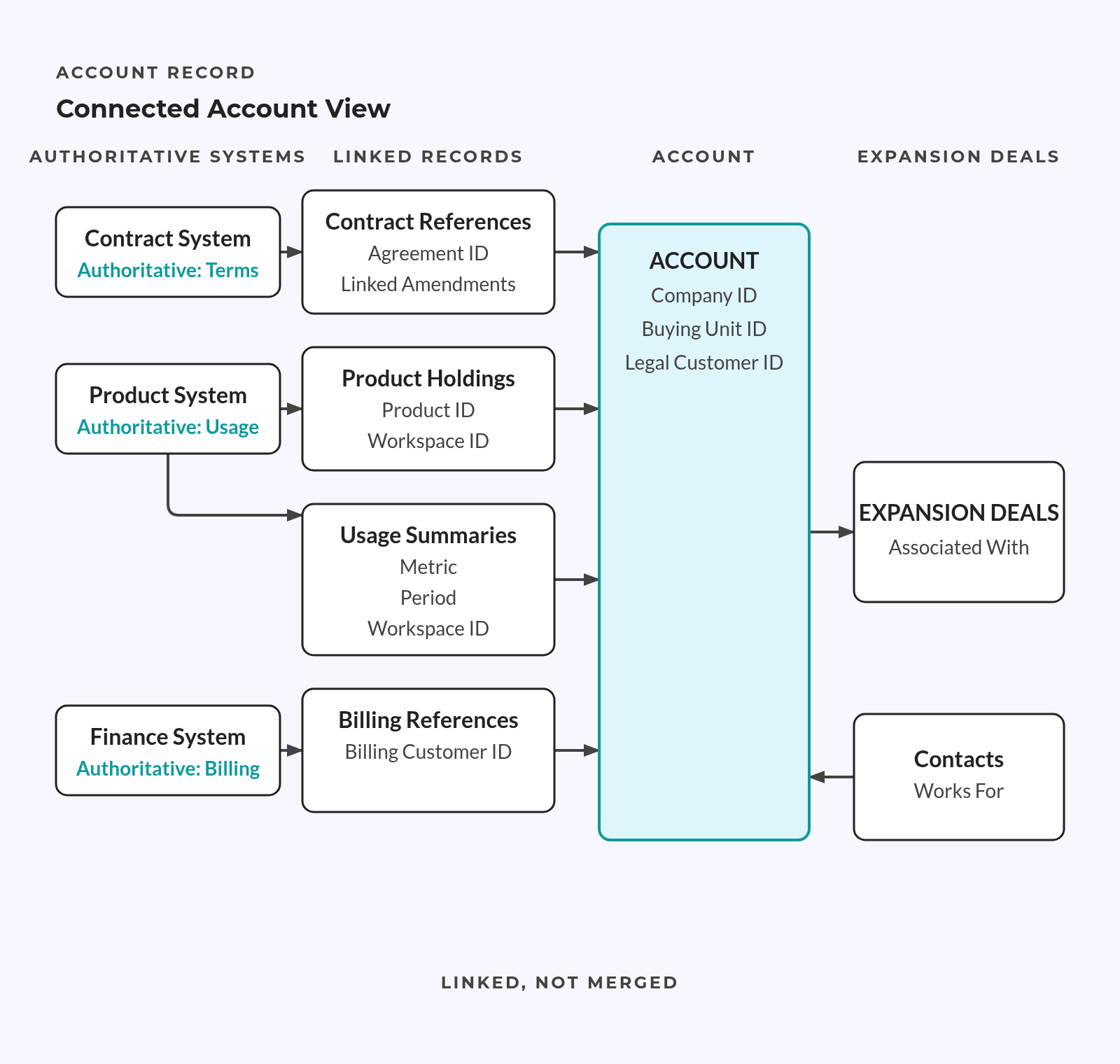
A shared email domain does not prove a shared contract. Match usage by ID to the workspace, buying unit and legal customer. Distinguish who uses, signs and pays so links show whose rights apply.
Define The Data Rules
Show failed refreshes as faults. Clearing values without an alert can make missing data look like a real change.
💡 Tip
Put the last successful refresh beside the usage summary so reviewers can judge its age without opening another system.
Agree on the model before using HubSpot’s property guidance to create fields. AI summaries can then help if they link to current evidence and show unknowns. They must not present a guessed need as customer-confirmed.
The following configurations, field names and test cases are proposed MAN Digital implementations and are untested; they are not official HubSpot expansion templates or measured results. Existing public demo screenshots illustrate individual features, not these configured agents.
Responsible role: RevOps defines the review model with customer success, the contract owner and the sales owner. Check existing properties before creating equivalents through HubSpot’s property setup.
Use the company fields for the latest review only. Preserve earlier evidence and decisions in dated notes or associated review records supported by the portal. Accepted means a named human accepted a specified next step; it does not establish signed scope or revenue.
Before invoking an agent, use deterministic integration or workflow logic to validate customer eligibility, company/workspace identity, source health, business-defined freshness windows, like-for-like periods, numeric thresholds and existing opportunities. Route failed refreshes or identity conflicts to Investigate without interpreting missing usage as zero. An existing opportunity blocks duplicate creation, not further evidence gathering. HubSpot’s agent-versus-workflow guidance distinguishes rule-based checks from interpreting unstructured evidence.
Responsible role: the CSM prepares the brief before the account review; contract and data owners resolve disputed facts.
Navigation and setup: open the company record, then Breeze Assistant. Supply the company record ID explicitly. Use only permitted CRM reads and explicitly supplied or approved integrated context. HubSpot access does not grant access to a separate contract or product-usage system. If turning the brief into a reusable agent, use Agents > Agent Hub > Create > Agents, then configure Instructions, Actions, Context and Inputs as documented in Agent Builder. Remove write actions and unnecessary tools; manage agent permissions and user access separately.
Required inputs: company, legal entity and buying-unit/workspace IDs; dated usage summary; current signed terms reference; recent customer interactions; open service issues. For ExampleCo, supply SYN-001, SYN-UK-01, the fictional 100-seat terms reference and the dated 80-meaningful-user/98-assigned summary. Do not fill gaps from memory.
Copy and paste into Breeze Assistant:
Prepare an internal account evidence brief from the supplied
or explicitly integrated inputs only.

Confirm company, legal entity and workspace identity.
Return: owned scope; observed change; customer-confirmed need;
risks; missing evidence; one suggested internal verification step.

For every factual item, include its evidence source and date.
Label missing information Unknown. Separate confirmed facts,
hypotheses and contradictions. Do not infer entitlement from
a closed-won deal. Treat health scores as risk context,
not expansion proof.

Do not calculate thresholds or entitlement. No CRM writes,
outbound messages, deal creation or automatic Accepted status.
Expected structured output: identity; owned scope; observed change; customer-confirmed need; risks; missing evidence; suggested internal verification step. Each factual item carries a source and date, with facts, hypotheses and contradictions separated.
Concrete test: supply two conflicting signed-terms references for SYN-UK-01. Expect both references and the conflict to appear, with contract-owner verification required—not a selected allowance.
Limit: a source-linked brief organises supplied evidence; it does not resolve legal rights or prove buying need. A Health Score card adds risk context only. Its documented access requires Service Hub Professional or Enterprise and a Service Seat; see the Health Score card requirements.
Responsible role: a RevOps administrator configures and tests the agent; the CSM reviews its candidate and the contract owner verifies allowance disputes.
Navigation and setup: Agents > Agent Hub > Create > Agents. Configure Instructions, Actions, Context and Inputs. Retain only necessary read actions and approved context; remove CRM write actions. A prompt saying “do not write” is not an authorization boundary while write actions remain enabled. Review permissions and user access separately under the current Builder instructions and access requirements; do not assume that every portal or user has the same access.
Required inputs: verified allowance and signed-terms reference; like-for-like usage periods; deterministic identity-match, refresh, eligibility and threshold results; dated customer confirmation; existing-opportunity check. For ExampleCo, pass the externally checked 100-seat allowance, 80 meaningful users and 98 assigned users without asking the model to calculate a utilisation gate.
Copy into Instructions:
Triage the supplied capacity evidence without recalculating
thresholds. Use only supplied or explicitly integrated inputs.

Return a candidate: Investigate, Hold, Ready for human review
or Rejected; reason; evidence source/date for every fact;
gaps; and one verification question.

Failed refresh or identity mismatch means Investigate.
Separate adoption/assignment issues from possible unmet capacity.
Use Unknown for missing facts. Keep hypotheses separate.
Flag existing expansion opportunities; do not propose duplicates.

No CRM writes, outbound, deal creation or automatic Accepted
status. Your candidate is not human approval.
Build-with-Breeze-Assistant alternative: open Breeze Assistant and submit the configuration prompt below. Review its proposed configuration, open the resulting agent in Builder, refine Actions, Context and Inputs, then test. Generating a configuration does not validate it; follow HubSpot’s agent-building flow.
Propose a read-only capacity-triage agent configuration.
Use supplied or approved integrated account, contract and
usage inputs, plus externally computed gates. Disable writes
and unnecessary actions. Require evidence source/date,
Unknowns and separate hypotheses. Return a candidate reason
and verification question only. No calculations, outbound,
deal creation or automatic Accepted status. Identify missing
inputs and permissions. Do not publish or enable automation;
prepare for admin review and five-record testing.
Expected structured output: candidate; reason; evidence items with source/date; gaps; one verification question; existing-opportunity flag. Keep this recommendation separate from the human-reviewed status.
Concrete test: submit ExampleCo’s verified 100-seat allowance, 80 meaningful users and 98 assigned users. Expect an adoption/assignment check, not a capacity-upsell recommendation.
Limit: this test checks one false-positive pattern, not production accuracy or contractual eligibility. Current usage above an allowance can justify human review only; it does not qualify a deal.
Keep the initial run manual and read-only. For a separately approved downstream workflow, current agent actions appear under AI > Run custom agent or Add agentic step where supported. Professional/Enterprise workflow access is distinct from Starter automation; check the portal’s entitlement and available actions in the current Agent Hub workflow documentation. If an approved workflow creates an internal task, add Create associations explicitly—Create task does not automatically associate the task with the company. No outbound or deal creation belongs in this triage configuration.
Responsible role: the account owner or CSM checks holdings and customer goals; a RevOps administrator configures the separate read-only agent.
Navigation and setup: obtain source-linked public and CRM context through the Company Research Agent. Its documented access requires Smart CRM Professional or Enterprise and credits; company-record placement additionally requires Sales Hub Professional or Enterprise. Then go to Agents > Agent Hub > Create > Agents and configure a separate agent’s Instructions, Actions, Context and Inputs. Remove write actions. Supply the research as approved context; do not assume the custom agent can automatically invoke another agent or access external holdings systems.
Required inputs: source-linked Company Research Agent findings; verified holdings for the correct buying unit/workspace; an approved offering description; dated customer interactions; a customer goal where confirmed. For ExampleCo, a report of a new business unit is a public trigger, not evidence that SYN-UK-01 lacks a capability or wants to buy it.
Copy into Instructions:
Review the supplied or explicitly integrated account evidence
for a cross-sell hypothesis.

Return: candidate offering; verified holding status;
customer goal; supporting evidence; counterevidence; Unknowns;
and three neutral customer questions.

Attach evidence source/date to every factual item. Separate
public triggers, customer-confirmed facts and hypotheses.
If an unowned capability or relevant customer goal is
unverified, label it Unknown and request verification.

Do not invent authority, budget, intent, timing or revenue.
Do not calculate eligibility or commercial gates.
No CRM writes, outbound, deal creation or automatic Accepted
status.
Expected structured output: candidate offering; verified holding status; customer goal; supporting evidence; counterevidence; Unknowns; three neutral customer questions. A candidate may remain unverified; the output is not a qualified opportunity.
Concrete test: supply ExampleCo’s new-business-unit news but no reliable holdings record or confirmed customer goal. Expect Unknowns and discovery questions, not a cross-sell recommendation.
Limit: public research can reveal a change, not entitlement, budget or willingness to buy. Advance a hypothesis only after a human confirms the unowned capability and relevant customer goal; this still does not establish commercial qualification.
Responsible role: the CSM conducts and logs the customer interview; the sales owner separately accepts or declines the proposed commercial next step.
Navigation and setup: CRM > Playbooks > Create playbook. Create “Expansion evidence check” and add the questions below as required questions. Access requires Sales Hub or Service Hub Professional or Enterprise, an assigned Sales/Service seat and appropriate playbook permissions. Creating and publishing require the relevant edit/publish permissions. Property-update question creation is Enterprise-gated; do not promise automatic property mapping on Professional. Use logged notes and separately reviewed manual property updates as the fallback. Follow the native Playbooks setup and logging instructions.
Required inputs: the source-linked brief, agent candidate, signed-terms references, service issues and available customer evidence. For ExampleCo, carry the unresolved allowance or holdings questions into the conversation rather than asking the buyer to endorse an AI conclusion.
Copy into the interview guide:
Interviewer instructions:
Record evidence source/date with every answer. Write Unknown
when unconfirmed. Separate customer statements from hypotheses.
This guide authorises no CRM property writes, outbound,
deal creation or automatic Accepted status.

Required questions:
1. Which legal entity and workspace are we discussing?
2. What customer goal or constraint needs attention?
3. Which current signed allowance applies? Cite its reference.
4. What did the customer confirm, and when?
5. What service issue could explain the signal?
6. Who can confirm buying authority and timing?
7. Who accepts the next step, and by what due date?
Expected structured output: logged answers with source/date; customer statements separated from hypotheses; unresolved questions; blocker owner; named next-step owner and due date. A human then reviews any property updates and acceptance decision.
Concrete test: leave ExampleCo’s buying authority unresolved and include a critical service issue. Expect both gaps recorded explicitly, with no automatic Accepted outcome.
Limit: required answers improve consistency but do not prove that an answer is true or that the contact can buy. Inspect existing workflow enrollment before logging: completed playbooks may trigger workflows where supported. Have an administrator review any playbook publication or automation separately. Deal-pipeline approvals apply to existing deals; they are not a substitute for this pre-deal review.
These are fictional fixtures and expected behaviours, not customer evidence or completed test results. Use the same input structure across all five: company/workspace IDs, source references and dates, allowance, usage metric and periods, refresh state, externally computed gates, customer evidence, service issues and existing-opportunity check. Define freshness and threshold policies before the test; do not ask the model to invent them.
For each fixture, check the exact IDs, source/date per fact, explicit Unknowns, candidate rationale, expected branch and readable trace. Confirm zero agent writes, outbound messages or deal creation. Test deterministic duplicate prevention separately and verify any separately configured internal task’s company association. One passing fixture does not establish production reliability.
Review privacy, permissions, context access and run limits with the portal owner before activation. Builder tests are documented as not consuming credits; published runs consume credits and costs vary. Use Builder’s test and run-history guidance to inspect estimates rather than treating them as fixed prices or assuming legacy free-run limits apply.
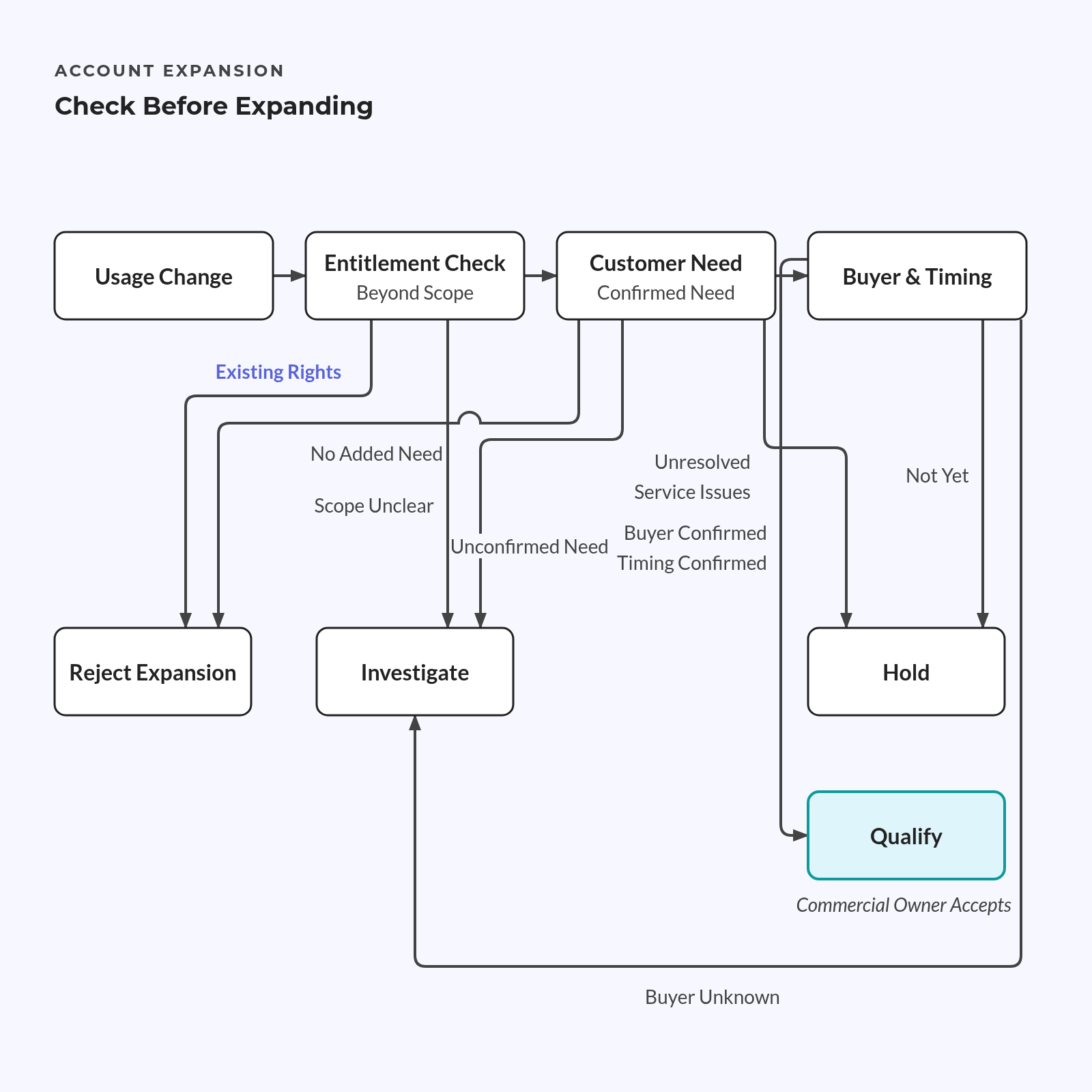
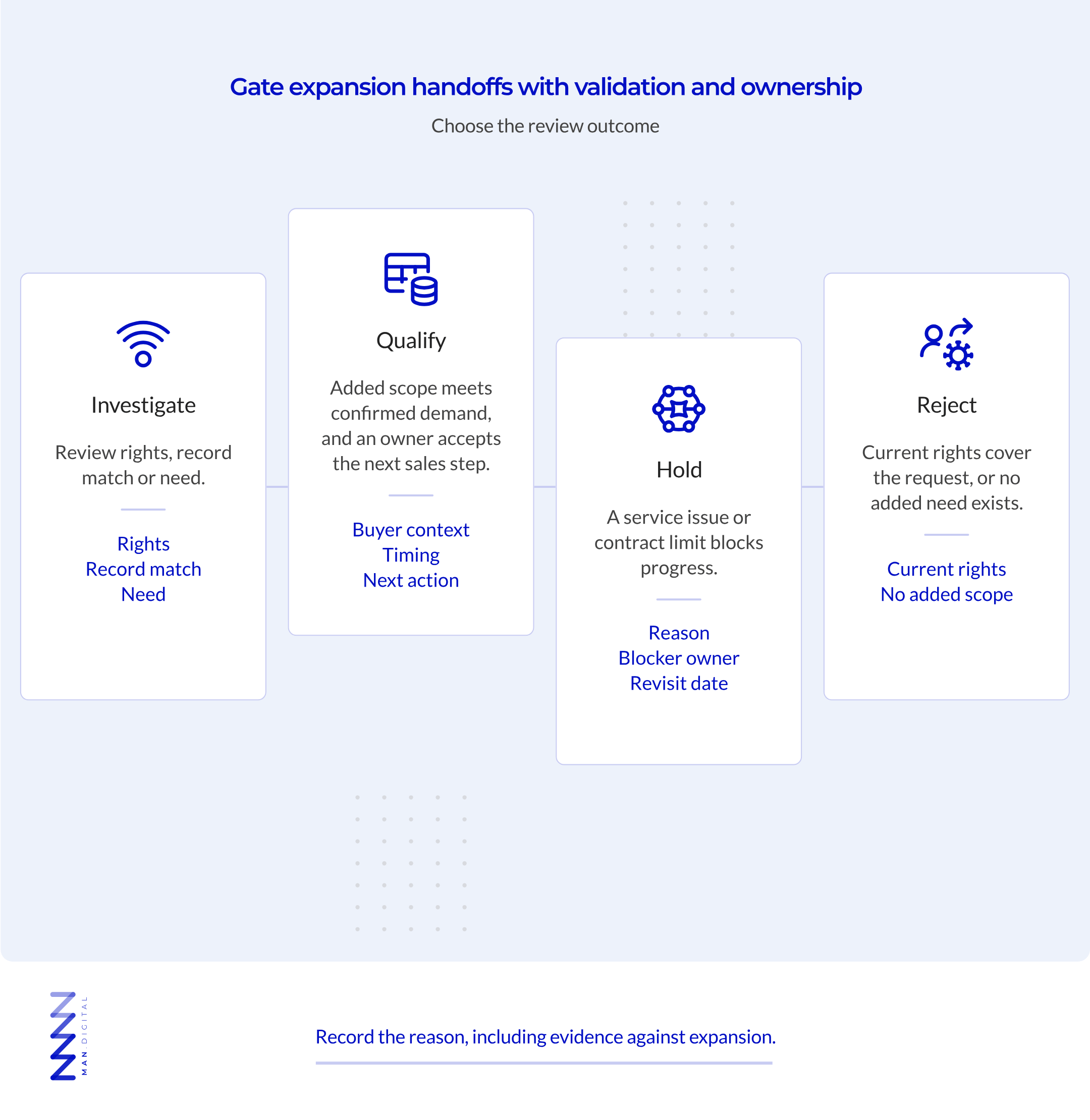
Automation should request review before creating pipeline. Set clear rules to keep signals separate from qualified deals and forecast commitments.
Confirm the record match, rights, need, product fit, risks and timing before handoff. Record that the sales owner accepts the deal.
Name Who Does What
This is an example, not a fixed sales and customer success split. Revenue leaders must settle who owns disputed work.
Keep Clear Exception Paths
Check supported record types, triggers and actions in HubSpot’s workflow guidance before routing work. These checks are business rules, not a native guarantee of deal quality.
Set freshness rules by fact type and recheck when terms or key people change. Give every unresolved review a specific next action, owner and due date.
More alerts do not prove more demand. Check decision quality and counting rules before treating pipeline growth as success.
📊 Fact
Benchmarkit’s 2026 SaaS and AI Metrics Benchmarks report puts expansion at 40% of total new annual recurring revenue for the median company, in both 2024 and 2025.
The denominator combines new-customer and expansion annual recurring revenue, not total company revenue. The figure does not show an account’s chance of buying.
Define The Measures Before Reporting
Report held reviews separately and explain how pauses affect elapsed time. Changing how blocked work counts can flatter results without improving decisions.
Count accounts, buying units, reviews and opportunities separately. Repeated alerts can support one deal but must not multiply its value. Keep added scope apart from retained renewal value, price changes and contract true-ups.
A source link traces a deal; it does not prove cause and effect. Use rejection reasons to find faults, such as wrong account matches or poorly shown contract rights.
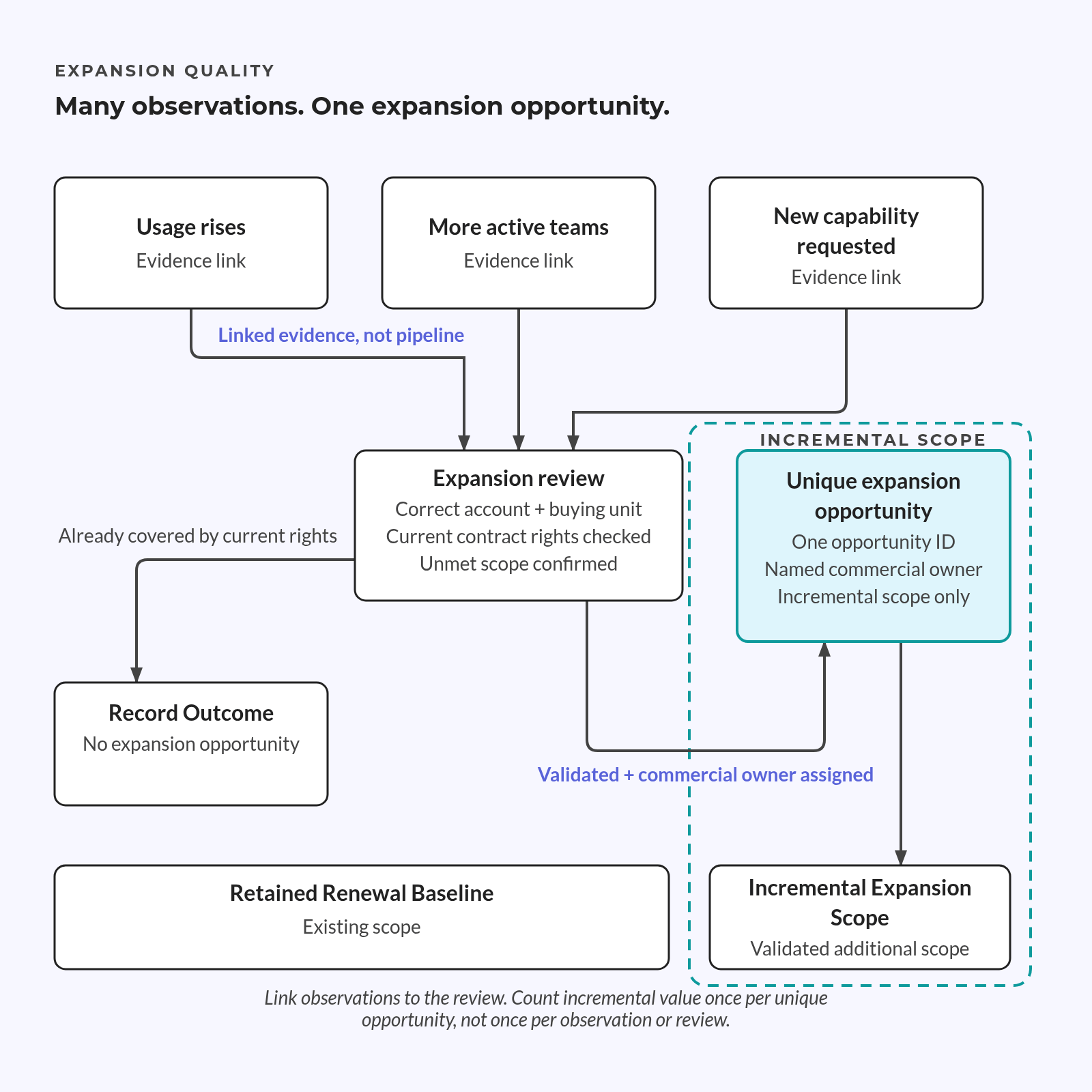
Link the correct customer and buying unit to current rights, unmet need and buyer evidence. Check product fit, timing and risks; name an owner who accepts the next sales action. Review missing facts before opening the deal.
No. Choose a design based on the portal, licence, access, reports and detail needed.
Decide where terms, usage and review outcomes belong before checking supported options. Not every source fact needs a company field.
A rise in usage can lead to added scope, adoption work or a data repair. Use the account evidence to choose the right path before opening pipeline.
Key Takeaways