

August 2, 2026
6 min read
The value is simple: Find the operational gaps that keep teams busy but not aligned.
Misalignment usually hides inside normal work, not broken tools.
Sales follows one lifecycle definition, marketing reports another, and customer success sees churn risk too late.
That gap matters because 81% of sales teams are investing in AI, yet weak CRM foundations still limit what automation can fix.
Most scaleups do not need another dashboard first. They need a diagnosis that shows which processes, data, and ownership gaps create the wrong signals. Once the cause is clear, HubSpot can become a shared operating system instead of a crowded record store.
Why RevOps Misalignment Shows Up First
In HubSpot is often the first place where misaligned revenue operations become visible. It connects marketing, sales, service, automation, and reporting in one system. That makes it useful for diagnosis, but only when leaders inspect the right layers.
The Symptoms Look Like Team Problems
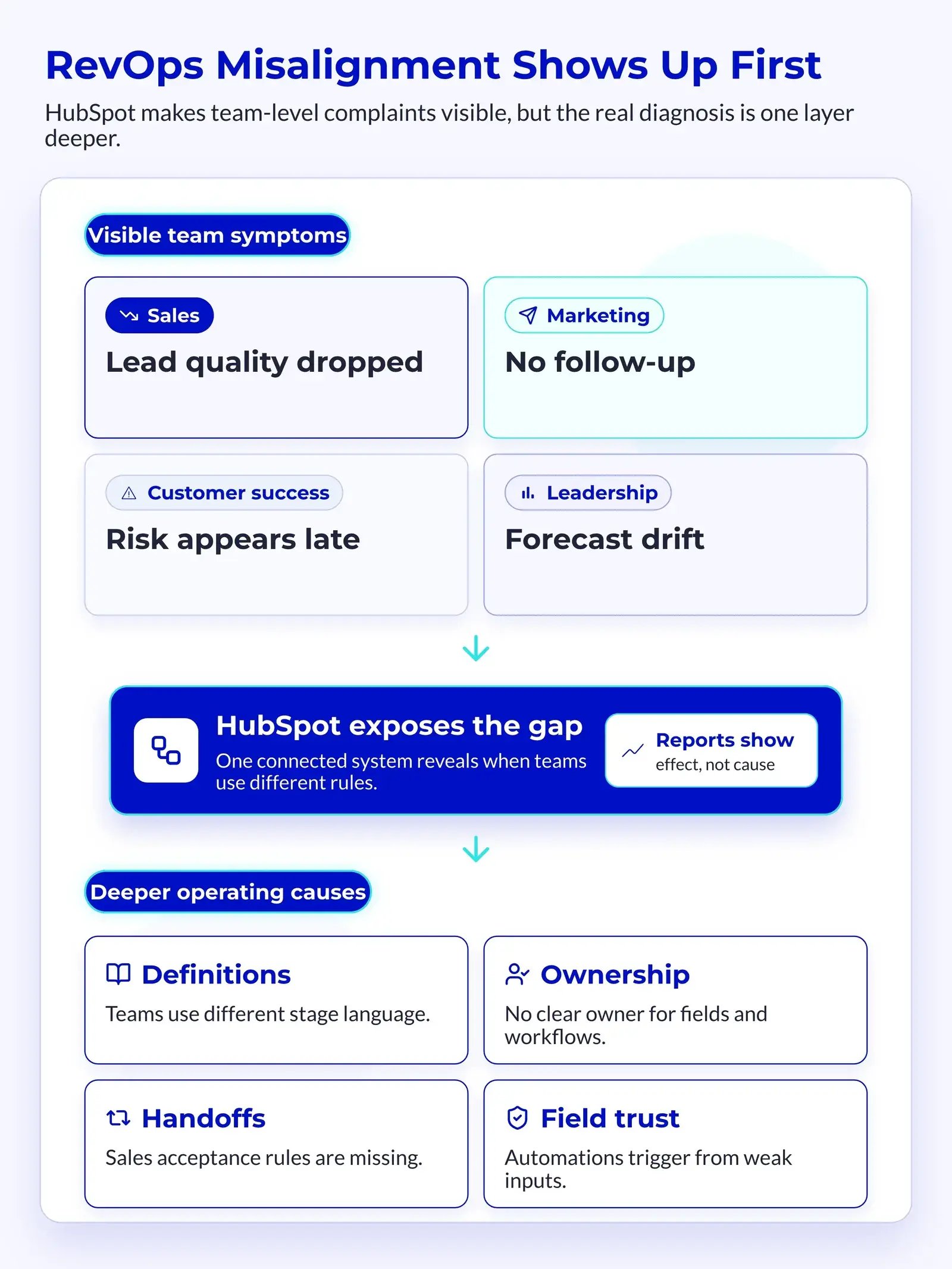
RevOps misalignment often looks like poor execution. Teams investing in revenue operations see measurable gains when they treat alignment as an operating issue.
Sales says lead quality dropped.
Marketing says sales do not follow up.
Customer success says renewal risk appears too late.
Leadership sees missed forecasts and asks for cleaner dashboards.
The real issue sits deeper.
Common warning signs:
- Lifecycle stages do not match the team's language
- MQLs move forward without clear sales acceptance
- Deal stages reflect hope instead of buyer evidence
- Forecasts change after board reporting starts
- Customer health data sits outside revenue reviews
- Automations trigger from fields no one trusts
These symptoms create a blame cycle.
Each team sees its own version of the truth, so each team fixes only its own surface problem.
💡 Insight
In HubSpot, misalignment rarely starts with reporting. Reporting shows the downstream effect of unclear definitions, weak ownership, and broken handoffs.
The System Mirrors Your Operating Model
HubSpot reflects how your GTM teams work. When the process is clear, the platform becomes easier to manage. When the process is unclear, HubSpot records that confusion at scale.
A scaleup usually feels this shift during fast growth. One market becomes three. One pipeline becomes multiple motions. One founder-led sales process becomes a team process.
That is when the CRM stops being a simple database.
The diagnosis should check four layers:
-
Definitions:
- Lifecycle stages
- Lead status
- Deal stages
- Customer health bands
-
Ownership:
- Field owners
- Workflow owners
- Pipeline owners
- Dashboard owners
-
Movement:
- Routing rules
- Stage entry criteria
- Handoff steps
- Escalation paths
-
Truth:
- Required fields
- Source tracking
- Forecast inputs
- Attribution rules
If leaders skip these layers, they often patch the wrong thing. They rebuild a dashboard when the field logic is wrong. They rewrite sales stages when the real issue is lead ownership.
Map the Revenue Process Before You Audit Fields
A useful HubSpot RevOps diagnose misaligned process starts outside the property editor. Leaders need to map how revenue should flow before checking where the portal fails. This keeps the audit from becoming a long list of unrelated fixes.
Start With the Revenue Journey
The journey map should show how a buyer becomes a customer. It should also show how the customer becomes healthy, retained, and ready for expansion.
Do not copy every HubSpot object into the map. Show the business process in plain language first.
A strong map includes:
-
Demand creation:
- Campaign source
- Form capture
- Intent signal
- First conversion
-
Lead qualification:
- Fit score
- Engagement score
- MQL threshold
- Sales acceptance
-
Sales execution:
- Discovery evidence
- Solution fit
- Buying group
- Forecast category
-
Customer success:
- Onboarding status
- Usage signal
- Ticket pattern
- Renewal risk
This map creates a baseline for the HubSpot audit. Every field, workflow, and report should support one part of this flow.
For a practical first-month structure, the RevOps in HubSpot guide explains how teams can sequence alignment work without turning it into a long admin project.
Separate Process Gaps From Portal Gaps
A process gap means the team has not agreed on what should happen. A portal gap means HubSpot does not support an agreed-upon process. Mixing these two slows every diagnosis.
Here is a simple way to separate them:
| Misalignment Type | What It Means | HubSpot Signal | Better Fix |
|---|---|---|---|
| Process gap | Teams disagree on the rule | Conflicting stage use | Decide the rule first |
| Data gap | Required inputs are missing | Empty key fields | Add validation and ownership |
| Workflow gap | Movement does not match reality | Wrong routing or delays | Rebuild trigger logic |
| Reporting gap | Leaders see different numbers | Dashboard disputes | Standardize source metrics |
💡 Tip
When a team debates a dashboard number, ask which process decision depends on it. If no decision depends on the number, remove or downgrade it.
This split keeps the diagnosis focused. It also prevents teams from asking HubSpot to make decisions they have not yet made.
Audit Lifecycle, Pipeline, and Handoff Logic
Once the process map is clear, the next step is a structured HubSpot audit. This is where the diagnosis becomes concrete. The goal is to inspect how records move, who owns them, and where handoffs lose context.
Check Lifecycle Stages and Lead Status
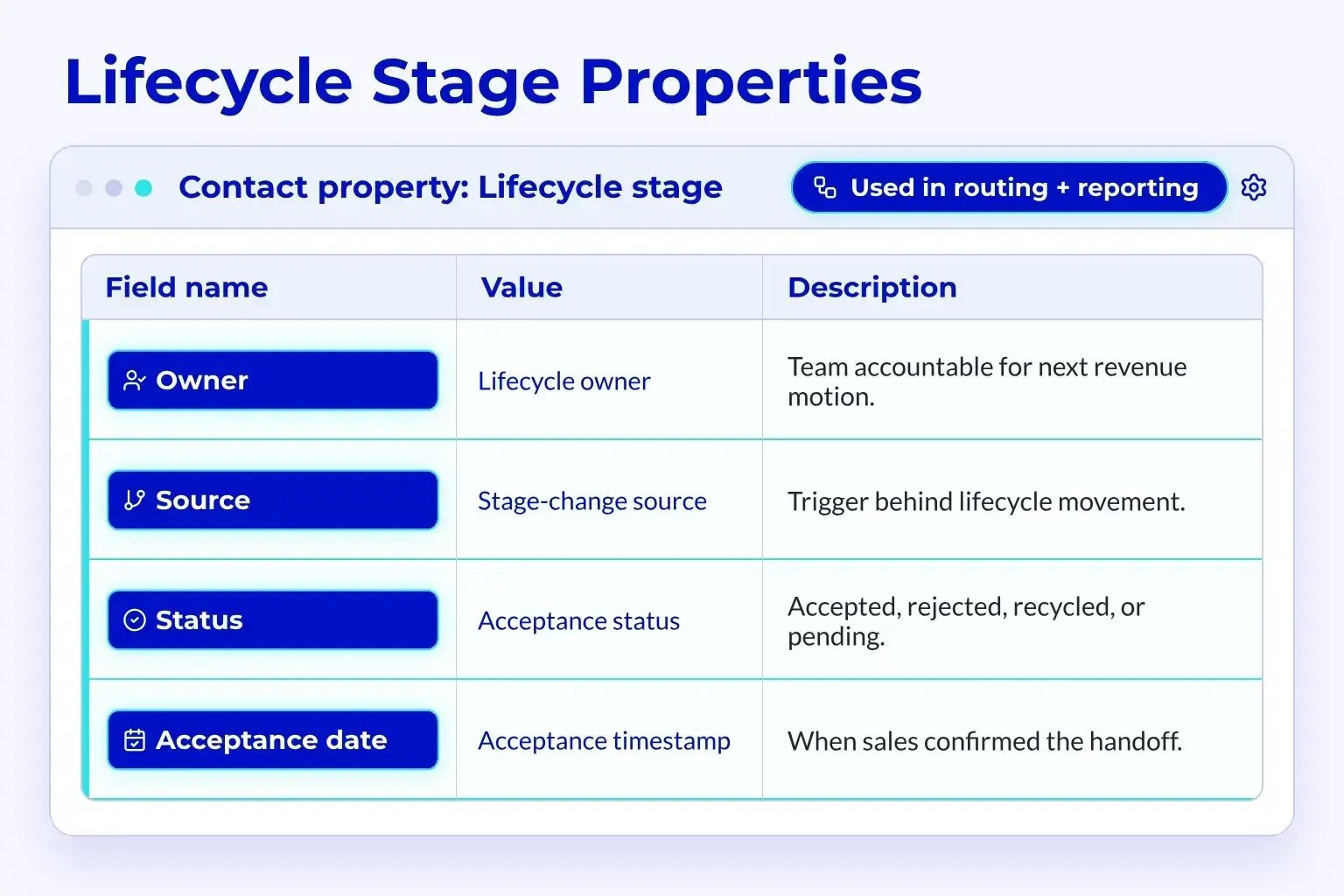
Lifecycle stages define where a contact or company sits in the revenue journey. Lead status usually defines the sales follow-up state. Many scaleups use both, but few keep the logic clean.
A good diagnosis checks whether these fields answer different questions.
Lifecycle stage should answer:
- What relationship does this person or company have with us?
- Has the record reached a real revenue milestone?
- Which team owns the next major motion?
Lead status should answer:
- What is sales doing right now?
- Has the rep attempted contact?
- Is the lead open, working, recycled, or disqualified?
Problems start when teams use lead status as a shadow lifecycle. They also start when lifecycle changes depend on weak actions, such as one email open.
📊 Fact
Clean routing and clear ownership are vital for scaleups because every unclear handoff pulls sales attention away from active buyer work.
The diagnosis should inspect stage movement over time. If contacts jump from subscriber to SQL without a defined trigger, the system cannot support trusted reporting.
Inspect Deal Stages Against Buyer Evidence
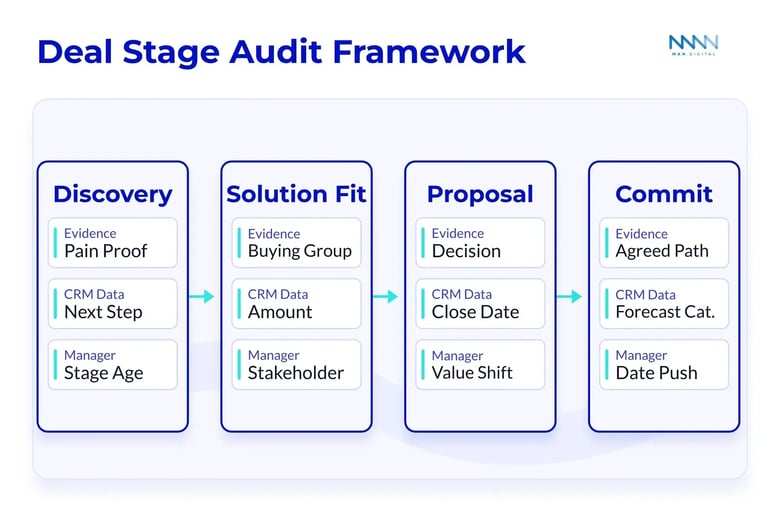
Deal stages should reflect buyer progress, not seller activity. A demo completed does not always mean the buyer moved forward. A proposal sent does not always mean the deal deserves a strong forecast position.
This is why stage entry criteria matter.
A clean deal stage has three parts:
-
Buyer evidence:
- Confirmed pain
- Identified buying group
- Agreed next step
- Known decision process
-
Required CRM data:
- Close date
- Amount
- Next step
- Forecast category
-
Manager review trigger:
- Stale stage age
- Missing stakeholder
- Large value change
- Close date push
If the forecast already feels unstable, compare this audit with your HubSpot forecasting setup. Forecasting only works when stages and categories mean different things.
Diagnose Data Quality Before Automating More
Automation can hide RevOps misalignment when teams add workflows before fixing data quality. Bad inputs create bad actions faster. A HubSpot RevOps diagnose misaligned audit must inspect field trust before workflow scale.
Find the Fields That Drive Action
Not every field deserves equal attention. The diagnosis should focus on fields that drive routing, scoring, segmentation, forecasting, or customer risk alerts.
These fields form the operating layer of HubSpot.
High-risk fields include:
- Original source
- Latest source
- Lifecycle stage
- Lead status
- Industry
- Company size
- Country or market
- Deal stage
- Close date
- Forecast category
- Customer health score
- Renewal date
For each field, ask three questions. Who owns it? What changes it? Which workflow or report depends on it?
If no one owns the field, the field will decay.
Review Workflow Triggers and Exceptions
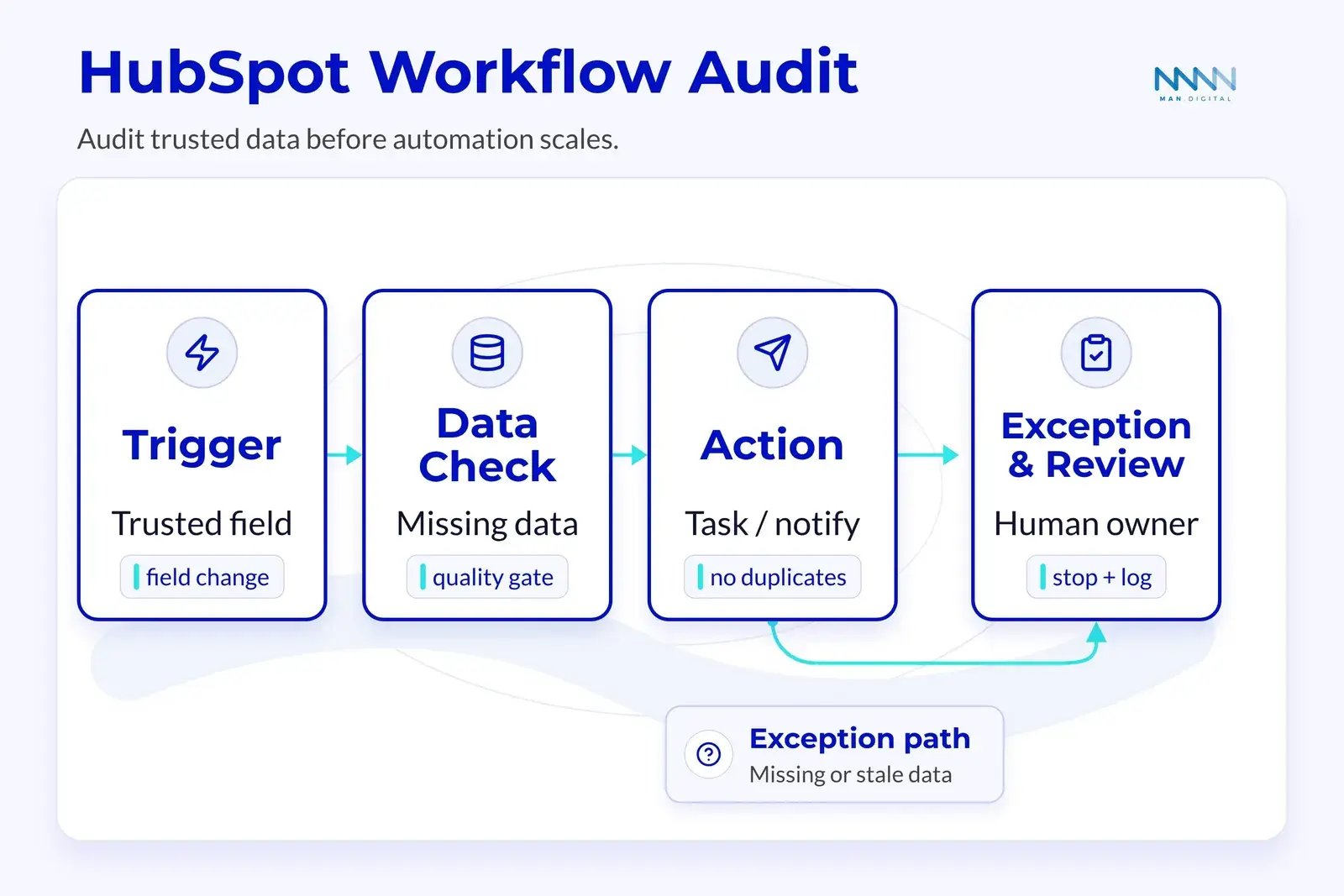
Workflows often expose hidden alignment issues. A trigger may look logical, but it can still create noise if the data behind it is weak. Diagnosis should check both the workflow rule and the exception path.
Workflow review checklist:
- Does the trigger use a trusted field?
- Does the workflow have a clear owner?
- Does it handle missing data?
- Does it create duplicate tasks?
- Does it notify the right team?
- Does it stop when the record no longer qualifies?
- Does it log why the action happened?
Modern revenue teams keep adding automation because buyer and seller work keeps getting more complex. The useful question is not whether to automate more. It is whether the automation follows a rule that the business trusts.
📝 Note
Automation should reduce judgment work, not remove accountability. Every important workflow still needs a human owner.
Turn the Diagnosis Into a RevOps Action Plan
The audit only creates value when it turns into a ranked action plan. Scaleups need to fix root causes without stopping daily revenue work. The best plan separates urgent fixes from structural rebuilds, then connects every fix to a measurable decision.
Prioritize by Revenue Risk
Do not rank issues by how annoying they feel. Rank them by the revenue decisions they affect. A broken forecast input should beat a messy dropdown field that no workflow uses.
A simple scoring model works well:
| Priority | Revenue Risk | Example | Action Window |
|---|---|---|---|
| Critical | Board, forecast, or routing impact | Close dates are unreliable | This week |
| High | Sales or marketing handoff impact | MQLs lack acceptance rules | Two weeks |
| Medium | Reporting or segment impact | Industry values are inconsistent | This month |
| Low | Admin or naming impact | Old unused fields remain | Backlog |
This keeps the plan practical.
Critical fixes often include:
- Rebuilding lifecycle trigger rules
- Adding stage entry criteria
- Cleaning required forecast fields
- Removing duplicate routing workflows
- Assigning field ownership
Medium fixes often include:
- Merging dropdown values
- Renaming dashboards
- Archiving stale properties
- Documenting workflow notes
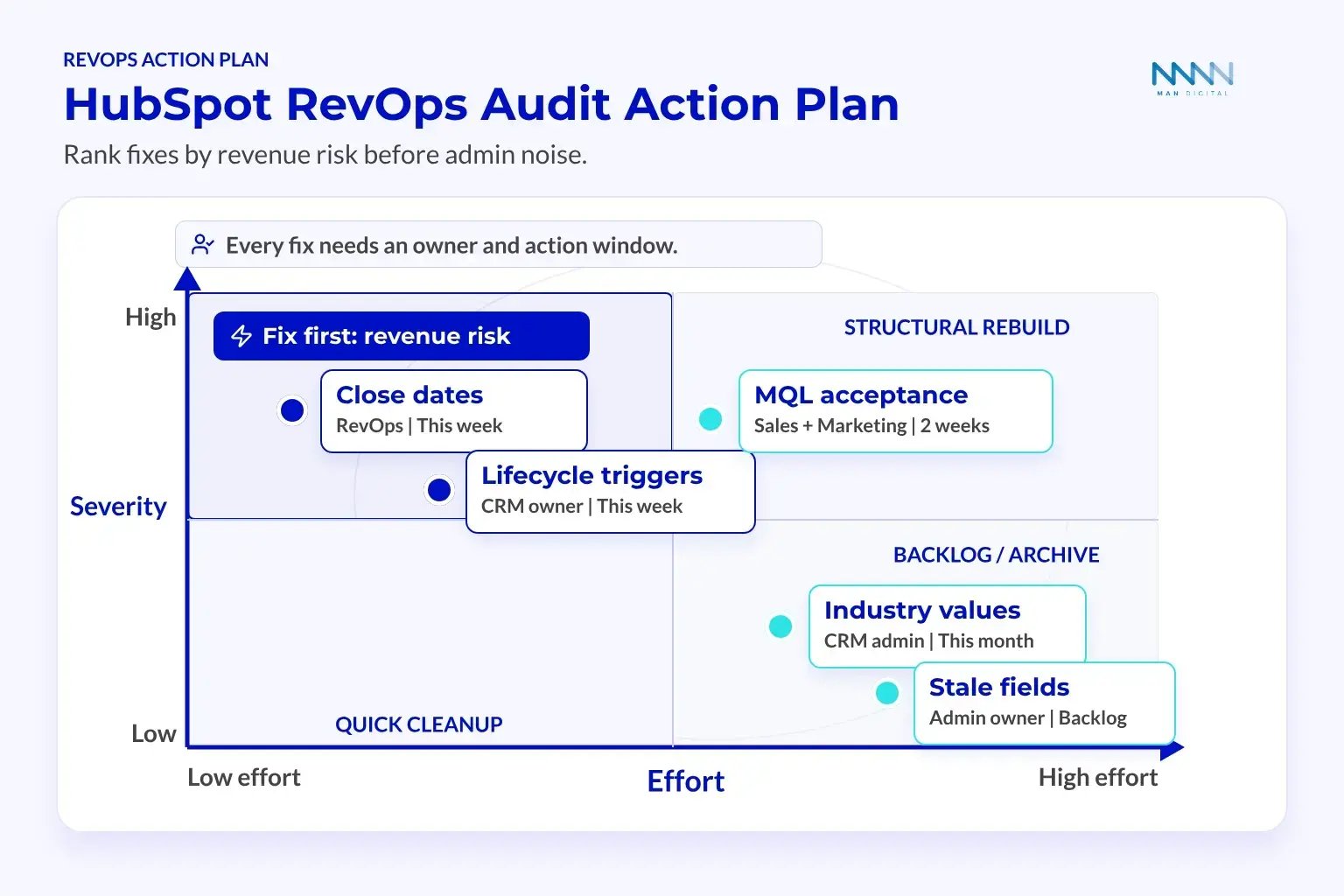
The plan should also name owners. A fix without an owner becomes another audit finding next quarter.
Measure Whether Alignment Improves
A diagnosis is not complete when the audit deck is done. Leaders need proof that fixes changed team behavior and revenue visibility. The right metrics show whether HubSpot now supports better decisions.
Useful health metrics include:
- Lead response time
- MQL acceptance rate
- MQL to SQL conversion rate
- SQL to opportunity conversion rate
- Deal stage age
- Close date push rate
- Forecast submission completeness
- Required field completion
- Workflow error count
- Customer health coverage
These metrics do not replace revenue metrics. They explain why revenue metrics move.
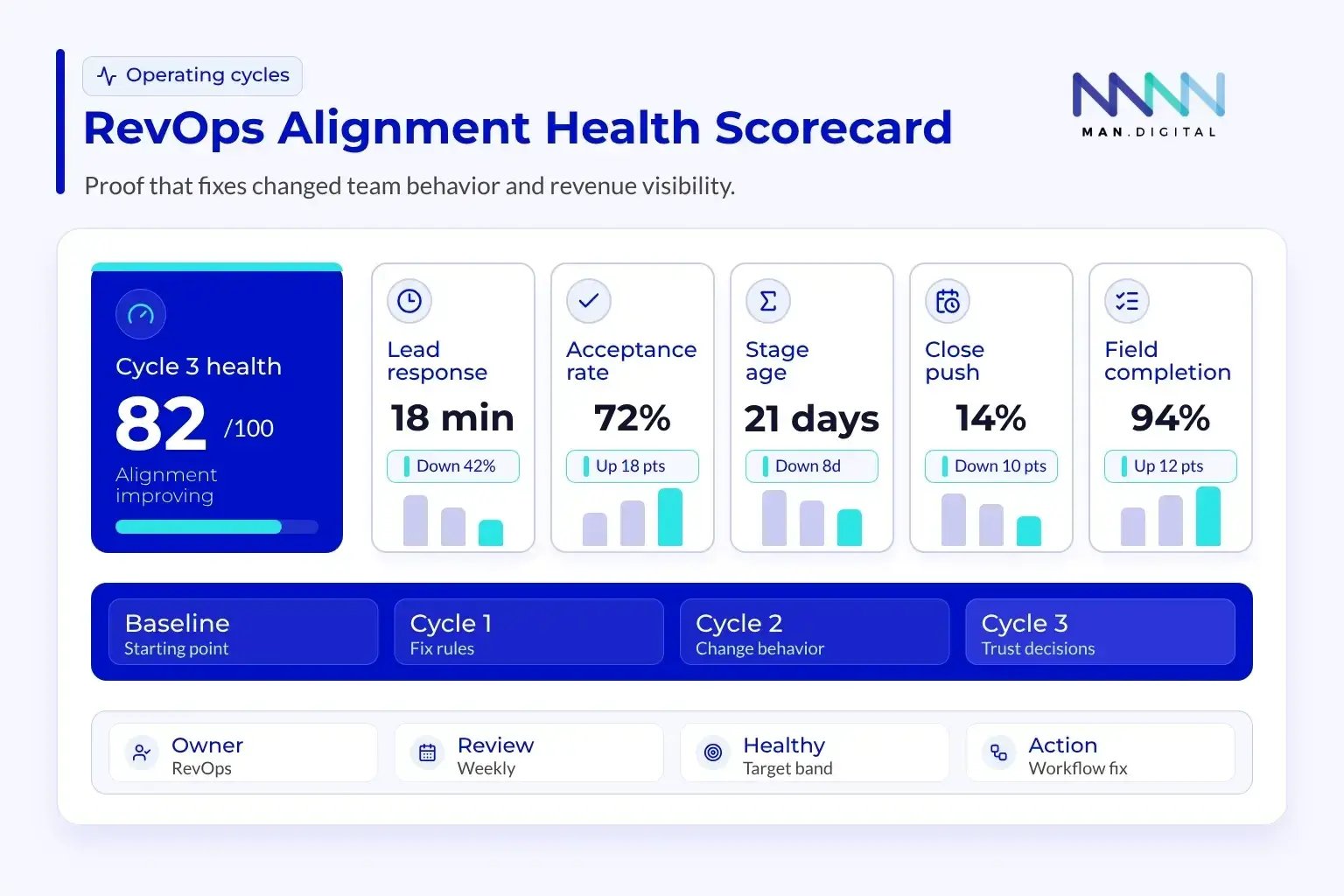
The diagnosis should define a starting baseline. Then the team can compare progress after one, two, and three operating cycles.
A stronger maturity path also needs clear stages. The RevOps maturity model shows how teams can move from reactive fixes to managed revenue operations.
Decision-linked reporting should define:
- Metric owner
- Review frequency
- Healthy range
- Warning range
- Action when outside range
- Related workflow or field
This prevents dashboard sprawl. It also helps leaders see HubSpot as an operating system, not a reporting archive.
Conclusion
HubSpot RevOps diagnoses misaligned work and gives scaleups a clear path from confusion to control. It helps teams turn scattered data, unclear handoffs, and weak ownership into a shared revenue operating model.
When the diagnosis connects process, data, workflows, and reporting, leaders gain a system they can trust. That trust improves decisions, strengthens governance, and supports growth without adding more tool noise.
Key Takeaways
- Diagnose definitions, ownership, movement, and truth before rebuilding dashboards.
- Separate process gaps from HubSpot setup gaps so fixes target the real cause.
- Audit lifecycle stages, deal stages, workflows, and key fields against revenue decisions.
- Rank fixes by revenue risk, not by admin frustration or dashboard noise.
- Use governance and health metrics to strengthen alignment after the first cleanup.