
October 26, 2026
8 min read
Sales and customer success can see those terms without rebuilding them from files.
Scattered data makes that task harder.
In Intuit’s survey, 70% said critical business data was scattered across systems, spreadsheets, dashboards, and static reports, without a single source of truth.
The finding covers surveyed US businesses, not HubSpot customers alone.
For a new CRO, the gap becomes clear when the CEO asks what customers have signed for next year.
What the HubSpot Contracts Object Actually Records
A closed-won report cannot answer when contract terms sit elsewhere. A shared record of signed terms brings that value into view without replacing the finance platform.
The HubSpot contract object holds a customer’s signed terms: value, dates, renewal details and links to related records. Reports can read these fields, while the signed contract remains the legal document behind them.
Where Contracts Sit Next to Deals, Quotes and Subscriptions
A contract is not a deal, a quote or an invoice.
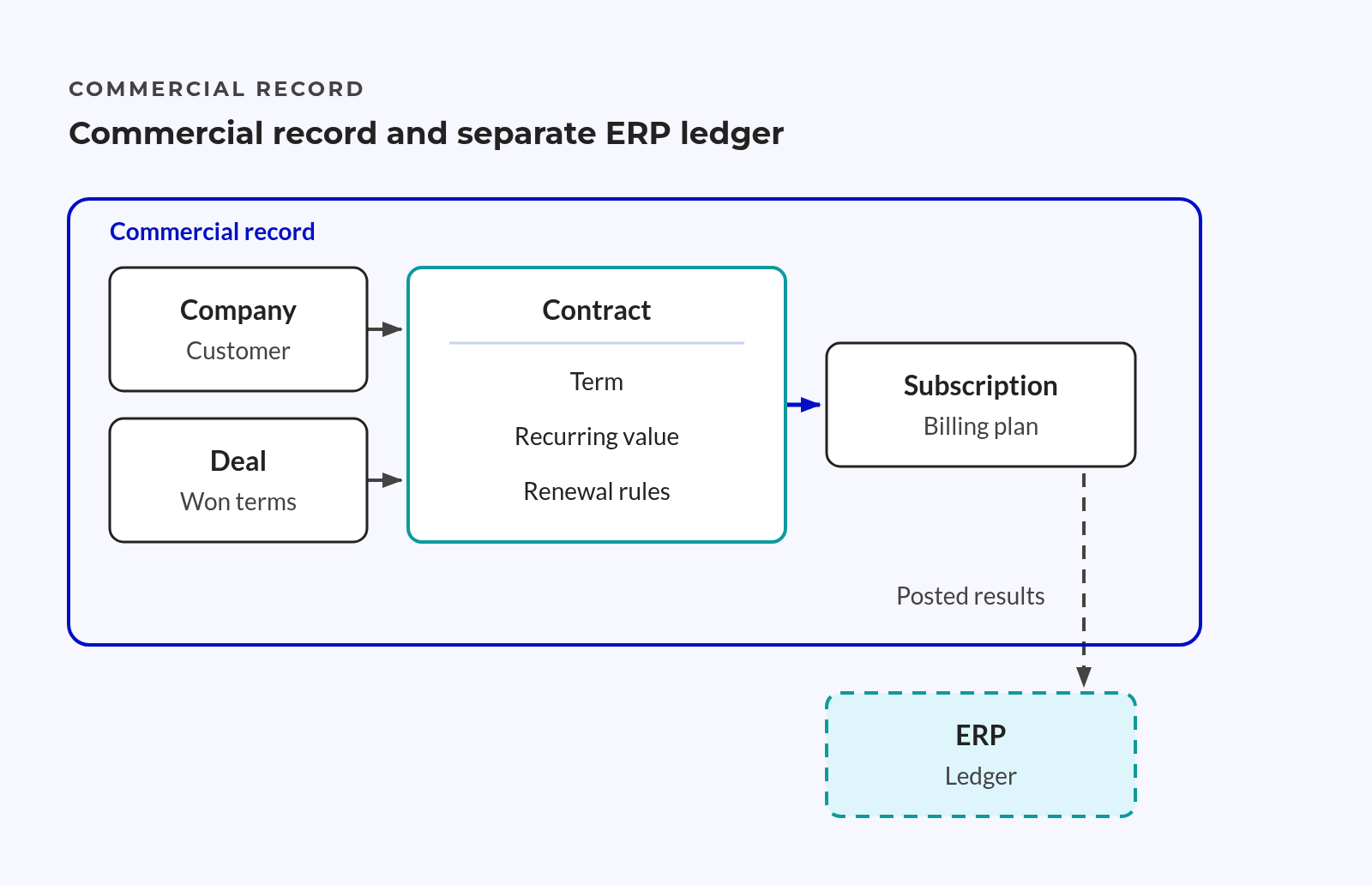
The deal records the sales process and its outcome. HubSpot quotes capture the offer, while subscriptions and line items describe how billing works. The contract record holds the agreed terms.
The signed document remains the legal evidence. Approved changes can alter the terms after the original sale closes.
Commercial context:
- Term
- Start and end dates define the contract’s span.
- Renewal rules and notice windows define the next decision.
- Value
- Amount and currency describe the signed value.
- Billing frequency shows how often the customer pays.
- Relationships
- Company and deal links connect the contract to its source.
- Subscription links connect signed terms to billing plans.
These links matter when a customer holds contracts with terms that overlap. A company-level value field cannot show which contract ends, changes or renews.
What the Contract Object Does Not Replace
HubSpot states that contracts can reflect deals signed elsewhere, with billing off when another system handles bills and payments. Not every contract needs a HubSpot quote.
HubSpot holds the signed terms; the ERP holds the financial record. Teams check that the two match rather than merge them.
Finance authority remains unchanged:
- Invoicing and payment collection stay in the finance system.
- Tax decisions stay with the finance process.
- Finance controls revenue recognition entries.
- Financial records retain the statutory audit trail.
The boundary rests on who owns each fact.
The sales team maintains signed terms, while finance owns posted results. Where the figures differ, teams need a clear reason linked to the records.
💡 Insight
Revenue teams need clear owners and links they can trace, not a copy of every fact in every system.
Why Revenue Visibility Breaks When Contract Data Lives Outside the CRM
A deal dashboard can show sales results without showing what customers have signed for. The gap appears when leaders ask about future periods, notice deadlines or changes agreed after the sale.
Four Places Contract Truth Splits
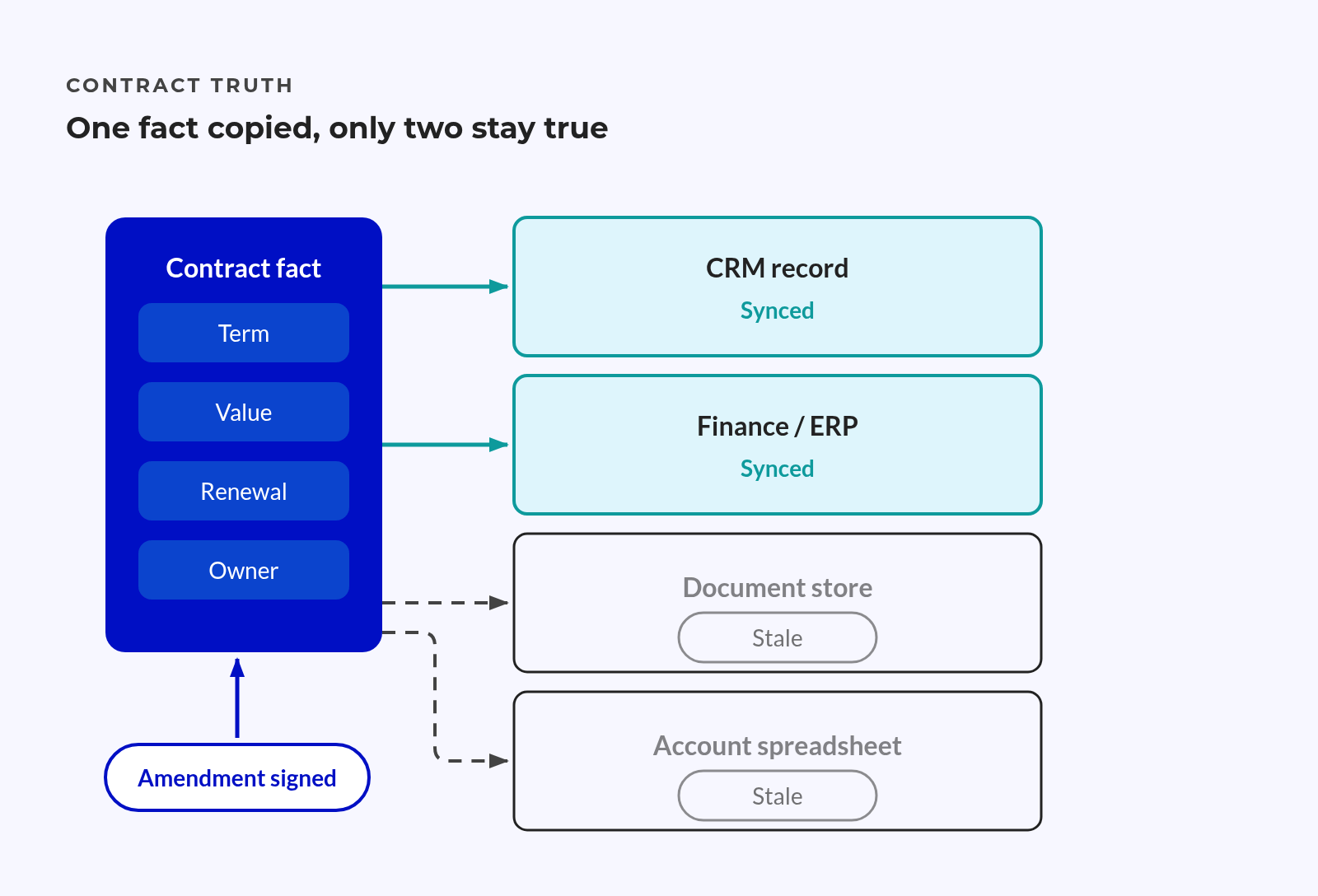
Each system can hold valid facts while answering a different question. Trouble starts when teams treat those answers as the same thing.
Where the record fragments:
- CRM: The deal captures the win but can lack current contract terms.
- Finance system: Invoices show bills, not the full value of future signed work.
- Contract file store: Signed documents hold terms that reports cannot read directly.
- Account records: Spreadsheets and inboxes hold changes that other teams cannot see.
The monthly recurring-revenue rebuild becomes a chain of manual choices.
Someone picks the current spreadsheet, checks signed changes and removes expired contracts. Someone else adjusts for billing gaps but leaves the reason outside the customer record. The next review starts with the same questions.
Questions the rebuild struggles to answer:
- Which contract supports this recurring value?
- When does the current term end?
- Does the amount include an upgrade that has not taken effect?
- Who owns the next customer conversation?
Without those answers, even a carefully checked total is hard to defend. The missing piece is a record that explains the number.
What a Late Renewal Signal Costs a Revenue Leader
Late notice leaves less time to fix service issues or shape a new offer. A discount can become the easiest response left.
📊 Fact
Average contract value erosion was 8.6%, as reported in WorldCC’s August 2025 whitepaper.
That figure covers lost contract value across outcomes, not revenue lost solely through missed renewals. It does not prove a return from CRM changes.
An end date alone is not an early warning.
A useful signal combines the notice deadline, current terms, account context and a named owner. Without those details, a reminder can arrive on time and still lead to no action.
The Minimum Viable Contract Data Model in HubSpot
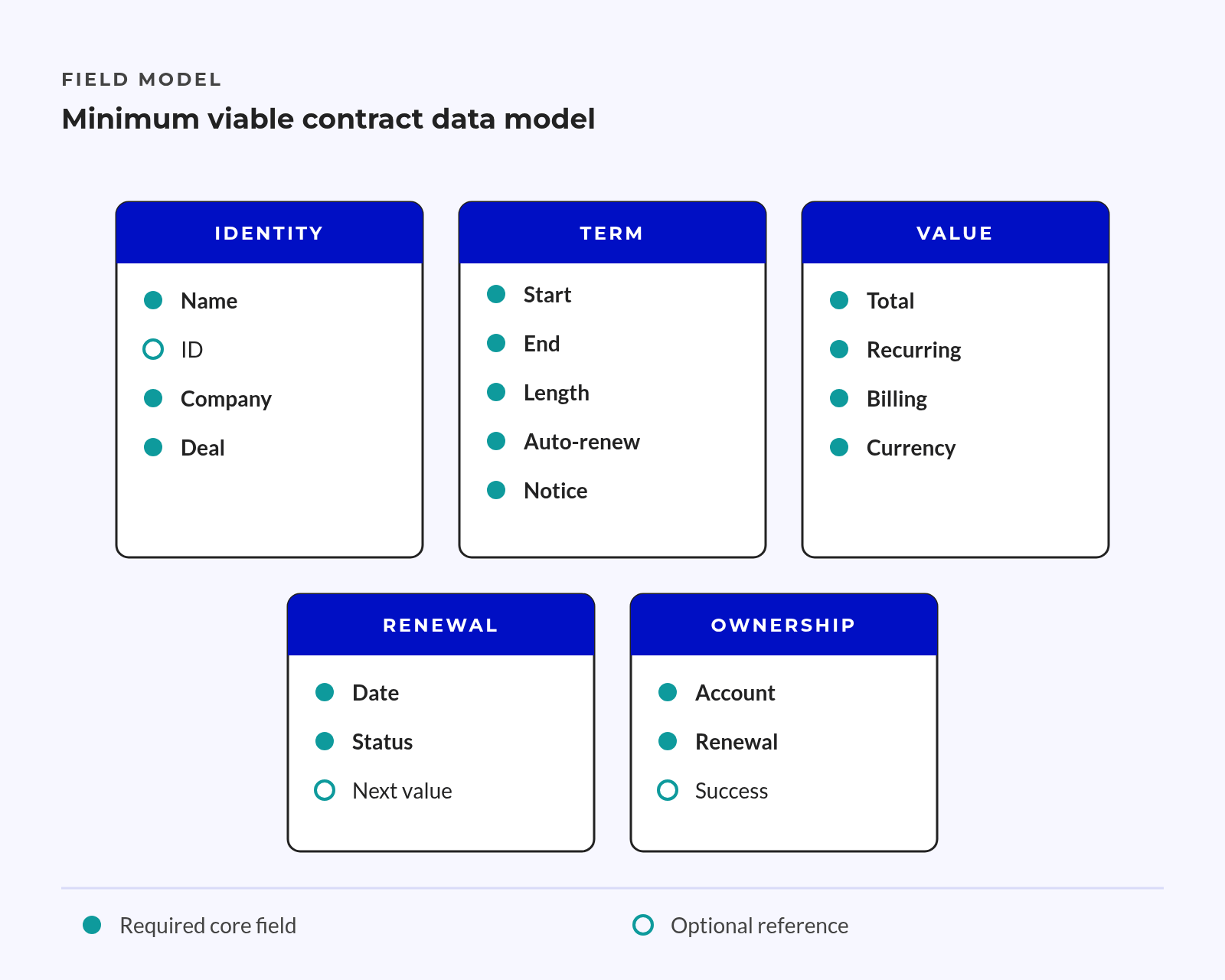
Start the contract data model with the decisions it must support. Each required field should answer a revenue question, prompt action or support a check against finance records.
Core Fields: Term, Recurring Value, Billing Frequency, Renewal Rule
Define what each field means before choosing where it lives.
Start with the native contract record when it fits the signed terms. HubSpot’s contract guide covers revenue values, billing details, renewal dates and record links.
A custom object needs a clear reason: its own lifecycle, record links or report needs. Fields on an existing object suit a small, stable scope only when they keep each contract distinct.
The wider HubSpot data model should preserve each contract as its own record. Company fields that overwrite an earlier contract when a new one starts lose that history.
Proposed pilot field map, not default fields:
| Field | Suggested Type | Pilot Need | Use |
|---|---|---|---|
| Contract name and ID | Text | Required | Find the contract |
| Company link | Record link | Required | Find the customer |
| Start and end dates | Date | Required | Place value within the term |
| Notice period | Number with clear units | Required | Work out the action deadline |
| Renewal date | Date | Required | Plan the renewal |
| Recurring amount | Number | Required | Measure signed recurring value |
| Currency | Fixed choice | Required | Keep amounts distinct |
| Billing frequency | Fixed choice | Required | Read the amount correctly |
| Auto-renewal flag | Yes/no | Required | Apply the renewal rule |
| Owner | User | Required | Assign action |
| Contract status | Fixed choice | Required | Keep current and ended terms distinct |
| Document and ERP links | Link or text | Optional at first | Trace source records |
| Entity or segment | Fixed choice | Optional at first | Group reports |
Field rules:
- Amount
- State whether it means monthly, annual or another recurring value.
- Keep one-off fees outside that scope.
- Naming
- Use a clear name format tied to the customer and contract.
- Keep a stable ID when names change.
An optional field becomes required when the pilot cannot match records without it. An ERP reference matters earlier, for example, when customer names differ between systems.
One Authoritative Date Rule
Keep one agreed source for the contract end date and one defined renewal date. Derive the renewal date where the signed terms allow. Record cases where they do not.
The notice deadline is a separate action point.
A deal close date does not establish the terms for renewal. Teams need an agreed date source, not whichever field makes a report look complete.
Date controls:
- Name the team that approves date changes.
- Define how notice periods affect action deadlines.
- Flag missing dates instead of silently filling them.
- Remove old fields from working views once teams use the agreed replacement.
💡 Tip
Test the date rule against an auto-renewing agreement and an amended agreement before applying it to all contracts.
Modelling Recurring Revenue and Amendments Without Duplicating the ERP
Recurring revenue reports need a value that matches the question. Signed terms, billing plans and posted invoices describe related facts, but they measure different things.
Subscriptions, Line Items and Contract Value: Pick One Source of Truth
Contract value shows what the customer has agreed to pay. Subscription data shows billing plans, while the ERP holds posted financial results.
Value-source rules:
- Contracted view
- Read the signed recurring amount and the dates it applies.
- Exclude terms that the parties have not agreed.
- Billing view
- Read the billing plan and related line items.
- Explain timing gaps against the signed terms.
- Posted view
- Read invoices and ledger results from finance.
- Keep the adjustments that explain gaps from expected billing.
Report labels need to name the measure.
A report called “revenue” invites debate if one team expects invoices and another expects annual recurring value. A correct number can still answer the wrong question.
Product rules affect the comparison too. A consistent product library helps teams distinguish recurring line items from one-off charges. Library prices must still remain distinct from signed contract value.
Amendments and Mid-Term Upgrades
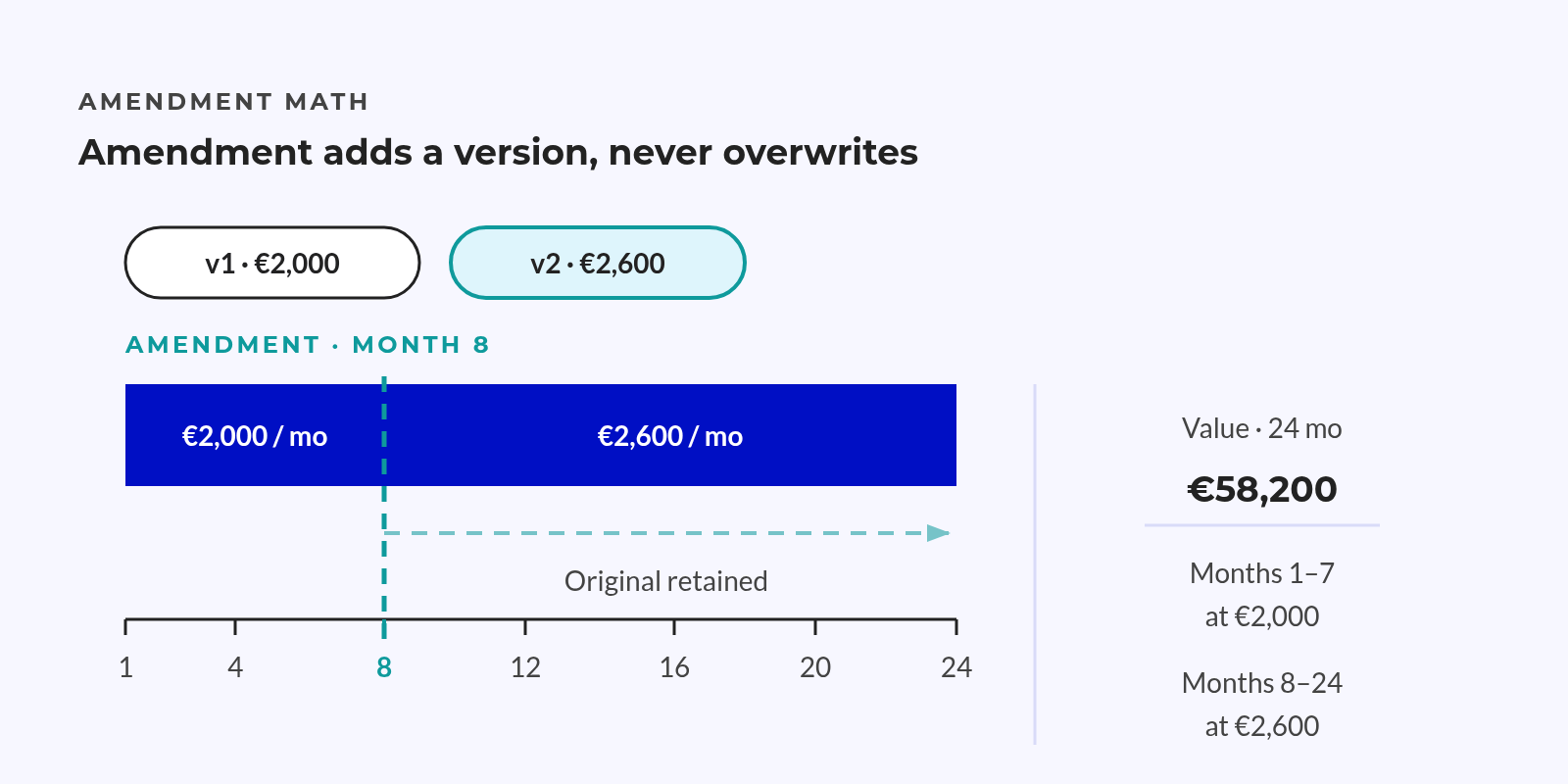
Consider an illustrative 24-month contract at €2,000 per month, upgraded in month eight to €2,600 per month. These amounts explain the model; they are not research findings.
Overwriting the original amount makes earlier reports appear wrong. Keeping only the old amount hides the new signed value.
The amendment needs an effective date and a saved prior version. Reports can then use the terms that apply to the period under review.
Amendment record:
- Keep the previous terms and version.
- Record the new value and effective date.
- Link the signed change.
- Name the person who approved the update.
A pending change must remain distinct from one that has taken effect.
The same rules apply when systems connect. HubSpot’s end-to-end revenue guide describes finance system links through apps or APIs, not guaranteed support for every contract event.
The scope must name which fields move and which system can update them. It must also define how failed changes reach an owner. A connector alone does not settle those rules.
Proving the View with a Five-Contract Pilot
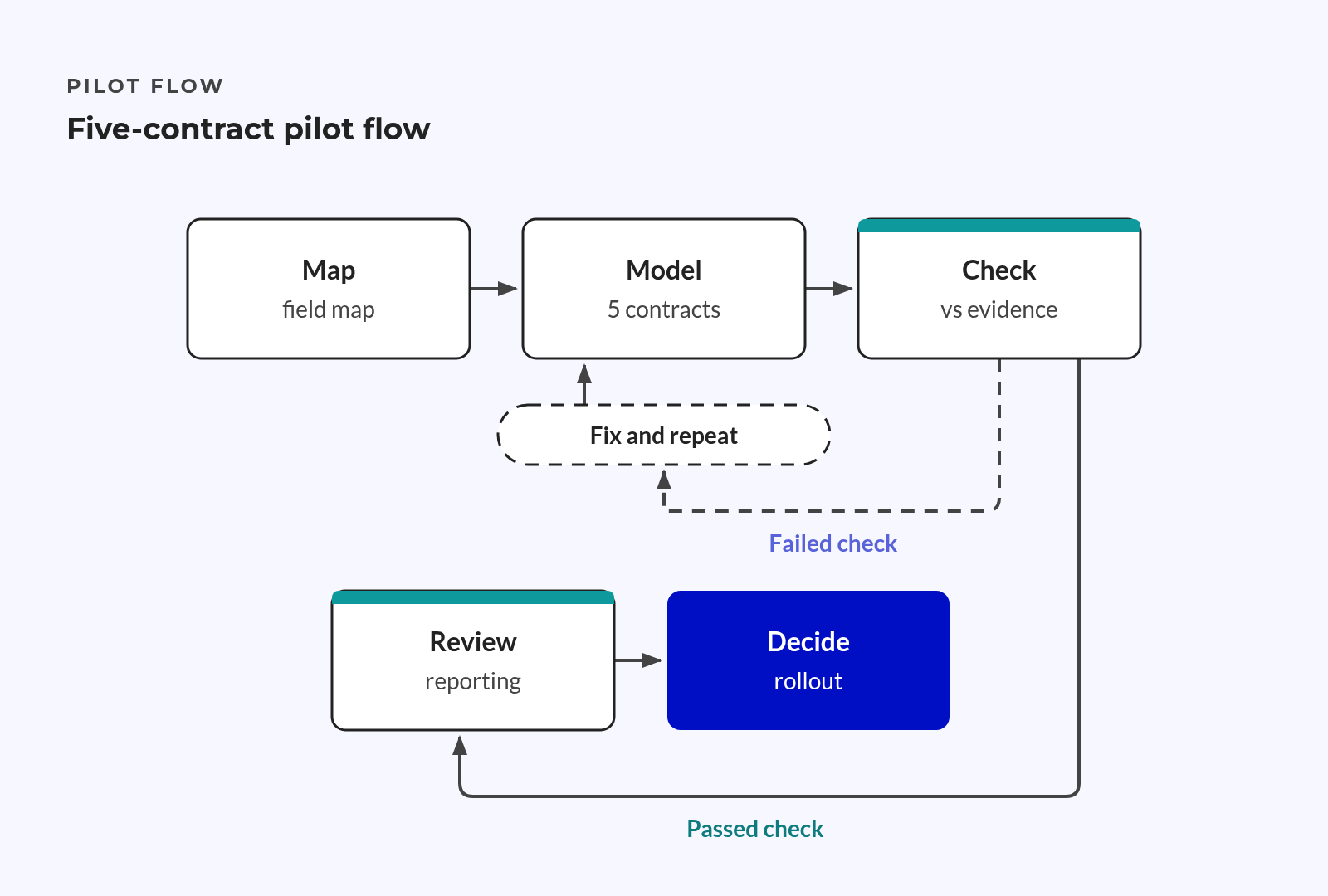
A pilot tests whether the model answers leaders’ questions before a wider rollout spreads its flaws. Revenue, RevOps, finance and contract owners need to agree on what must pass before that rollout.
How to Choose the Five Contracts
The pilot needs contracts with different rules, not just the cleanest records.
Pilot sample:
- A simple renewal tests the basic term and owner rules.
- A multi-year contract tests value across report periods.
- A mid-term amendment tests version history and effective dates.
- A multi-currency or multi-entity contract tests report boundaries.
- An at-risk renewal tests whether account context leads to action.
Agree the field map first, then model the chosen contracts with billing off. Check their terms against signed evidence and finance records. Review the report only after those checks.
A failed comparison shows what needs fixing.
Correct the field meaning, mapping or report and repeat the check. Hold the wider rollout until signed value, renewal dates and owners match the source records for every chosen contract.
What Proven Looks Like in a Reporting Review
A named person should answer leaders’ questions from HubSpot without opening a spreadsheet. Each answer should trace back to the signed contract.
Reporting review:
- What is already contracted for next year?
- Which renewals are inside their next notice window?
- Which accounts lack a named owner?
The renewal view should show signed value by period, notice deadlines and pending changes. Talks about account growth should start from signed scope, with account context used to assess room for more work.
Observable renewal risks:
- An end date approaching without a clear next step.
- A missing contract owner.
- An open amendment awaiting agreement.
- No recent customer contact.
- Service or support flags needing review.
Clear ownership keeps the view useful after the pilot. Set edit rights for signed terms, route changes through approval and name a chair for monthly checks with finance.
When terms change outside that process, the owner must check and update the record before teams use the revised figure.
Cutting manual work also matters to finance leaders. Among surveyed large North American enterprises, 49% named process automation that frees staff for higher-value work as their top finance-talent priority.
That finding does not prove savings from this pilot. The pilot must show whether clear records and handoffs remove the need to rebuild the same view each month.
First comes a trusted view of signed terms. Agreed workflows and ownership follow. AI comes after those foundations.
Frequently Asked Questions
Billing can stay in finance while revenue teams work from signed terms in HubSpot. Field ownership, change approval and checks between the systems define the boundary.
Can HubSpot Contracts Work Without Replacing Our ERP?
Yes, HubSpot can hold signed terms while the ERP keeps control of finance tasks. Revenue teams can see signed value, term and renewal ownership. Finance retains invoicing, tax, payment and ledger control, with checks explaining gaps between signed terms and posted results.
Do We Need HubSpot Billing to Use Contract Records?
No, billing can stay in another system while HubSpot holds the contract record. Contracts can also reflect deals signed outside HubSpot without a HubSpot quote. Teams still need rules for matching records, approving changes and resolving gaps between signed terms and billing plans.
Should We Use the Native Contract Object or a Custom Object?
Start with whether the native record fits your contracts and report needs. A custom object needs a clear reason, such as a distinct lifecycle or links the design must preserve. A small set of fields suits limited needs only when it keeps separate contracts distinct.
How Should We Handle Mid-Term Contract Upgrades?
Keep the original terms and record the approved change with an effective date. Reports should use the value that applies to their period, preserving earlier terms. Keep pending changes separate, link the signed amendment and name the owner who checks the update against the source records.
Conclusion
HubSpot contracts can replace a monthly rebuild with a view of signed terms that teams can trace to their source. Leaders can see which terms apply, when notice is due and who owns the next decision. Finance keeps control of its records and processes.
The pilot tests whether that view holds up across contracts with different terms. Named owners and monthly checks keep it accurate as customers renew, upgrade or change scope.
Key Takeaways
- Signed terms belong in HubSpot; financial control stays in the ERP.
- Required fields, clear value sources and agreed dates give reports a shared basis.
- Amendment history preserves prior terms, with changes taking effect from their agreed dates.
- Five contracts with different terms test the reporting view before a wider rollout.
- Named owners and monthly finance checks keep the record reliable before AI enters the workflow.