
November 16, 2026
8 min read
Poor CRM data can cost sales, not just time spent fixing fields.
In Validity’s survey, 62% reported direct revenue loss attributable to poor CRM data quality.
The finding spans CRM systems; it is not a HubSpot-only benchmark.
A flawed rule creates more errors each time it runs.
Start Your HubSpot Audit with the Revenue Model
Before adding automation, check which data each workflow trusts, who must act and what happens when an input is wrong. Clean records alone cannot show whether the process works.
A complete record can still leave a revenue leader guessing. Start with the questions leaders need answered, then trace the records and links behind each answer.
MAN Digital places this work within ARC: Architect, Run, Compound.
These checks form a working checklist, not a formal credential.
| ARC Stage | Purpose | Audit Connection |
|---|---|---|
| Architect | Agree what reports must show, how work flows and who owns the data | Gather proof and find gaps |
| Run | Put agreed processes into daily use | Approve repairs and test the journey |
| Compound | Strengthen the base and add governed AI where it fits | Check for repeat issues and expand proven workflows |
Check 1: MAP the Commercial Record
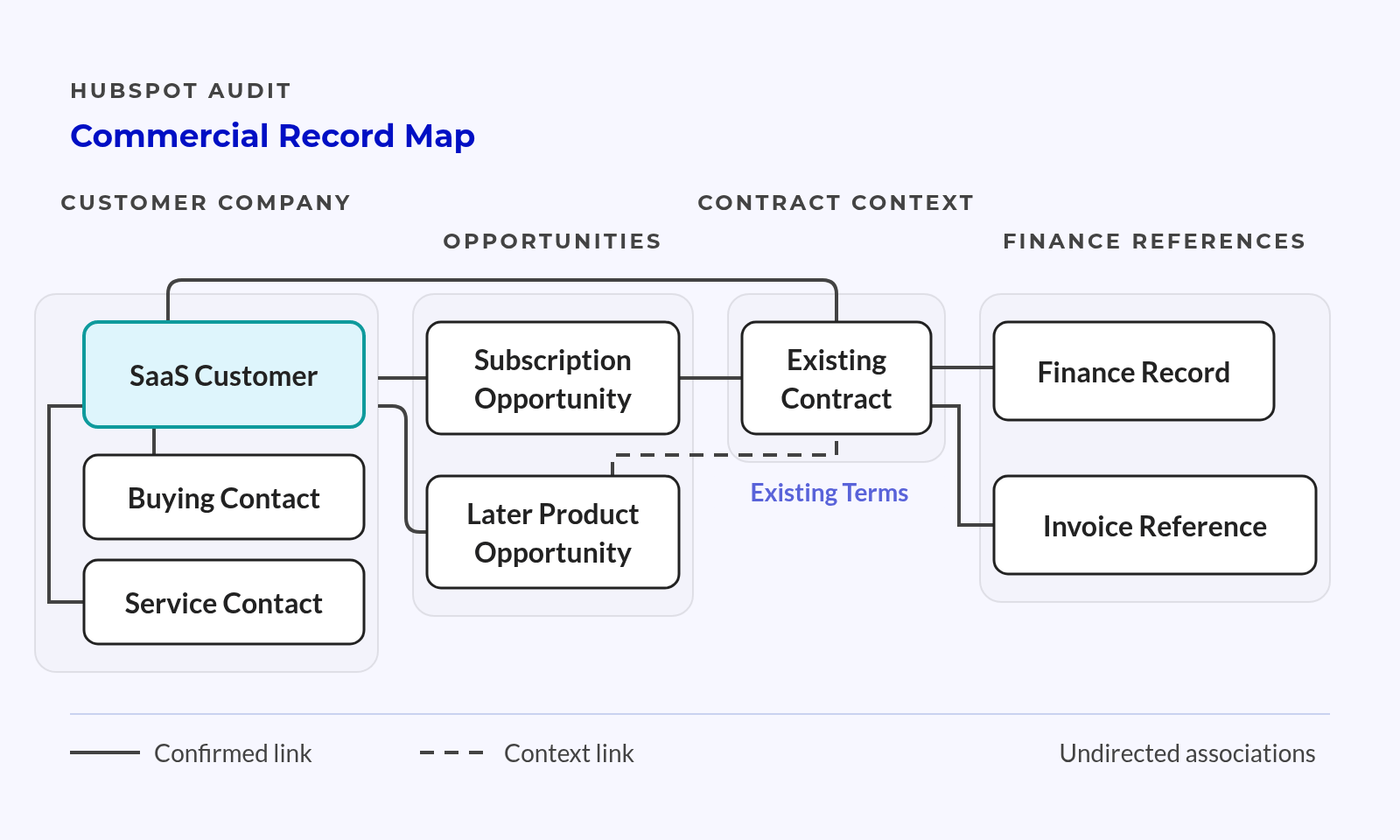
Take a hypothetical SaaS customer that buys an annual plan, then adds another product. Different contacts handle buying, onboarding and service. The records need to keep those roles clear as the account grows.
Trace the current model before proposing a new one.
Capture the commercial facts:
- Sold scope:
- Products and services bought.
- Relevant agreement or source record.
- Commercial timing:
- Contract dates and renewal timing.
- Recurring value and its agreed meaning.
- Responsibility:
- Owner of the customer account.
- Owner of the next sales or service action.
Keep finance and billing systems in the map. HubSpot can hold context for daily work without taking over accounting or needing a custom object.
Owner and pass condition: The revenue leader, RevOps and finance agree where each key fact lives and who keeps it up to date.
Check 2: Test Record Associations
Check that the right contacts, company and deals link to each other. HubSpot’s record association documentation explains these record links.
For the hypothetical customer, check the first purchase and later product deal on their own. A contact linked to the company can not be the buyer for both deals.
Record relationship exceptions:
- Missing links that prevent a handoff.
- Unclear links that can skew a report.
- Old links that no longer reflect the account.
Owner and pass condition: The CRM data owner confirms that record links support the intended reports and handoffs without unclear joins.
Check Data Quality and Lifecycle Rules
Duplicate checks cannot show whether teams use a field in the same way. Field meanings and lifecycle rules shape routing, reports and the work that follows.
📊 Fact
In HubSpot’s marketing research, 12.4% cited difficulty sharing data across the organization. This is a reported marketing challenge, not a HubSpot defect rate.
Check 3: Audit Critical Properties
Start with fields that drive routing, reports or promises to customers.
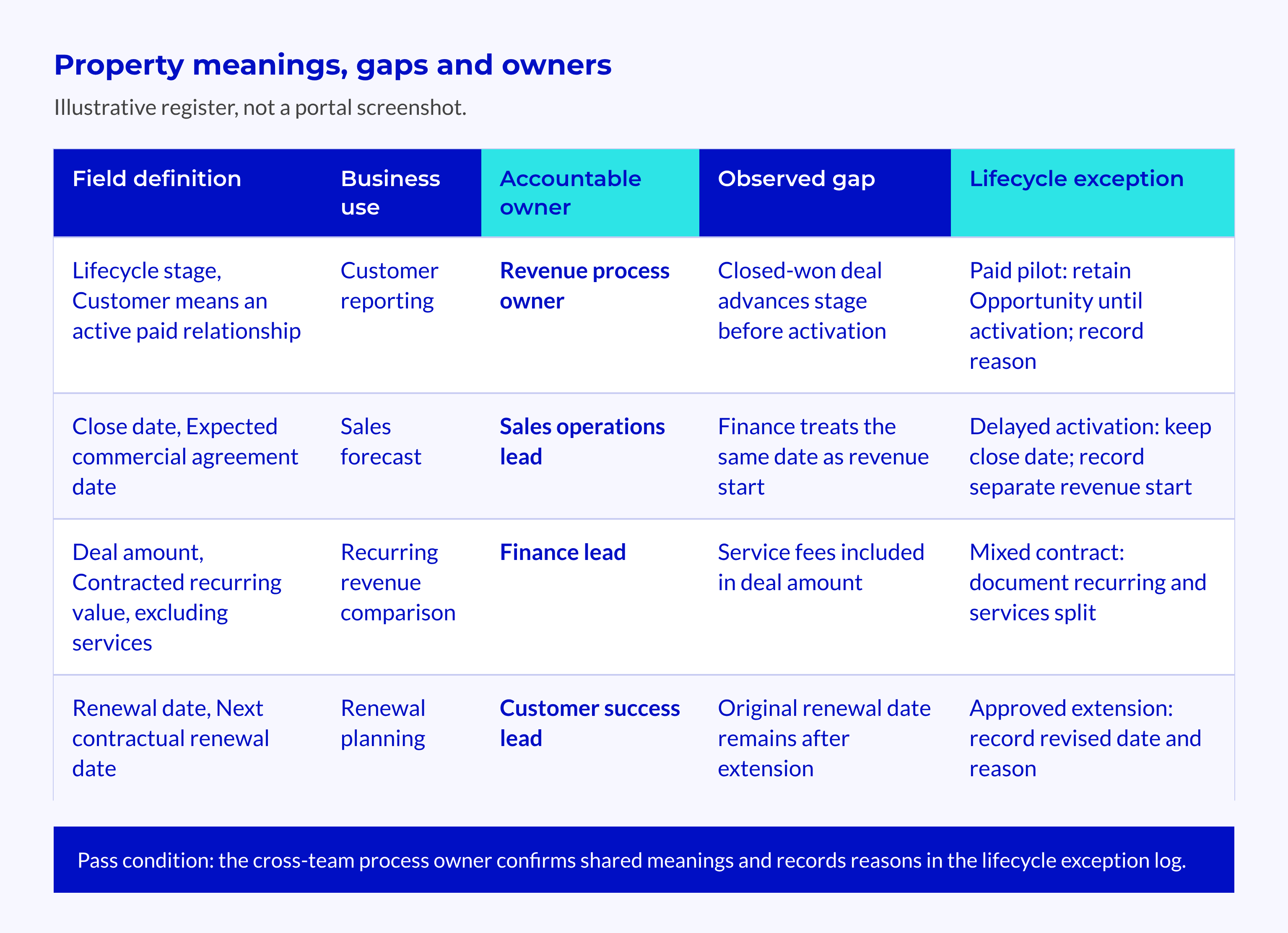
A data governance system gives each property a clear meaning, change rules and an owner. A filled field is useful only if its value means what the process expects.
Build a critical-property register:
- Meaning and use:
- Definition and allowed values.
- Decisions or workflows that depend on the field.
- Evidence and exceptions:
- Missing values and mixed formats.
- Duplicate fields or records that can be duplicates.
Review companies with the same domain before merging them. Compare their identity, owners and record links before choosing which record to keep. A shared domain alone does not settle that choice.
Check what depends on an empty property before deleting it.
Owner and pass condition: The data steward records the meaning, business use and known gaps for each field that drives a decision.
Check 4: Audit Lifecycle Rules
Follow the hypothetical customer through marketing, sales and service. Compare what each team means by a stage with the events that change it.
Lifecycle stage, lead status and deal stage serve different purposes. Similar labels do not mean teams share the same entry and exit rules.
Capture transition evidence:
- The business event that should trigger a change.
- The actual trigger and observed result.
- Cases that need human judgement.
Keep stage values unchanged while gathering evidence.
The process owner needs the original values to trace the cause. Changing them too soon can hide the gap between the agreed rule and what happened.
Owner and pass condition: The cross-team process owner confirms shared meanings and records the reasons for exceptions in a lifecycle exception log.
Verify Ownership, Handoffs and Access
An owner field does not prove that someone will take the next action. Follow who does what from lead review through closing, onboarding and renewal. Include absences and staff changes in the test.
Check 5: Test Ownership and Handoffs
For the hypothetical customer, find out who accepts the handoff after closing. Check what happens when that person is absent or rejects a handoff with missing details.
Inspect the handoff rules:
- Normal route:
- Named recipient and required context.
- Acceptance signal and next action.
- Exception route:
- Absence cover and a new owner.
- Escalation when no recipient takes the work.
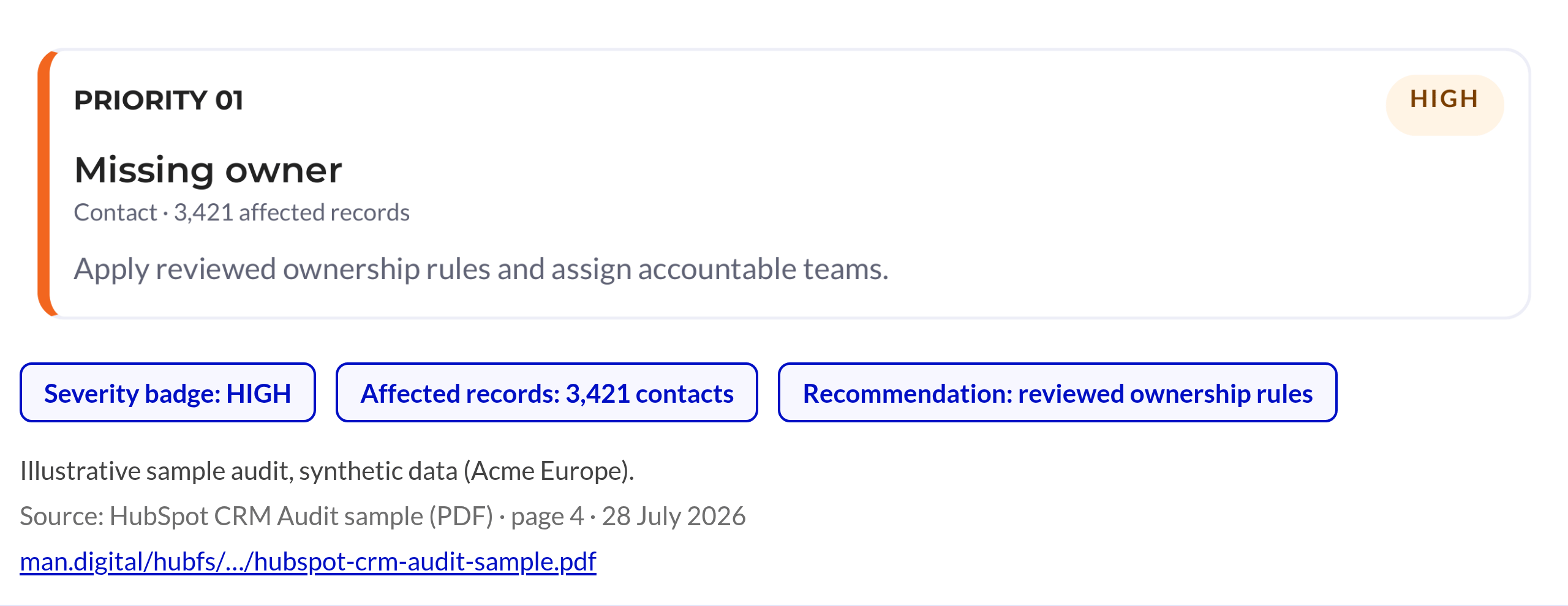
MAN Digital’s sample uses synthetic data to flag missing owners and suggest reviewed rules with named teams. It does not support assigning every unowned contact to a random user.
The buying-contact link needs the same care: select the relevant buyer, not just any contact at the company.
Owner and pass condition: The sales or service leader confirms a recipient and a fallback route for each key handoff.
Check 6: Review Access and Change Rights
Compare each role’s duties with its rights to edit key data, workflows and reports. Check those rights and the available controls against the HubSpot permissions guide.
This is an access check for daily work, not a full security review.
Capture access gaps:
- Users who cannot complete their agreed work.
- Broad edit rights without a clear business need.
- High-impact changes with no review or record.
- Records that still belong to inactive staff.
Check whether access blocks the intended process before treating a workaround as user error.
Owner and pass condition: The HubSpot admin confirms that rights match duties and that someone reviews changes made with broad access.
Test Workflows and Integrations Before Adding Automation
Trace the source data, trigger, rules, final field update and action that follows. If teams dispute a required input, settle that dispute before letting more workflows use it.
AI use adds pressure to move quickly. McKinsey reported 88% regular AI use in at least one business function, but only approximately one-third had begun enterprise-wide scaling.
Those figures describe broad AI use, not readiness for a specific HubSpot workflow.
Check 7: Test Workflow Logic and Exceptions
Inspect enrolment, re-enrolment, exclusions and branches. Look for other workflows that write to the same property.
Build controlled test cases:
- Expected journey:
- An eligible record enters the correct path.
- The intended recipient receives the right action.
- Exception journey:
- Missing data follows a safe route.
- Repeat entry does not create unwanted actions.
Check HubSpot’s workflow testing documentation before choosing a test method. Confirm which tests are available and how they behave. Do not assume a test cannot affect live records.
A run can complete without errors and still send work to the wrong person.
Owner and pass condition: The workflow owner records expected and observed results and names who will resolve each failure.
Check 8: Trace Integration Writes and Failures
List every system that can write to each key field. Check field mapping, sync direction, overwrite rules, errors and recovery.
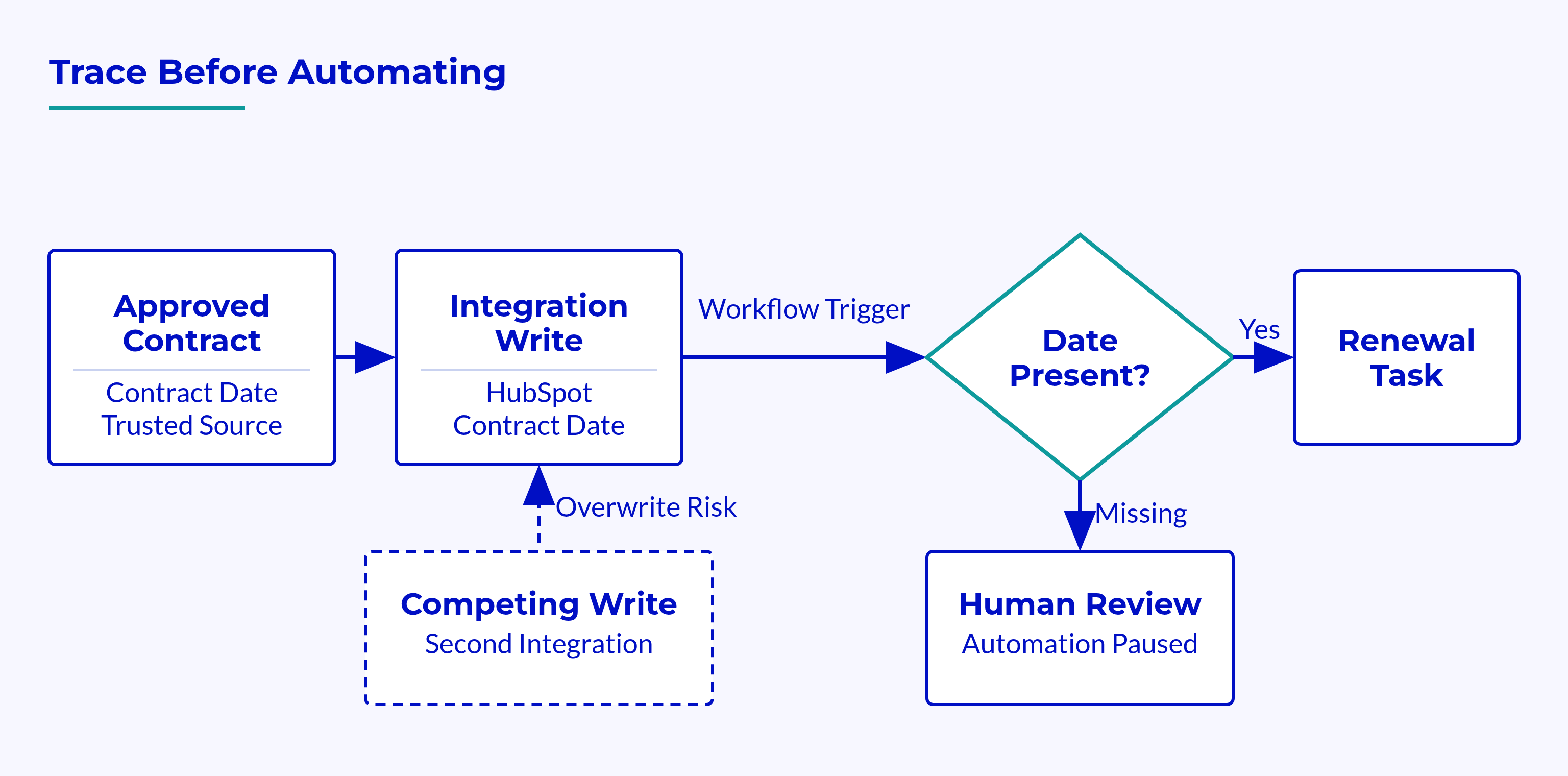
For the hypothetical customer, identify which source controls contract timing. Check whether a later sync can overwrite an approved date. That overwrite would affect any renewal task that uses the field.
💡 Tip
Agree which source controls each field before changing sync rules; otherwise, the next update can undo the repair.
Owner and pass condition: The integration and data owners agree which sources to trust and can detect and resolve failed writes.
Gartner reported that 63% lacked, or were unsure they had, the right data-management practices for AI. Published in 2025, it reflects earlier fieldwork, not a current portal failure rate.
Reconcile Reporting and Recurring-Revenue Context
Choose a revenue figure that leaders already use and trace it back to its records. Check filters, dates and meanings before comparing dashboard totals.
Check 9: Reconcile Report Definitions
Inspect the source records, date basis, currency rules and record links. Check whether joins or filters leave out relevant records or count them more than once.
Use the custom report builder documentation to check the product’s reporting options. Confirm plan and feature limits before choosing a design.
Capture the reconciliation evidence:
- Metric meaning and records included.
- Filters, date fields and currency basis.
- Reference total and reasons for differences.
- Open gaps and named reviewers.
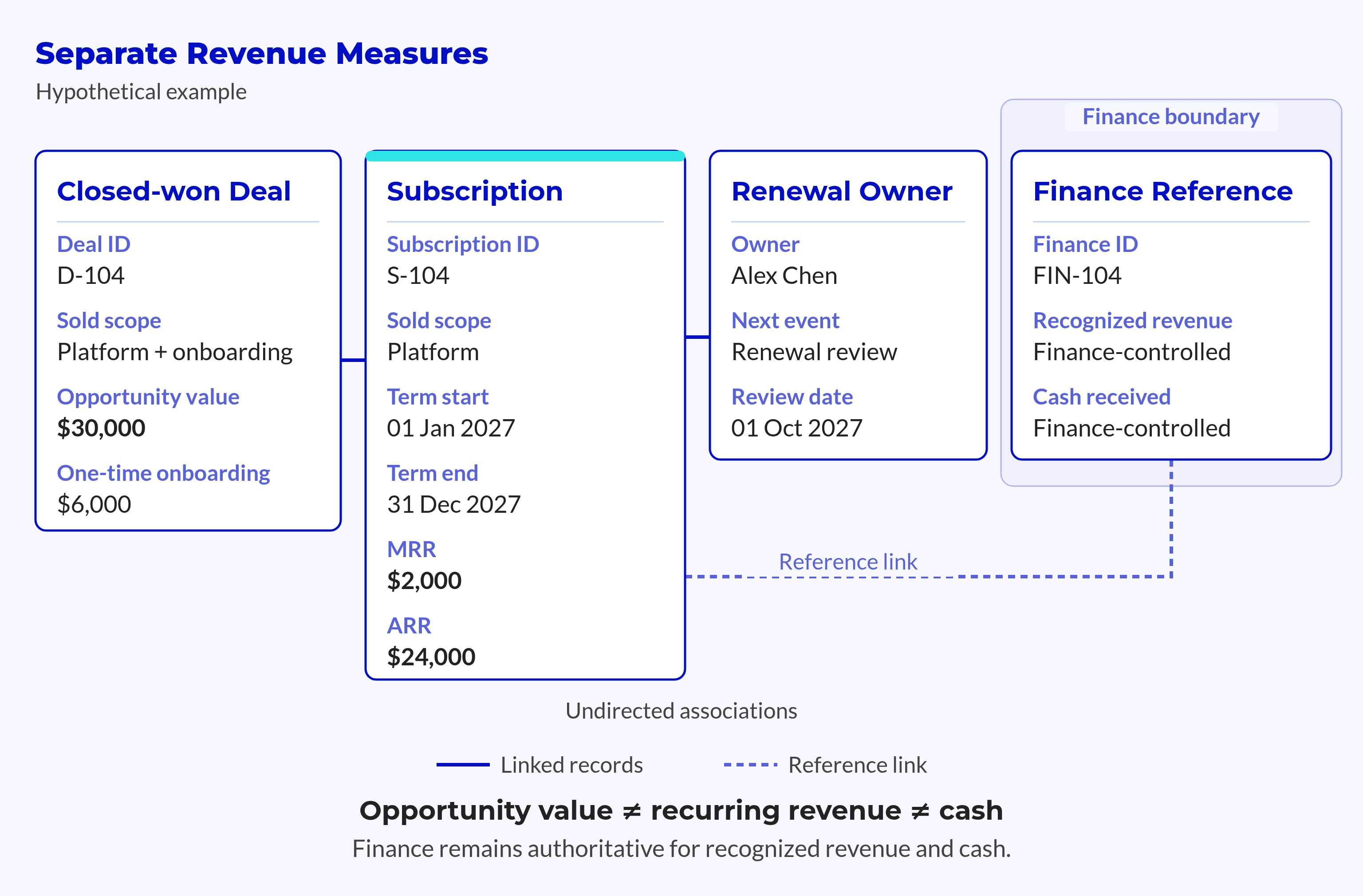
Closed-won value does not by itself equal recurring revenue, collected cash or recognised revenue.
Each figure can be valid while answering a different question. A report needs to make that question clear so leaders know what the total means.
Owner and pass condition: The reporting owner and finance explain differences from the agreed reference totals.
Check 10: Inspect Recurring Context
Return to the hypothetical customer’s annual plan and later product purchase. Check that dates, recurring value and renewal ownership remain clear after closing.
The contract data model should link those facts through clear record associations. Assess the current model before deciding whether it needs a dedicated Contract record.
Check the next commercial event:
- What renews, changes or ends?
- Which dates govern that event?
- Who owns the next action?
- Which finance reference supports the view in HubSpot?
The synthetic workbook flags overdue open deals for owner review of stage, date and next step. A past close date calls for review. It does not justify inventing a replacement date.
Owner and pass condition: The renewal owner can identify the next commercial event without searching private spreadsheets.
Check Adoption and Ongoing Governance
Watch people complete real tasks to see whether the portal supports their work. Turn the gaps into owned repairs with clear tests for release.
Check 11: Test Real Adoption
Ask users from the relevant teams to review leads, hand off accounts and handle renewals. Watch where they leave the portal and ask why.
Document material workarounds:
- Spreadsheets that hold missing account or contract details.
- Personal notes that replace shared next actions.
- Repeated manual checks caused by unclear ownership.
- Access or ease-of-use gaps mistaken for training needs.
HubSpot audit logs show changes within their documented scope. They cannot show, on their own, whether users can complete these tasks. Logs support the audit; they do not replace it.
Owner and pass condition: The team manager confirms that required tasks work and records key workarounds with their causes.
Check 12: Inspect Governance
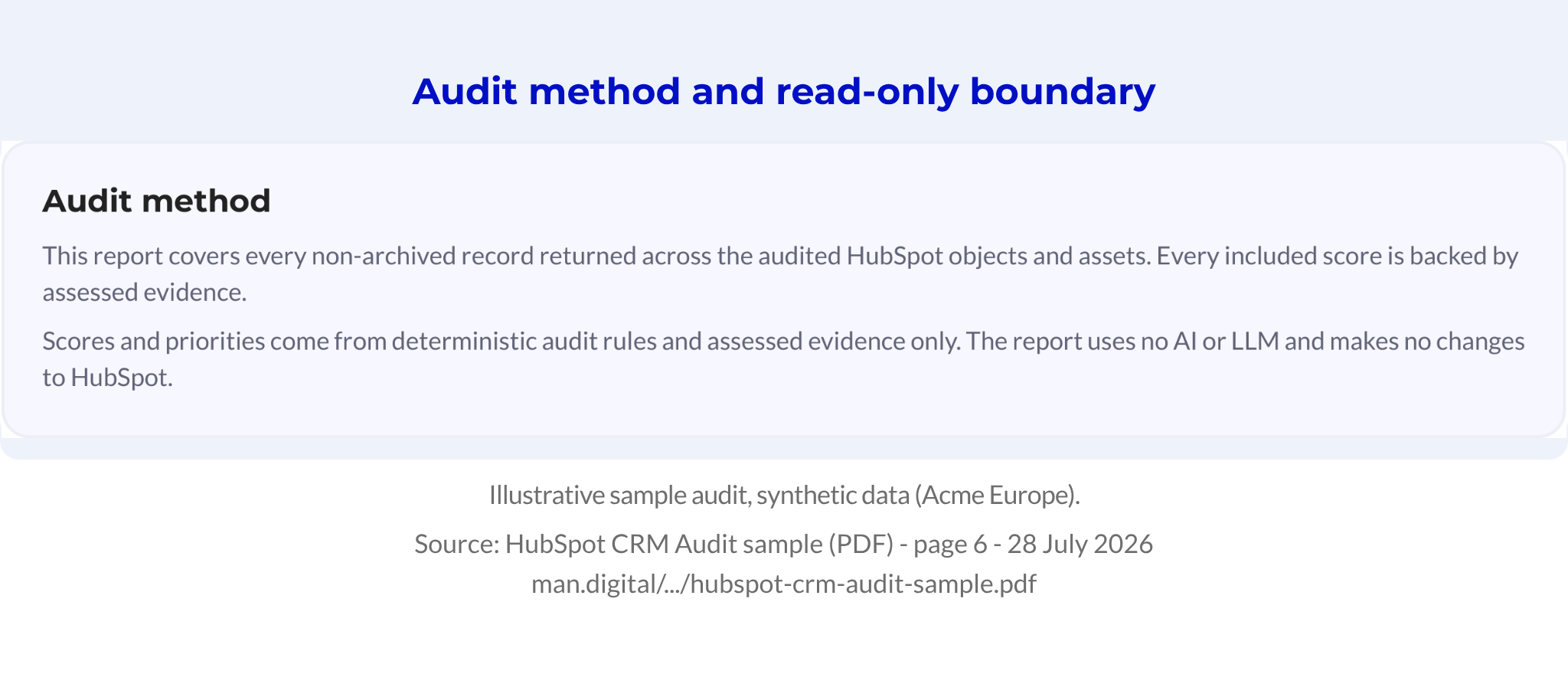
MAN Digital’s audit method keeps read-only checks separate from changes to the portal. The app does not change CRM records, and its audit/report path does not use generative AI.
People still need to judge what the evidence means for the business.
Full inspection covers the authorised scope, not every business process. Sampled inspection has per-object limits. Missing access rights and failed checks leave gaps in coverage.
📝 Note
A favourable score cannot clear an input or rule that nobody inspected. Read severity, coverage and affected records together before approving a change.
Move findings through an accountable loop:
- Review:
- Confirm evidence and likely cause.
- Record the decision, change owner and target date.
- Implement:
- Approve a bounded change using trusted values.
- Define its pass test and record how to make it.
- Recheck:
- Re-run and compare the relevant evidence.
- Record changes in scope, settings or rules.
The synthetic workbook shows how to assign findings and plan repairs, not proof that those repairs improved the portal.
Owner and pass condition: The RevOps governance owner ensures that each finding has an owner and each change has a clear pass test.
The release decision depends on what each workflow needs to work safely.
| Classification | Meaning | Release Condition |
|---|---|---|
| Blocker | A required meaning, record link or owner remains unclear | Hold the affected workflow until its test passes |
| Controlled improvement | A defined repair can proceed safely | Approve the change and check its result |
| Monitored exception | A known limit can remain for now | Record the reason, owner and review trigger |
A blocker can stop one workflow while unrelated, safe changes proceed. In ARC, Architect gathers the evidence, Run tests the repair, and Compound checks whether the issue returns.
Frequently Asked Questions
Finding a problem and proving a repair are separate tasks. An audit finding needs to show what failed, who owns the gap and what must pass before release.
What Should a HubSpot Audit Include?
It should check the commercial model, record links, key fields, lifecycle rules, ownership and access. It also needs to test workflows, connected systems, reports and daily work.
Each finding needs evidence, an owner and a pass condition. Automated checks supply signals, but people must judge what the data means, which source controls it and how to handle exceptions.
Does an Audit Mean We Must Stop All Automation?
No, only automation that depends on an unresolved blocker needs to wait. A reporting gap can block a renewal workflow while leaving other processes untouched.
Bounded repairs can proceed once the owner approves them, tests a relevant journey and rechecks the evidence.
Conclusion
A useful HubSpot audit shows why a process fails and what must change before it runs again. Each finding connects a record or rule to a business decision, an owner and a test.
An approved repair is not yet a proven repair.
Testing and repeated review show whether the change holds, whether another system overwrites it and whether users can complete the task. That evidence gives revenue leaders a basis for adding automation and governed AI.
Key Takeaways
- Commercial meaning and daily work matter alongside duplicate checks.
- Inspection coverage sets the limits of what the evidence can show.
- Findings need owners, decisions and pass tests.
- Repair approval and proof of improvement are separate steps.
- Automation is ready only when its required inputs and rules pass.