
HUBSPOT CONTRACTS IMPLEMENTATION
HubSpot Contracts Object Implementation Guide
Bring your customer agreements into HubSpot and give Sales, Customer Success and Finance a shared view of committed revenue.
For RevOps teams and HubSpot administrators. Choose where billing lives, prepare your imports and test the reports and renewal handoffs before rollout.
THE SHORT ANSWER
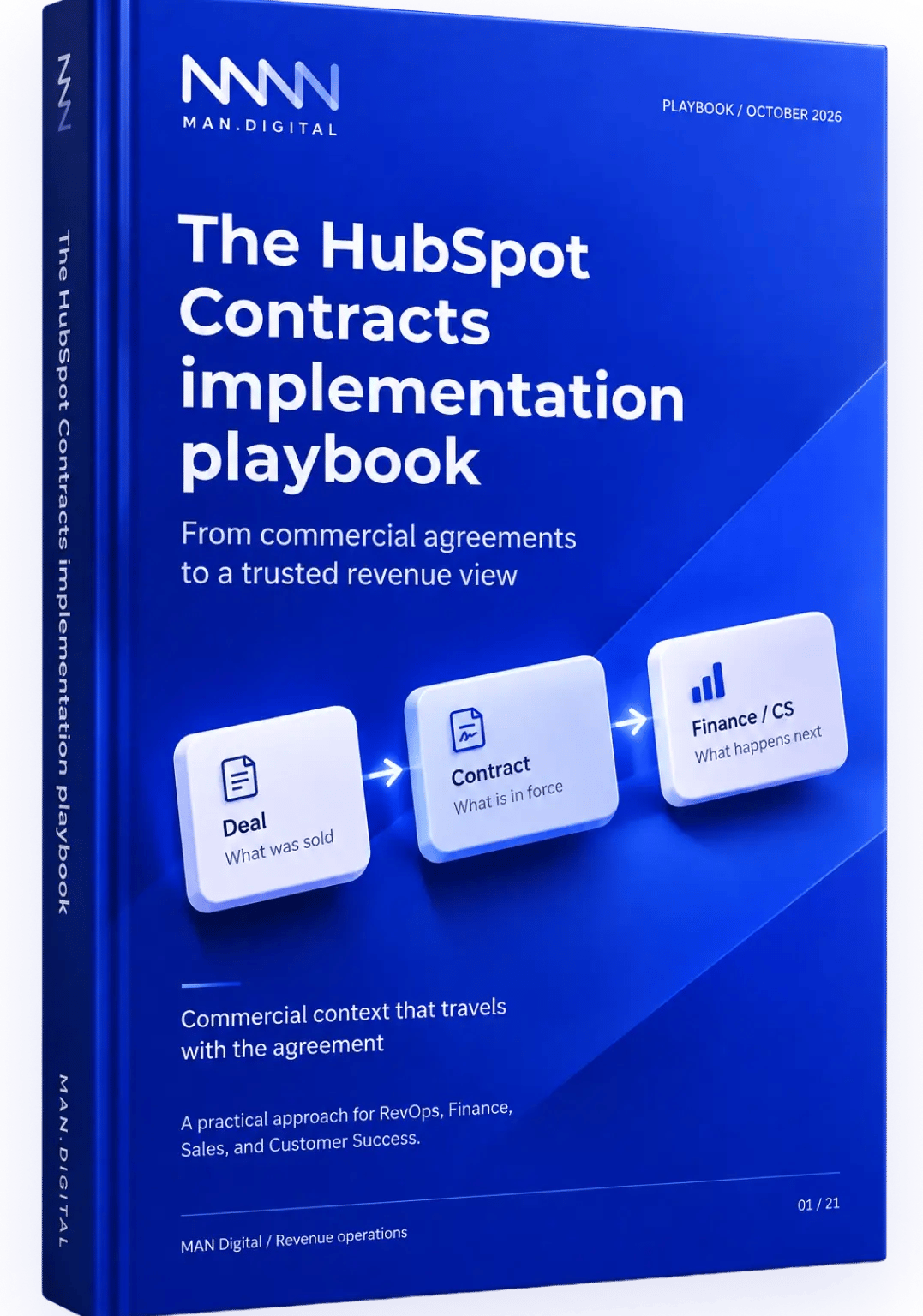
How Do You Implement HubSpot Contracts?
This guide covers HubSpot’s native Contracts CRM object for committed revenue.
Start by checking account access and deciding who will issue invoices. Then choose how to create or import Contracts, map the agreement data and test a representative sample. Before rollout, reconcile the values, validate the reports and assign responsibility for changes and renewals.
01
Assess
02
Map
03
Pilot
04
Validate
05
Scale

01 / THE OPERATING RECORD
The Native HubSpot Contracts Object
The HubSpot Contracts object is a native CRM record for committed revenue. It brings agreed products, terms, dates, recurring value and changes together so your teams can understand the customer agreement over time.
Keep a reference to the signed legal document. The CRM record does not provide legal drafting, redlining or clause management.
Deal
Opportunity

Quote
When used
Contract
Agreement context
Contract context connects to line items, party roles, renewal terms, and the chosen finance system.
How Do Contracts Relate to Deals, Quotes and Subscriptions?
| Record | Main job |
|---|---|
| Deal | An opportunity or proposed commercial change; used for pipeline and sales forecasting. |
| Quote | An offer the buyer reviews and accepts, when you use a quote-based process. |
| Contract | The agreed commercial context, including products, term dates and changes. |
| Subscription | A recurring billing record. Its role depends on the billing flow configured in your account. |
For a broader introduction to the model, read our HubSpot Contracts object overview. Check the current access and import requirements below, as these capabilities have changed since the overview was published.
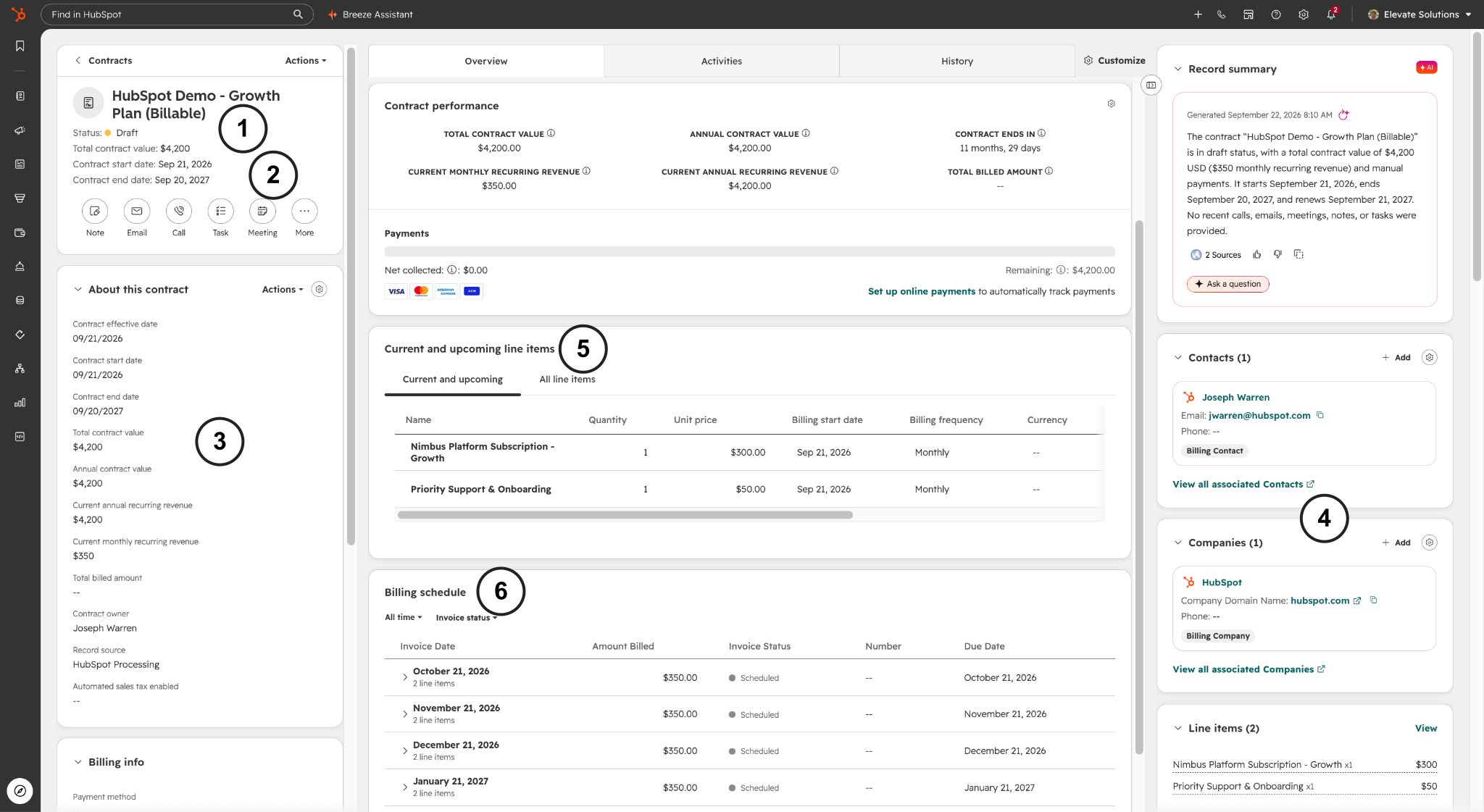
Find the Agreement Details on the Contract Record
-
01
Status. Check whether the agreement is still a draft.
-
02
Dates. Compare start and end dates with the signed terms.
-
03
Value. Check current MRR and ARR against the agreed recurring charges.
-
04
Customer. Confirm the billing contact and company associations.
-
05
Line items. Review products, quantities, prices and frequency.
-
06
Billing schedule. Inspect invoice dates and amounts when the Contract has billing.

02 / BEFORE YOU CONFIGURE
Account Access and Setup
HubSpot Contracts access depends on your creation route. Quote-based creation requires a Revenue Hub subscription and seat. Direct creation or import may be available with other subscriptions through the Direct Create, Edit, and Renew HubSpot Contracts beta.
Check the route in your target account before designing the rollout. Quote-based setup requires Revenue Hub access and a Revenue Hub seat. The Direct Create, Edit, and Renew Contracts beta has different access conditions; do not assume the same requirements apply to every route.
Account Access
Confirm the subscription, seats and beta enrolment needed for creation, billing, workflows and reporting.
Permissions
Have a Super Admin configure settings. Confirm Contract create/edit permissions and Import access for the people running the pilot.
Creation Settings
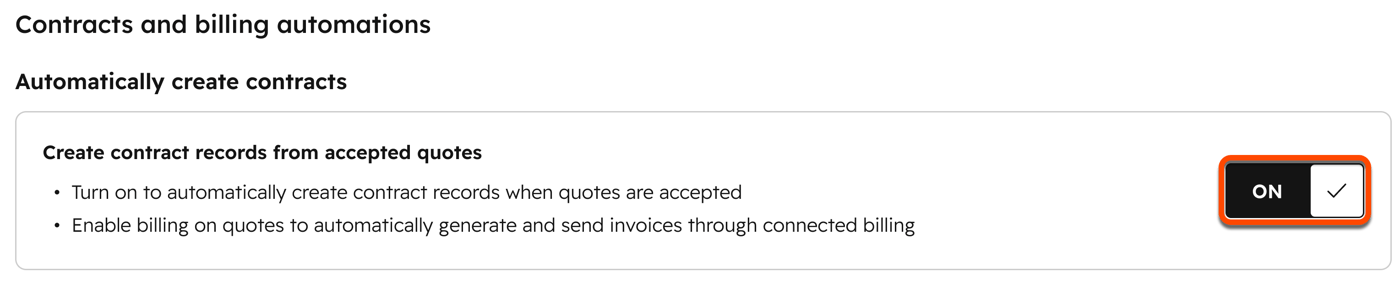
Under Settings → Data Management → Objects → Contracts, review automatic creation from accepted quotes and the renewal settings.
Billing Controls
Agree who issues invoices, collects payments and maintains tax and currency data. Test the configured flow before accepting a live quote.
Check Access for Your Chosen Route
| Route | Seat / beta check | Permission / control check |
|---|---|---|
| Accepted quote | Revenue Hub access and seat; billing beta if applicable | Contract creation permissions; automatic creation setting |
| Direct creation | Direct Create, Edit, and Renew Contracts beta; separate seat conditions | Contract create/edit permissions |
| Standard import | Confirm account eligibility for non-billing imports | Import access; unique Contract identifier |
| Billing migration | Confirm migration eligibility and payment setup | Finance approval; draft review and activation controls |
Check existing quotes. Accepted legacy quotes do not automatically create Contracts. Published quotes can retain the billing flow from publication; changing a setting does not rewrite every existing record.
In HubSpot: Set Accepted-Quote Creation
-
01
Click Settings > Data Management > Objects.
-
02
Open Select an object and choose Contracts.
-
03
Review Create contracts from accepted quotes. Enable it for your chosen quote route, then test the resulting Contract and billing behaviour.
04 / BRING AGREEMENTS INTO HUBSPOT
Create or Import HubSpot Contracts
Choose a route that matches the agreement and its billing behaviour. Creating a commercial record and moving active billing are separate implementation decisions.
NEW AGREEMENT
Accepted Quote
Enable automatic Contract creation when the buyer needs to review and accept a quote. Test the resulting associations and billing behaviour.
DIRECT ENTRY
Create a Contract
With the relevant beta access, record an agreement without quote acceptance. Review the draft, line items, parties and billing choice before finalising.
EXISTING AGREEMENTS
Import or Migrate
Use standard import for non-billing Contracts. Use the separate billing-migration route when HubSpot must take over future invoicing and collection.
Can You Import Existing Contracts?
Yes. Start by checking access, creating a unique Contract identifier and preparing line-item and association rows. Choose the non-billing import route when invoicing remains in your existing system.
Steps for Importing Contracts Without Billing
-
01
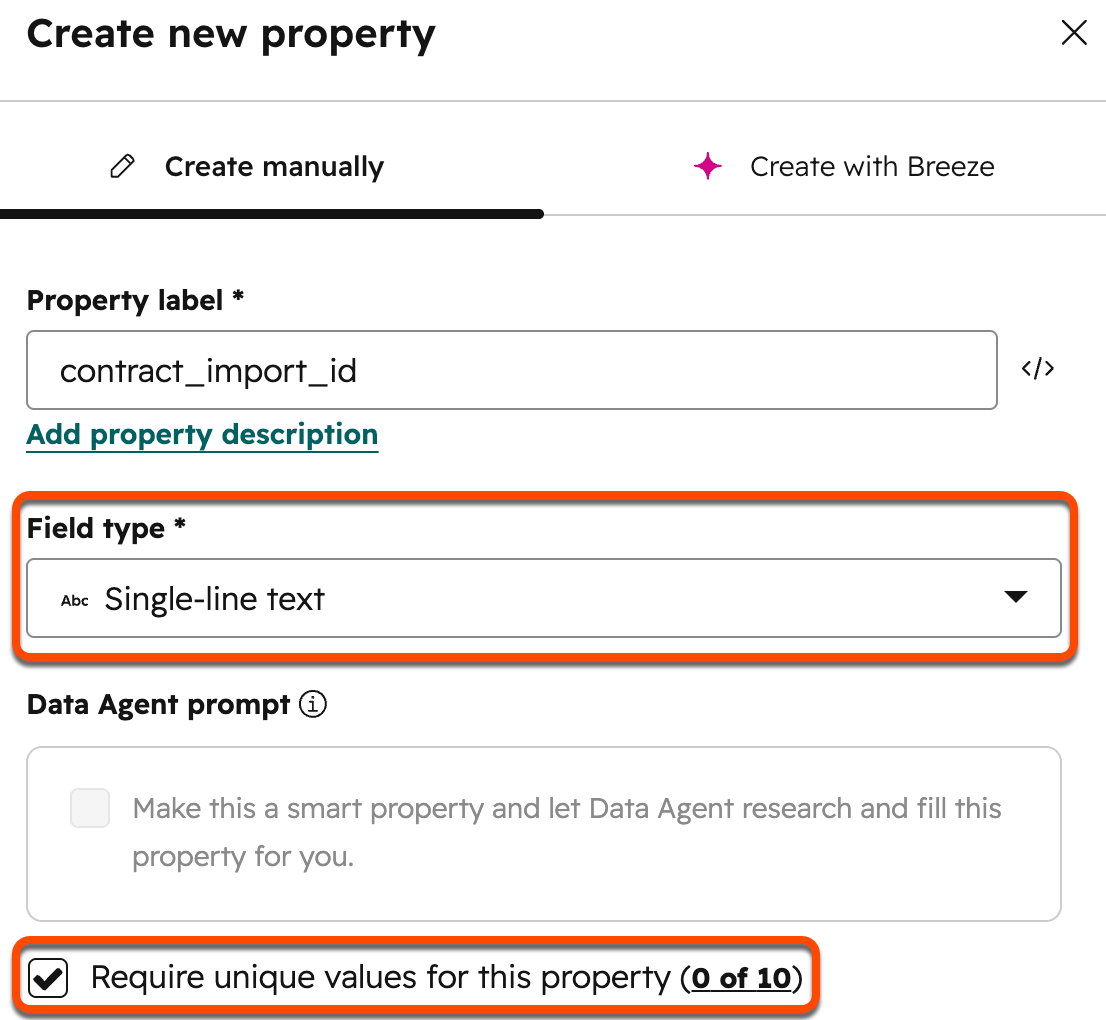
Define the match. Create a unique single-line text Contract identifier, such as contract_import_id , and keep a record linking it to the source agreement.
-
02
Prepare the rows. Repeat the Contract identifier for its line-item rows. Put associated Deal details on a separate row with the existing Deal Record ID.
-
03
Map the commercial data. Check products, quantities, prices, currencies, term dates and party associations. Separate one-time charges from recurring charges.
-
04
Import a representative sample. Review field mappings and import errors. Confirm that the expected Contracts and associations were created.
-
05
Reconcile before scaling. Compare source totals and dates with the resulting records. Inspect history and test the reports the team will use.
Map One Agreement Before Importing the Batch
Fictional ACME mapping example. Match these concepts to the properties and associations in your account.
| Source data | HubSpot destination | Example |
|---|---|---|
| Agreement ID | Unique Contract identifier | ACME-2026-01 |
| Existing opportunity | Deal association using Record ID | Deal 48201 |
| Product and quantity | Associated line item | 100 seats × EUR 100 / month |
| Charge type | Line-item billing frequency | Monthly seats; one-time setup fee |
| Currency | Currency on mapped commercial values | EUR |
| Term and effective dates | Applicable Contract / line-item dates | Starts 1 July 2026; validate end dates |
Example Import Rows
Line-item row 1
ACME-2026-01 · Seats · 100 × EUR 100 · Monthly
Line-item row 2
ACME-2026-01 · Setup · 1 × EUR 1,000 · One-time
Deal association row
ACME-2026-01 · Deal Record ID 48201
This diagram shows the relationship between rows. Confirm the actual headers, required fields and mappings in a test import before preparing the full CSV.
Standard import does not carry a billing schedule. Billing migration has its own payment setup, CSV structure, future billing start and activation controls. Revenue continuity uses a supported event path; a current-value snapshot does not recreate the history by itself.
In HubSpot: Prepare the Import Identifier
-
01
Create a custom Contract property such as contract_import_id.
-
02
Select Single-line text and tick Require unique values for this property.
-
03
Repeat the ID on separate line-item rows; add the Deal on a separate row with its Record ID. Test the mappings and associations before scaling.
Watch: Billing Migration Explained
HubSpot Developers explains why billing migrations are getting easier. Watch here alongside the import and billing-route checks.
Watch: Create Contracts Without a Quote
07 / REVENUE VISIBILITY
Report on Recurring Revenue and Renewals
Start with current recurring value, revenue movement and upcoming renewals. Contract context should explain what is in force, what changed its value and which customer action comes next. Confirm revenue-reporting access and event coverage in the pilot.
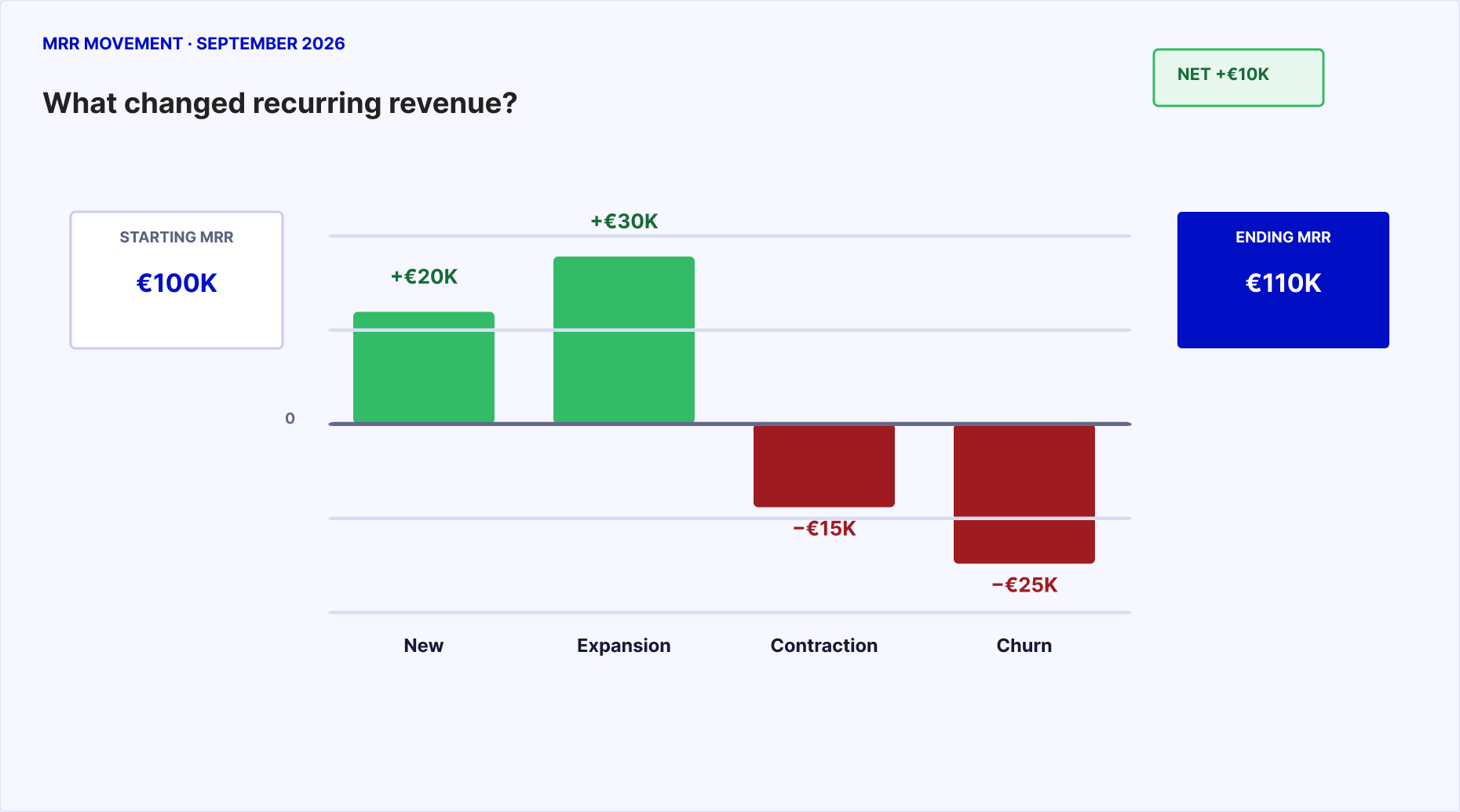
Explain the movement behind the total. New business and expansion add EUR 50k, while contraction and churn remove EUR 40k. The ending total is up EUR 10k, but those losses still need an explanation.
When Did Recurring Value Start?
Check the effective date of each recurring charge. Keep it separate from the date the agreement was booked.
What Expanded or Contracted?
Explain the changes behind the total: new business, expansion, contraction and churn.
What Renews Next?
Review renewal dates and notice deadlines alongside the current agreement and customer context.
Who Owns the Next Action?
Name the person responsible for the change, billing handoff or renewal decision.
Define the Metric Before Building the Dashboard
MRR
Monthly recurring revenue: the recurring amount normalised to a month. Keep one-time fees outside it.
ARR
Annual recurring revenue: the annualised recurring run rate. In a steady model, ARR = MRR × 12; it is not cash collected or recognised revenue.
TCV and ACV
Total and annual contract value describe the agreed term. For evergreen Contracts with no end date, HubSpot does not calculate TCV or ACV; use MRR and ARR.
Booked versus effective
A commercial action can be booked in one period and become effective in another. Keep booking dates and effective dates distinct.
Make the view actionable. Define the metric and period, confirm event coverage, and reconcile the numbers before relying on the dashboard. Renewal and retention views need the right dates and customer-cohort history.
Get the playbook for more reporting examplesIn HubSpot: Verify the Current Revenue View
-
01
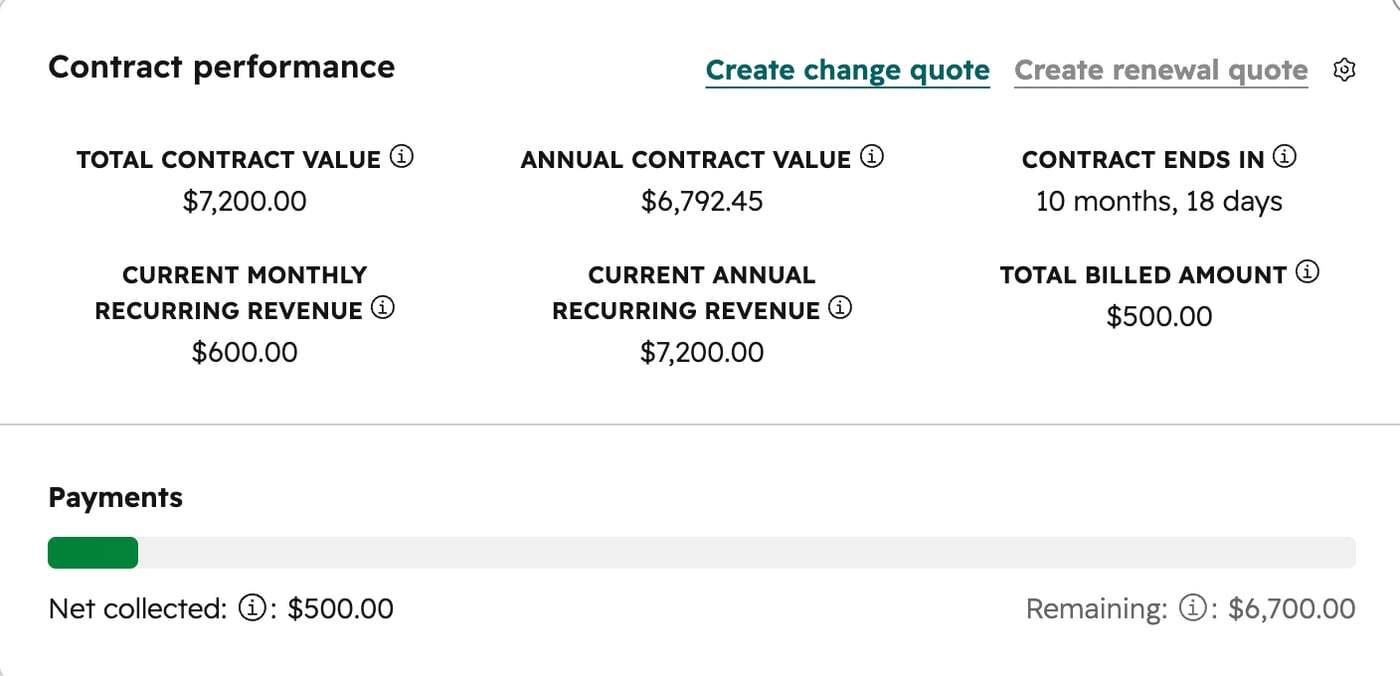
Open More > Revenue > Contracts, or Revenue > Contracts if More is absent. Select the Contract name.
-
02
Click Overview. Compare Contract performance and Current and upcoming line items with the source agreement.
-
03
Click History to inspect the effective date, status and recurring revenue of each change. Expand Line items to inspect the detail.
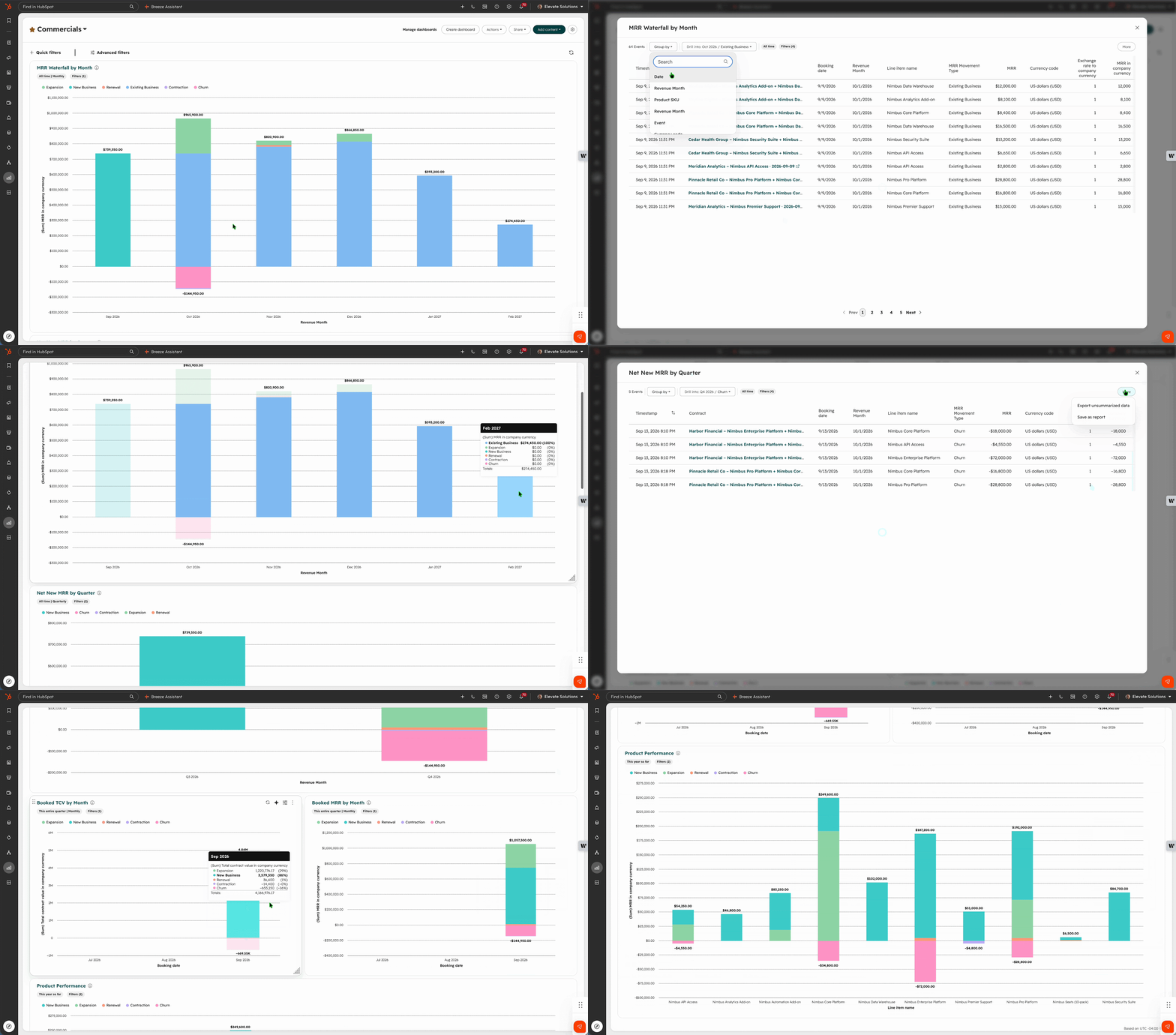
See the Reports Demonstrated in the Webinar
Watch the dashboard walkthrough to see how recurring revenue movement is presented. This demonstration uses its own sample data, separate from the ACME example.

09 / PROVE BEFORE ROLLOUT
Validate the Pilot Before Rollout

Unique, traceable source IDs
Correct buyer and billing roles
Products, values, currencies, and dates reconcile
History supports the intended reports
Renewal and change actions have an owner
Billing controls pass, if applicable
Expected Results for the ACME Pilot
Illustrative acceptance evidence for the ACME pilot. Agree your own cases and owners before rollout.
| Test case | Expected result / pass condition | Owner |
|---|---|---|
| Import and associations | One ACME Contract; correct line items and Deal 48201; no duplicate identifier | RevOps |
| Recurring value | 100 × EUR 100 = EUR 10,000 MRR; EUR 1,000 setup excluded | Finance |
| Seat amendment | 120 seats gives EUR 12,000 MRR from the supported effective event; reconcile the billing handoff | RevOps + Finance |
| Renewal handoff | Named owner, notice deadline and next action; review linked records after acceptance | Customer Success |
| External billing | Billing owner confirms approved changes reached the invoice system | Finance |
Resolve These Decisions Before Rollout
Billing authority
Choose the billing route before importing.
Reporting history
Label a snapshot as a baseline.
Identifier mapping
Resolve uncertain matches deliberately.
Operating ownership
Test the handoff, not just the record.
Access requirements: see HubSpot documentation for setup, Contracts model, creation and import, and changes and renewals.

FROM READING TO DOING
Inside the Contracts Implementation Playbook
Use illustrated examples to plan how agreements enter HubSpot, how changes affect revenue and what to check before rollout.
TWO ADOPTION ROUTES
Choose Your Operating Model
Existing billing
HubSpot
Commercial context first, with billing authority made explicit.
Preview this section →ONE AGREEMENT IN MOTION
Follow the ACME Example
100
seats
120
seats
110
seats
EUR 11,000 current MRR
Preview this section →EVIDENCE BEFORE RELEASE
Review the Pilot Checks

Data reconciles.
Reports are explainable.
Teams can operate.

YOUR NEXT STEP
Start with One Revenue Question
Choose a billing setup, agree which records answer your question, and test a representative sample before widening rollout.
Follow the implementation approachQUESTIONS BEFORE YOU START
HubSpot Contracts Implementation FAQs

Can I use HubSpot Contracts while keeping billing in my ERP or accounting system?
Yes. Use non-billing Contracts to hold agreement terms, products, recurring value and customer associations while your ERP, accounting platform or other billing system remains responsible for invoices and payments. Decide which system owns billing before importing anything, map the shared identifiers and test how an approved contract change reaches Finance. A standard CRM import is different from migrating active billing into HubSpot.
What is the difference between HubSpot Contracts, Deals, Quotes and signed agreements?
Deals track opportunities and proposed commercial changes. Quotes present an offer for buyer acceptance when your process uses them. The native Contracts object records the committed agreement and its lifecycle, including products, dates, amendments and renewals. Keep a link to the signed legal document: the CRM record does not replace legal drafting, redlining or clause management. A Contract can be created without a quote where direct-create beta access is available.
How do I import existing agreements into HubSpot Contracts without moving billing?
First verify account access and the supported import route. Prepare a unique Contract identifier, map companies, contacts and line items, and test a small representative CSV before importing the full portfolio. Standard import creates non-billing Contracts; the separate billing migration workflow has its own requirements and activation controls. HubSpot currently states that existing HubSpot subscriptions cannot be migrated to Contracts. Reconcile associations, currencies, dates and recurring values after the test import.
How should I validate MRR, ARR and renewal reporting in HubSpot Contracts?
Start with a revenue question and reconcile current recurring value with Finance. Check current MRR and ARR, then validate the supported MRR waterfall, net new MRR, booked revenue and renewal horizon for a defined period. Separate one-time charges from recurring line items. Use the ACME example to test expansions and contractions, and confirm the event dates behind each movement before trusting product or segment breakdowns. Report availability depends on the account and supported data.
Will importing a current contract snapshot recreate historical MRR, churn or retention?
No. A current-value snapshot records the position at one point in time; it does not recreate every event that produced that position. Historical MRR movement, churn and retention need an appropriate event history, effective dates, a defined starting customer group and a reporting period. HubSpot’s dedicated migration route can support revenue continuity under its documented conditions. Test the intended route and reconcile its output rather than presenting a snapshot as historical movement.
What should I test before rolling out HubSpot Contracts to Sales, Customer Success and Finance?
Run a pilot with representative fixed-term and evergreen agreements, one-time and recurring line items, and a mid-term change. Check unique identifiers, customer and billing associations, prices, currencies, effective dates and the next renewal action. Compare expected MRR and reports with Finance, test the renewal handoff with its owner, and resolve duplicate or unmatched records. If billing is moving, validate invoice, payment and activation controls before widening rollout.
Which HubSpot subscription, seat, permissions and beta access do I need for Contracts?
Check the exact creation and billing route in your portal. HubSpot’s current setup documentation requires a Revenue Hub subscription and seat unless the account is enrolled in the Direct Create, Edit, and Renew HubSpot Contracts beta. Quote creation and quote-based changes have Revenue Hub requirements. Setup requires Super Admin permissions; workflows have their own subscription and publishing permissions. Verify eligibility and beta availability in the target account before designing the rollout.
Do I need HubSpot access to download the implementation playbook?
No. The 21-page PDF explains the native Contracts model, billing alternatives, import preparation, the ACME revenue example and pilot checks without connecting your HubSpot account. Complete the download form and use the PDF link in the confirmation. Marketing consent is optional. Configuring Contracts and validating data later require the appropriate access to your own portal.